
Conmo ESBS-58 Manuale utente

EatSmart
Precision SMARTSCALE
Bluetooth® Body Analyzer with Fitness App
ESBS-58
EatSmart Products
Las Cruces, NM 88001
866-843-3905
Introduction
Thank you for purchasing the Conmo SMARTSCALE Bathroom Scale. This body fat scale is designed and
manufactured in a facility certified ISO 9001 Quality, BSCI Certification and Safety Management Systems
and ISO13485 Medical Devices Quality Management System. The scale uses the method of Bioelectrical
Impedance Analysis (BIA) to estimate body fat, total body water, bone mass, and muscle mass
percentage. It sends a harmless amount of electricity into the body, then estimates from the measured
impedance of the body, the percentage of total body water, percentage of muscle mass, percentage of
bone mass and percentage body fat. The body fat scale also calculates body mass
index (BMI) and estimates basal metabolic rate (BMR), which the scale displays as “Kcal”. The body fat
scale is also equipped with an “Athlete Mode” for athletes whose body build is different from non-
athletes.
Your SMARTSCALE Bathroom Scale comes with the following:
• SMARTSCALE Digital Body Fat Scale
• Instruction Manual
• 3 AAA Batteries
• 2 Year EatSmart Guarantee
Please read this instruction manual carefully before use.
If you have any questions regarding the operation of your SMARTSCALE Bathroom Scale, please
call 866-843-3905 from 8:00 AM to 5:00 PM, Monday through Friday, Mountain Standard Time.
Please fill out your purchase information for future reference:
Date Purchased:………………………………………………………………….
Place Purchased:…………………………………………………………………
Order ID (if any)…………………………………………………………………..

NOTES ON SAFETY
Please read this section carefully to familiarize yourself with features and operations
before using the unit.
• The warning signs and the sample icons shown here are listed in order for you
to use this product safely and correctly as well as to prevent product damage,
risk and injury to you and others.
• The icons and meanings are as follows:
This scale is intended to measure body weight and impedance and estimate
percentage of body fat, muscle mass, bone mass and body water using BIA (Bioelectrical
Impedance Analysis). It is intended for use by healthy adults with active,
moderately active, to inactive lifestyles for body composition assessment in the
home environment.
• Do not use the scale on people who have body implants such as a
pacemaker, artificial limbs, contraceptive devices, or metal plates
or screws. It may cause the device to malfunction or produce an
inaccurate result. When in doubt, consult your physician.
•Do not use on pregnant women. The result is inaccurate and effects on the
fetus are unknown.
• Do not disassemble the scale as incorrect handling may cause injury.
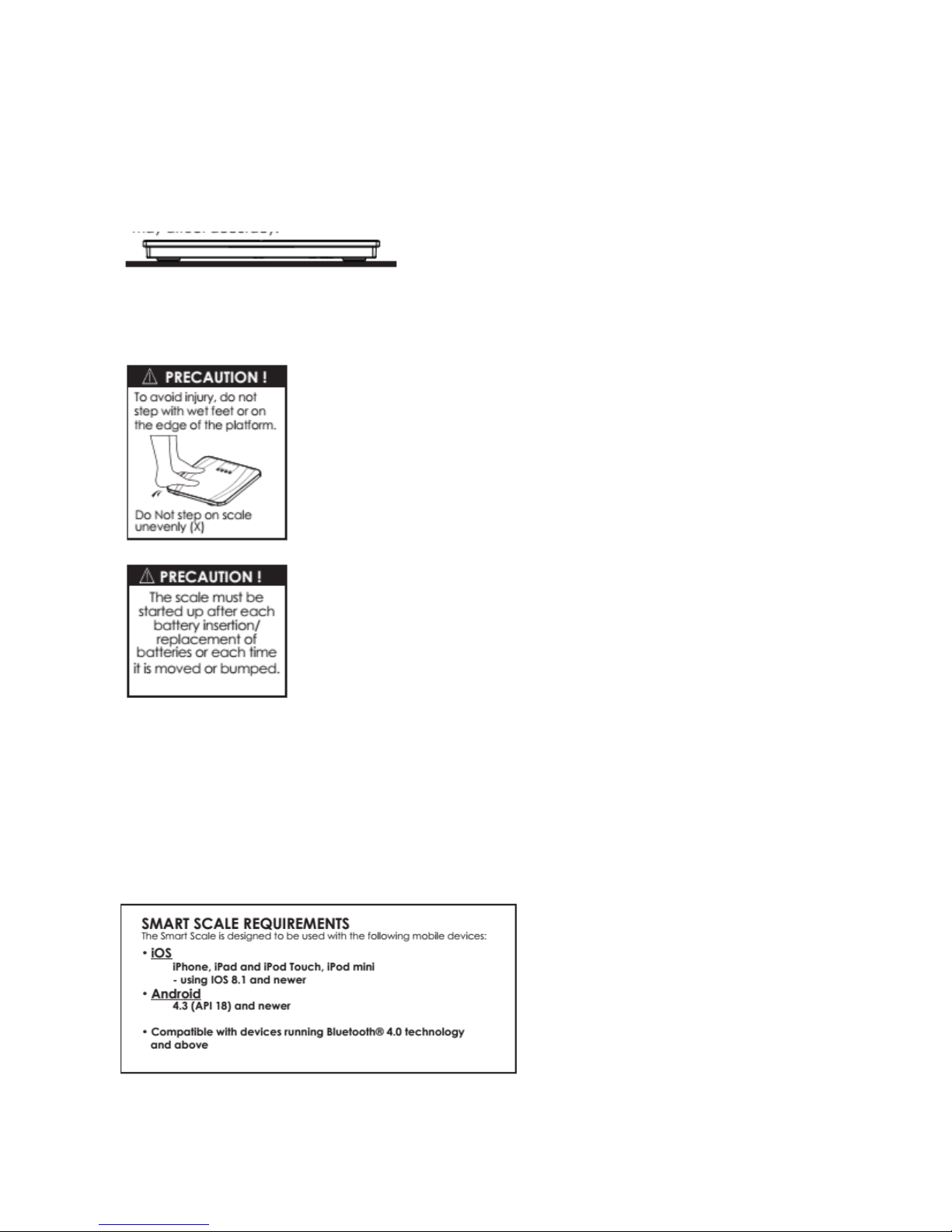
• Do not step on the scale when your body or feet are wet, especially
after bathing or showering to prevent slipping.

• This product is intended for adults and children (ages 18 to 80).
•Make sure to use only the type of battery stated (see Section “PREPARATION
BEFORE USE”).
•The “Athlete” mode is applicable only to people 18-80 years of age.
•Body fat percentage estimates will vary with the amount of water in the
body, and can be affected by dehydration or over-hydration due to such
factors as alcohol consumption, menstruation, illness, intense exercise, etc.
•Do not use on pregnant women. The result is inaccurate and effects on the
fetus are unknown.
•For body fat and body water estimates, always estimate in bare feet.
1. Insert the Battery
This scale operates on 3 'AAA' batteries (included). Remove any plastic wrap from the batteries before
installation. Remove any screws and open the battery cover on the back of the scale unit. Place the
batteries into the battery compartment according to the “+” and “-” polarity symbols at the bottom of
the compartment. Replace the battery compartment cover and screw(s). If you do not intend to use this
unit for a prolonged period of time, it is advisable to remove the batteries before storing.
NOTE: Please recycle or dispose of batteries per local regulations.
WARNING: Batteries may pose a choking hazard. As with all small items, do not let children handle
batteries. If swallowed, seek medical attention immediately.
PRECAUTION: Do not dispose of batteries in fire. Batteries may explode or leak. Remove the batteries if
the scale will not be used for a long period of time.
2. Set units of measurements
Your scale is set at the factory to weigh in pounds (lb). To switch to kilogram (kg) or
stone (st) units of measurement (1 stone = 14 pounds), press the button on the bottom of the scale
while the scale is on. (Press firmly on the platform to turn the scale on.)
3. Some models have a static cling label on the LCD lens to prevent scratching. Remove before use.
4. Set the scale in the right position
Always use the scale on a flat and hard floor surface. Do not use on carpets. Carpeted or uneven flooring
may affect accuracy.
5. Start-up the Scale
Press firmly on the scale platform to start-up the scale. The display shows “0.0” and then turns off. The
scale is ready for use.
Artwork is FPO
SETTING UP YOUR SMART SCALE USING BLUETOOTH® 4.0 TECHNOLOGY
The SMARTSCALE can estimate body fat, body water, muscle mass and bone mass percentages, daily
calorie estimates, BMI and weight difference compared to goal weight and real weight, and then it
transmits your results to an app on a mobile device using Bluetooth® 4.0 technology. You can use
your SMARTSCALE with or without Bluetooth 4.0 transmitting data. Below are the directions for
setting up the scale using Bluetooth 4.0.
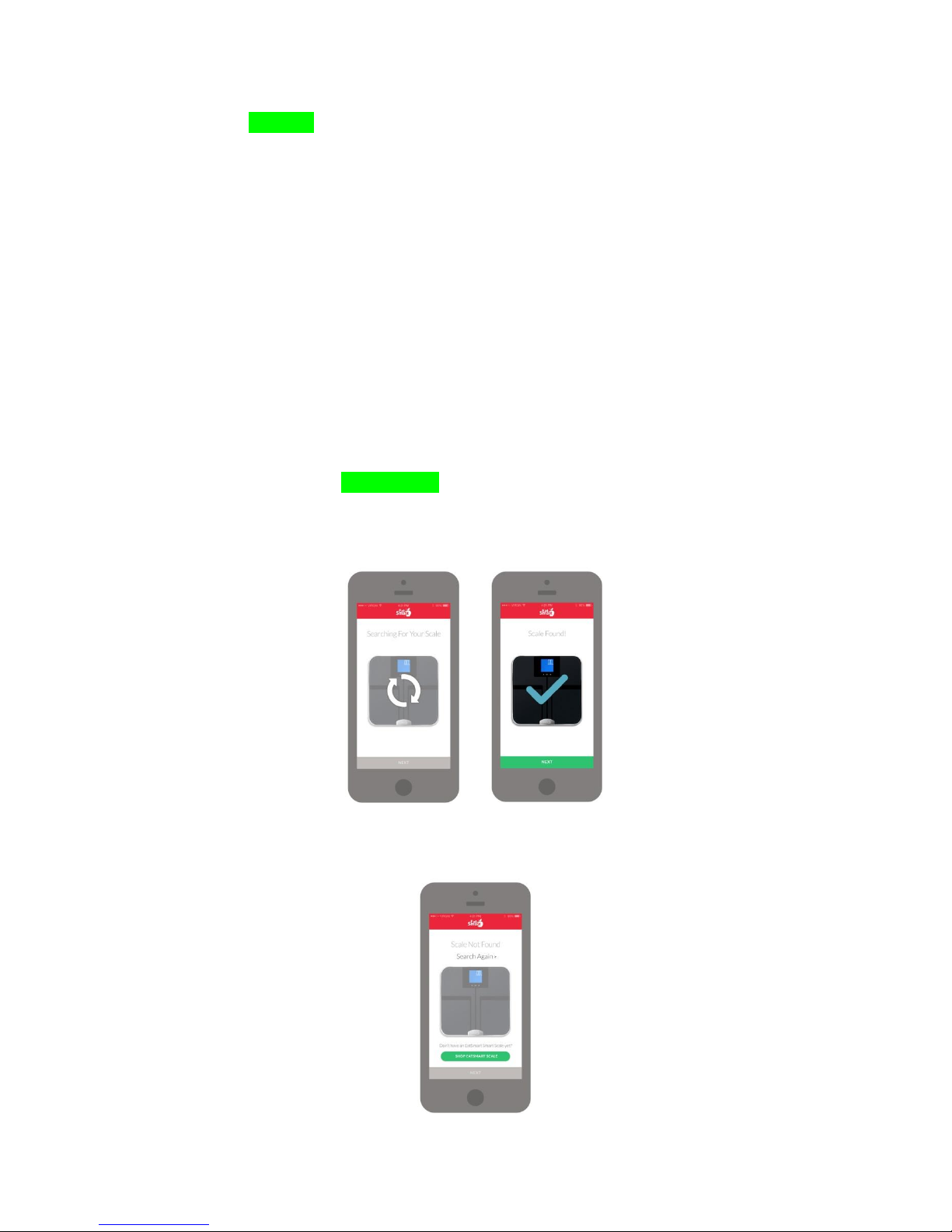
Download the free EatSmart app from the Apple store (for IOS devices) or Google play (for Android
devices).
To add new user profile:
1. Your SMARTSCALE will scan the mobile device automatically, please make sure the Bluetooth
setting is “ON” and your device is within 3-30 ft. of the scale.
2. Edit the user profile to set up your personal data, including activity levels and goal weight.
3. Proceed to the next step to store your user profile.
4. If you would like to change personal data, including activity levels and goal weight, simply edit the
user profile again and be sure to save the changes.
5. Step directly on to the platform with bare feet to turn the scale on. Your measurements will appear
on the app and scale.
6. To delete the selected user profile, double click the user profile and then press “Delete”. Tap the
“Confirm” button to approve deletion.
Setting Up Your Profile with the EatSmart App
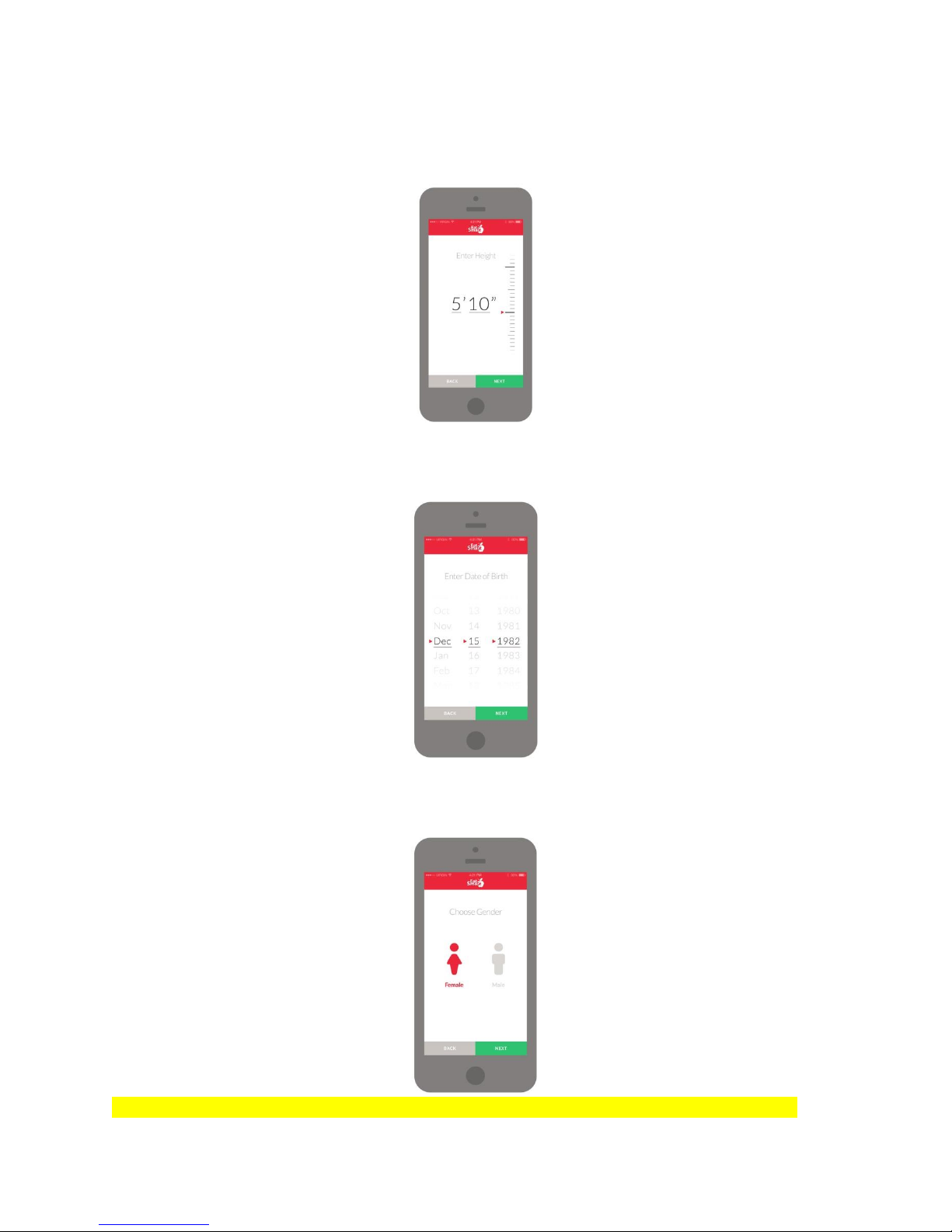
1. Open the app and it will search to connect with your SMARTSCALE. Tap “NEXT” to enter your
personal information.
Note: If it cannot locate your SMARTSCALE you may press “Search Again” or you may select
“Shop EatSmart Scale” to purchase a SMARTSCALE through Amazon.
2. Enter Your Height
Use the ruler on the side to increase or decrease your height. Tap “NEXT” to continue or “BACK” to
return to the previous screen.
3. Enter Your Date of Birth
Scroll through the Month, Date and Year to select your birthdate. Tap “NEXT” to continue or “BACK” to
return to the previous screen.
4. Select Your Gender
Select either the Male or Female icon to choose your gender. Tap “NEXT” to continue or “BACK” to
return to the previous screen.
Bob: on “Gender”which shall have icon to choose: Male, Male athlete, Female and female athlete
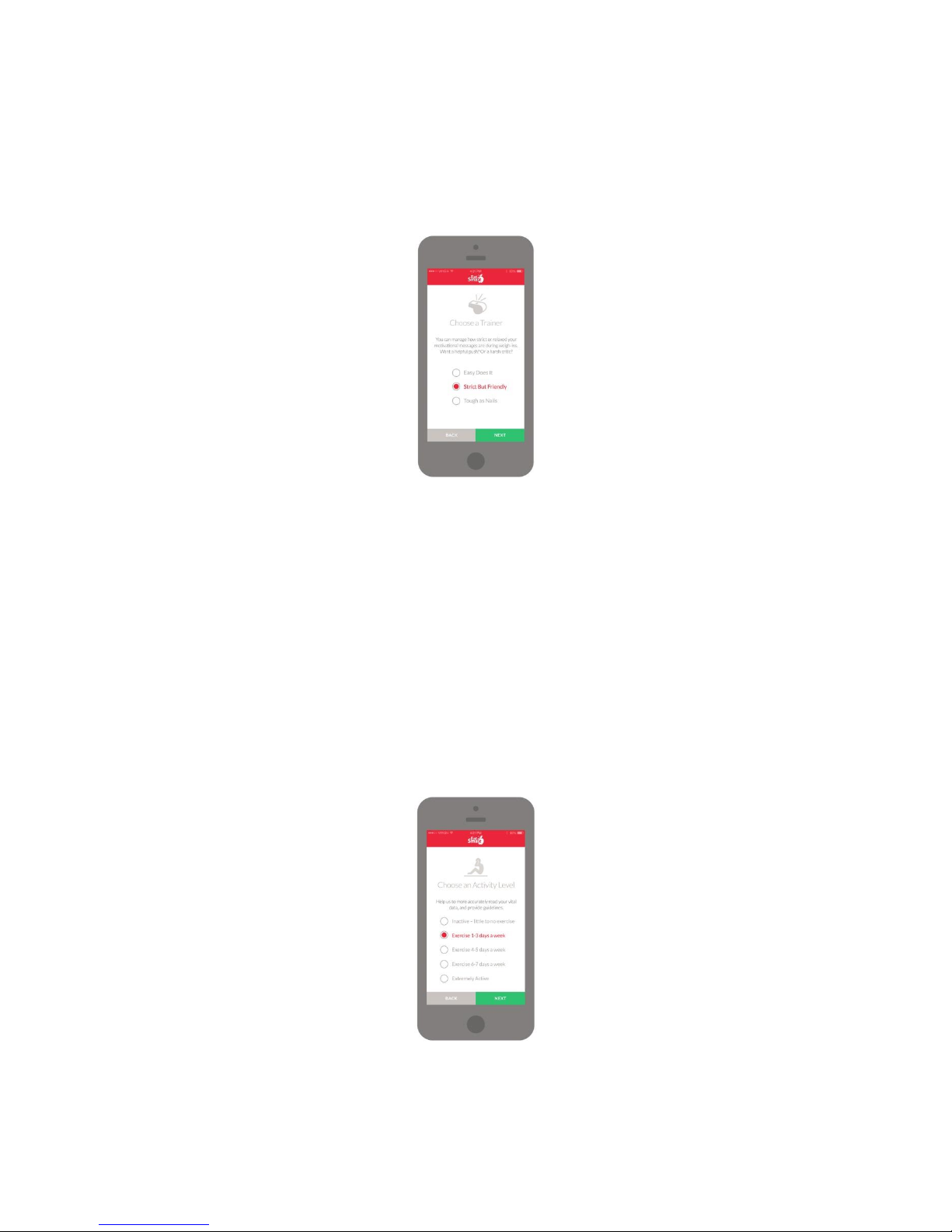
5. Choose a Trainer
You may select among 3 different types of Trainers (Easy Does It, Strict But Friendly, or Tough As Nails)
to keep you on track and motivated during your fitness journey. Depending on your choice, these
Trainers will send you relaxed, moderate, or strict motivational messages during your weigh-ins. Tap
“NEXT” to continue or “BACK” to return to the previous screen.
Note: A Trainer must be selected to continue the set up process.
6. Choose an Activity Level
Select your current activity level. This will allow the app to better read vital data and provide guidelines.
Tap “NEXT” to continue or “BACK” to return to the previous screen.
Inactive: little or no exercise
Limited Activity: exercise 1-3 days a week
Moderate Activity: exercise 4-5 days a week
Very Active: exercises 6-7 days a week
Extremely Active: physically demanding exercise or athletic training
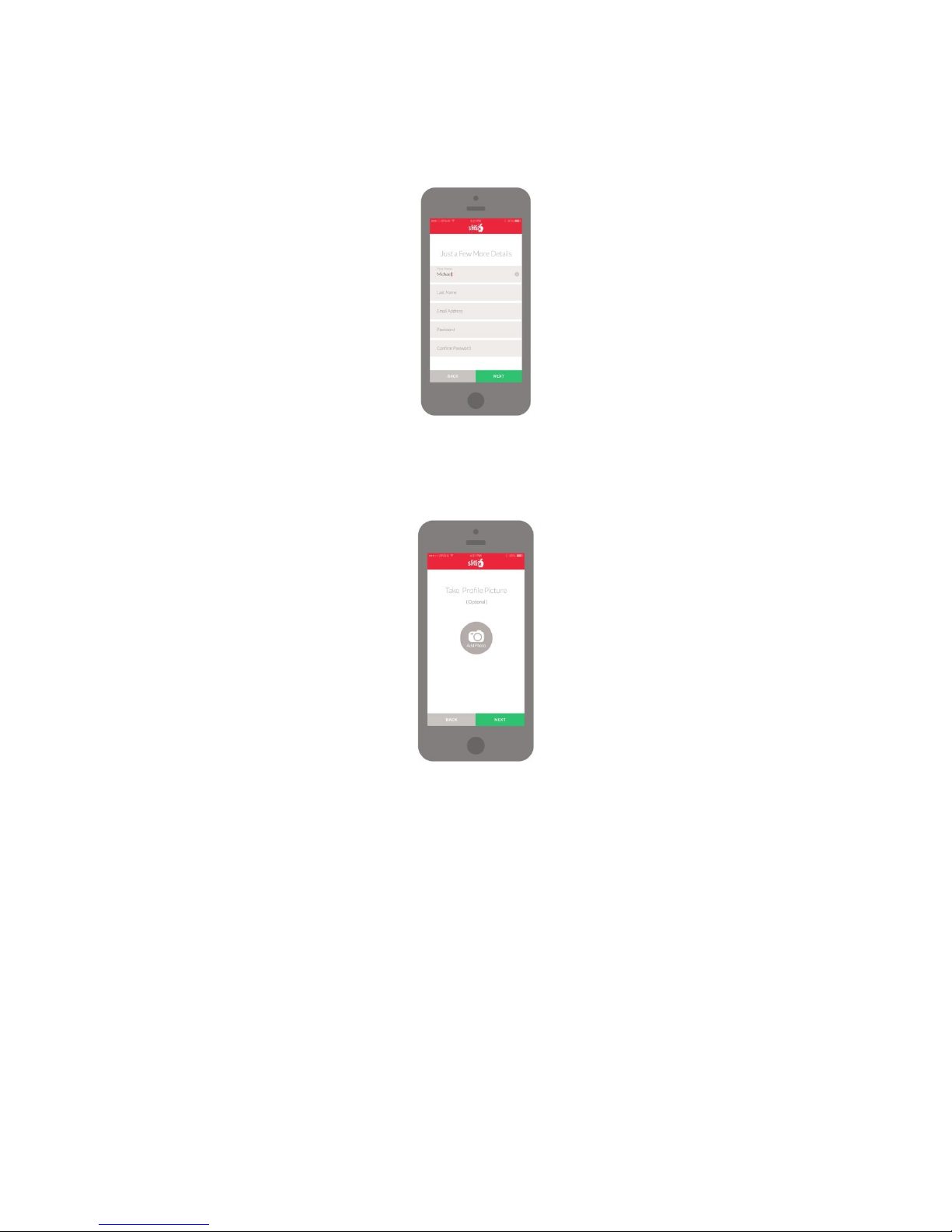
7. Add Your Name, Email Address and Password
Once your password is confirmed, tap “NEXT” to continue or “BACK” to return to the previous screen.
8. Add a Profile Picture (Optional)
You may personalize your profile with a picture. This is optional and not required to complete setting up
your profile. Tap “NEXT” to continue or “BACK” to return to the previous screen
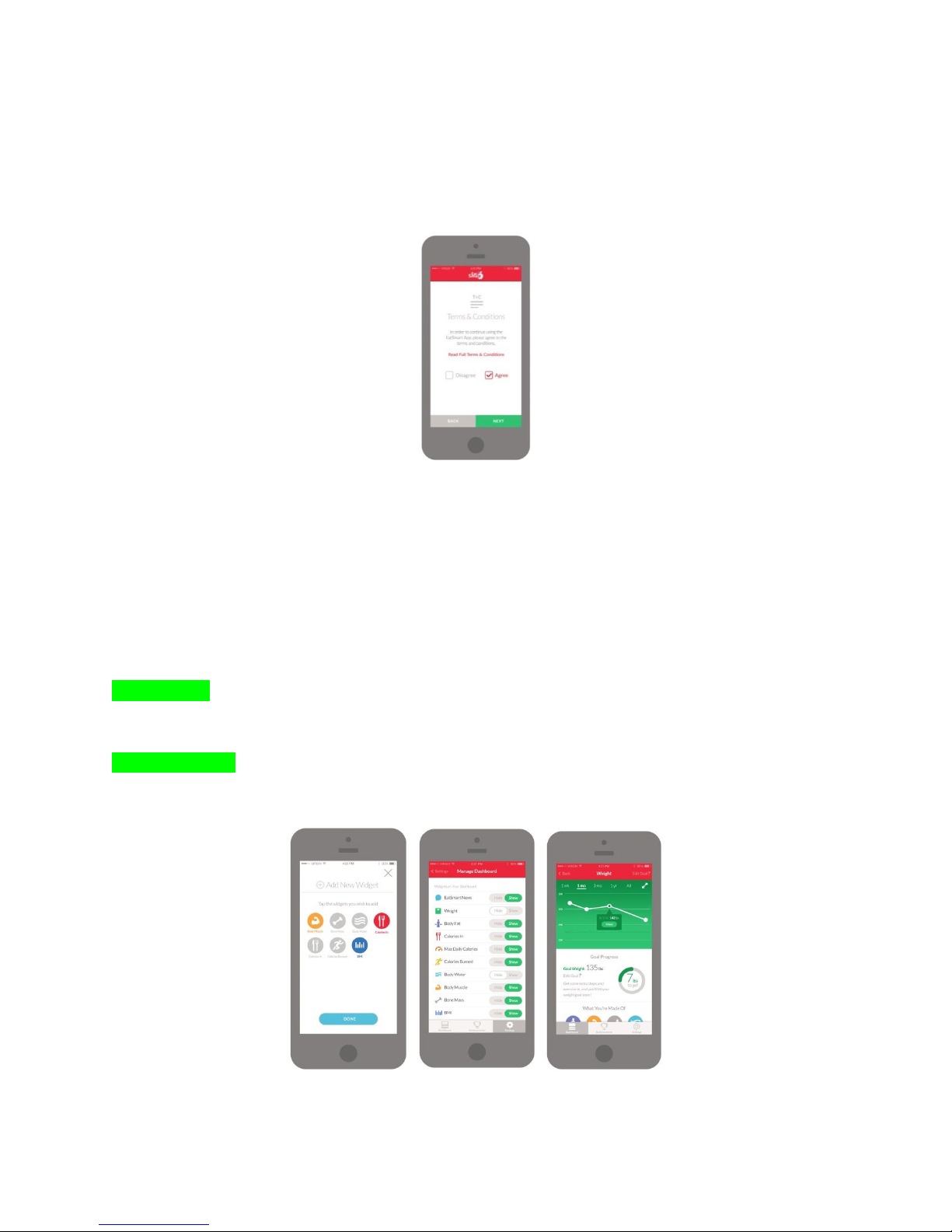
9. Terms & Conditions
In order to continue using the EatSmart app you will need to agree to the Terms & Conditions. You may
read the full Terms & Conditions by clicking on the on the link. Please select “Agree” or “Disagree”. Tap
“NEXT” to continue or “BACK” to return to the previous screen.
NOTE:
1. In the event you are sharing the scale with another user and they enter a personal profile through the
scale manually, if you select their user number your app profile will override their profile information
entered on the scale.
2. Data will only be transmitted if attached to a specific memory number. If a personal profile has not
been assigned to a memory number, the results will appear once on the scale display only and will not
be transmitted or saved.
3. If you prefer to use the scale without the app, please refer to
EatSmart App Features
Widgets
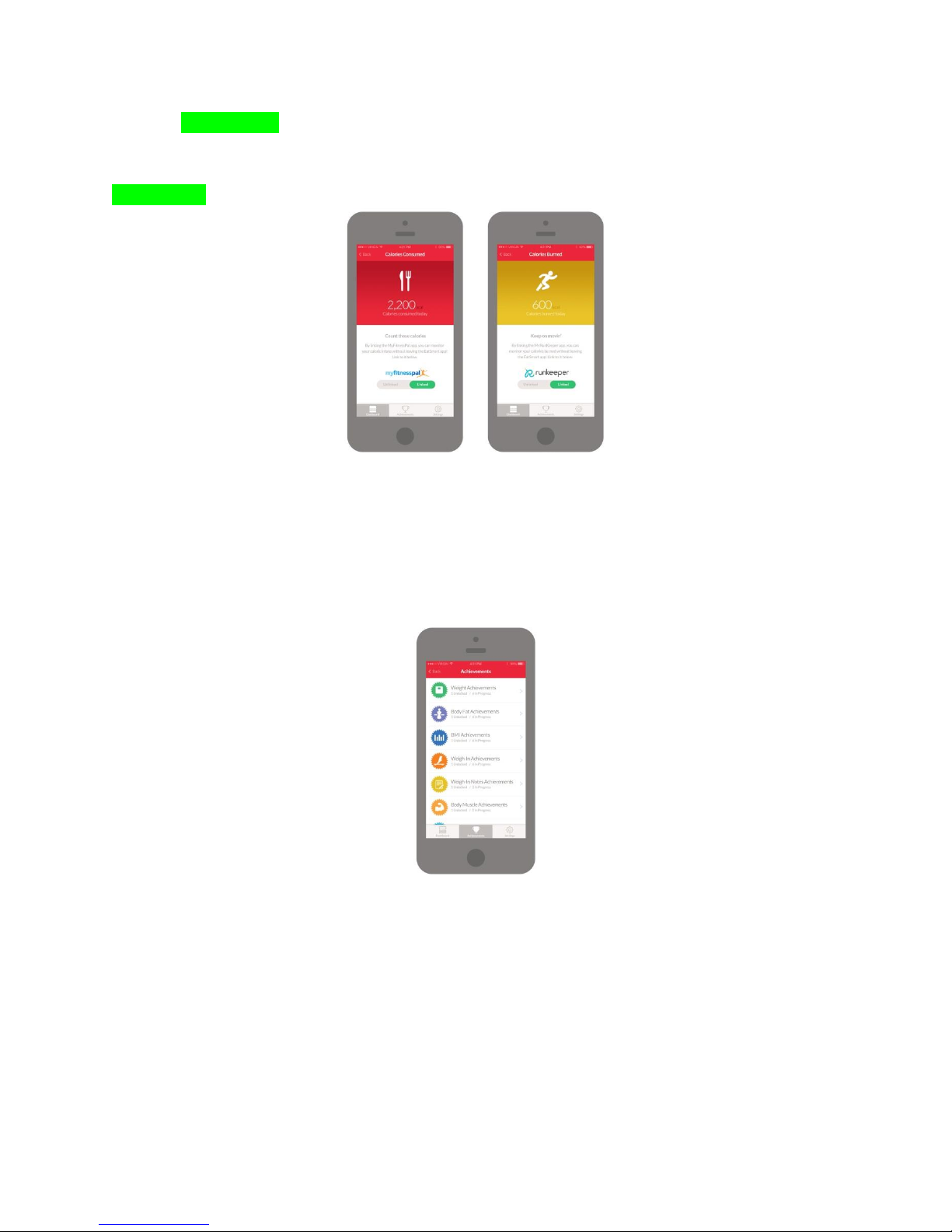
The EatSmart app has several features to help you with your fitness goals. You can easily see your
weight, body fat, muscle mass, bone mass, body water, caloric intake (kCal), and BMI through your
dashboard. To select which Widgets you would like to see, simply go to Settings > Manage Dashboard.
Link your EatSmart App to MyFitnessPal and RunKeeper
Maximize your fitness goals by linking up with MyFitnessPal and RunKeeper and add their widgets to
your dashboard. You can track caloric intake (kCal) and calories burned without ever having to leave the
EatSmart app!
Achievements
Stay motivated by unlocking achievements during your fitness journey. Achievements help you reach
and maintain weight, body fat, BMI, body water, muscle mass targets and keep you accountable for
weigh-ins. You can also add notes to help you document your progress along the way.
Indice


