
Contacta STS-K080-IP Manuale operativo

Window Intercom System
STS-K080-IP
Installation &
User Guide
March 2023

Important Safety Instructions
1. Read these instructions.
2. Keep these instructions.
3. Heed all warnings.
4. Follow all instructions.
5. Do not use this apparatus near water.
6. Clean only with dry cloth.
7. Do not block any ventilation openings. Install in accordance with the
manufacturer’s instructions.
8. Do not install near any heat sources such as radiators, heat risters, stoves, or
other apparatus (including amplifiers) that produce heat.
9. Do not defeat the safety purpose of the polarized or
grounding-type plug. A polarized plug has two blades with one wider than
the other. A grounding type plug has two blades and a third grounding
prong. The wide blade or the third prong are provided for your safety. If
the provided plug does not fit into your outlet, consult an electrician for
replacement of the obsolete outlet.
10. Protect the power cord from being walked on or pinched particularly at
plugs, convenience receptacles, and the point where they exit from the
apparatus.
11. Only use attachments/accessories specified by the manufacturer.
12. Use only with the cart, stand, tripod, bracket, or table specified by the
manufacturer, or sold with the apparatus. When a cart is used, use caution
when moving the cart/apparatus combination to avoid injury from
tip-over.
13. Unplug the apparatus during lightning storms or when unused for long
periods of time.
14. Refer to all qualified service personnel. Servicing is required when the
apparatus has been damaged in any way, such as power-supply cord or plug
is damaged, liquid has been spilled or objects have fallen into the apparatus,
the apparatus has been exposed to rain or moisture, does not operate
normally, or has been dropped.

Safety Precautions
• Ensure that you only use the supplied power supply. Do not
attempt to install your own power supply system otherwise
damage may occur.
• Do not attempt to dismantle or modify any parts of the unit.
No user serviceable fuses or parts are included.
• Ensure the system is not installed in areas of high ambient temperatures or
high levels of humidity or dust.
• It should not be exposed to direct sunlight or be placed next to vibrating or
heat generating equipment.
• This system is designed for indoor use only.
• Do not place the unit on an unstable surface.
• Do not insert liquids or foreign objects. This could result in fire or
electrical shock. If liquids or foreign objects should enter, immediately
turn off the power switch, disconnect the power plug from the power outlet
and contact your local dealer.
• Ensure the aerial is taped down securely. Do not leave any trailing leads that
may cause a trip hazard.
Thank you for purchasing this system. Before using, please read the following
guide to ensure correct usage. After reading, store this guide in a safe place
for future reference. Incorrect handling of this product could possibly result in
personal injury or physical damage. The manufacturer assumes no responsibility
for any damage caused by mishandling that is beyond normal usage defined in
this manual.
If a problem occurs with the equipment, first refer to the Troubleshooting section
of this guide, and run through the suggested checks. If this does not resolve
the problem contact your dealer. They will tell you what warranty condition is
applied.
This symbol is used to alert you to
important instructions within this manual.
This symbol is used to alert you to the
dangers of getting an electric shock.

Contents
Product Overview
Components
Tools Required
Installation Instructions
Staff Loudspeaker Unit and Amplifier Setup
Connections
Amplifier Setup
Using the System
Troubleshooting
5
5
6
7
8
12
13
15
17
Contacta has a policy of continuous product development, and therefore small specification changes
may not be reflected in this manual. Images, labels, packaging, accessories and product colours are
subject to change without notice.

5
Product Overview
Components
Window intercom systems provide assistance for clear communication where
normal speech is impaired by use of glass, a security screen or other similar
barriers.
There is also a hearing loop facility included which provides additional assistance
for hearing device wearers.
1. Adhesive Clip x10
2. No.6 x 1/2” Countersunk Screws x15
3. P-Clips x6
Also included is a Fixing Kit, which contains:
1. Installation and User Manual
2. A31H Amplifier
3. S80 IP54 Speaker with mounting
bracket.
4. M15-300 IP54 Microphone
5. SU1 Staff Unit
6. Hearing Loop Sticker
7. 5m Amplifier Extension Lead
8. Hearing Loop Aerial
9. Power Supply
10. 2 pin Euroblock
11. Wall Plugs (for securing speaker)
12. Screws (for securing speaker)

6
Tools Required
Your basic toolkit will include:
• Screwdrivers (Flat or Blade 2.5mm
and Phillips Head PH2)
• Battery or Mains Drill
• Drillbits: 2mm, 3mm, 5mm and 7mm
• Allen Key Set
• Cable Tacking Gun (10mm)
• Wire Cutters/Strippers
• Sealant
• Pliers
• Tape Measure
• Pencil or Marker Pen
• Torch
• Cable Ties
• Electrical Insulation Tape
• Trunking

7
1. Place the amplifier under the staff counter, ensuring that it will not obstruct
staff when they are sitting.
2. Mark the 4 fixing points for the amplifier under the counter.
3. Drill and fix the amplifier in place using the supplied screws.
Amplifier and Staff Unit SU1 Installation
Installation Instructions
Install the amplifier, staff unit SU1, overhead loudspeaker and microphone in the
order described below. If you have followed the steps closely and the system is
not functioning as intended, consult Troubleshooting on page 17.
Fixing points
If you remove any green connectors for feeding cables, ensure they are replaced at the
correct polarity. It is recommended to take photos of the connectors as a record before
taking any apart.

8
Staff Loud Speaker Unit and Amplifier
1. Place the Staff Loudspeaker Unit on the staff side of the counter top,
ensuring that it does not cause an obstruction and is as close to staff as
possible.
2. Use the cable management hole to run the Staff Loudspeaker Unit cable
back to the amplifier. If there is not already a cable management hole, one
will need to be drilled in a suitable location near the rear of the counter.
If you remove any green connectors for feeding cables, ensure they are replaced at the
correct polarity. It is recommended to take photos of the connectors as a record before
taking any apart.

9
S80 IP54 Speaker Installation
The IP54 speaker can be used in outdoor environments and can be installed
either overhead or to the side:
1. The S80 speaker is provided with a bracket,
use the bracket as a guide to mark out the
fixing points.
2. Use the screws and wall plugs provided to
secure the bracket in position.
3. Take the speaker and select the “8Ώ” setting on the rear of the speaker, you
may require a screwdriver to make this adjustment.
4. Once the bracket is fitted, support the speaker in position and attach both
ends using the supplied M6 screw caps and adjust to the required angle.
Fixing Points
10
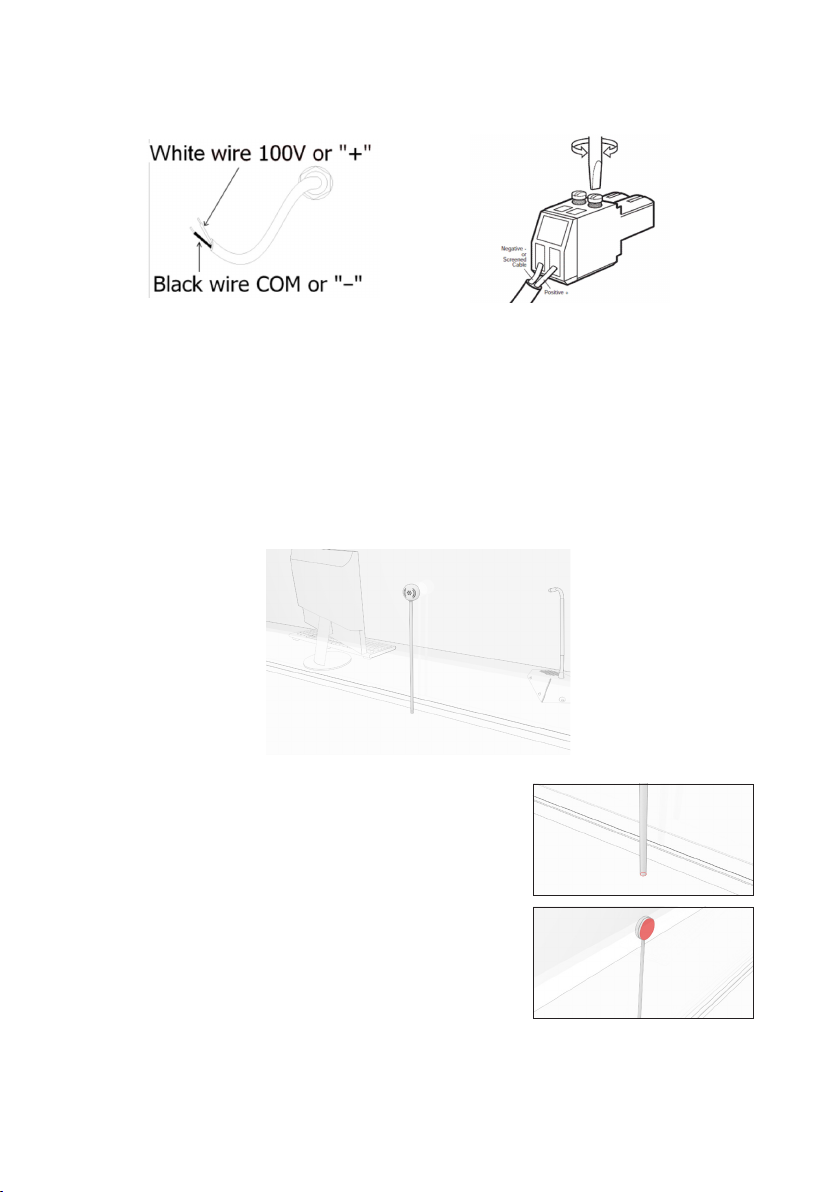
5. Take the supplied 2 pin euroblock connector and install this onto the
stripped cable ends.
6. Route the cable back to the amplier. If the speaker cable is not long
enough for installation use the provided extension cable to provide
additional length to reach the ampliers install location.
Take care to seal any outdoor speaker connections from moisture ingress.
M15-300 IP54 Microphone
1. Position the microphone stem on the customer side of the counter top.
2. Mark the cable route ready for drilling
(approx. 7mm) and feed the wiring through
the cable hole back to the amplifier. Insert
the thread section of the stem into the desk
hole.
3. Fix the microphone head to the screen using
the double-sided pad supplied.
4. Route the cable back to the amplifier and seal any gaps around the base
of the microphone stem to ensure there is no water ingress. Use an
appropriate sealant for the fixing surface.
Indice
Altri manuali Contacta Sistema di interfono

Contacta
Contacta IL-EL42-PB Manuale utente

Contacta
Contacta STS-K060 Manuale operativo

Contacta
Contacta STS-K002L Manuale operativo

Contacta
Contacta STS-K020 Manuale operativo
Contacta
Contacta STS-K035-B Manuale operativo

Contacta
Contacta STS-K070 Manuale operativo

Contacta
Contacta STS-K009-IP-L-B Manuale operativo

Contacta
Contacta STS-K001L Manuale operativo

Contacta
Contacta STS-K020 Manuale operativo

Contacta
Contacta STS-K071 Manuale operativo


