
Contixo F35 Manuale utente
F35 DRONE INSTRUCTION MANUAL

Table of Contents
Introducon 1
SafetyPrecauons 1
RemoteControlFuncons 4
DroneDiagram 5
DualRemoteControllerMode 9
RemoteControlOperangMethod 10
InstalltheConxoF35App 10
Flight 11
WayPointFlight 20
OrbitMode 21
FlightSeng 22
CameraFuncons 22
HowToFindaLostDrone 23
Specicaons 27
PartsList(Included) 29
Troubleshoong 30

1
PREFACE:
Thank you for Purchasing the Conxo F35 RC Drone
TheConxoF35Droneisaquadcopterthat’spurposelybuiltfordrone
applicaondeveloperstoenableyoutogetyourapplicaonsairborne
quickly.ThisDevelopmentplaormisintendedtobemodiedbydevelopers
accordingtotheirprofessionaljudgment.Conxohasnotestablished
operaonlimitaonsforthekitortestedanyconguraonsotherthanthe
baseconguraonthatisshippedascongureddefaultfromthefactory.
Developersareresponsiblefortesngandensuringthesafetyoftheirown
conguraon,andestablishingtheoperanglimitsofthoseconguraons.
F35DroneisdesignedandengineeredbyConxo,Inc.inSouthernCalifornia,
USA.MadeinChina.
IMPORTANT:
Neverallowchildrenoryoungteenagerstooperatethedroneandkeepthem
awaywhileitisoperang.Neverallowadultstooperatethedronewithout
fullyunderstandingtheinstrucons.
SAFETY PRECAUTIONS:
Safety:F35dronewasdesignedandmanufacturedwithsafetyinmind.Your
safetyalsodependsonpropertrainingandthoughuloperaon.Donotsetup,
operate,maintain,orrepairthedronewithoutreadingandunderstandingthis
manualandthelabelsontheunit.
Owner Responsibility:Inordertomaintainyourdroneproperlyandtoensure
operatorsafety,itistheresponsibilityofthedroneownertoreadandfollow
theseinstrucons:
Followallsetup,operaon,andmaintenanceinstrucons.
Readandfollowallsafetyinstrucons.Keepthemreadilyavailablefor
operators.
Makesurealloperatorsareproperlytrained,knowhowtosafelyoperate,and
areproperlysupervised.
Donotoperatethedroneunlyouarecertainthatallpartsareinplaceand
operangcorrectly.
Carefullyinspectthedroneonaregularbasisandperformallmaintenanceas
required.
Serviceandmaintainthedroneonlywithapprovedreplacementparts.
Keepallinstruconspermanentlywiththeproduct.
Onlyusethisproductifitcanbeusedsafely!

2
NOTE: Thisequipmenthasbeentestedandfoundtocomplywiththelimitsfor
aclassbdigitaldevice,pursuanttopart15oftheFCCrules.Theselimitsare
designedtoprovidereasonableproteconagainstharmfulinterferenceina
residenalinstallaon.Thisequipmentgenerates,uses,andcanradiateradio
frequencyenergy.Ifnotinstalledandusedinaccordancewiththeinstrucons,
theequipmentmaycauseharmfulinterferencetoradiocommunicaons.
However,thereisnoguaranteethatinterferencewillnotoccurinaparcular
installaon.Ifyourequipmentdoescauseharmfulinterferencetoradioor
televisionrecepon(whichcanbedeterminedbyturningtheequipmento
andon),theuserisencouragedtotrytocorrecttheinterferencebyoneor
moreofthefollowingmeasures:
•Adjustorrelocatethereceivingantenna.
•Increasethedistancebetweentheequipmentandreceiver.
•Connecttheequipmentintoanoutletonacircuitdierentfromthatto
whichthereceiverisconnected.
•Consultthedealeroranexperiencedradio/TVtechnicianforhelp.
•Pleasenotethatchangesormodicaonsnotexpresslyapprovedbythe
partyresponsibleforcompliancecouldvoidtheuser’sauthoritytooperate
theequipment.
WARNING:PRODUCTSHOULDONLYBEUSEDBYADULTSANDCHILDREN14
YEARSANDOLDER.ADULTSUPERVISIONREQUIREDFORCHILDRENUNDER14
YEARSOFAGE.
WARNING:CHARGINGOFTHEDRONEBATTERYMUSTBESUPERVISEDATALL
TIMESBYANADULT.UNPLUGTHEBATTERYWHENFULLYCHARGED.DONOT
OVER-CHARGETHEBATTERY.
3
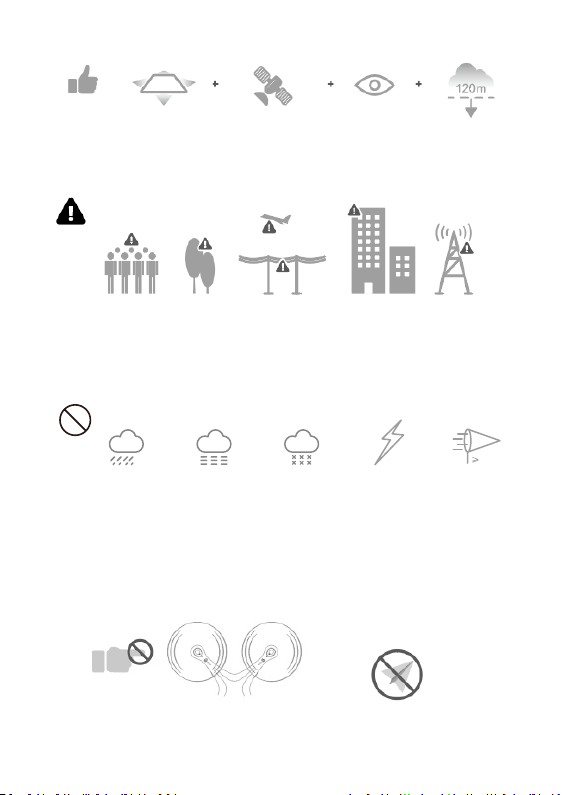
Flight Safety
FlyBelow
400(120m)
Strong
GPSSignal
Maintain
LineofSight
FlyinOpen
Areas
Stayawayfromtherotang
propelleresandmotors
NoFlyZone
DONOTusethedroneinadverseweathercondionssuchas
rain,snow,fogandwindspeedsexceeding7m/sor16mph.
Avoidyingoverornearobstacles,crowds,highvoltagepowerlines,
trees,airportsorwater.
DONOTynearstrongelectromagnecsourcessuchaspowerlinesand
basestaonsasitmayaecttheonboardcompass.

4
It’simportanttounderstandbasicightguidelines,forthesafety
ofbothyouandthosearoundyou.Don’tforgettoreadthesafety
guidelinesbeforeight.
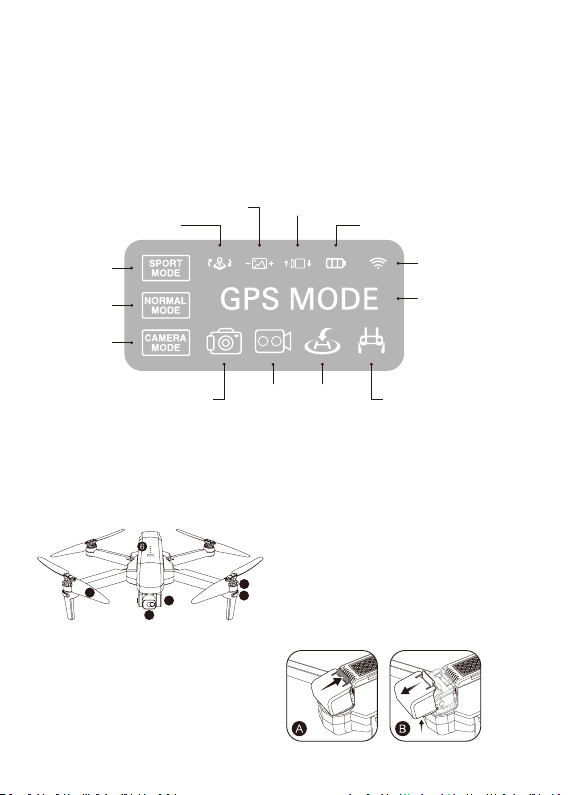
Remote Control Funcons
1
3 4 5 6
2
7 8
9
10
1. ThroleSck
2. DireconSck
3. SpeedToggle
4. EmergencyStop(Clickonce,thenHOLD3seconds)
5. PowerBuon
ON-Clickonce,lightturnson
OFF-Clickonce,thenHOLD3secondsunlLightturnso
Whenthereisnooperaonin10minutes,theremotecontrollerwillbe
automacallypoweredo.
5
6. RTHMode/GPSToggle–PressoncetoiniateRTH.Holddownfor5
secondstotoggleGPSonando.
7. ZoomIn/OutDial
8. GimbalDial–Controlthecamera’svercallt.
9. PhotoCaptureBuon
10. Start/StopRecordingVideo
Tip: When the battery on the remote control is low, the power indicator light on
the remote will ash repeatedly. When this occurs, please land the drone as
soon as possible and charge the remote control.
Drone Diagram
1. 2-AxisStabilizingGimbal
2. 4KWiFiCamera
3. Propeller
4. Motor
5. LEDIndicator
6. Intelligentbaery
A. Open the gimble cover buckle.
B. Pull the gimble cover up, then
gently take it off.
RepeaterSignal
Indicator
ChargingIndicator
Control’sthecamera’slt
GPSMode
Indicator
Lowbaeryindicator
RTHRecordingShoong
High
Speed
Le/RightSckswitch
Zoomin/out
Medium
Speed
Low
Speed
1
2
3
4
5

6
1
12
2
Unfolding the Drone –
Unfoldthefrontarmsrst,thenunfoldthebackarms.
Folding the Drone –
Foldinthebackarmsrst,thenfoldinthefrontarms.
Installing the Propellers –
Tip:BoththepropellersandmotorsaremarkedwithA,B(propellerAwith
motorAandpropellerBwithmotorB).
2
2
A
B
B
A
Front
Back
Front
Back
2
2
1
1

7
Intelligent Flight Baery
12
3
1. PowerBuon
2. BaeryPowerIndicator
3. USBChargingPort
•Topoweron,HOLDthepowerbuonfor3seconds.TopowerOFF,holdthe
powerbuonfor3seconds.
•Whentheightbaeryislow,thebluepowerindicatorwillstartashing,
andthedronebaeryindicatorintheConxoF35Appwillturnred.Land
thedroneimmediatelyandchargethebaerytoavoidunnecessarypower
failures.
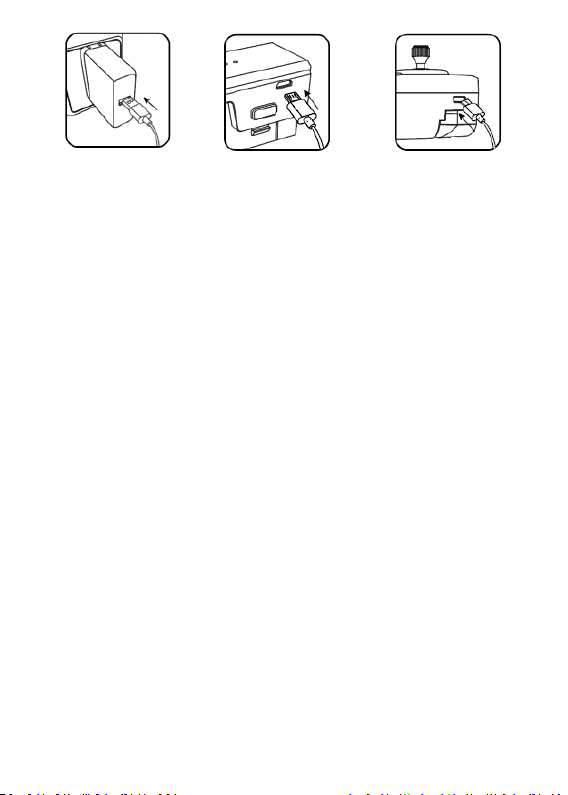
Charge the Baery
Low HighElectricity
Push 2 Side Buttons In,
Pull the Battery from the Drone.
8
PhoneAdapter:
5V/3A(NotIncluded)
ChargingTime:
About4.5Hours
RemoteControl
ChargingTime:
About25Minutes
Tip:Whentheremotecontrolbaeryislow,thepowerindicatorlighton
theremotecontrolwillkeepashing.Pleasechargetheremotecontrol.
Lithium Baery Charging Instrucons
1. Charging:Eitherpoweronorpowero,theaircracanbecharged.Insert
theUSBcableintotheUSBportofthechargerandconnecttothecharging
portofthebaerytocharge.Theindicatoronthedronewillbeginblinking
bluewhencharging.Whenfullycharged,theindicatoronthedronewill
turntoasolidblue.
2. Thedronecanbechargedbyatravelorcarcharger.
3. Thedronebaerytakesabout4.5hoursforafullcharge.Flightmeis
about26minutes.
4. Theremotecontrollithiumbaerytakesabout25minutesforafull
charge.
(Whilecharging,theindicatorontheremotecontrolisRed.Whenfully
charged,theindicatorontheremotecontrolwillturntosolidBlue).
Altri manuali per F35
1
Indice
Lingue:
Altri manuali Contixo Drone

Contixo
Contixo F24 Manuale utente

Contixo
Contixo F31 Manuale utente

Contixo
Contixo F20 GPS Manuale utente

Contixo
Contixo F10 Manuale utente

Contixo
Contixo SC6 Manuale utente

Contixo
Contixo TD1 Manuale utente

Contixo
Contixo TD2 Manuale utente

Contixo
Contixo F36 Manuale utente

Contixo
Contixo F21 Manuale utente

Contixo
Contixo F24 Manuale utente


