Coredy FL022 Manuale utente

Owner's
Manual
FL022

TABLE OF CONTENTS
1. Important of Safety Information .......................................................................................................................................
1.1 Use Restrictions .........................................................................................................................................................................................................................
1.2 Battery and Charging ...............................................................................................................................................................................................................
2. Product Diagram .......................................................................................................................................................................
2.1 Robot .................................................................................................................................................................................................................................................
2.2 Accessories ...................................................................................................................................................................................................................................
2.3 Charging Dock .............................................................................................................................................................................................................................
2.4 LED Indication ..............................................................................................................................................................................................................................
3. Operating and Programming .............................................................................................................................................
3.1 Important Tips Before Use ...................................................................................................................................................................................................
3.2 Map Navigation and Management ....................................................................................................................................................................................
3.3 Quick Start ....................................................................................................................................................................................................................................
3.4 Use Your FL022 with the “Coredy Robot” App ...........................................................................................................................................................
3.5 Using the Water Tank and Mopping Cloth ....................................................................................................................................................................
4. Regular Maintenance .............................................................................................................................................................
4.1 Emptying Robot’s Bin ..............................................................................................................................................................................................................
4.2 Clean Robot's Filter ...................................................................................................................................................................................................................
4.3 Dry the Dust Bin and Filter Components ......................................................................................................................................................................
4.4 Clean Robot's Water Tank and Mopping Cloth ..........................................................................................................................................................
4.5 Clean Robot's Side Brush .....................................................................................................................................................................................................
4.6 Cleaning Robot’s Cliff Sensors and Charging Contacts .......................................................................................................................................
4.7 Cleaning Robot’s Front Bumper ........................................................................................................................................................................................
4.8 Cleaning Robot’s Rolling Brush ..........................................................................................................................................................................................
4.9 Battery and Charging Information .....................................................................................................................................................................................
5. Troubleshooting ........................................................................................................................................................................
6. Wi-Fi Connection ......................................................................................................................................................................
7. Specification ...............................................................................................................................................................................
01
01
02
04
04
06
07
08
09
09
11
12
15
26
27
28
29
29
30
31
31
32
32
34
36
40
41

01
1.1 Use Restrictions
1. Important Safety Information
This appliance can be used by children aged from 8 years and above and persons with reduced physical, sensory or mental
capabilities or lack of experience and knowledge if they have been given supervision or instruction concerning use of the
appliance in a safe way and understand the hazards involved. Children shall not play with the appliance. Cleaning and user
maintenance shall not be made by children without supervision.
The robot must be used in accordance with the directions in this Instruction Manual. Coredy Inc. cannot be held liable or
responsible for any damages or injuries caused by improper use.
To reduce the risk of injury or damage, keep these safety precautions in mind when setting up, using and maintaining your
robot:
Do not dispose of electrical appliances as unsorted municipal waste, use separate collection facilities. Contact your local
authority for information regarding the collection systems available. If electrical appliances are disposed of in landfills or
dumps, hazardous substances can leak into the groundwater and get into the food chain, damaging your health and well-being.
Please contact your local or regional waste authority for more information on collection, reuse and recycling programs.
Read all safety and operating instructions before operating your robot.
Retain the safety and operating instructions for future reference.
Heed all warnings on your robot, battery, charging dock and in the owner’s manual.
Follow all operating and use instructions.
The symbol on the product or its package indicates:
Your robot is for indoor use only. Do not use the robot outdoor, commercial or industrial environment.
Before using this device, please pick up objects like clothing, loose papers, pull cords for blinds or curtains, power cords,
and any fragile objects. If the device passes over a power cord and drags it, there is a chance an object could be pulled from
a table or shelf.

02
1.2 Battery and Charging
Your robot is not a toy. Do not sit or stand on this device. Children and pets should be supervised when your robot is
operating.
Store and operate your robot in room temperature environments only.
Do not use this device to pick up anything that is burning or smoking.
Do not use this device to pick up spills of bleach, paint, other chemicals, or anything wet.
If the room to be cleaned contains a balcony, a physical barrier should be used to prevent access to the balcony and ensure
safe operation.
This appliance is not intended for use by persons (including children) with reduced physical, sensory or mental capabilities,
or lack of experience and knowledge, unless they have been given supervision or instruction concerning the use of the
appliance by a person responsible for their safety.
Children should be supervised to ensure they do not play with the robot. Cleaning and maintenance shall not be performed
by children without supervision.
Do not place anything on top of your robot.
Be aware that the robot moves on its own. Take care when walking in the area where the robot is operating and avoid
stepping on it.
Do not operate the robot in areas with exposed electrical outlets on the floor.
Use only rechargeable battery packs with the correct specification approved by Coredy.
Charge using a standard outlet only. The product may not be used with any type of power converter. The use of other power
converters will immediately void the warranty.
Do not use a Charging Dock with a damaged cord or plug. If the cord or plug is damaged, it must be serviced by the manu-
facturer or similarly qualified persons.
Always remember to remove the battery from your robot and accessories before long-term storage or transportation.
Charge indoors only.

03
Your robot’s Charging Dock may be protected with a surge protector in the event of severe electrical storms.
Never handle the Charging Dock with wet hands.
Always disconnect your robot from the Charging Dock before cleaning or maintaining it.
Please ensure the voltage rating for the enclosed Charging Dock matches the standard outlet voltage.
Used battery packs should be placed in a sealed plastic bag and disposed of safely according to local environmental
regulations.
Before every use, check the battery pack for any sign of damage or leakage. Do not charge damaged or leaking battery
packs.
If the battery pack leaks, please don’t hesitate to contact Coredy.
Customer Service for disposal. The battery pack must be removed from the robot before disposal.
Do not crush or dismantle battery packs. Do not heat or place the battery pack near any heat source.
Do not incinerate the battery pack. Do not short-circuit the battery pack.
Do not immerse the battery pack in any liquid.
This device complies with Part 15 of the FCC Rules. Operation is subject to the following two conditions: (1) this device may
not cause harmful interference, and (2) this device must accept any interference received, including interference that may
cause undesired operations.

04
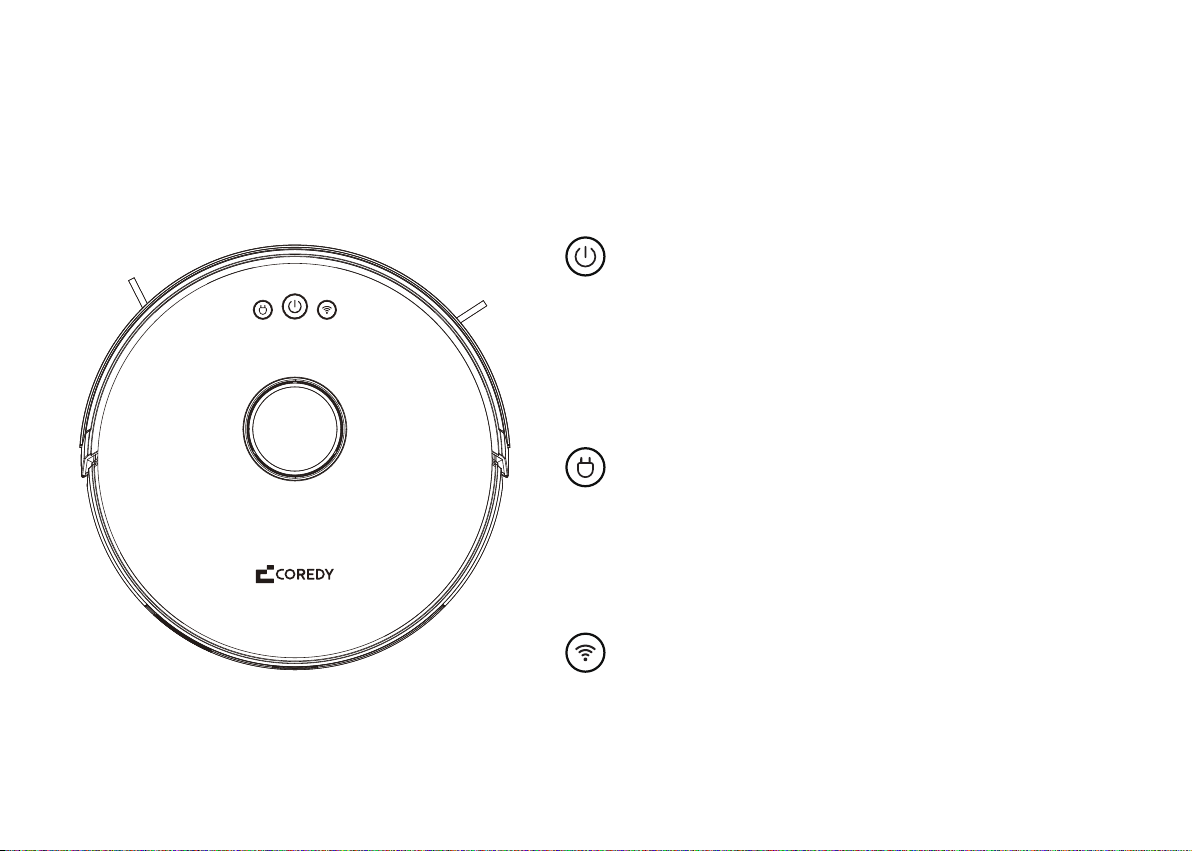
2.1 Robot
Press and hold for 3 seconds to active Wi-Fi paring or reset
Wi-Fi connection
2. Product Diagram
Press and hold for 3 seconds to turn on or off
Press to start Auto cleaning
Press to pause the current cleaning when working
Press to return Coredy FL022 to the charging dock
Press again to pause

05
WiFi Status Light
Power Button
Recharge Button
Front Bumper
Cliff Sensors
Side Brushes
Side Wheels
Dust Bin
Charging Contacts
Universal Wheel
Battery Compartment
Brush Guard
Rolling Brush
Laser Distance Sensor
Cover
Dust Bin Release Button

06
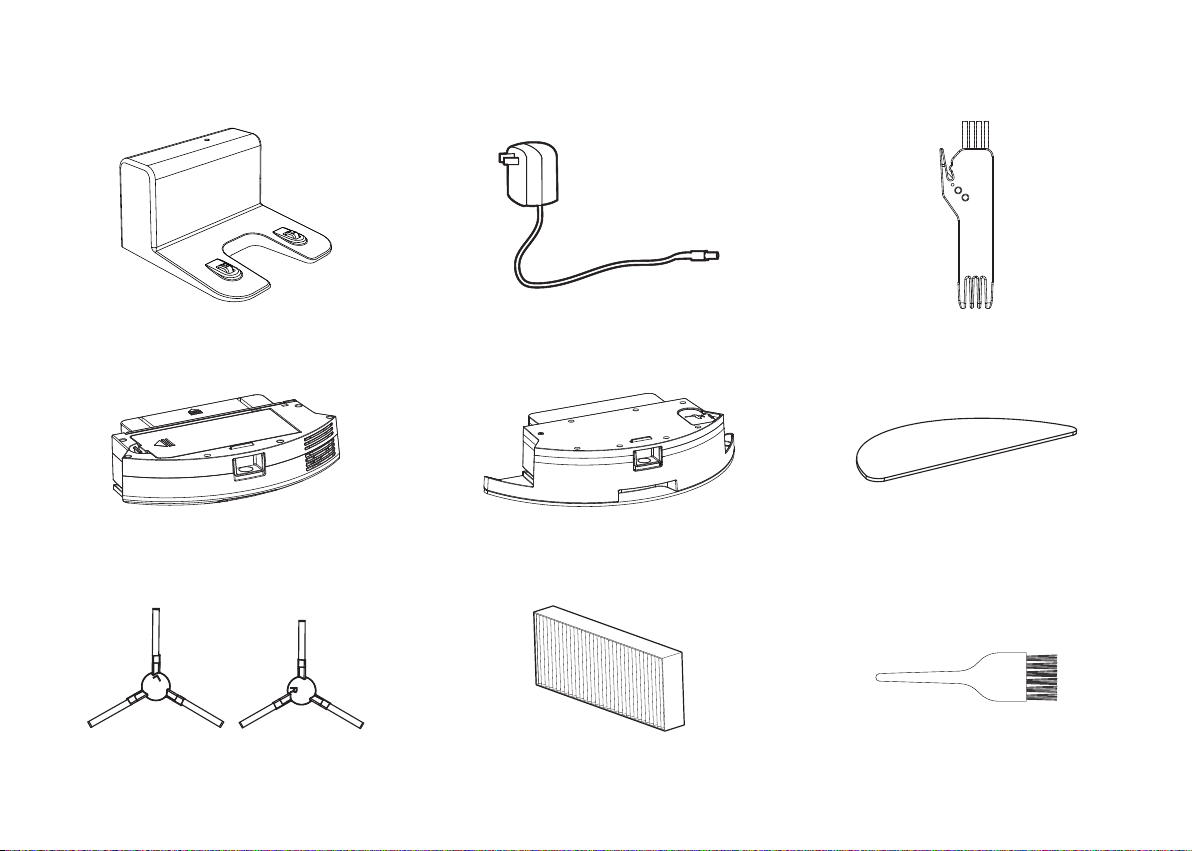
2.2 Accessories
1 x Charging Dock 1 x Power Adapter 1 x Cleaning Tool
1 x Dust Bin 1 x Water Tank (with Mopping Cloth) 1 x Mopping Cloth
4 x Side Brush 2 x HEPA Filter 1 x Cleaning Brush

07
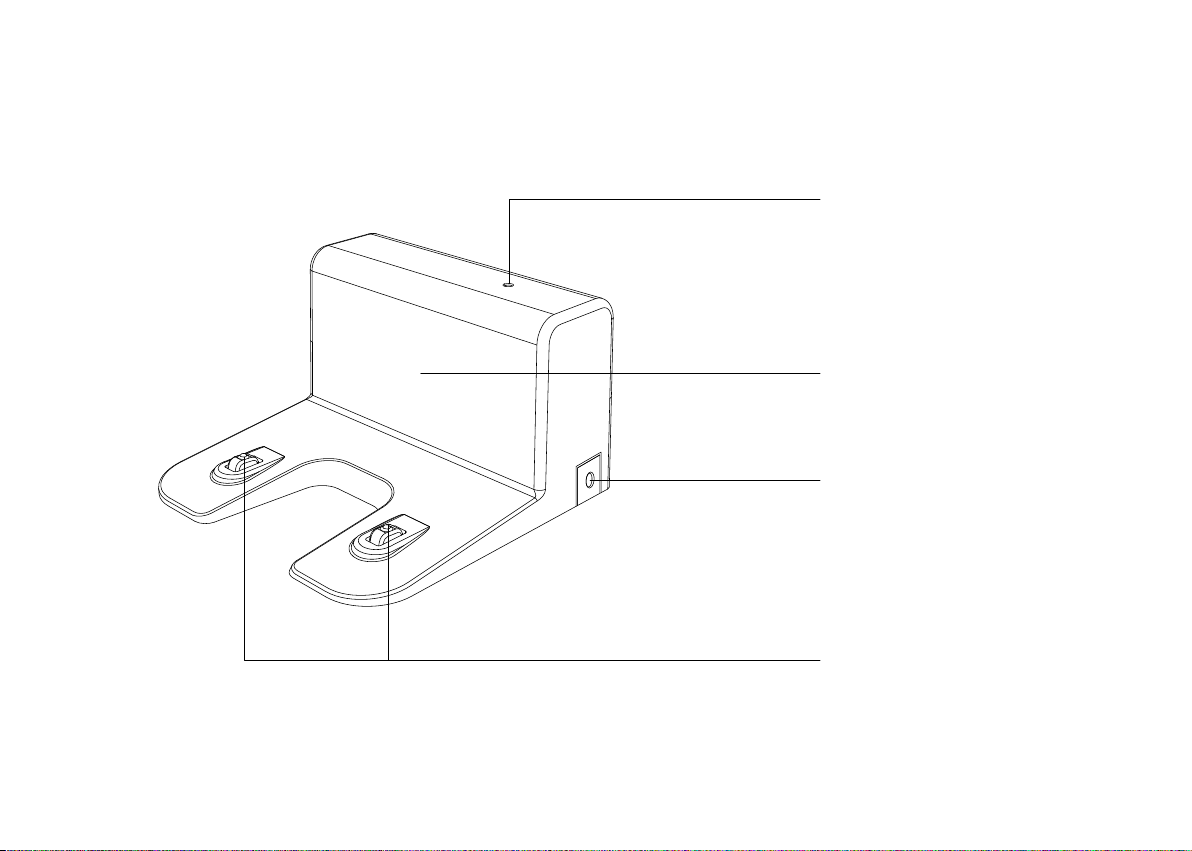
2.3 Charging Dock
Charging Indicator
Signal Transmission Area
Power Socket
Charging Contact Pins

08
2.4 LED Indication
Light Light Status Status
Solid red Error indication
Flashing blue
+
+
Pause
Flashing blue, purple, red alternately,
Rapidly flashing purple Waking up
Solid blue
Standby
Cleaning
Fully charged
Solid purple Low power and returning to Charging Dock
Breathing blue Charging
Slowly flashing blue Waiting for Wi-Fi connection
Solid blue Wi-Fi connected
Indice
Altri manuali Coredy Aspirapolvere

Coredy
Coredy L900 Manuale utente

Coredy
Coredy R380 Manuale utente

Coredy
Coredy R650 Manuale utente

Coredy
Coredy R750 Manuale utente

Coredy
Coredy R700 Manuale utente

Coredy
Coredy SL200 Manuale utente

Coredy
Coredy R750 Manuale utente

Coredy
Coredy R650 Manuale utente

Coredy
Coredy R500+ Manuale utente

Coredy
Coredy SL200 Manuale utente