
Cowboy C4 Manuale utente

C4 and C4 ST
A guide
for riders

Welcome to Cowboy. Your new bike
has arrived, and with it a new way to
move freely and mindfully through
your city. As you map your own path,
we’ll be there to power you forward,
open to the road ahead.


7
00
Battery charger
Front and rear lights
Battery keys x2
Bell
Spoke reflectors x4
USB cable
Allen key 5 Allen key 6Butterfly Allen key 4
Belt spanner
Rear reflector
What’s in the box
Pedals x2
L R
The extra lights and reflectors are
there if you need them. Always
make sure that you comply with
local driving regulations.
Allen key 3

9
The set-up
All the Cowboy essentials are in your
hands. Follow the instructions, and in
just a few steps you'll have your bike
put together.
C4
01
09
1112
05
10
04
C4 ST
02
03
07
08 08
06
Suitable size: 170cm to 195cm Suitable size: 165cm to 190cm
The essentials
01 Rear light
02 Removable battery
03 Mudguards
04 Rear hub motor
05 Puncture-resistant tyres
01 09
1112
05
10
04
02
03
0706
To assemble
Handlebar
Brakes
Pedals
Saddle
Wireless charging
06 Carbon belt drive
07 Pedals
08 Hydraulic disc brakes
09 Front light
10 Cockpit with wireless phone charger
11 Frame
12 Adjustable saddle

1010
01
90°
Handlebar
3mm Allen key
01 Check
Your bike comes with the handlebar
parallel to the wheels and frame.
03 Secure
Use the 3mm Allen key to tighten the
two screws securely as shown. This will
keep your handlebar in place. Be sure
to use the short end of the Allen key for
the most tightening force, then test it to
make sure it’s fully secure by blocking
the front wheel between your legs and
trying to move the handlebar from left
to right.
02 Rotate
Turn the handlebar 90° clockwise until
it’s at a right angle to the rest of the
bike. It’s important that the front brake
disc marked in the diagram ends up on
the left side of the wheel.
If you see the disc brake is sitting incorrectly
on the right-hand side, turn the fork in the anti-
clockwise direction to rectify. Note: In the UK,
the brakes are opposite (rear brake on left-hand
side, front brake on right-hand side).
Front
brake disc

12
02 Brakes
5mm Allen key
45°
5mm Allen key
01 Loosen
Loosen the screw under each brake using
the 5mm Allen key.
02 Turn up
Turn the brake handles and grips up until
the brake handles are at a 45° angle.
Hold them in place. Just as you can
set your brake handle position, you
can also rotate the grip position to be
more comfortable, in particular the
ergonomic grips of the C4 ST.
03 Tighten
Tighten the screw as shown using the 5mm
Allen key. Make sure it’s nice and tight.

1414
L R
03 Pedals
01 Know right from left
The right and left pedals are different.
You can tell them apart by their position
in the box and the three small grooves
on the left pedal axle only. You will also
find the stamped ‘R’ and ‘L’ on the end
of the axle.
03 Tighten up
Insert the shorter end of the 6mm Allen
key into the screw head on the side of
the pedal closest to the frame. Tighten
as firmly as possible.
Repeat these steps for the left pedal,
screwing anti-clockwise this time.
02 Screw in
Take the right pedal and screw it in
clockwise as far as you can by hand.
It should screw in easily. If it doesn’t,
stop right away as you may be cross-
threading the screw. Make sure the pedal
is properly aligned before trying again.
6mm Allen key
3 grooves indicate
left pedal

16
4mm Butterfly Allen key
04 Saddle
01 Find the right position
Let’s work out your perfect saddle height.
Sit on the bike and move the pedal
around with your foot until it’s closest to
the ground in the 6°clock position. You’ll
know the saddle is the right height when
your leg is just slightly bent as shown.
02 Take out the battery
To change the saddle height, you’ll first
need to take out the battery using one
of the battery keys provided.
03 Adjust the height
Loosen the saddle by turning the 4mm
Butterfly Allen key in the two holes as
shown. Then raise or lower the saddle
to where you want it, being careful not
to raise it higher than the depth warning
mark indicated on the saddle post. Use
the Butterfly Allen key again to secure
it in place.
1818
45°
05 Wireless
phone charging
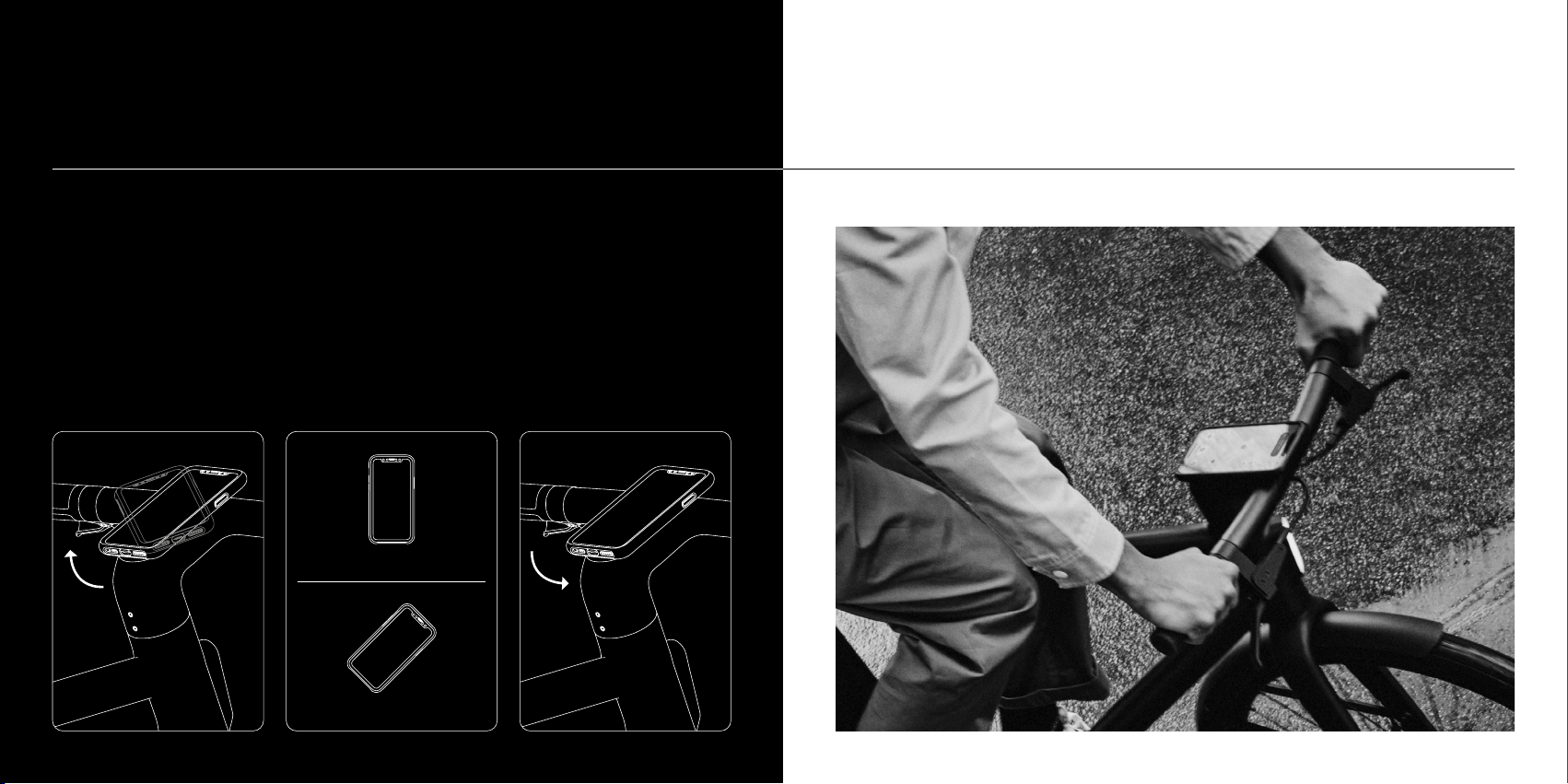
01 Dock your phone
With the Cowboy app about to be front
and centre, put the Quad Lock case
on your phone. Position your phone at
45° and slot the phone over the mount,
making sure the two are aligned. Rotate
the phone so it’s upright at 0° as shown.
It should click right into place. Always
check your phone has clicked securely
before you ride.
03 Undock your phone
To undock your phone, simply turn it
back through 45° and you can take it
off the mount. Be careful not to leave
your phone unattended on the bike as
anyone can detach and take it.
02 Charge up
If your phone is compatible with wireless
charging, it will charge automatically when
docked with the bike turned on. For the
best result, you should check you have fast
charging enabled in your phone’s settings.
Important note
Don’t keep anything metal such as coins and
credit cards between the phone and the charger.
Don’t attempt to mount anything heavier than
a smartphone. If you have an electrical device
such as a pacemaker, consult a physician before
using wireless charging.
Incorrect position
Correct position
45°
Altri manuali per C4
2
Questo manuale è adatto per i seguenti modelli
1
Indice
Altri manuali Cowboy Bicicletta


