CreamWare MINIMAX ASB Manuale utente

1
Owners Manual
MINIMAX ASB

2
MINIMAXASBismanufacturedbyCreamWareAudioGmbH,
Siegburg,Germany.
(C)CreamWare1998- 2005 - all rights reserved.
Thefollowingdocumentation,compiledbyCreamWareAudioGmbH(henceforth
calledCreamWare), representsthecurrentstateofthe described product.The
documentationmay beupdatedona regular basis.Anychanges which might
ensue,including those necessitatedbyupdatespecifications, are included in the
latestversion of this documentation.CreamWareisunder no obligation to notify
anyperson, organization, or institution ofsuchchangesorto make these
changespublic in anyotherway.
We must caution you that this publication could include technical inaccuracies or
typographicalerrors.
CreamWareoffersno warranty,eitherexpressedor implied, for the contentsof
thisdocumentation.Youwillfindthe warranty regulations for the productatthe
endof this documentation.
InnoeventwillCreamWarebeliableforanyloss of dataor for errorsindatause
orprocessingresultingfromtheuseofthisproductorthedocumentation.In
particular, CreamWarewillnotbe responsible for any direct or indirectdamages
(includinglostprofits,lost savings, delays or interruptions in the flow of business
activities,including but not limitedto,special,incidental,consequential,or other
similardamages)arisingoutofthe use of or inability to use this product or the
associateddocumentation, evenifCreamWareorany authorized CreamWare
representativehasbeen advised ofthepossibilityof such damages.
Theuse of registered names, trademarks, etc., in this publication does not imply,
evenin the absence of a specific statement,thatsuchnamesareexemptfrom
therelevant protective lawsandregulations (patentlaws, trademarklaws.etc.)
andtherefore free for general use.Innocase does CreamWareguarantee that
theinformation given in this documentation is freeofsuchthird-partyrights.
Neitherthis documentationnorany partthereofmaybe copied, translated,or
reducedto any electronic medium ormachineformwithout the prior written
consentfrom CreamWareAudioGmbH.
Thisproduct (and the associated documentation)isgovernedby the GTC
(GeneralTermsand Conditions) of CreamWareAudioGmbH.

3
Index
Owners Manual MINIMAX ASB
Disclaimer 02
Welcome 04
Setup and layout 05
Getting started
Making connections 08
Power adaptor 08
MIDI connection 08
Audio connection 09
Power switch 09
USB connection and drivers 09
Installation of Remote-software 10
Presets 11
The Control Panel
Controllers 12
Oscillator Bank 13
Mixer 14
Modifiers 15
Output 18
The Configuration-Strip
Match 19
Value 19
MIDI 20
Sound 20
Presets 20
Effects 21
Effectprogramms / Parameters 21
MINIMAX ASB Remote-Software
General information 24
The panel´s layout 24
Main-page 25
Add-page 25
Prefs-page 28
MIDI monitor 30
MIDI keyboard 31
Preset administration 32
Specifications
MIDI implementation table 34
Specifications 35
Warranty regulations 36
CE certification 36

4
Introduction
What’s inside the MINIMAX ASB?
Welcome
Thank you for choosing MINIMAX ASB. You will have just as
much fun with your MINIMAX ASB as we had when
developing this unique and characteristic Synthesizer. Please
read the manual thoroughly in order to fully take advantage of
the many features the MINIMAX ASB has to offer.
Introduction
One may not consider a synthesizer with three Oscillators and
noise, a mixer as well as a filter followed by amplifiers and
two envelopes, as being spectacular in sound. But we are not
just talking about any kind of synthesizer but about “the"
synthesizer that started it all.
MINIMAX ASB is a perfect emulation of one of the most
popular synthesizers ever. Its ease of use and easy to learn
sound technique made this instrument a role model for many
other synthesizers. Its sound is famous. The oscillators and
filters are extremely powerful and the envelopes extremely
quick.

5
Many soft and hardware companies have tried to copy its
features but have shattered by doing so. Its hardware
duplicate had different built-in components taking away from
its original sounding character. Most software programs
emulated only parts of the hardware such as the filter.
Significant elements like Oscillators and envelopes were for
the most part forgotten.
MINIMAX ASB is different from anything available before.
MINIMAX ASB not only emulates parts of the instrument. We
consider it as being “the” synthesizer. Today, where most
hardware components are difficult to get and software reached
the limits, MINIMAX ASB has managed to go beyond.
Within the MINIMAX ASB, we have remodelled all significant
sound elements after the original’s circuitry. In addition, a
steady cross-check with the Original was made and now offers
even identical knob positions as within the original. No
reproduction has yet been that precise. Measurements and
adjustments were only a part of the work. Beforehand there
was another problem to tackle. The original analog model
produces frequencies which when copied or emulated would
produce aliasing. Those who are familiar with aliasing know
how awful it sounds. The MINIMAXASB’s sound generation is
based on newly developed algorithms that are free of any
aliasing. The MINIMAX ASB handles even the most complex
Modulations, filter FM or Oscillator-Modulation. Moreover, the
nice thing about this, the MINIMAX ASB will always sound like
the original. Thus MINIMAX ASB tops today’s digital synthesis
technique.
Setup and Layout
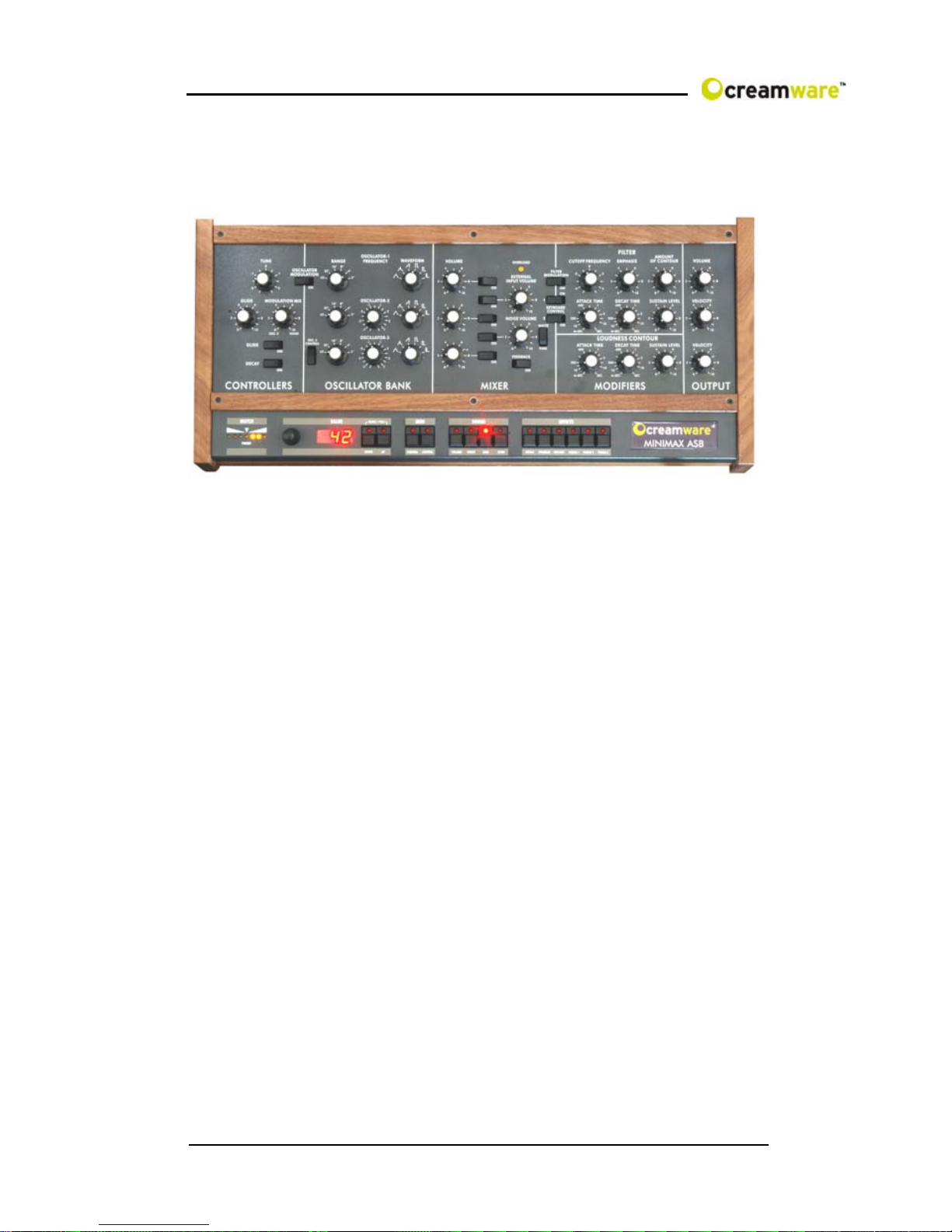
Just as the original, the MINIMAX ASB has one oscillator
section with three oscillators. Oscillator 3 can also be used as
an LFO or better said FO (Frequency Oscillator). Oscillators
can be mixed with noise and an external signal within the
mixer section. This is followed by the filter and an amplifier
each using an envelope with attack, decay and sustain pro
voice. In addition to the original model, equipped the
MINIMAX ASB with an additional effects section featuring
chorus/flanger and delay.

6
The quality of the synthesis algorithms in this instrument is
remarkable. Because the oscillators use the frequency
spectrum’sfullbandwidth, moreovertonesareproduced than in
earlier algorithms. Even the saturation level in the mixer
section for internal and external signals were taken into
consideration. Saturation gives the sound more presence.
Especially the filter profits greatly from the new algorithms.
Existing filter-algorithms may have had resonance, but in
general they weren’t that exciting like the analog archetype.
Using digital filters caused high attention to avoid Aliasing
when using filter sweeps. Many filters therefore reduce the
amount of resonance or don’t open wide enough to not cross
the borderline to Aliasing (half sample frequency). Filter
sweeps with such filters have been so so, but normally were
lacking kind of vitality. The filter implemented in your
MINIMAX ASB now provides all the resonances and
distortions, you desire. Filter resonance can be fully tuned on
and sweeps can be performed withoutAliasing, even when
exceeding the half sample frequency border. This way also a
Filter FM with all the possible side chains occurring is easily
possible.
Besides that the envelopes of the MINIMAX ASB don’t need
hideawayfromtheanalog paragons. They’re not onlyfast,but
also exactly modeled like the Original’s behavior.
Although our major goal for the development of the MINIMAX
ASB has been to reach out for getting as close as possible, we
decided to also implement some of the never fulfilled dreams
of the Original. The envelopes now have an adjustable
velocity and the trigger behavior can be easily switched.
Moreover the Low-Note-Priority can be changed to Last-Note-
Priority. You will note, that there’s an extended effects section
included now, which can be switched off to receive the
Original Sound. And additionally – the Original had only one,
but beautiful voice, desperately waiting for others to join. Now
it’s all in your hands – you can choose between playing
monophonic or polyphonic – it’s up to you.

7
You will also find our adoration for the Original within the
surface. All elements have been adjusted to fit the Original’s
behavior. If you may have one of the rare sound sheets, you
can even port them now one on one – and then: save them.
And after all, you should take some time to touch the wooden
parts, this is pure nature handcrafted for this fine instrument
and using only natural materials and oil, to get that exiting
surface.
Well – as mentioned before: we made this because we loved
our work and we really hope you enjoy your MINIMAX ASB
with the same intensity, we used to create it – for you.

8
Getting started
Making Connections
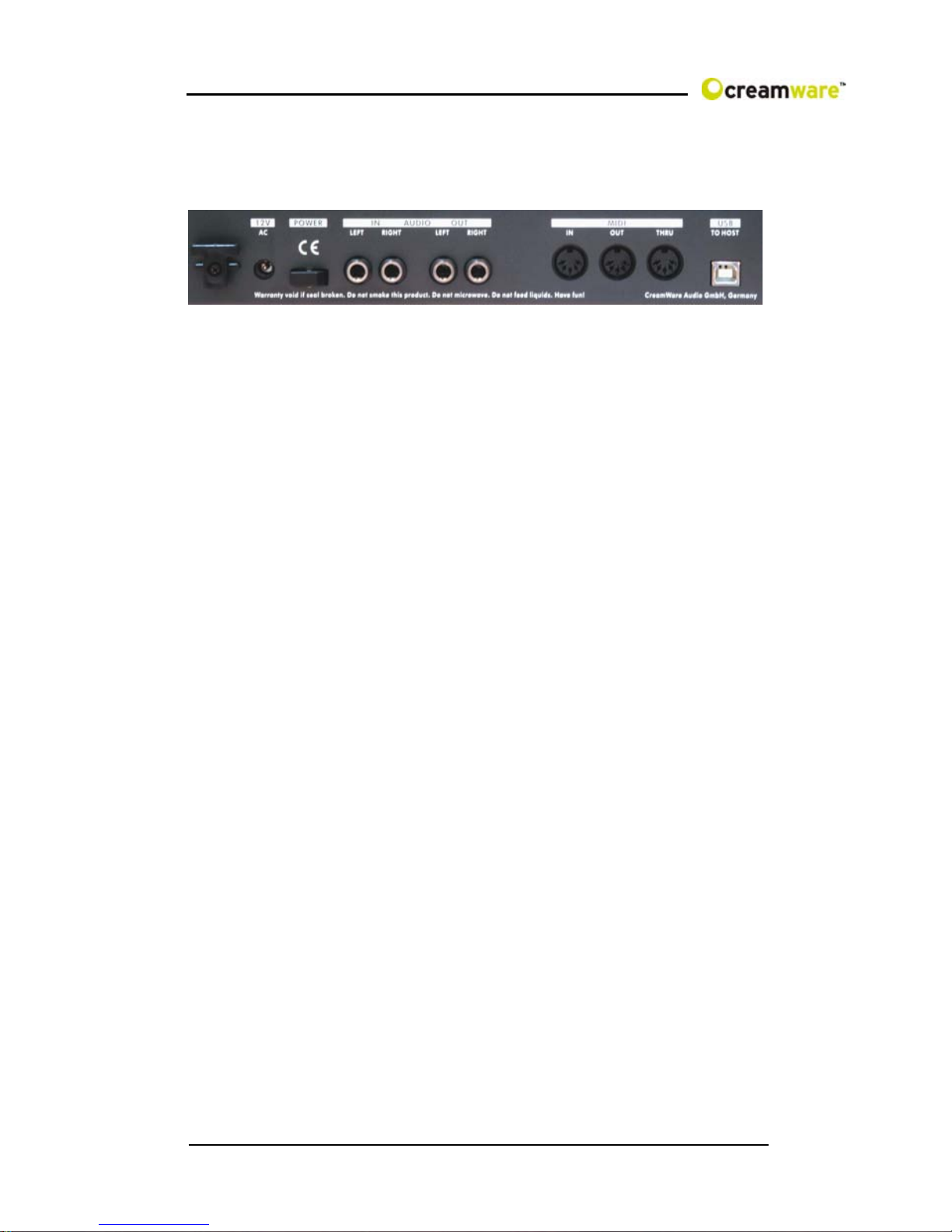
Connecting the power adaptor
To connect your MINIMAX ASB with the power supply, please
use the power adaptor coming with the MINIMAX ASB.
Connect the power adaptor to your MINIMAX ASB. Before
connecting the power adaptor to the socket, make sure it is
compatible to the power supply system. Upon loss of the
power supply, a standard AC or DC 12V / 1.5 A power supply
can be used as a replacement. The connection to the
MINIMAX ASB is made with a hollow plug (5.5 mm x 2.1mm x
11.5 mm, center positive).
MIDI connections
There are two ways to play your MINIMAX ASB using MIDI:
1. Connect your MINIMAX ASB directly to a master
keyboard.
2. Connect your MINIMAX to the MIDI port found on your
computer in order to use it with a sequencer or the
MINIMAX Remote-Software.
Connect the MIDI in and out of your MINIMAX ASB with the
MIDI in and out of your keyboard or computer. The MIDI input
of the MINIMAX ASB has to be connected to the MIDI output
of your keyboard or computer and MIDI output of the
MINIMAX ASB with the MIDI input of your keyboard or
computer.
The incoming MIDI signal can also control another instrument
via MIDI thru. If your computer does not have a MIDI port, you
can use the USB connection as an alternative.

9
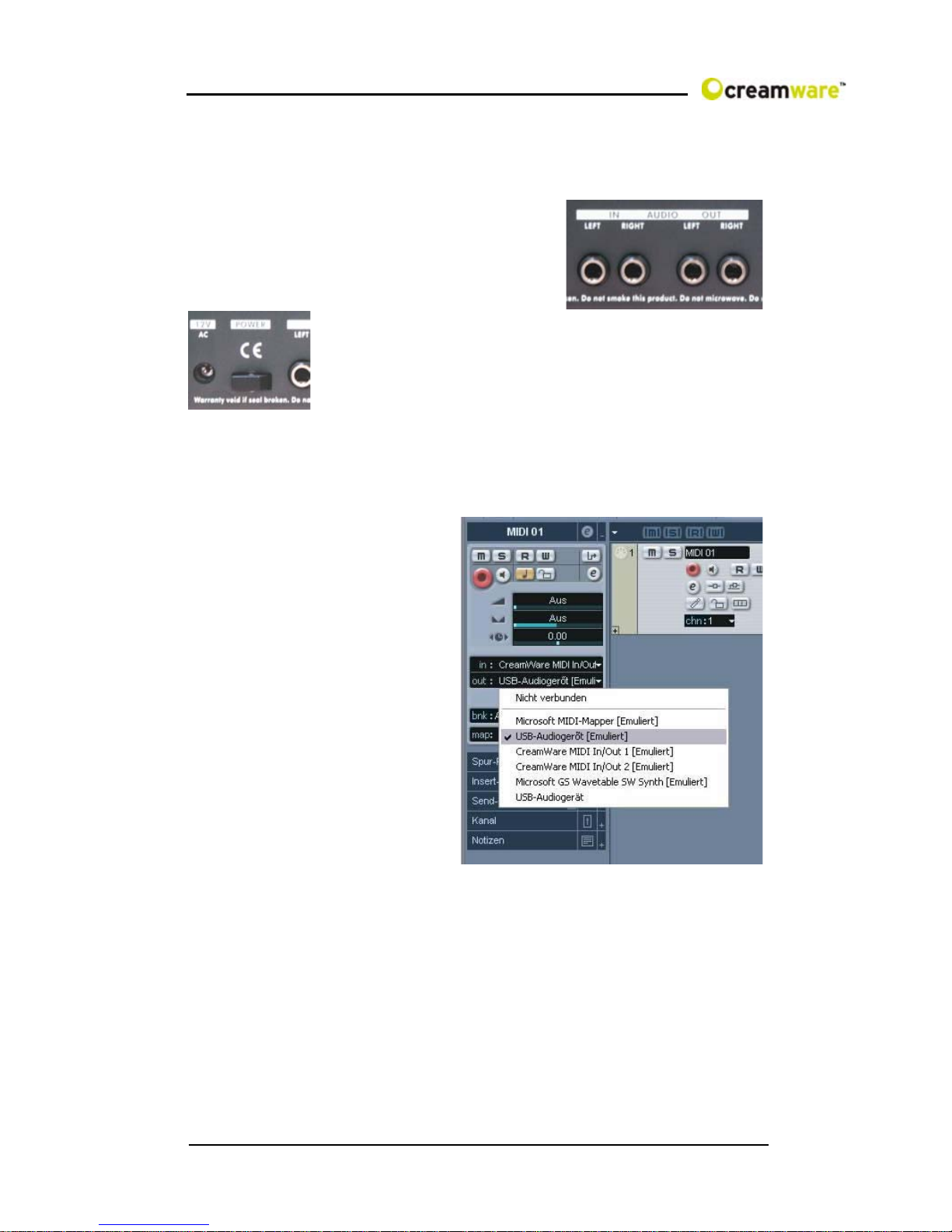
Audio Connections
In order to obtain sound output, you may either connect the
MINIMAX ASB stereo outputs to a mixer’s inputs, computer’s
inputs or HiFi stereo input.
You can also process an external signal
by connecting an external source to
your MINIMAX ASB input.
Power Switch
In order to operate the MINIMAX ASB please
turn the power switch on.
USB Connections and driver installation (Windows XP)
Rather than using MIDI to connect your MINIMAX ASB to a
computer, you can use the
implemented USB
interface. To utilize this
function, you need Windows
Service Pack 2.
After connecting to a
computer, windows will
automatically recognize
your MINIMAX ASB as an
audio USB instrument. No
extra drivers are required
for this device . You can
start playing right away!
After starting your
sequencer program (here:
CubaseSX), you can use
the USB audio instrument
driver as a MIDI port. In very few cases, you may encounter
that under older versions of Windows XP (before Service
Pack 2), the USB port will not show availability after
disconnecting the MINIMAX ASB. In this case, please reboot
XP. After rebooting, your USB port will show availability again.

10
Installation of the Remote-Software
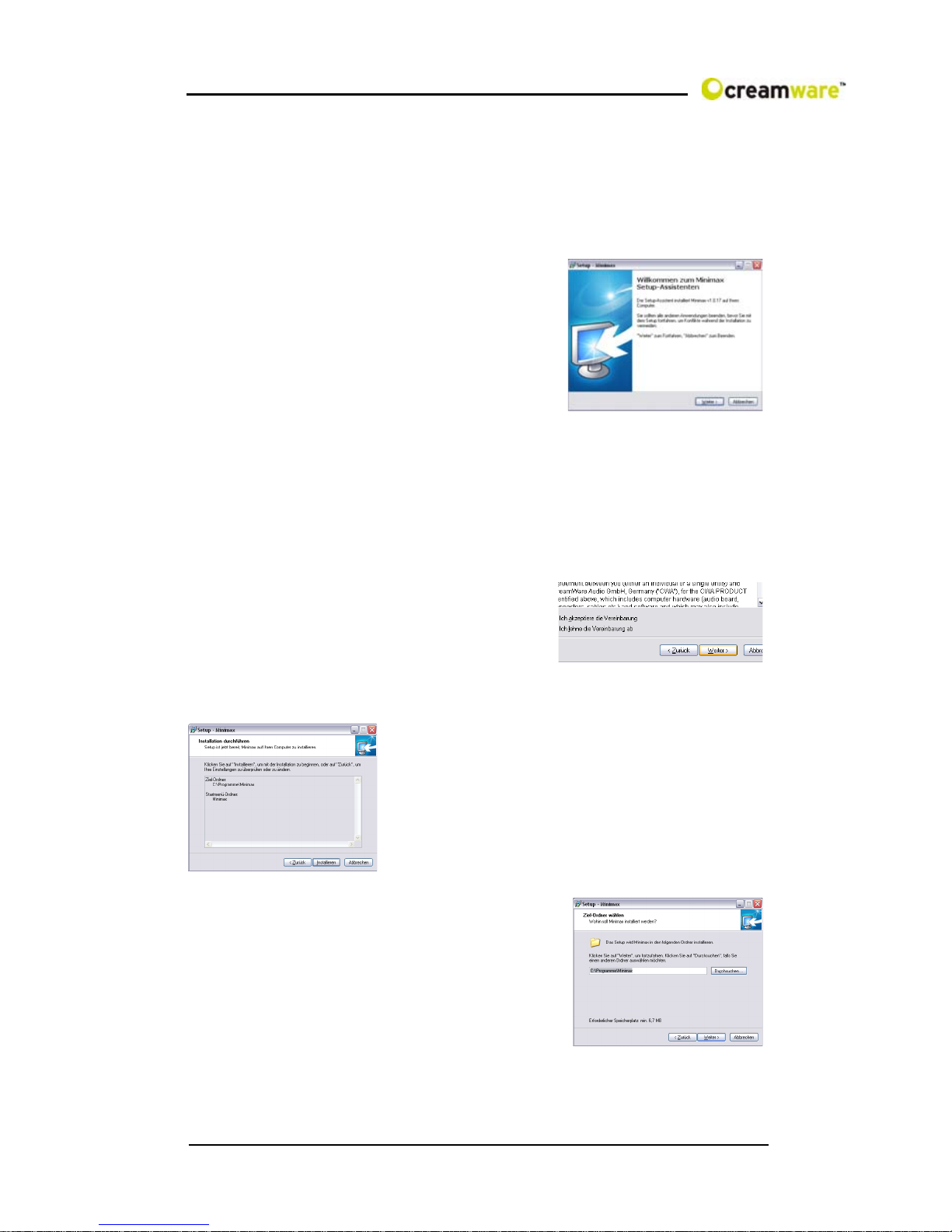
To install the Remote-Software coming with the MINIMAX ASB
on your PC, please put the CD-ROM with print MINIMAX ASB
into the CD-R drive of your Computer. The Install Dialog should
then appear on your screen automatically. In case you have de-
activated the automatic Start-function of
your CD-R drive, please start the
installation by double clicking the file
„setup.exe” on the CD.
Within the first dialogue please choose
the language used within the install
procedure and then, confirm your choice
by pressing the „Next“ button.
Youwillnextsee the„Welcometo theInstallation“Dialog–please
confirm by pressing „Next“.
In the following you will find the license agreement. Please read
carefully and choose „ I accept the
license terms“ if you agree and go the
next dialog by pressing „Next“ button
then.
You can now choose the installation path by defining it within the
drop down menu „Installation path“. If you
don’t choose a dedicated path here, the
Remote-Software will be installed to
“C:\Programs\Minimax”. The required
empty space on your hard-disk is 6.7 MB.
Within “Choose Startmenu-Folder” you
can decide the directory your own.
Otherwise the directory “Minimax” will be
created and used.
Indice
Altri manuali CreamWare Sintetizzatore

CreamWare
CreamWare Noah Interpole Manuale utente

CreamWare
CreamWare Noah Arpeggiator Manuale utente

CreamWare
CreamWare Pro-12 Manuale utente

CreamWare
CreamWare PRO-12 ASB Manuale utente

CreamWare
CreamWare Noah Vectron Player Manuale utente

CreamWare
CreamWare PRO-12 ASB Manuale utente

CreamWare
CreamWare Noah Istruzioni per l'installazione

CreamWare
CreamWare MINIMAX Klangbox Manuale utente

CreamWare
CreamWare Noah Vocodizer Manuale utente

CreamWare
CreamWare Noah Step Sequencer Manuale utente