
Creation BD16 Manuale utente
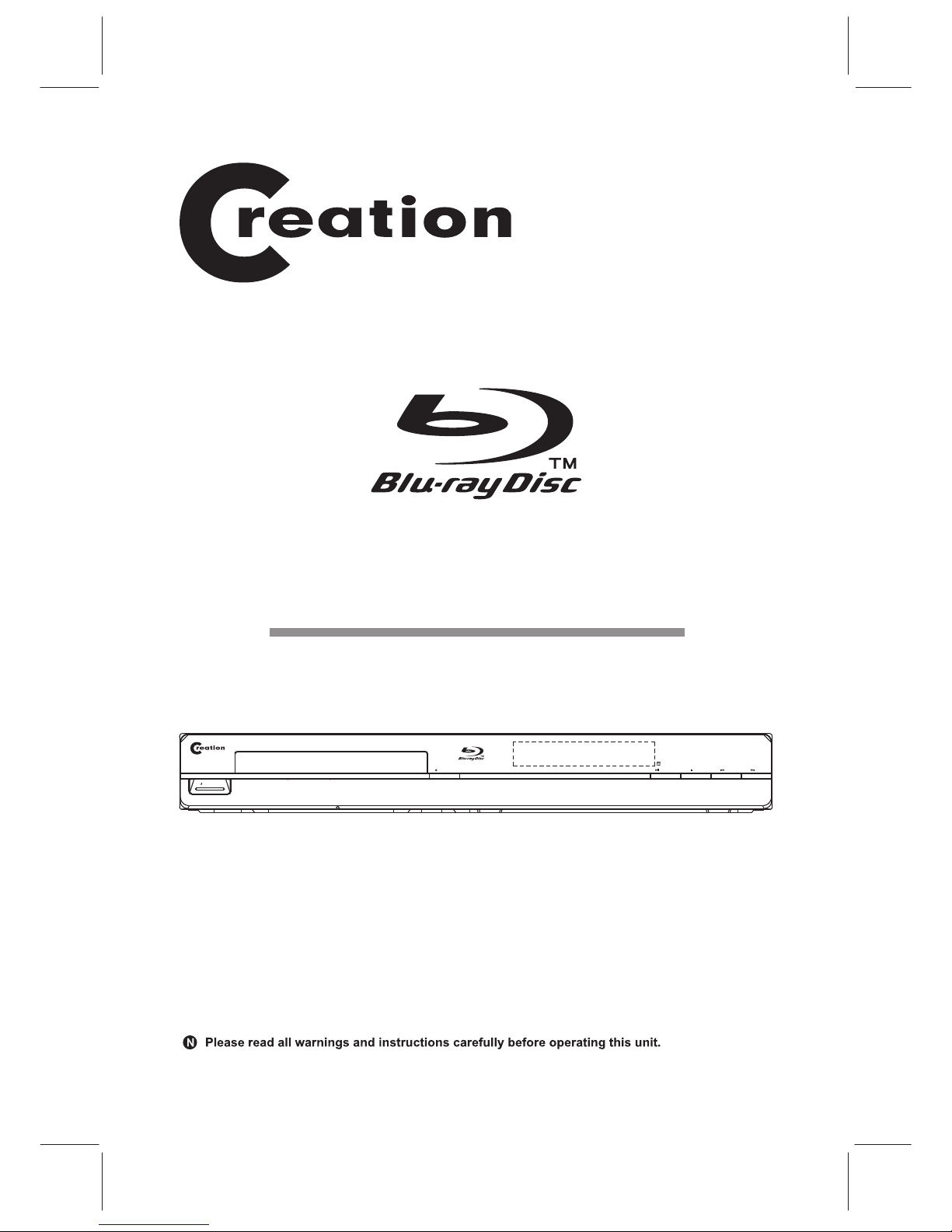
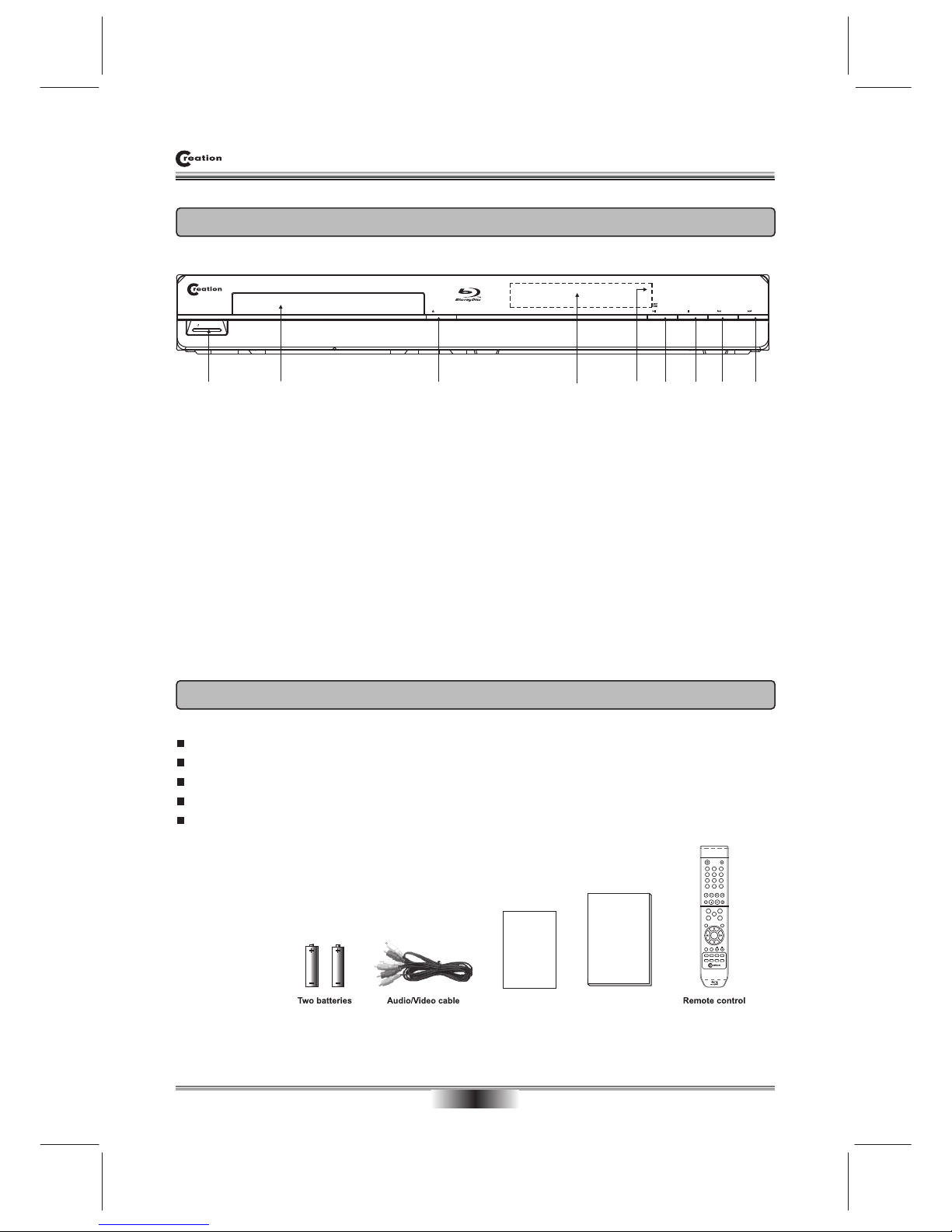
OPEN/CLOSE PLAY/PAUSE STOP
NEXTPREV
STANDBY/ON
Blu-ray Disc Player
MODEL: BD16

SAFETY PRECAUTIONS 01
IMPORTANT SAFETY INSTRUCTIONS 03
NOTICE 04
PLAYABLE DISCS
05
ACCESSORIES AND PANEL 06
REAR PANEL 07
BASIC CONNECTION 08
REMOTE CONTROL 10
BASIC PLAYBACK 11
ADVANCED PLAYBACK 12
SPECIAL FUNCTION PLAYBACK
13
SYSTEM SETUP 18
FREQUENTLY ASKED QUESTIONS 24
TROUBLE SHOOTING 25
SPECIFICATIONS 29
TABLE OF CONTENTS
SAFETY PRECAUTIONS
01
When replacing the unit's plug or power cord, the replacement must be the exactly
the same ;or one recommended by the manufacturer.
The lightning flash with arrowhead symbol, within an equila-
teral triangle, is intended to alert the user to the presence
of uninsulated "dangerous voltage " within the product's en-
closure that may be of sufficient magnitude to constitute a
risk of electric shock to persons.
The exclamation point within an equilateral triangle is
intended to alert the user to the presence of important
operating and maintenance (servicing) instructions in the
literature accompanying the appliance.
This Digital Video Disc player employs a laser system.
The symbol for CLASS II (Double Insulation).
Use of controls, adjustments or the performance of procedures other than those
specified may result To prevent direct expo-
sure to laser beam, do not try to open the enclosure.
DO NOT STARE INTO BEAM.
in hazardous exposure to radiation.
WARNING:
CAUTION:
TO REDUCE THE RISK OF ELECTRIC SHOCK, DO NOT REMOVE COVER (OR
BACK) AS THERE ARE NO USER-SERVICEABLE PARTS INSIDE. REFER
SERVICING TO QUALIFIED PERSONNEL.
SAFETY PRECAUTIONS
02
Manufactured under license from Dolby Laboratories. Dolby and the double-D symbol
are trademarks of Dolby Laboratories.
This product incorporates copyright protection technology that is protected by U.S.
patents and other intellectual property rights. Use of this copyright protection technology
must be authorized by Macrovision, and is intended for home and other limited viewing
uses only unless otherwise authorized by Macrovision. Reverse engineering or
disassembly is prohibited.
Disposal of your old appliance
1. When this crossed-out wheeled bin symbol is attached to a product, it means the
product is covered by the European Directive 2002/96/EC.
2. All electrical and electronic products should be disposed of separately from the
municipal waste stream via designated collection facilities appointed by the government
or the local authorities.
3. The correct disposal of your old appliance will help prevent potential negative
consequences for the environment and human health.
4. For more detailed information about disposal of your old appliance, please contact
your city office, waste disposal service or the shop where you purchased the product.
Manufactured under license under U.S. Patent #’s: 5,451,942; 5,956,674;5,974,380;
5,978,762;6,226,616;6,487,535 & other U.S. and worldwide patents issued & pending.
DTS is a registered trademark & the DTS logos and symbol are trademarks of DTS,
Inc. 1996-2007 DTS, Inc. All rights reserved.

03
Slots and openings in the cabinet are provided for ventilation
and to ensure correct operation of the product. These protect
it from overheating. These openings must not be blocked or
covered. The openings should never be blocked by placing
the product on a bed, sofa, rug or other.
must
must ever
placed
power boards
do this
18.where the MAINS plug or an appliance coupler is
used as the disconnect device, the disconnect device
shall remain readily operable.

04
an vehicle
ELECTRICAL DISTURBANCE
following situations.
suffer from condensation under the
connecting will ensure
PLAYABLE DISCS
05
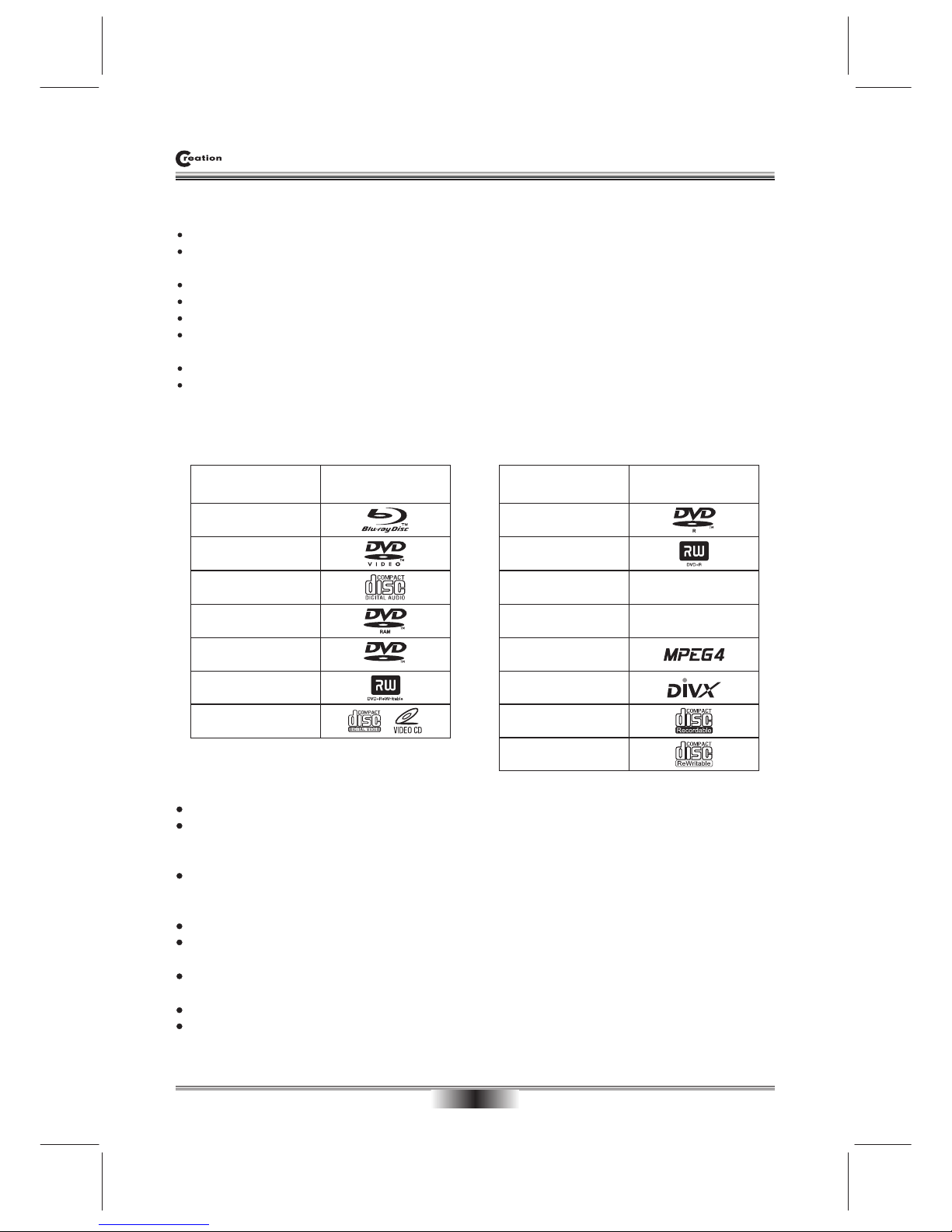
The following types of discs can play in the REF player:
Notes:
Writeable DVD disks (DVD-RAM, DVD-RW, DVD-R) must be finalized, VR-mode only.
This Blu-ray disc player supports discs that are compatible with DVD-RAM Standard Version 2.0.
Playback may not work for some types of discs, or when specific operations, such as angle change and
aspect ratio adjustment, are being performed. Information about the discs is written in detail on the box.
Please refer to this if necessary.
Do not allow the disc to become dirty or scratched. Fingerprints, dirt, dust,
scratches or deposits of cigarette smoke on the recording surface may make it impossible to use the disc
for playback.
CD-R/-RW, DVD-RAM/-RW/-R recorded with UDF or ISO9660 format can be played back.
MP3 files must be written to the disk with a .mp3 file extension in order to be recognized and played back
properly.
Windows Media Audio (MP3/WMA) files must be written to the disk with a .wma file extension in order to be
recognized and played back properly.
High bitrate or variable bitrate .mp3 and .wma files may not play back correctly.
JPEG picture files must be written to the disk with an .jpeg or .jpg file extension in order to be recognized
and played back properly
Features
Full high-definition video playback at up to 1080p resolution for an amazing viewing experience.
Upconversion of standard definition DVDs for enhanced picture quality at up to 1080p over an HDMI
connection.
Rich multi-channel surround sound.
Easy and simple HDTV connection using a single HDMI cable (cable not included).
Multiple outputs for connecting your home theater system or amplifier.
PIP functionality that lets you display primary and secondary video at the same time (if available on the Blu-ray
Disc).
Pop-up menu display without interrupting playback (if available on the Blu-ray Disc).
HDMI 1080p/fps output (Blu-ray Disc only) that provides smooth playback of video with a frame rate of 60
frames per second (TV must be connected with an HDMI cable and be compatible with an HDMI cable and
be compatible with 1080p 60 frame).
Disc type Logo
Blu-ray Disc
DVD-video Disc
(DVD-ROM)
Audio CDs
(CDDA)
DVD-RAM
DVD-RW
DVD+RW
DVD-R
DTS-CD
MP3/WMA/JPEG
Data CD
RW
MPEG4
DivX
CD-R
CD-RW
Disc type Logo
Video-CD
(VCD)
DVD+R
OPEN/CLOSE PLAY/PAUSE STOP
NEXTPREV
STANDBY/ON
23456
ACCESSORIES and PANEL
06
FRONT PANEL
ACCESSORIES
Blu-ray Disc player manual
Blu-ray Disc Player
1. STANDBY/ON Turns the Blu-ray disc player on or off.
2. TRAY Opens to accept a disc.
3. OPEN/CLOSE Opens or closes the disc tray.
4. VFD SCREEN Display the playing status, time, etc.
5. REMOTE CONTROL SENSOR Receive the signal from the remote control.
6.
7. STOP
8.
9. NEXT Go to the next title/chapter/track.
PLAY/PAUSE Play: playback a disc; Pause:
PREVIOUS Go back to the previous title/chapter/track.
Temporarily pauses BD disc playback.
Stop playback.
Warranty card
Warranty card
Audio/Video cable ................................ 1
Remote control ..................................... 1
Blu-ray Disc player manual ...................1
Batteries ............................................... 2
Warranty card........................................1
178 9
1 2 3
456
78 9
0
A B C D
DISCMENU
SEARCH
SETUP
REPEAT
ANGLE
RETURN
OPEN/CLOSE
OSD
VOL
STANDBY/ON
A-B
SUBTITLE
POPUPMENU
TITLE MENU
ENTER
AUDIO
RESOLUTION PIP MUTE
SECONDARY
AUDIO
Y
CB / PB
CR / PR
VIDEO
VIDEO OUT / AUDIO OUT
L
R
COAXIAL
OPTICAL
DIGITALAUDIO OUT
HDMI Ethernet
RISK OF ELECTRIC SHOCK
DONOT OPEN
CAUTION
Disconnect the unit from the
mains before removing the cover.
WARNING
CLASS 1 LASER PRODUCT
Blu-ray
USB
This unit plays only the discs with
the same regional code as the unit
or discs with no regional code.
Please check whether both the BD
player and the disc have the same
regional code before playback.
This product is covered by one or more of the
following U.S. Patents: 5,060,220 5,457,669 5,987,
417 6,377,524 6,389,570 6,556,5206,631,110 6,778,
755 6,795,637 6,862,256 6,868,054 6,937,552.
Dolby and the double-D symbol are registered
trademarks of Dolby Laboratories.
Manufactured under license under U.S. Patent #’s:
5,451,942; 5,956,674;5,974,380; 5,978,762;6,226,616;
6,487,535 & other U.S. and worldwide patents issu-
ed & pending. DTS is a registered trademark & the
DTS logos and symbol are trademarks of DTS, Inc.
1996-2007 DTS, Inc. All rights reserved.
U.S. Patent Nos. 6,836,549; 6,381,747; 7,050,698;
6,516,132; and 5,583,936.
DVD-Video
110V-240V~ 50/60Hz
S/N:
MODEL: BD16
AC: 110V-240V~ 50/60Hz
POWER: 25W
BLU-RAY DISC PLAYER
REAR PANEL
07
REAR PANEL OUTPUT
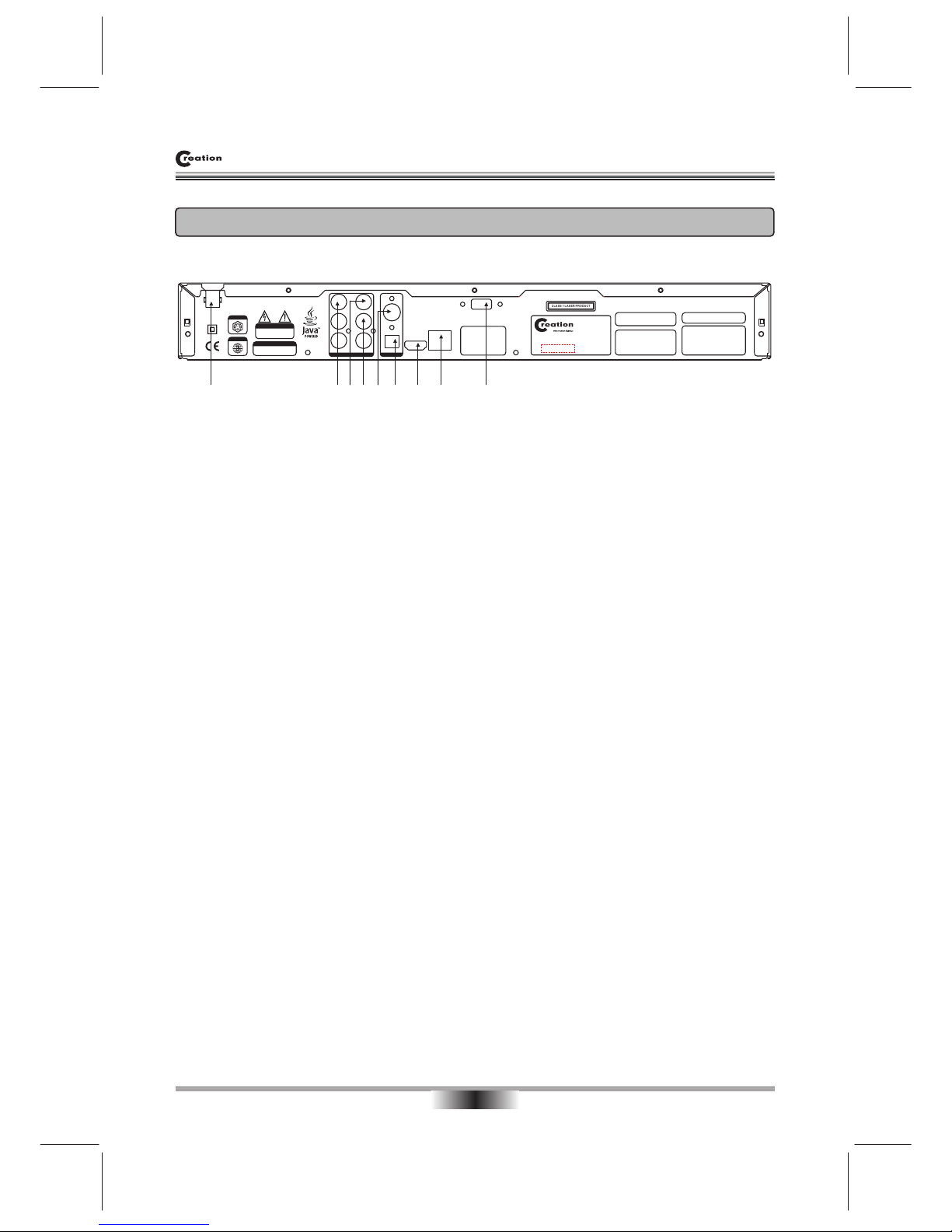
72 3 4 65 8
1. POWER LINE INPUT
Isolates Mains supply
2.Y, CB/PB, CR/PR (Component) OUTPUT
Connect these outputs to the YUV inputs of the television, if the television does not have an HDMI input.
NOTE: The component video output has a maximum resolution of 1080i.
3. VIDEO OUTPUT
If your TV does not have component or HDMI video inputs, connect this output to the composite video input
of the HD television.
4. L/R AUDIO OUTPUT
C
5. COAXIAL OUTPUT
This is a digital audio output. If you have a surround-sound receiver with a digital coaxial input, connect this
output to the digital coaxial input of the surround sound receiver.
6. OPTICAL OUTPUT
This is another digital audio output. If you have a surround-sound receiver with a digital optical input, connect
this output to the digital optical input of the surround sound receiver.
7. HDMI OUTPUT
If your surround-sound audio receiver does not have an HDMI input (or if you are not using a surround-sound
receiver), connect this output directly to the HDMI input of the TV. One of the other audio outputs can be
connected to the audio receiver.
Otherwise, connect the HDMI output of the player to the HDMI input of the audio receiver. (You will need to
connect a second HDMI cable from the HDMI output of the audio receiver to the HDMI input of the television)
8. ETHERNET
Use this jack to connect your player to the Internet to download BD-Live information.
9. USB
Connect a USB drive to this jack.
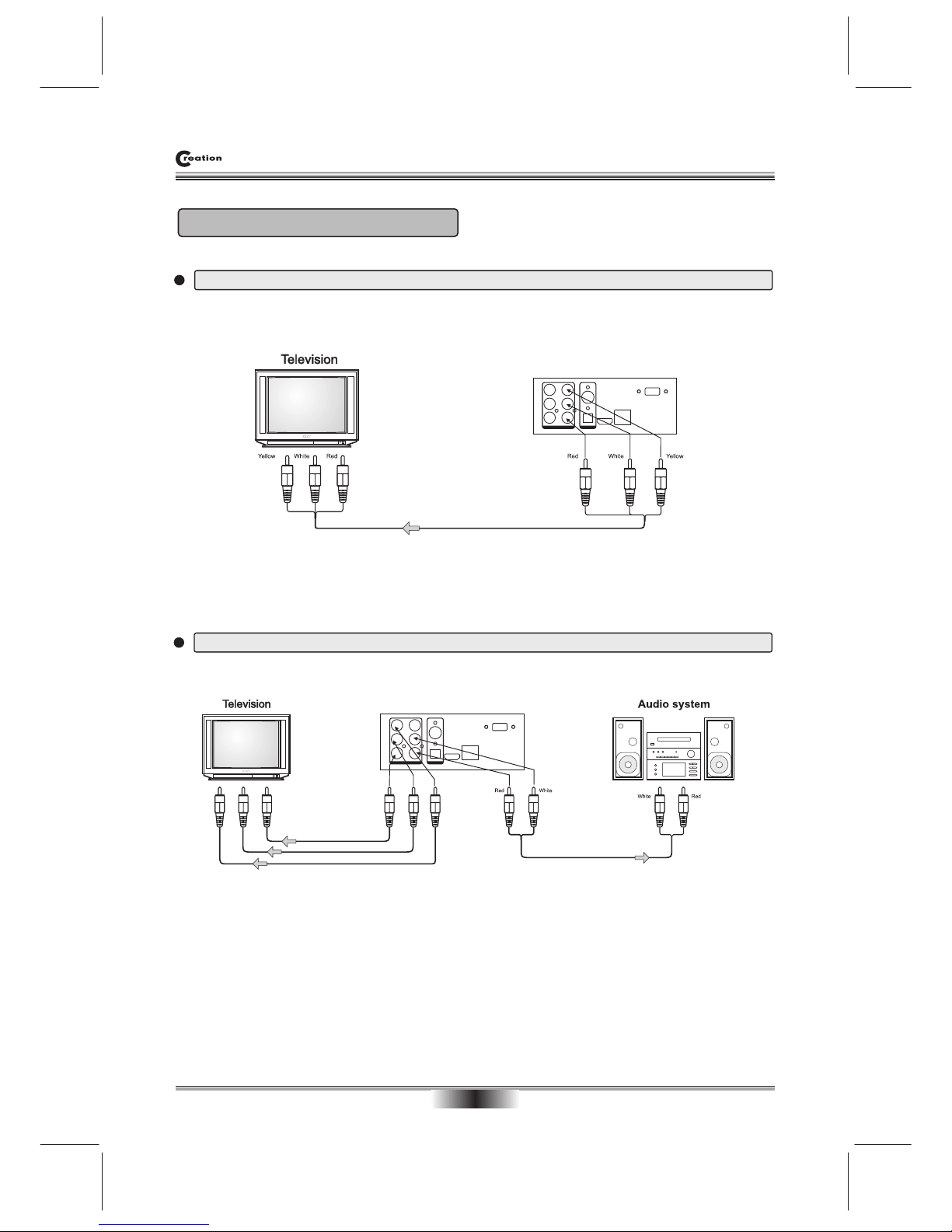
onnection for external equipment using the Red/White Audio (RCA) Cables.
1 9
BASIC CONNECTION
08
BASIC CONNECTION
Connecting to a TV with Audio/Video cable
Connecting to a audio system and TV equipped with YUV (Component) video input
To video input(yellow)
To audio inputs(red, white)
To audio inputs of the amplifier
To Y video input
To CB/PB video input
To CR/PR video input
To Y video output
To CB/PB video output
To CR/PR video output
BD Player
BD Player
Y
CB / PB
CR / PR
VIDEO
COAXIAL
OPTICAL
VIDEO OUT / AUDIO OUT
DIGITALAUDIO OUT
HDMI
L
R
Ethernet
USB
Y
CB / PB
CR / PR
VIDEO
COAXIAL
OPTICAL
VIDEO OUT / AUDIO OUT
DIGITALAUDIO OUT
HDMI
L
R
Ethernet
USB
Indice


