
Cumberland PNEG-1640 Manuale utente

PNEG-1640
Smart IR Sensor
Installation and Operation Manual
PNEG-1640
Date: 12-21-11

2PNEG-1640 Smart IR Sensor

Table of Contents
PNEG-1640 Smart IR Sensor 3
Contents
Chapter 1 Safety .....................................................................................................................................................4
Safety Guidelines ...................................................................................................................................4
Chapter 2 Application ............................................................................................................................................6
Chapter 3 Installation ............................................................................................................................................7
Chapter 4 Basic Operation ....................................................................................................................................8
Chapter 5 Delay Time ............................................................................................................................................9
Check Delay Time Setting ......................................................................................................................9
Setting/Adjusting the Delay Time .........................................................................................................10
Delay Time Operation ..........................................................................................................................10
Delay Time By-Pass .............................................................................................................................10
Chapter 6 Run Time .............................................................................................................................................11
Maximum Run Time .............................................................................................................................11
Check Maximum Run Time Setting ......................................................................................................12
Setting/Adjusting the Maximum Run Time ...........................................................................................12
Maximum Run Time Operation ............................................................................................................13
Resetting the Maximum Run Timer ......................................................................................................13
Chapter 7 Sensitivity ...........................................................................................................................................14
Chapter 8 Replacement Parts .............................................................................................................................16
Smart IR Sensor Assembly (FLX-4951) ...............................................................................................16
Chapter 9 Wiring Diagrams .................................................................................................................................18
Alarm Wiring Diagram ..........................................................................................................................18
AP Wiring Diagram ...............................................................................................................................19
Choretime Wiring Diagram ...................................................................................................................21
Universal Wiring Diagram ....................................................................................................................22
Chapter 10 Warranty ............................................................................................................................................23

4PNEG-1640 Smart IR Sensor
1. Safety
Safety Guidelines
This manual contains information that is important for you, the owner/operator, to know and understand.
This information relates to protecting personal safety and preventing equipment problems. It is the
responsibility of the owner/operator to inform anyone operating or working in the area of this equipment
of these safety guidelines. To help you recognize this information, we use the symbols that are defined
below. Please read the manual and pay attention to these sections. Failure to read this manual and its
safety instructions is a misuse of the equipment and may lead to serious injury or death.
DANGER
WARNING
CAUTION
NOTICE
This is the safety alert symbol. It is used to alert you
to potential personal injury hazards. Obey all safety
messages that follow this symbol to avoid possible
injury or death.
WARNING indicates a hazardous situation which, if not
avoided, could result in death or serious injury.
CAUTION, used with the safety alert symbol, indicates a
hazardous situation which, if not avoided, could result in
minor or moderate injury.
NOTICE is used to address practices not related to
personal injury.
DANGER indicates a hazardous situation which, if not
avoided, will result in death or serious injury.

1. Safety
PNEG-1640 Smart IR Sensor 5
Install and Operate Electrical Equipment Properly
Electrical controls should be installed by a qualified electrician
and must meet the standards set by the National Electrical Code
and all local and state codes.
Disconnect and lock out all power sources before installing
wires/cables or servicing equipment.
Electric Shock Hazard
Prepare for Emergencies
Be prepared if fire starts.
Keep a first aid kit and fire extinguisher handy.
Keep emergency numbers for doctors, ambulance service,
hospital, and fire department near your telephone. Keep Emergency Equipment
Quickly Accessible
Wear Protective Clothing
Wear close-fitting clothing and safety equipment appropriate
to the job.
Remove all jewelry.
Tie long hair up and back.
Wear safety glasses at all times to protect eyes from debris.
Wear gloves to protect your hands from sharpedges on plastic
or steel parts.
Wear steel-toed boots to help protect your feet from falling
debris. Tuck in any loose or dangling shoestrings.
A respirator may be needed to prevent breathing potentially
toxic fumes and dust.
Wear a hard hat to help protect your head.
Wear appropriate fall protection equipment when working at
elevations greater than six feet (6').
Eye Protection
Gloves
Steel-Toed Boots
Respirator
Hard Hat
Fall Protection

6PNEG-1640 Smart IR Sensor
2. Application
The Smart IR Sensor is used as the primary control for a Flex-Flo feed line. It uses “infrared” technology
todetectthepresence of all types ofmashandpelletfeeds. It is designed to be used inplaceofa proximity
switch or drop tube switch and will operate with or without the aid of a power relay. The sensor is installed
underneath a control unit between the powerhead drop (funnel) and the drop tube at the end of a Flex-Flo
feed system.
Figure 2A

PNEG-1640 Smart IR Sensor 7
3. Installation
The sensor is installed underneath a control unit between the powerhead drop (funnel) and the drop tube
at the end of a Flex-Flo feed system. The control unit power head drop funnel must be an FLX-2017
or equivalent with an outlet measuring approximately 3-1/4" O.D. Use two (2) #10 x 3/4" self-drilling
screws (S-8045) (supplied) to fasten the Smart IR Sensor to the powerhead drop funnel and drop tube as
shown in Figure 3A.
Figure 3A

8PNEG-1640 Smart IR Sensor
4. Basic Operation
The Smart IR Sensor will detect when the last feeder is full and immediately shut the Flex-Flo system off,
the yellow “Product Detected” LED will be lit and the display will read “Full”. When the feed falls away from
the sensor, it will count down a pre-determined delay time and then turn the Flex-Flo system back on.
It also includes a maximum run timer that will shut the system down if the auger runs too long in case of
an empty or bridged feed tank or a feed spill. Alarm contacts are available to provide remote notification
of a maximum run situation.
Figure 4A Full
Figure 4B Maximum Run Time Alarm

PNEG-1640 Smart IR Sensor 9
5. Delay Time
Delay time is the length of time after the IR sensor no longer detects feed, before it turns the Flex-Flo
system back on again. It is used to prevent short-cycling of the Flex-Flo system. Excessive short-cycling
will reduce the life of the motor and/or Flex-Flo system. It can also result in the motor running hot and
continually activating the thermal reset.
The required delay time setting depends on how quickly the animals can empty the feeders once the feed
system is full. Large capacity feeders or younger, smaller animals will allow for longer delay time settings.
Forbestresults,usea slightlylessdelay time settingthanthetime ittakesthe animals to completelyempty
the feeder. Always check a pen where there are the most and largest animals and atthe time of day when
consumption is highest. As the animals get older and larger and consume more feed, decrease the delay
time setting to prevent feeders from going empty.
The range of delay time setting for the Smart IR Sensor is from 0 hours and 0 minutes to 23 hours and
59 minutes.
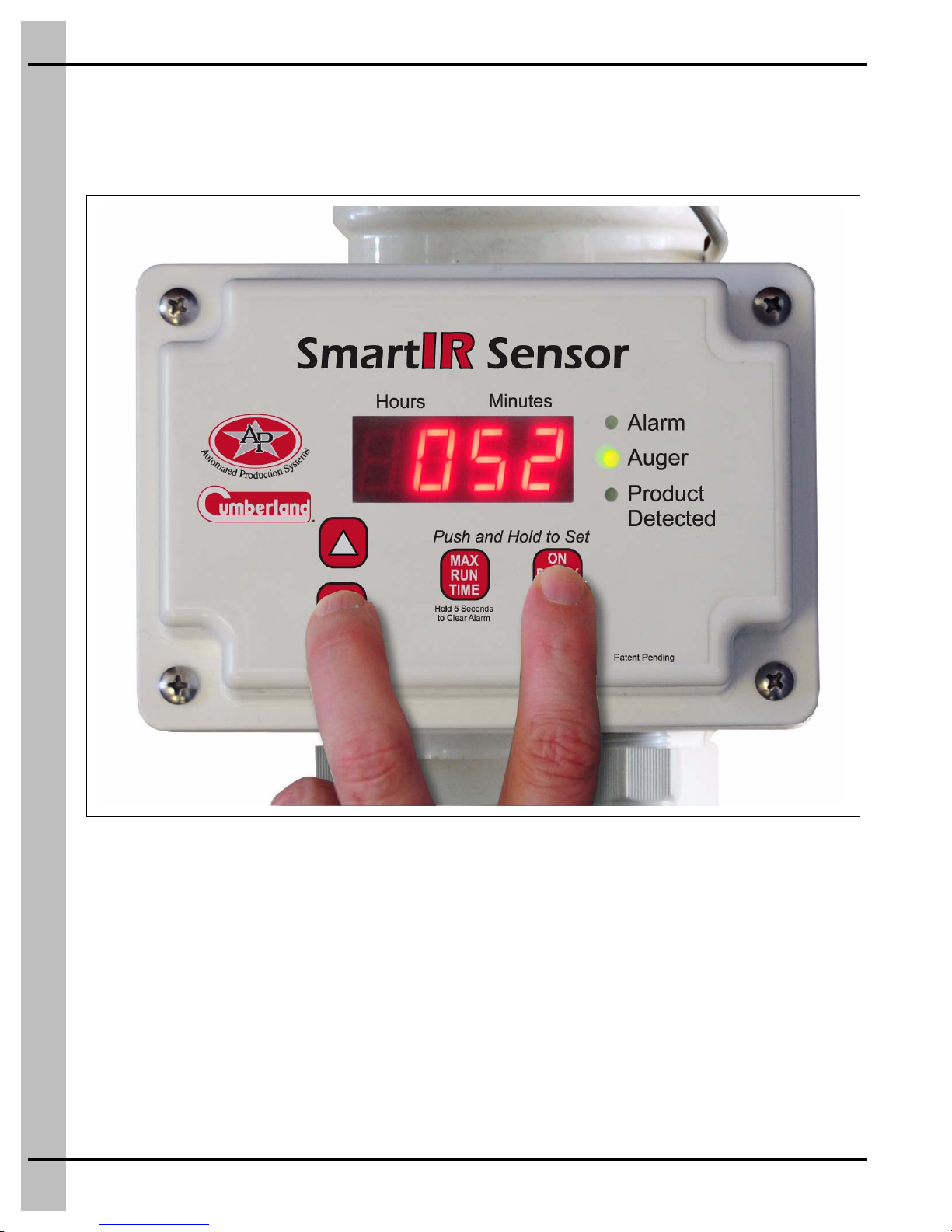
Check Delay Time Setting
To check the delay time setting, at any time, push and hold the “On Delay Time” button.
Figure 5A Checking Delay Time
5. Delay Time
10 PNEG-1640 Smart IR Sensor
Setting/Adjusting the Delay Time
To adjust the delay time setting, at any time, while pushing and holding the “On Delay Time” button, push
either the “arrow up” or “arrow down” button. Each time an “arrow” button is pushed, the time will change
by 1 minute. To make the time scroll faster, continue to hold the “arrow” button down for several seconds.
Figure 5B Adjusting the Delay Time
Delay Time Operation
Once the yellow “Product Detected” indicator light goes off, the delay time will begin to count down from
its maximum setting. During this time, the green “Auger” indicator light will flash. After the delay time
reaches 0.00, the “Auger” indicator light will turn on solid and the Flex-Flo system will start.
Delay Time By-Pass
When the Smart IR Sensor is in delay time, the green “Auger” indicator light will be flashing. It is not
necessary to wait for the delay time to expire before the auger will start-up. To make the auger start
immediately, by-pass the delay time for one cycle only, by pressing and holding the “On Delay Time”
button down for 5 second.
Indice
Altri manuali Cumberland Sistema di sicurezza

Manuali Sistema di sicurezza popolari di altre marche


EDM
EDM Solution 6+6 Wireless-AE Manuale utente

Highway Safety Group
Highway Safety Group EA401 Manuale utente

Siren
Siren LED GSM Manuale utente

Detection Systems
Detection Systems 7090i Istruzioni per il montaggio

Se-Kure Controls
Se-Kure Controls MicroMini SK-4841 Manuale utente

Siemens
Siemens FDM273 Manuale utente