
CUTWORX eclipse 1523 Manuale utente


Eclipse 1523/2029 Installation Manual
Please read the manual carefully before using the
product
To ensure production safety, please read the "Safety
Instructions"
EN 60204-2018 Safety of machinery – Electrical equipment of machines
EN 61000-2011 Electromagnetic compatibility(EMC)
The design and use of this product comply with relevant
specifications:
1
binding101.com
(866) 537-2244

Eclipse 1523/2029 Installation Manual
Safety Instructions
The company is not responsible for safety
injuries caused by the improper use of ma-
chine that is not authorized by Eclipse or
Eclipse dealer certified technician.
Note
Note
Note
Note
All installation, operation and maintenance work
should only be carried out by professionals.
People and property maybe seriously injured
in the following situations:
▲Unauthorized removal of the cover
▲Wrong installation and use
Internal or external changes to the equipment
can only be carried out after consultation with
Eclipse or Eclipse dealer certified technician.
2
binding101.com
(866) 537-2244

Eclipse 1523/2029 Installation Manual
Table of Contents
Safety Introductions
1.Machine Introduction...................................................................................... 06
1.1
Eclipse 1523/2029 Digital Die Cutters Introduction
.................................. 06
1.2
Eclipse 1523/2029 Technical
Parameters................................................... 07
2.Machine Installation........................................................................................ 08
2.1 Preparation Before Installation..................................................................... 08
2.1.1 Customer Installation Site Requirements .......................................... 08
2.1.2 Other Preparations .............................................................................. 08
2.1.3 Technician Requirements .................................................................... 08
2.2 List of Installation Tools ................................................................................ 09
2.3 Unpacking Instructions ................................................................................ 09
2.3.1 Unpacking Inspection and Notice ...................................................... 09
2.3.2 Check Before Unpacking..................................................................... 10
2.3.3 Installation of Equipment .................................................................... 11
2.3.4 Connection Between Machine and Computer.................................. 13
2.4 Computer Configuration ............................................................................... 14
2.4.1 Windows Update ................................................................................. 14
2.4.2 Driver Updates ..................................................................................... 15
2.4.3 Windows Boot Configuration ............................................................. 15
2.5 Eclipse Software Suite Installation............................................................... 17
2.5.1 Folder Directory Setup ........................................................................ 17
2.5.2 Cut Control Software Installation ....................................................... 17
2.5.3 Design Manager Installation ............................................................... 18
2.5.4 Configuring Admin & Security Privileges .......................................... 19
2.6 License Key Software Installation ................................................................ 20
2.6.1 CodeMeterRuntime Installation.......................................................... 20
3
binding101.com
(866) 537-2244

Eclipse 1523/2029 Installation Manual
2.6.2 iEcho Sentinel Software Installation................................................... 20
2.7 Pre-Boot Configuration.................................................................................. 21
2.7.1 Power Supply Voltage Confirmation................................................... 21
2.7.2 Hardware Check.................................................................................... 21
2.7.3 Air Pressure Confirmation ................................................................... 21
2.8 Booting the Eclipse........................................................................................ 21
2.8.1 Booting Sequence................................................................................ 21
2.9 Hardware ........................................................................................................ 22
2.9.1 DK 1.5mm/0.9mm Cut Tool ................................................................ 22
2.10 Feeding Device ............................................................................................ 24
2.10.1 Feeding Device Operation ................................................................ 24
2.10.2 Usage of Feeding Device .................................................................. 24
2.11 Suction Device ............................................................................................. 25
2.11.1 Working Principle of Suction Device ............................................... 25
2.11.2 Positioning of Suction Cups and Materials..................................... 25
3.Eclipse Software Configuration .................................................................... 26
3.1 Design Manager Configuration .................................................................... 26
3.1.1 Cut Control Software Link................................................................... 26
3.1.2 Camera Hardware Configuration........................................................ 27
3.2 Cut Control Software Configuration ............................................................ 28
3.2.1 Serial Port Configuration..................................................................... 28
3.2.2 Cut Control Tool Bar Configuration .................................................... 29
3.3 CCD Camera Calibration ............................................................................... 32
3.3.1 CCD Camera Calibration Configuration ............................................. 32
3.3.2 Registration Mark Calibration ............................................................. 35
3.3.3 Collecting Device Configuration......................................................... 35
Table of Contents
4
binding101.com
(866) 537-2244

Eclipse 1523/2029 Installation Manual
4. Offset Cutting Test ........................................................................................ 37
4.1 EOT Tool Configuration ................................................................................. 37
4.1.1 EOT Blade Introduction ....................................................................... 37
4.1.2 Installation of EOT Blade..................................................................... 37
4.1.3 Material Press Plate Installation ......................................................... 38
4.1.4 Debugging of EOT Tool ....................................................................... 38
4.1.5 EOT Tool Configuration ....................................................................... 39
4.2 Calibration Test Cut File ................................................................................ 43
4.2.1 Calibration Test Cut File Configuration.............................................. 43
4.2.2 Start Calibration Sheet Cut ................................................................. 45
4.2.3 Tool Offset Adjustments ..................................................................... 46
5. Support ............................................................................................................ 48
5.1 TeamViewer Remote Support ....................................................................... 48
5.1.1 Downloading TeamViewer................................................................... 48
5.1.2 Remote Support Request .................................................................... 48
5.2 Troubleshooting ............................................................................................. 49
5.2.1 Communication Errors......................................................................... 49
5.2.2 Loading Device Troubleshooting........................................................ 53
5.2.3 Cutting Issues....................................................................................... 56
5.2.4 Conveyor Not Advancing After Cutting............................................. 57
6. Maintenance.................................................................................................... 58
6.1 Maintenance Schedule .................................................................................. 58
6.2 Warranty ......................................................................................................... 59
Table of Contents
5
binding101.com
(866) 537-2244
Eclipse 1523/2029 Installation Manual
1.1 Eclipse 1523/2029 Digital Die Cutters Introduction
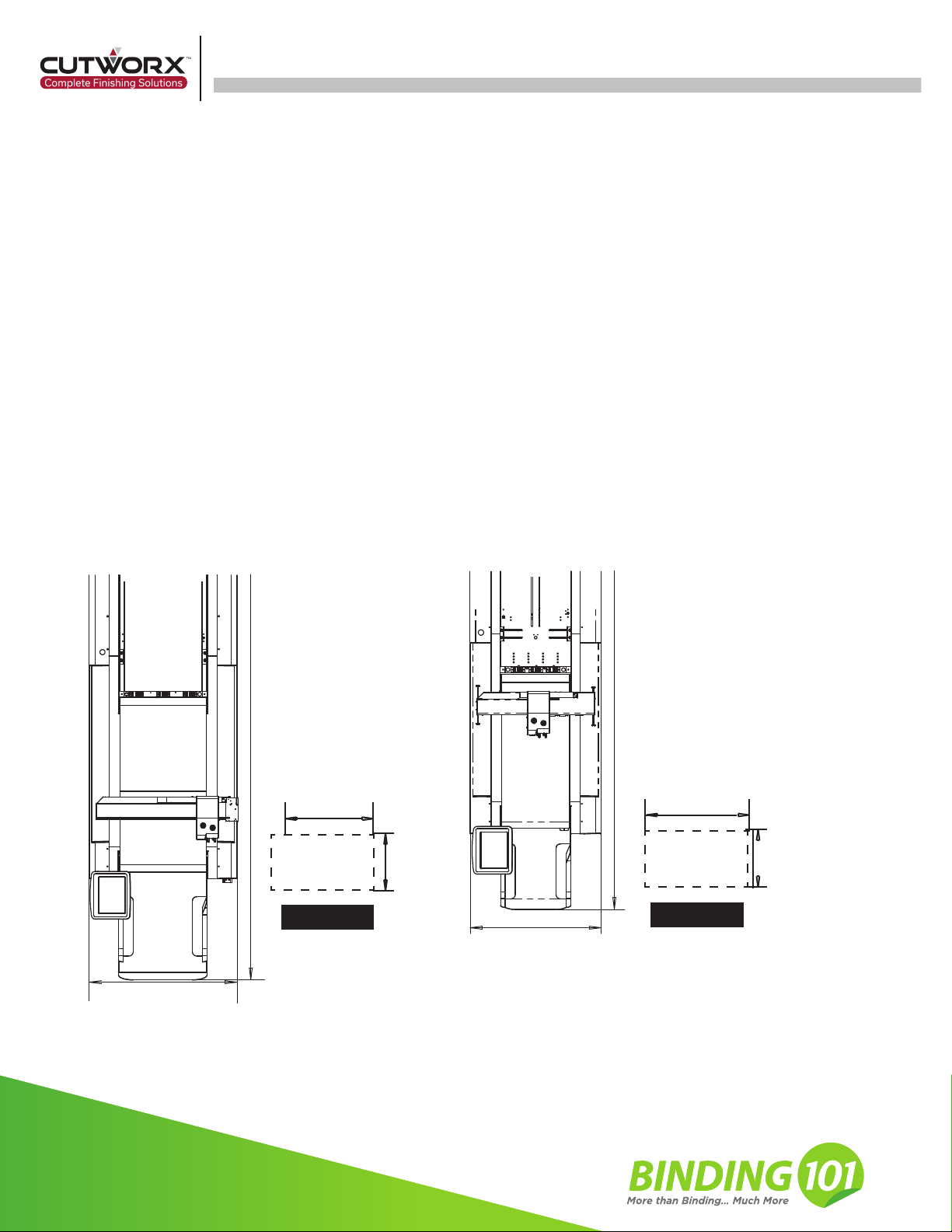
Note: The computer desk should be on the left or right side of the machine (about 16inx28in)
Eclipse 2029
computer
desk position
43in
110in
28in
computer
desk position
16in
39in
87in
Eclipse 1523
28in
16in
1. Machine Introduction
Eclipse Series Digital Die Cutters are efficient automatic sheet-fed digital cutting systems. The system
can process vector graphics and convert them into cutting lines, then the motion control system drives the
cutter module to complete cutting requirements. The equipment is equipped with a variety of cutting tools,
so that creasing and cutting on different materials can be completed. With an integrated CCD Camera,
continuous automatic sheet-fed production can be achieved on printed and non-printed materials.
Eclipse Digital Die Cutters are suitable for cutting the following materials:
Cardstock, self-adhesive materials, cardboard, KT board, PP plastic, corrugated board etc.
* For more material choices, please contact CUTWORX USA support team.
6
binding101.com
(866) 537-2244
binding101.com
(866) 537-2244

Eclipse 1523/2029 Installation Manual
Model Eclipse 1523 Eclipse 2029
Effective cutting area 15.5in x 26.5in 20.5in x 29.5in
Applicable paper A3/A4/A5/B3/B4/B5 A2/A3/A4/A5/B2/B3/B4/B5
Machine dimension(L*W*H)88in × 40in × 46in 110in × 43in × 46in
89in × 44in × 58in 89in × 45in × 59inPackage dimension(L*W*H)
Weight 662 Lbs 882 Lbs
Optional function Roll Feeding Device
Loading system Vacuum Adsorption
Cutting tools Drag knife、Creasing wheel、Oscillating knife、Kiss cut
1200mm/s (39in/s)
6mm
±0.1 mm (.004in)
Maximum cutting speed
Maximum cutting thickness
Cutting accuracy
File format DXF/PLT/PDF/HPG/HPGL/TSK/BRG/XML/CUT/OXF/ISO/AI/PS/EPS
Connect port
Air pressure
Rated voltage
Power
Working condition
USB/WLAN/WIFI
75 PSI, 5 CFM, Moisture/Water/Oil Free
Single Phase - 208v/220v
Temperature 50°F-80°F ,Humidity 20%-80%RH
30 Amp 30 Amp
1.2 Eclipse 1523/2029 Technical Parameters
7
binding101.com
(866) 537-2244
Eclipse 1523/2029 Installation Manual
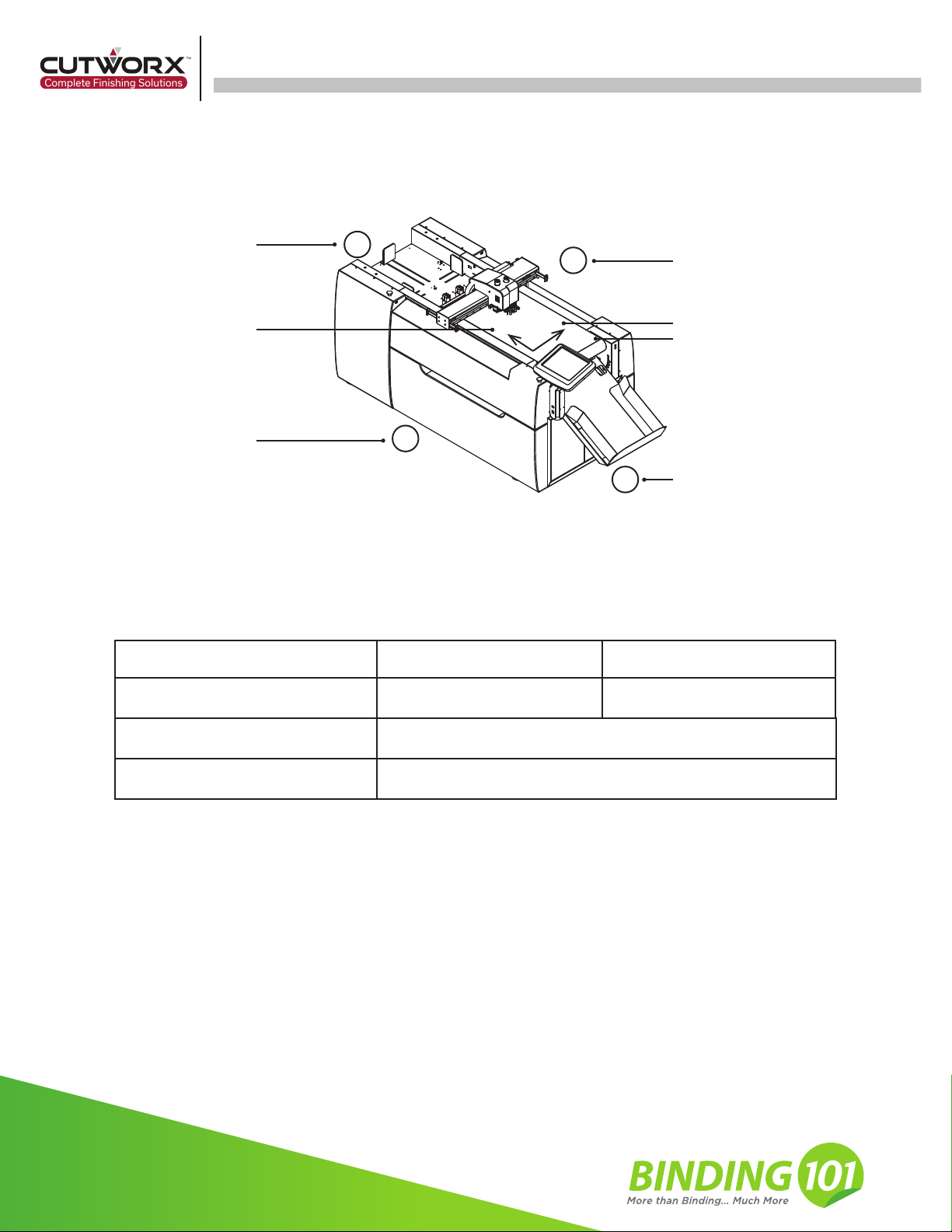
1
2
3
4
XY
(0,0)
Rear
Right
Front
Y direction
Original point
Left
X direction
Model
Required area
Indoor installation environment
Eclipse 1523 Eclipse 2029
93in × 36in × 46in 102in × 40in × 60in
Power Single Phase - 208v/220v 30 Amp
Temperature 50°F-80°F ,Humidity 20%-80%RH
2.1.2 Other Preparations
CPU: Intel(R) Core(TM) i5-10400 CPU @ 2.90Ghz, 16 GB RAM, 64-bit operating system, x64-based processor,
Windows 10 Pro, 5 USB ports, mouse, keyboard, monitor.
2.1.3 Technician Requirements
The installer must be guided by CUTWORX USA technicians.
The installer is required to wear work gloves.
The installer must be familiar with the machine installation precautions, and have read and understood the instal-
lation instructions.
The following aspects are defined uniformly and used to communicate with CUTWORX USA technical personnel
and after-sales support engineers.
2.1 Preparation Before Installation
2. Machine Installation
2.1.1 Customer Installation Site Requirements and Environmental Requirements
8
binding101.com
(866) 537-2244

Eclipse 1523/2029 Installation Manual
Wrench(14mm、18mm) Screwdriver(cross, flat)
To adjust the feet level Connect the communi
-cation line
Electric drill(8mm sleeve)
Used to unpack the box
Pliers
Used to remove the
transport fixture
Roll ruler
Used to measure
installation space
Allen key(2mm、6mm)
Used to install EOT blades
and collecting device
Laser level
Used to adjust
foot level
2.2 List of Installation Tools
2.3 Unpacking Instructions
2.3.1 Unpacking inspection and Notice
2.3.1.1 Unloading of Packages
9
binding101.com
(866) 537-2244
Questo manuale è adatto per i seguenti modelli
1
Indice


