D-MAX DAZ-530 Manuale utente

DAZ-530/DAZ-523
AUTO FOCUS, DAY&NIGHT
ZOOM COLOR CAMERA
USER MANUAL
DISTRIBUTED BY
DAZ-530/523(동양표지3.10) 2008.3.10 4:34 PM 페이지1 (주)조은프린트02-2269-9980 2400DPI 175LPI T

Contents
1. Precautions …………………………………………… 2
2. Features ………………………………………………… 3
3. Products Components ………………………… 5
4. Name and Functions of Each Parts ……… 6
1) Front ………………………………………………… 6
2) Back ………………………………………………… 7
5. Connection …………………………………………… 9
1) Connecting to Monitor ………………………… 9
2) Connecting to Connection…………………… 9
6. Operating Your Camera……………………… 12
1) Menu Configuration…………………………… 12
2) Menu Setup……………………………………… 12
7. Trouble Shooting ………………………………… 35
8. Specifications ……………………………………… 36
DAZ-530/523(동양본문3.10) 2008.3.10 4:33 PM 페이지1 (주)조은프

◀2
1. Precautions
Installation of this product by unqualified personnel is strictly prohibited,
Please consult an experienced installer or authorized retailer for proper
installation to avoid possible fire or electric shock.
If the camera overheats or smoke is noticed, turn off immediately. It may
cause fire
Do not install the product in an area of high humidity or near flammable
materials (e.g oil or gas)
Install the product in an incorrect environment may cause fire, electric shock
damage to the product
Do not install correct installation place, to prevent possible fall to product.
Do not handle power plug with wet hand, it might cause electric shock.
Do not insert foreign objects into the product or disassemble the products. It
may cause ire or damage the product.
Cautions
This information is provided to ensure your safety and to prevent any loss,
financial, Please read it carefully and use the products accordingly.
●
Warning
!
!
!
!
!
!
!
Use only under temperature condition (+50℃~-10℃).
Severe light changes or flickering may hinder normal camera operation.
Fall or strong shock, it may cause malfunction.
Do not exposure direct sunshine or strong light the camera.
Avoid touching the camera lens with finger.
●
Cautions
DAZ-530/523(동양본문3.10) 2008.3.10 4:33 PM 페이지2 (주)조은프

High Magnification Zoom Lens
High 230 x zoom function. (x 23 Optical zoom, x 10 Digital
zoom) : DAZ-523
High 300 x zoom function. (x 30 Optical zoom, x 10 Digital
zoom): DAZ-530
High resolution 520TVL
Color : more than 520TVL, B/W : more than 570 TVL.
SSNR Function
Low illumination noise has been significantly reduced and
resulting in a clear and sharp image display in the dark.
Low illumination, Day Night
The camera automatically determines whether it is night time or
day time, selecting operating mode automatically.
Change B/W mode (0.1Lux) building in ICR DAY & NIGHT in
the dark.
DIS Function
Compensate for vibration of camera under the shaking
condition.
Motion detection
Once motion is detected, the camera sends an alert signal to
3▶
2. Features
DAZ-530/523(동양본문3.10) 2008.3.10 4:33 PM 페이지3 (주)조은프

the processing unit without separate sensor (Output MD of
External signal)
Miscellaneous Functions
Preset, Privacy Zone Masking, Digital zoom. Image Pause,
Mirror Effect, Up Down reversion etc.
Control via OSD menu and RS-485
The OSD menu and RS-485 pins allow for remote control for
the camera, the user can control the lens using external control
connection.
Multi Protocol
Various Protocol available by using Multi Protocol function.
Remote reception (option.)
Effective control by using Remote Controller.
◀4
DAZ-530/523(동양본문3.10) 2008.3.10 4:33 PM 페이지4 (주)조은프

5▶
1. Color zoom camera (DAZ-530 / DAZ-523)
2. Instruction Manual
3. Products Components
DAZ-530/523(동양본문3.10) 2008.3.10 4:33 PM 페이지5 (주)조은프

1) Front
1. Tripod Mounting Bracket Screw Hole
Used to fix tripod mounting bracket
on top of the camera.
Tripod mounting is attached on
bottom of the camera but it can
install the mounting in the top of
camera when the user need.
2. Remote receive
Zoom and focus functions can be controlled by using
external controllers (Optional : Remote controller)
◀6
4.
NNaammee aanndd FFuunnccttiioonnss ooff EEaacchh PPaarrttss
The measurement of suitable
screw for the holes
DAZ-530/523(동양본문3.10) 2008.3.10 4:33 PM 페이지6 (주)조은프

7▶
2) BACK
①Key Buttons
UP (TELE button) : To move the arrow indicator to up
- To close in on a far object. (ZOOM IN)
DOWN (WIDE button) : To move the arrow indicator to
down
- To widen the view. (ZOOM OUT)
SET: To access the main setup menu.
LEFT (F-NEAR button): To move the arrow indicator to left
- To see a near object clearly
RIGHT (F-FAR button) : To move the arrow indicator to right
- To see a far object clearly
AF button : To activate auto focus just once
②Protocol Select Switch
- Set Protocol as the allow direction.
③Power Input Terminal
- Power supply terminal (DC12V±10%).
DAZ-530/523(동양본문3.10) 2008.3.10 4:33 PM 페이지7 (주)조은프

◀8
④Video Output Jack
- Used to connect an external video monitor in jack.
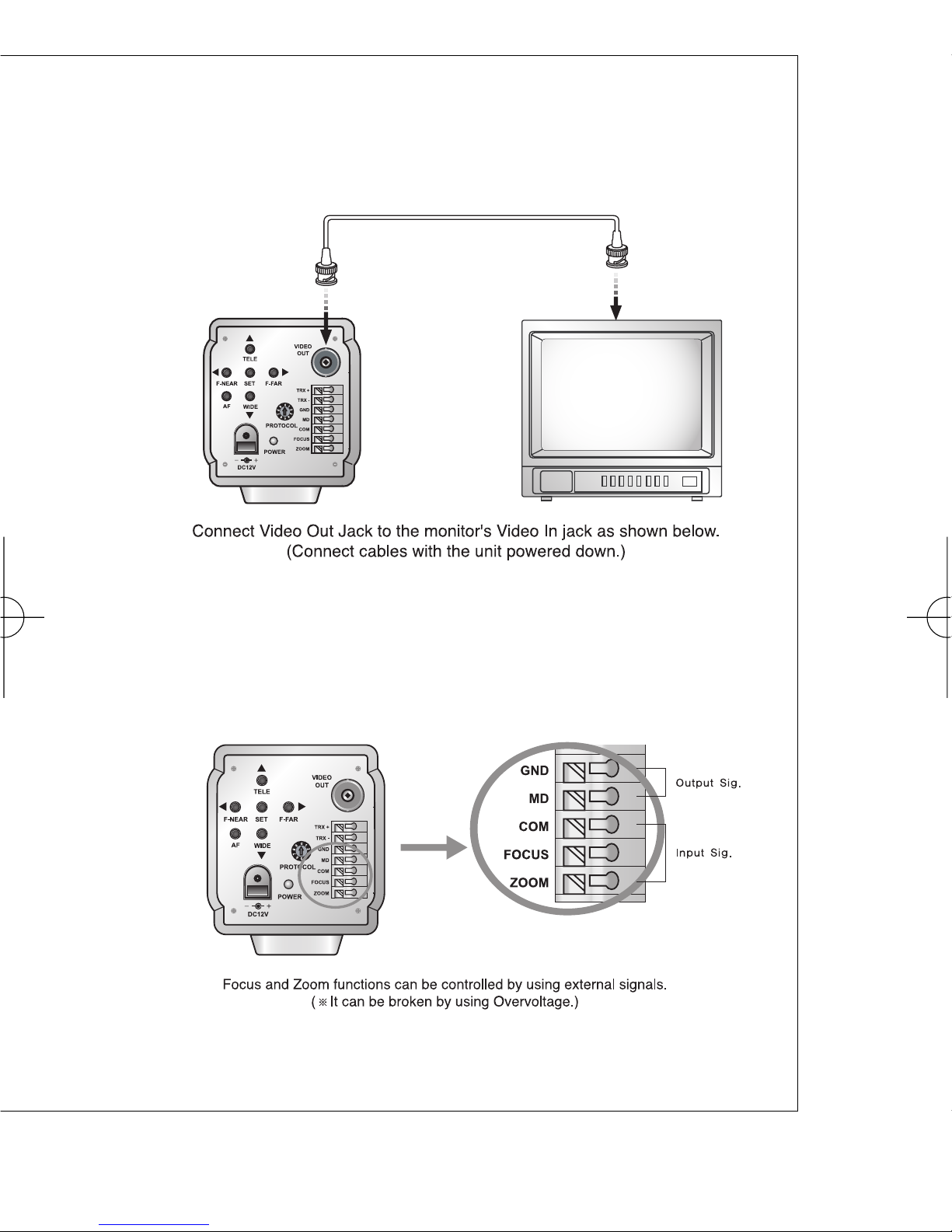
⑤External Control Connector
- Zoom and focus functions can be controlled by using
external signal, RS-485 communication.
⑥Power LED
- Illuminates when power is supplied.
⑦Tripod Mount Pole
- Used to install the camera on an optional Tripod or Bracket.
☞Notes
If the Adaptor Power Line is extended improperly, it may cause malfunctions since
the camera is affected by unstable voltage condition.
Ensure Power Supply Source: DC 12V ±10%, 500mmA
The wire is polarized. Match "+" and "-" terminals properly
DAZ-530/523(동양본문3.10) 2008.3.10 4:33 PM 페이지8 (주)조은프

1) Connecting to Monitor
2) Connecting to connection
External Control Connector
9▶
5. Connection
DAZ-530/523(동양본문3.10) 2008.3.10 4:33 PM 페이지9 (주)조은프
Questo manuale è adatto per i seguenti modelli
1
Indice