Daewoo Sky link S42 Manuale utente

S42 User's Manual
Read this guideline before using user phone.
Copyright 2006 ITTEKI
S42 영문-메뉴얼1 2006.7.7 9:49 AM 페이지1 2540DPI 175LPI

Read and to defend certainly.
Read these simple guidelines. Failure to comply
with them may be dangerous or illegal.
Road safety comes first
Do not uses a hand-held mobile phone while
driving; park the vehicle first. Remember that in
some countries, it is illegal to use a mobile phone
while driving.
Switch off when refueling
Do not use the phone at a refueling point (service
station or near fuels or chemicals.
Switch off on aircraft
Mobile phones can cause interference. Using
them on aircraft is both illegal and dangerous.
Use sensibly
Use only in the normal position (at the ear . Do
not touch the antenna unnecessarily when the
phone is switched on.
Emergency calls
Ensure the phone is switched on and in service.
Enter the emergency number (112 or another
official emergency number and press the key.
Give user location. Do not end the call until told to
do so.
Non-Ionizing Radiation
No part of the human body is allowed to come too
close to the antenna during operation of the
equipment.
IMPOR AN !
Use only approved accessories and batteries.
The use of any other power accessory will
invalidate any approval or warranty applying to
the phone, and may be dangerous. When user
disconnect the power cord of any accessory,
grasp and pull the connector, not the cord.
Switch off in hospital
Follow any regulations or rules. Switch phone off
near medical equipment.
Respect special regulations
Follow any special regulations in force in any area
and always switch off user phone whenever it is
forbidden to use it, or when it may cause interference
or danger (in a hospital for example .
Interference
All wireless phones may be subject to radio
interference, which may affect their performance.
Use qualified service
Only qualified service personnel must repair
equipment.
English Russian
2
English
Russian
3
For user safety
S42 영문-메뉴얼1 2006.7.7 9:49 AM 페이지2 2540DPI 175LPI

Russian
Russian English
5
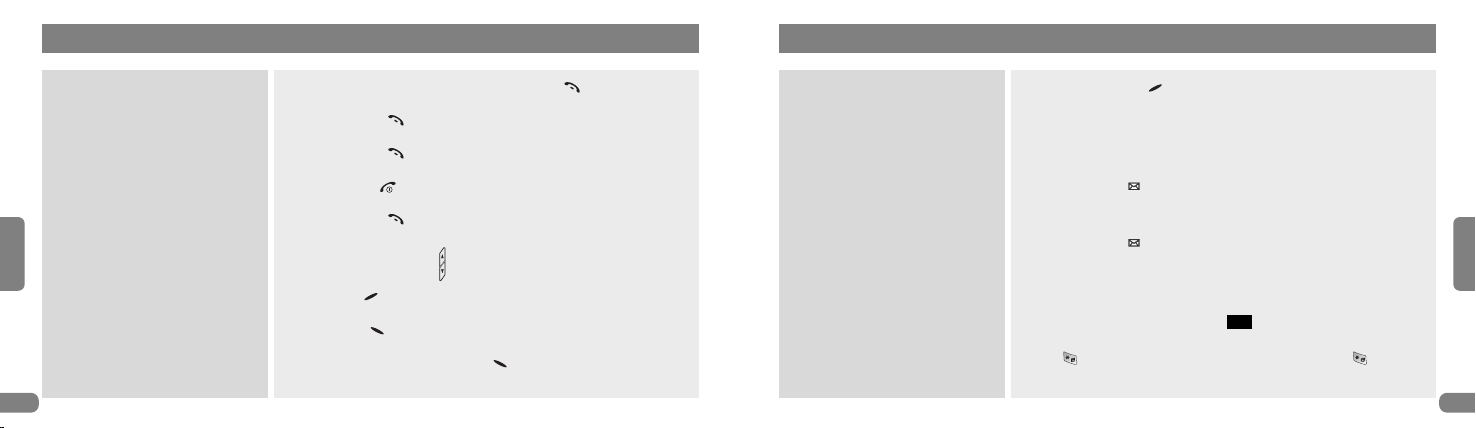
Make a call
Answer call
Answer call during call
End a call
Redial
Adjust call volume
Mute a call
Use the in-call menu
Save a name and number
Enter a phone number, and press the Send( ) key.
Press the Send( ) key / Slide Up.
Press the Send( ) key during call.
Press the End( ) key / Slide Down.
Press the Send( ) key twice.
Press the side Volume( ) key.
Press Mute( ) key during a call.
Select Menu( ) during a call.
Enter a number →Press Menu( ).
Look up a name
Use speed dialing
Check voice mail
Write and send text message
Read a new message
Using Etiquette
Press Phonebook( - PB) key, and in the search field at the
top of the screen, press the first letters of name user want to find.
Press and hold a key (1~99 . User must assign a key to each
number in phonebook before.
Press Message( ) key.
Message →Voice Message.
Press Message( ) key.
Message →Write message.
Enter the Text Message, and select Save/No.
If a new message arrives, select to display the message.
Press key to take etiquette function and press again to
release that.
OK
English
4
Quick Guide
S42 영문-메뉴얼1 2006.7.7 9:49 AM 페이지4 2540DPI 175LPI

For using phone
1. Before getting started ₩₩₩₩₩₩₩₩₩₩₩₩₩₩₩₩₩₩ 7
1 Unpacking ₩₩₩₩₩₩₩₩₩₩₩₩₩₩₩₩₩₩₩₩₩₩₩₩₩₩₩ 7
2 Part of your phone ₩₩₩₩₩₩₩₩₩₩₩₩₩₩₩₩₩₩₩₩ 8
3 Icons description ₩₩₩₩₩₩₩₩₩₩₩₩₩₩₩₩₩₩₩₩₩₩ 8
4 HOT key description ₩₩₩₩₩₩₩₩₩₩₩₩₩₩₩₩₩₩₩ 9
5 Key description ₩₩₩₩₩₩₩₩₩₩₩₩₩₩₩₩₩₩₩₩₩₩10
6 How to use the battery ₩₩₩₩₩₩₩₩₩₩₩₩₩₩₩₩₩11
2. Basic functions ₩₩₩₩₩₩₩₩₩₩₩₩₩₩₩₩₩₩₩₩₩₩₩₩12
1 Switching the phone on or off ₩₩₩₩₩₩₩₩₩₩₩12
2 Making a call ₩₩₩₩₩₩₩₩₩₩₩₩₩₩₩₩₩₩₩₩₩₩₩₩₩14
(Enter number/Re dialing/Speed dialing
3 Answering a call ₩₩₩₩₩₩₩₩₩₩₩₩₩₩₩₩₩₩₩₩₩₩16
Getting started
1. Calling ₩₩₩₩₩₩₩₩₩₩₩₩₩₩₩₩₩₩₩₩₩₩₩₩₩₩₩₩₩₩₩18
Using Menus
1. Sound ₩₩₩₩₩₩₩₩₩₩₩₩₩₩₩₩₩₩₩₩₩₩₩₩₩₩₩₩₩₩₩₩19
2. Display ₩₩₩₩₩₩₩₩₩₩₩₩₩₩₩₩₩₩₩₩₩₩₩₩₩₩₩₩₩₩₩24
3. Secretary ₩₩₩₩₩₩₩₩₩₩₩₩₩₩₩₩₩₩₩₩₩₩₩₩₩₩₩₩₩28
4. Game ₩₩₩₩₩₩₩₩₩₩₩₩₩₩₩₩₩₩₩₩₩₩₩₩₩₩₩₩₩₩₩₩45
5. Security ₩₩₩₩₩₩₩₩₩₩₩₩₩₩₩₩₩₩₩₩₩₩₩₩₩₩₩₩₩₩46
6. Setting ₩₩₩₩₩₩₩₩₩₩₩₩₩₩₩₩₩₩₩₩₩₩₩₩₩₩₩₩₩₩₩53
Using HO Key
1. HOT1 : Message ₩₩₩₩₩₩₩₩₩₩₩₩₩₩₩₩₩₩₩₩₩₩58
2. HOT2 : Call Log ₩₩₩₩₩₩₩₩₩₩₩₩₩₩₩₩₩₩₩₩₩₩₩68
3. HOT3 : Camera ₩₩₩₩₩₩₩₩₩₩₩₩₩₩₩₩₩₩₩₩₩₩₩77
4. HOT4 : Sound ₩₩₩₩₩₩₩₩₩₩₩₩₩₩₩₩₩₩₩₩₩₩₩₩₩83
5. HOT5 : Phone Book ₩₩₩₩₩₩₩₩₩₩₩₩₩₩₩₩₩₩₩₩84
In-Call Option ₩₩₩₩₩₩₩₩₩₩₩₩₩₩₩₩₩₩₩₩₩₩₩₩102
Supplement
1. Menu Construction ₩₩₩₩₩₩₩₩₩₩₩₩₩₩₩₩₩₩₩₩104
2. Text input mode ₩₩₩₩₩₩₩₩₩₩₩₩₩₩₩₩₩₩₩₩₩₩₩106
3. Insert the UIM card ₩₩₩₩₩₩₩₩₩₩₩₩₩₩₩₩₩₩₩₩109
4. Technical information ₩₩₩₩₩₩₩₩₩₩₩₩₩₩₩₩₩₩113
1. Before getting started
Before getting started, explain phone's basic
function and using guide.
1) Unpacking
2) Part of your phone
3) Icons description
4) HO key description
5) Key description
6) How to use battery
1) Unpacking
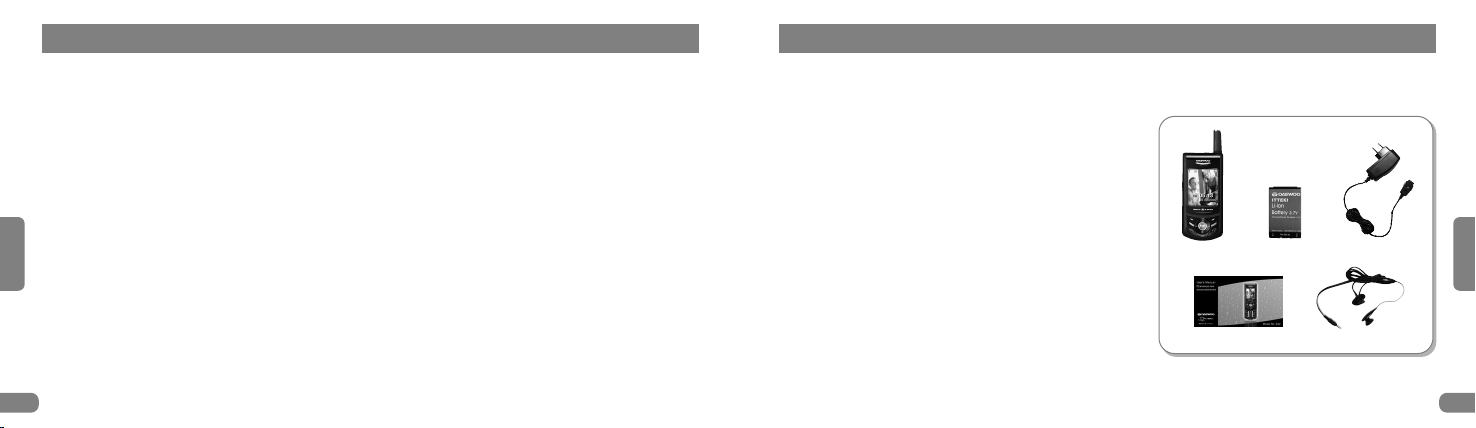
User packing contains the following items.
The items supplied with user phone may be
different depending on manufacturers.
English Russian
6
English
Russian
7
Contents For using phone
Phone
Standard Battery
Travel Adapter
Owner’s Manual Ear Microphone
S42 영문-메뉴얼1 2006.7.7 9:49 AM 페이지6 2540DPI 175LPI

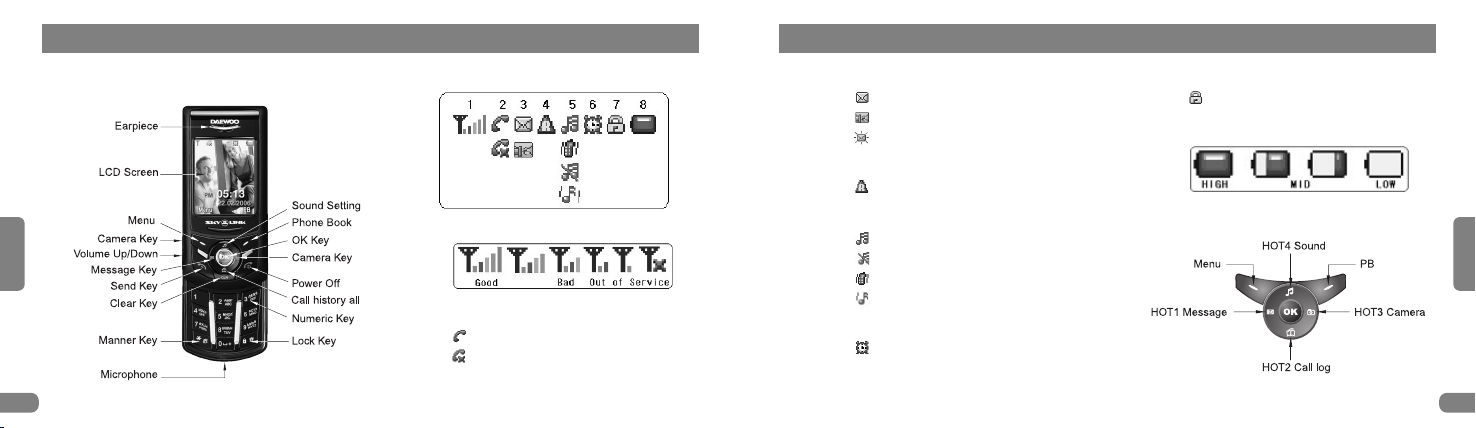
2) Part of your phone 3) Icons description
1. Receiving Signal Strength Indicator
2. Calling
: A call is in progress.
: Out of service areas.
3. Message
: A new messages.
: Voice message.
: Urgent message (Blink icon
4. Roaming
: Roaming condition.
5. Ring Selections
: Sound.
: Silent.
: Vibration.
:
Ring+Vib, Ring After Vib, Vib After Ring.
6. Alarm/Schedule
: Alarm or Schedules.
7. Function lock
: Lock condition.
8. Battery
4) HO key description
English Russian
8
English
Russian
9
S42 영문-메뉴얼1 2006.7.7 9:49 AM 페이지8 2540DPI 175LPI

5) Key Description 6) How to Use the battery
Charge. Replacing the battery.
Remove the battery.
English Russian
10
English
Russian
11
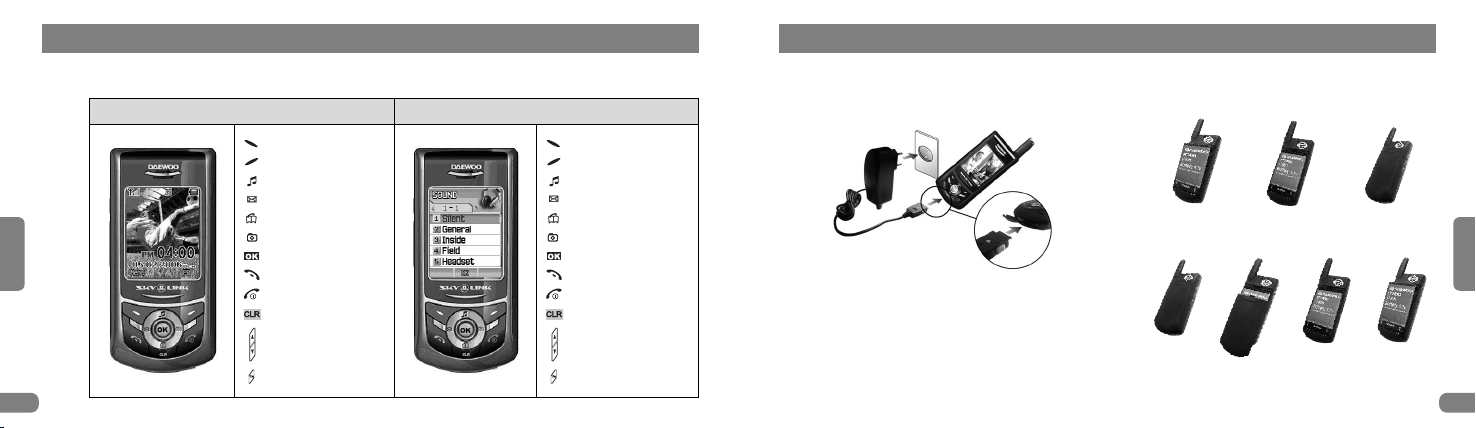
Idle Screen Application Screen
: Menu
: Phone Book
: Sound Setting
: SMS Message
: Call log
: Camera
: OK
: Call
: Power On/Off
: Clear/Cancel
: Volume Up/Down
: Camera side key
: Menu
: Function key
: Up
: Left
: Down
: Right
: OK
: Call
: Out of Application
: Clear/Cancel
: Side key Up/Down
: Camera side key
S42 영문-메뉴얼1 2006.7.7 9:49 AM 페이지10 2540DPI 175LPI

2. Basic Functions
1) Switching the phone on or off
2) Making a call
(Enter number/re dialing/Speed dialing)
3) Answering a call
1) Switching the phone on or off Switching the Phone On/Off
1. Press and hold down for more than one second to switch the
phone on/off. If user switch the phone on without installing the UIM
card, the phone insists user to insert the card and user cannot use
the phone features.
2. If the phone is locked, the display asks user enter the phone
password. Enter the 4-digit password.
3. When user switch on the phone with UIM card, user phone asks
user to enter the 4 digit number for the PIN code. Then user phone
connects to the CDMA network. When user phone locates in service
area, user can see the service icon ( on the display.
If the phone is out of service area, "No Service" and No Service icon
( appear on the display. In this case, user cannot make or receive
calls. User can try again later when service is available.
4. When user wish to switch the phone off, press for more than two
seconds.
English Russian
12
English
Russian
13
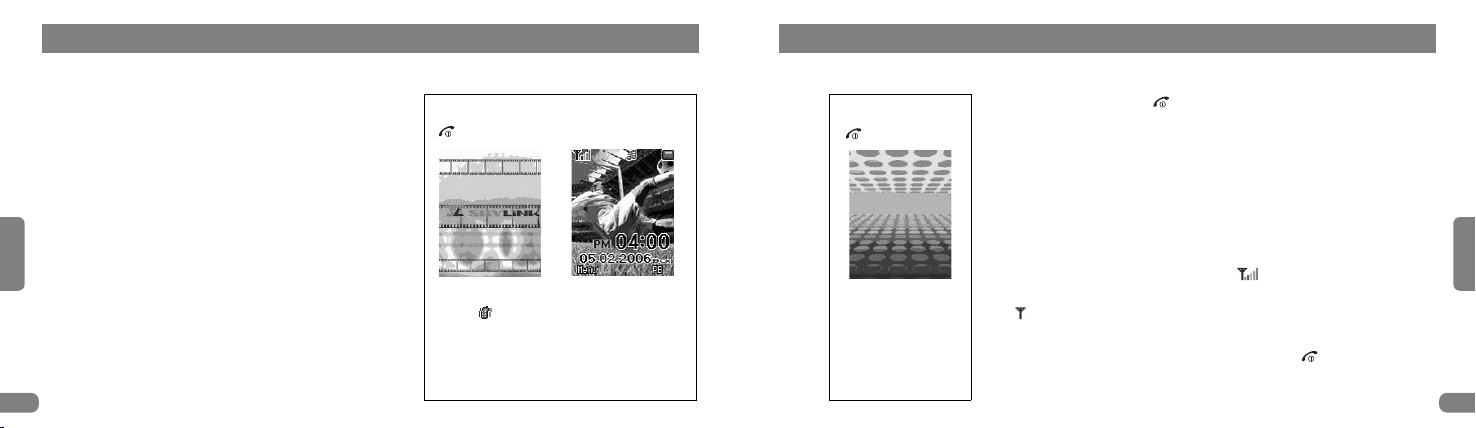
Power On
: Hold down.
Start Animation Idle Screen
Appear and alarm when user set alert menu
and manner mode.
Power Off
: Hold down.
Ending Animation
S42 영문-메뉴얼1 2006.7.7 9:49 AM 페이지12 2540DPI 175LPI

Russian
Making a call
To make a call:
1. In the standby mode, enter the area code
and phone number.
(Enter phone number + (send key
2. When user want to end a call, press or
Slide down.
Note: 1. The phone automatically retries to make the call
when nobody answers to user or the line is busy.
2. Hard pause(P function : To connect the
extension number of some company or ARS
number, User press the phone number first and
then press some extension number after pressing
(up key. After connecting the phone number,
user can press (send key if user want to
connect the extension number.
Ex Input phone number →press (up key
→input extension number →connecting
→press (send key for extension number
3. Time Delay (T : To connect the extension
number of some company or ARS number, User
press the phone number first and then press
some extension number after pressing (down
key. After connecting the phone number, The
extension number will be connected automatically
after 2 seconds.
Ex Input phone number →press (down key →
input extension number →connecting →
connecting to the extension number automatically
since 2 seconds.
Navigation key
→(up key : Hard Pause (P
→(down key : Time Delay (T
Correcting a Number
o clear : Press key.
The last digit displayed number clear : press
key shortly.
The whole display number clear : press
key for 1-2 seconds.
English
Russian
15
2) Making a call (Enter number/Re dialing/Speed dialing)
English
14
Enter Number Re-Dial Speed Dial
1. Enter phone number.
2. Change phone number ( key .
3. (send key.
4. End a call →/Slide Down.
Press key →appear last call
number.
Capacity - Speed dial : 99 entries.
UIM : 99 entries.
How to use
Press 1~99 Digit key longer (Phone or,
Press 1~99 Digit key (UIM
→key.
S42 영문-메뉴얼1 2006.7.7 9:49 AM 페이지14 2540DPI 175LPI

Russian
Answering a call
When somebody calls user, the phone alerts
user by ringing, displaying the following screen
on the display.
If user are subscribed to the Caller Line
Identification service (contact user service
provider for availability and the caller can be
identified, the caller's phone number, or name
if stored in user Phonebook, is displayed.
1. If the Answer Key menu is set to Any Key,
open the Slide or press any key except to
END Key.
If the menu is set to Send Key, user must
press to answer the call.
(See "Setting > Call" on page 54
2. After the conversation, end the call by Slide
down or press key.
Adjusting the Volume
During a call, if user want to adjust the voice
volume, use the volume keys on the left side
of the phone.
Press the upper key to increase the volume
level and the lower key to decrease the level.
The graphic on the display shows the volume
level.
In the standby mode, user can adjust the key
tone volume using these keys.
←
←
English
Russian
17
3) Answering a call
English
16
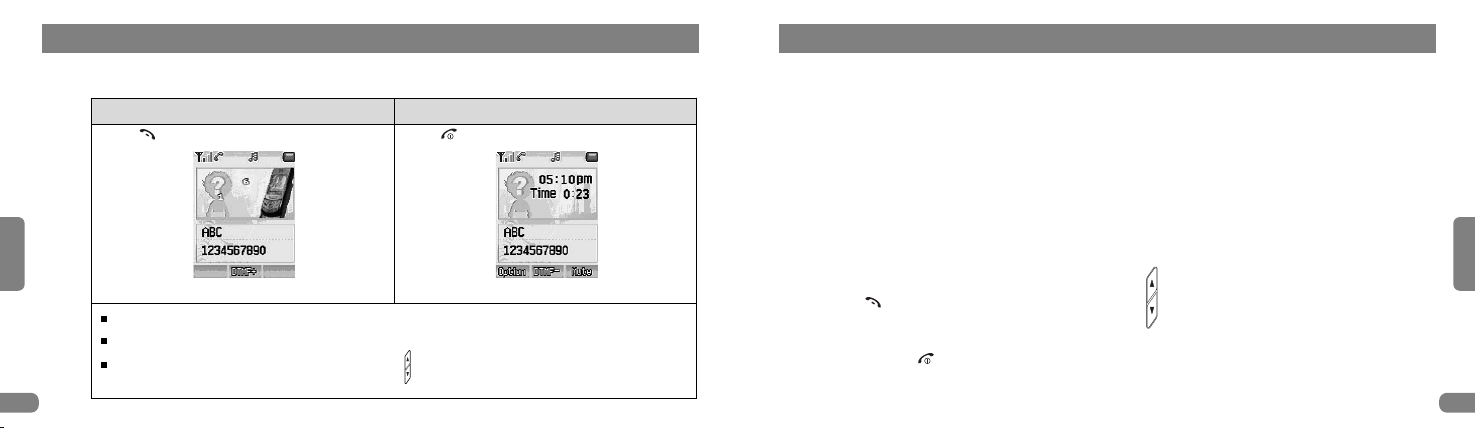
Answering a call Ending a call
Press key, Slide up. Press key, Slide down.
There are 4 kinds of ways for answering a call setting. (See "Setting > Call" on page 54
If the incoming caller number is identified with Phonebook, the name is showed in idle screen.
Adjust the voice volume : Side volume key Up/Down ( .
S42 영문-메뉴얼1 2006.7.7 9:49 AM 페이지16 2540DPI 175LPI

1. Sound
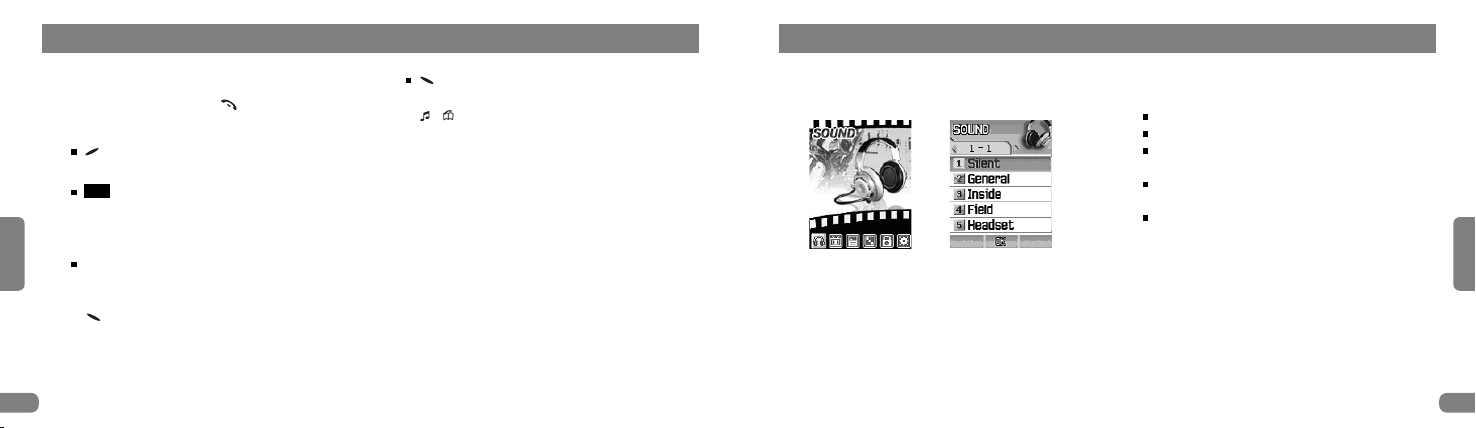
Menu > 1. Sound
Function
Sound Mode
Silent : The phone neither rings nor vibrates.
General : Use the function generally.
Inside : To use the phone inside of building
like office, room, etc...
Field : To use the phone outside of building
like street, etc...
Headset : To use the phone with Ear Jack only.
Menu setting of Inside/Field/Headset mode
are the same as general setting method.
Only Silent mode sets "On", he below
sub menu function(Call alert, Slide one,
Key one, Dial one) can be regularly
operated regardless of setting "On" or
"Off".
English
Russian
19
Using enus
1. Calling
Input Number →Press key.
Function
(mute key : Set MIC Mute/Unmute
during speaking by phone.
key : DTMF + / - (key tone →Set
ON/OFF function for transmitting key tone to
other person when user save memo during
speaking by phone.
Scratch pad : The function is to save in
phone book during speaking by phone
(Save the phone number by pressing
(save key after input that with key button .
Phone Book Usage (page 87
OK
(option key →Phone book/SMS pop up
menu, choose one of them by pressing
, (up/down key.
Phonebook Usage : page 84
SMS Usage : page 58
English Russian
18
Getting started
S42 영문-메뉴얼1 2006.7.7 9:49 AM 페이지18 2540DPI 175LPI
Indice
Altri manuali Daewoo Telefono

Daewoo
Daewoo DTC-410 Manuale utente

Daewoo
Daewoo DTC-150 Manuale utente

Daewoo
Daewoo DTC-215 Manuale utente

Daewoo
Daewoo DTC-700 Manuale utente

Daewoo
Daewoo DTC-240 Manuale utente

Daewoo
Daewoo DTD 5000 Manuale utente

Daewoo
Daewoo DTC-400 Manuale utente

Daewoo
Daewoo DTC-115 Manuale utente

Daewoo
Daewoo DTC-370 Manuale utente

Daewoo
Daewoo DTD-7000 Manuale utente