Dahua DHI-ARA12-W2 Manuale utente

ZHEJIANG DAHUA VISION TECHNOLOGY CO., LTD. V2.0.1
Wireless Siren
User's Manual

Foreword
General
This manual introduces the installation, functions and operations of the wireless siren (hereinafter
referred to as the "siren"). Read carefully before using the device, and keep the manual safe for
future reference.
Model
DHI-ARA12-W2 (868); DHI-ARA12-W2
Safety Instructions
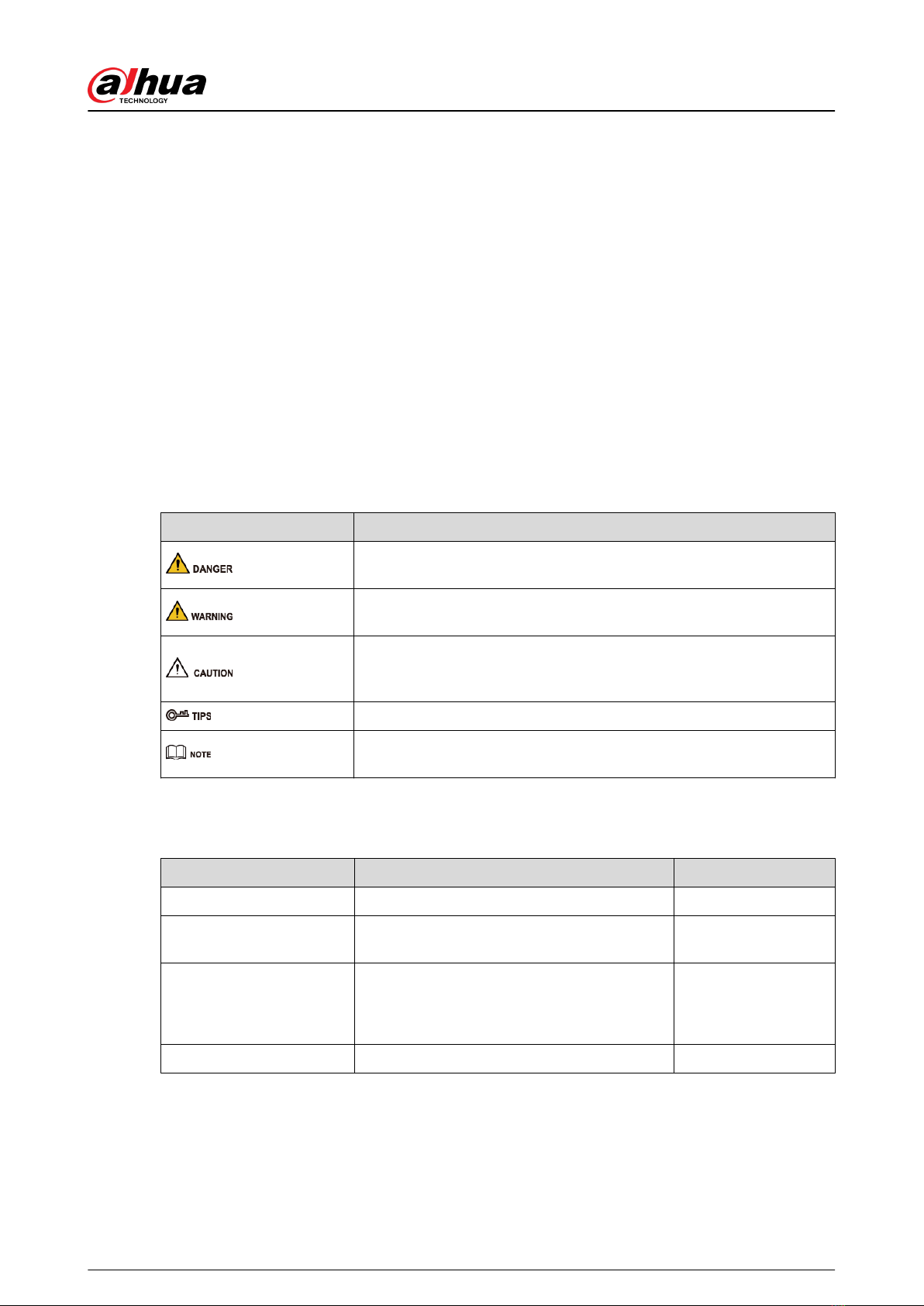
The following signal words might appear in the manual.
Signal Words Meaning
Indicates a high potential hazard which, if not avoided, will result in
death or serious injury.
Indicates a medium or low potential hazard which, if not avoided,
could result in slight or moderate injury.
Indicates a potential risk which, if not avoided, could result in
property damage, data loss, lower performance, or unpredictable
result.
Provides methods to help you solve a problem or save you time.
Provides additional information as the emphasis and supplement to
the text.
Revision History
Version Revision Content Release Time
V2.0.1 Revised arm indication description. June 2023
V2.0.0 Added a note that the tool is required for
removing the back cover of the siren. August 2022
V1.1.0
●Added technical specications.
●Updated descriptions of parameters.
●Updated images.
January 2022
V1.0.0 First release. January 2021
Privacy Protection Notice
As the device user or data controller, you might collect the personal data of others such as their
face, ngerprints, and license plate number. You need to be in compliance with your local privacy
protection laws and regulations to protect the legitimate rights and interests of other people by
User's Manual
I

implementing measures which include but are not limited: Providing clear and visible identication
to inform people of the existence of the surveillance area and provide required contact information.
About the Manual
●The manual is for reference only. Slight dierences might be found between the manual and the
product.
●We are not liable for losses incurred due to operating the product in ways that are not in
compliance with the manual.
●The manual will be updated according to the latest laws and regulations of related jurisdictions.
For detailed information, see the paper user’s manual, use our CD-ROM, scan the QR code or
visit our ocial website. The manual is for reference only. Slight dierences might be found
between the electronic version and the paper version.
●All designs and software are subject to change without prior written notice. Product updates
might result in some dierences appearing between the actual product and the manual. Please
contact customer service for the latest program and supplementary documentation.
●There might be errors in the print or deviations in the description of the functions, operations
and technical data. If there is any doubt or dispute, we reserve the right of nal explanation.
●Upgrade the reader software or try other mainstream reader software if the manual (in PDF
format) cannot be opened.
●All trademarks, registered trademarks and company names in the manual are properties of their
respective owners.
●Please visit our website, contact the supplier or customer service if any problems occur while
using the device.
●If there is any uncertainty or controversy, we reserve the right of nal explanation.
User's Manual
II

Important Safeguards and Warnings
This section introduces content covering the proper handling of the siren, hazard prevention, and
prevention of property damage. Read carefully before using the siren, and comply with the
guidelines when using it.
Operation Requirements
●Make sure that the power supply of the device works properly before use.
●Do not pull out the power cable of the device while it is powered on.
●Only use the device within the rated power range.
●Transport, use and store the device under allowed humidity and temperature conditions.
●Prevent liquids from splashing or dripping on the device. Make sure that there are no objects
lled with liquid on top of the device to avoid liquids owing into it.
●Do not disassemble the device.
Installation Requirements
●Connect the device to the adapter before power on.
●Strictly abide by local electrical safety standards, and make sure that the voltage in the area is
steady and conforms to the power requirements of the device.
●Do not connect the device to more than one power supply. Otherwise, the device might
become damaged.
●Observe all safety procedures and wear required protective equipment provided for your use
while working at heights.
●Do not expose the device to direct sunlight or heat sources.
●Do not install the device in humid, dusty or smoky places.
●Install the device in a well-ventilated place, and do not block the ventilator of the device.
●Use the power adapter or case power supply provided by the device manufacturer.
●The power supply must conform to the requirements of ES1 in IEC 62368-1 standard and be no
higher than PS2. Note that the power supply requirements are subject to the device label.
●Connect class I electrical appliances to a power socket with protective earthing.
Installation Requirements
●Connect the PIR to the adapter before power on.
●Strictly abide by local electrical safety standards, and make sure that the voltage in the area is
steady and conforms to the power requirements of the PIR.
●Do not connect the PIR to more than one power supply. Otherwise, the PIR might become
damaged.
User's Manual
III


●Observe all safety procedures and wear required protective equipment provided for your use
while working at heights.
●Do not expose the PIR to direct sunlight or heat sources.
●Do not install the PIR in humid, dusty or smoky places.
●Install the PIR in a well-ventilated place, and do not block the ventilator of the device.
●Use the power adapter or case power supply provided by the device manufacturer.
●The power supply must conform to the requirements of ES1 in IEC 62368-1 standard and be no
higher than PS2. Note that the power supply requirements are subject to the device label.
●Connect class I electrical appliances to a power socket with protective earthing.
User's Manual
IV

Table of Contents
Foreword.............................................................................................................................................................. I
Important Safeguards and Warnings.............................................................................................................. III
1 Introduction..................................................................................................................................................... 1
1.1 Overview.................................................................................................................................................1
1.2 Technical Specications........................................................................................................................ 1
2 Checklist........................................................................................................................................................... 4
3 Design............................................................................................................................................................... 5
3.1 Appearance............................................................................................................................................ 5
3.2 Dimensions.............................................................................................................................................5
4 Adding the Siren to the Hub........................................................................................................................... 6
5 Installation....................................................................................................................................................... 7
6 Conguration................................................................................................................................................... 9
6.1 Viewing Status....................................................................................................................................... 9
6.2 Conguring the Siren.......................................................................................................................... 10
Appendix 1 Cybersecurity Recommendations............................................................................................. 13
User's Manual
V

1 Introduction
1.1 Overview
Wireless siren is an indoor siren that loudly alarms when an alarm event occurs. It features danger
warning and intrusion determent.
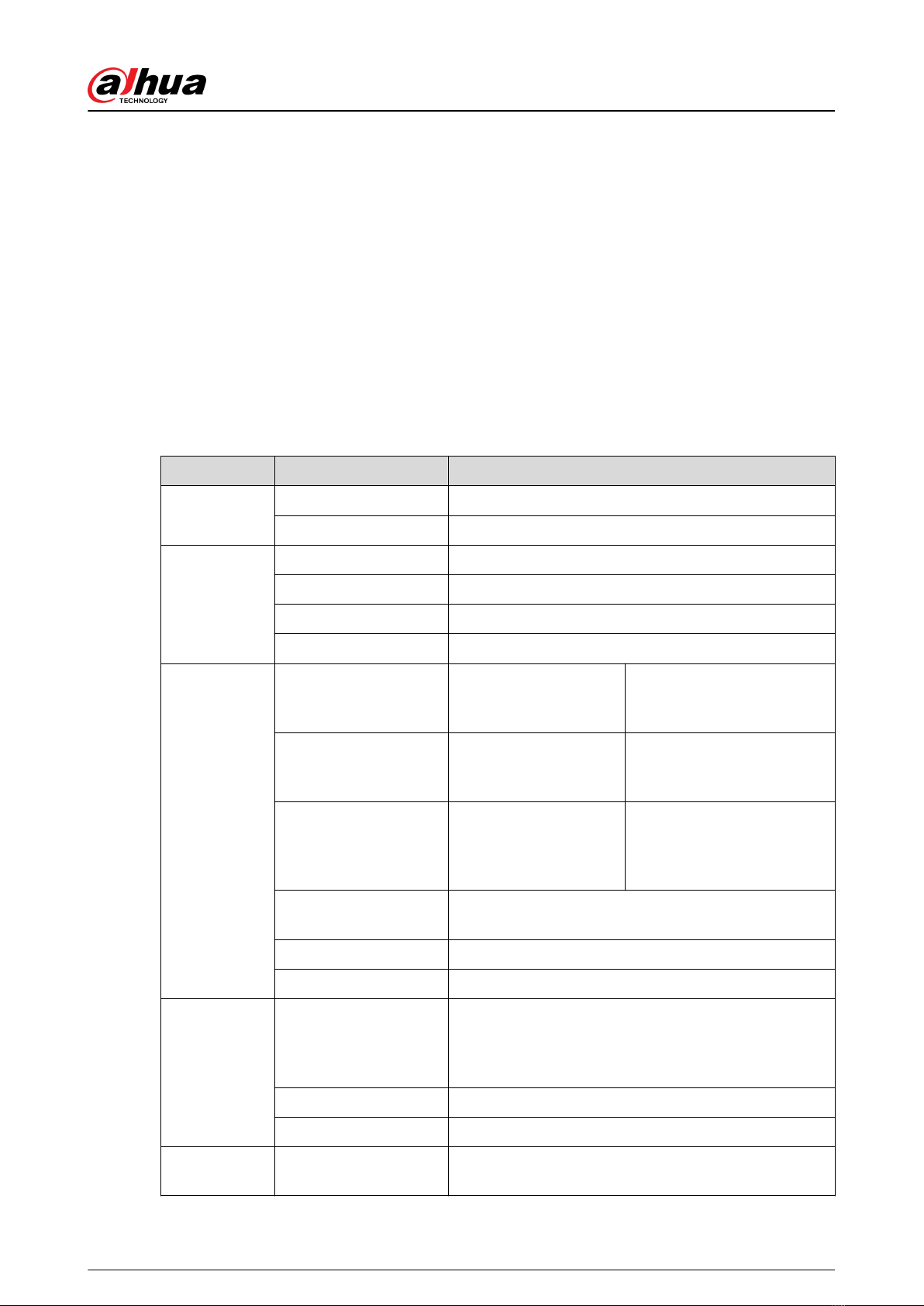
1.2 Technical Specications
This section contains technical specications of the siren. Please refer to the ones that correspond
with your model.
Table 1-1 Technical specications
Type Parameter Description
Port Indicator Light 1 × green alarm indicator
Button 1 × power button
Function
Tamper Alarm Yes
Remote Update Cloud update
Search Signal strength detection
Low Battery Alarm Yes
Wireless
Parameters
Carrier Frequency DHI-ARA12-W2 (868):
868.0 MHz–868.6 MHz
DHI-ARA12-W2:
433.1 MHz–434.6 MHz
Transmission Power DHI-ARA12W2 (868):
Limit 25 mW
DHI-ARA12-W2:
Limit 10 mW
Communication
Distance
DHI-ARA12W2 (868):
Up to 1,000 m (3,280.84
ft) in an open space
DHI-ARA12W2:
Up to 800 m (2,624.67 ft) in
an open space
Communication
Mechanism Two-way
Encryption Mode AES128
Frequency Hopping Yes
Temperature
Measuring Range
Indoor: –15 °C to +65 °C (+18.8 °F to +149 °F)
Certied temperature:–10°C to +40°C (+14°F to
+104 °F)
Measuring Precision ± 1 °C (± 33.8 °F)
Resolution 1 °C (33.8 °F)
Technical
Parameter Test Mode Yes
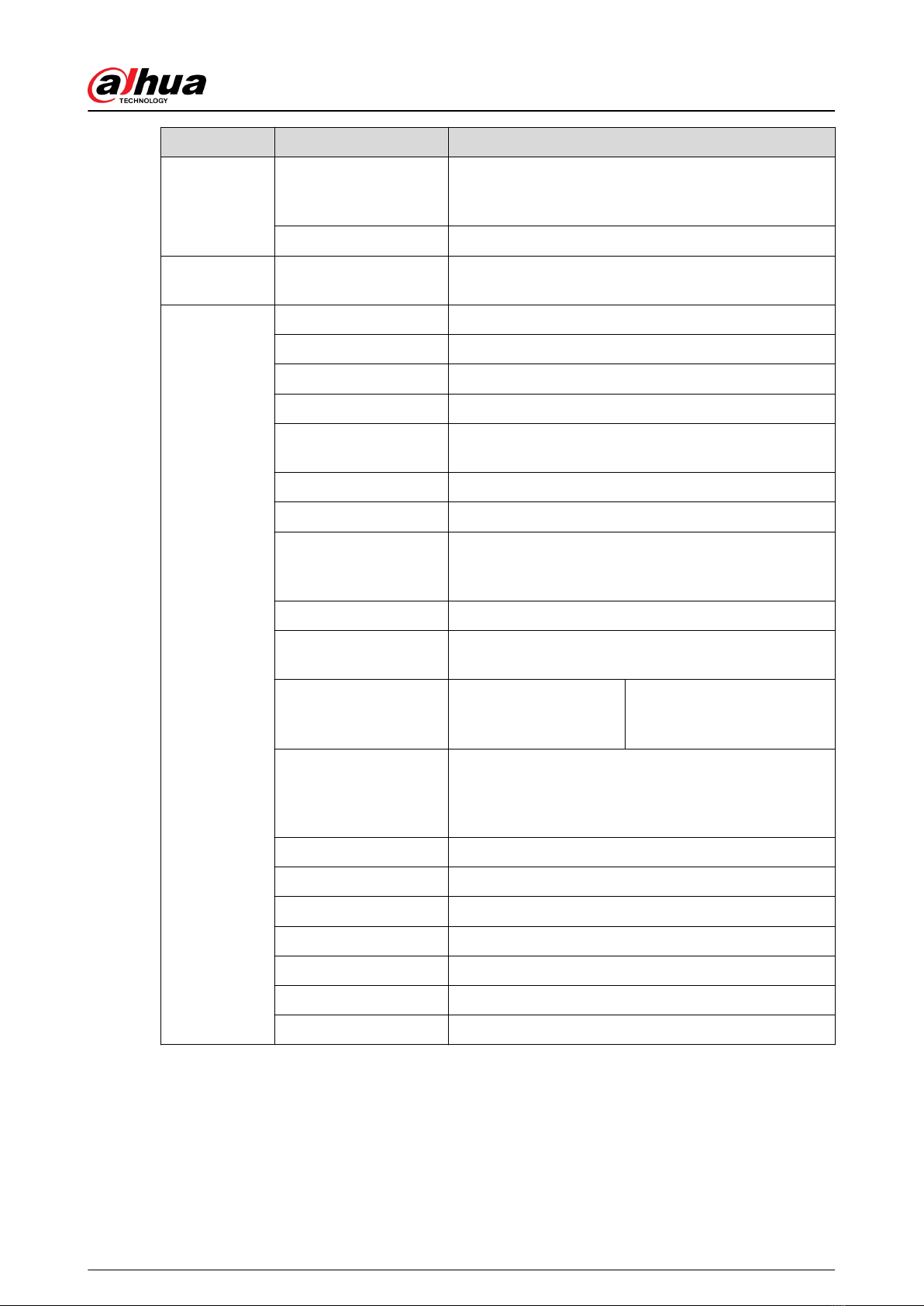
User's Manual
1

Type Parameter Description
Sound Pressure
Certied
Volume high 84 db (A )1 m
Volume medium 78 db (A)1 m
Certied Sound Volume control medium and volume control high
Audio and
Video Volume Control 3 volume levels
General
Power Supply 2 × CR123A batteries
Battery Voltage 3 VDC
Min. Voltage 2.5 VDC
Battery Low Threshold 2.7 VDC
Battery Restore
Threshold 2.75 VDC
Typical Voltage 3 VDC
Low Voltage Value 2.7 VDC
Consumption Quiescent current 9 uA
Max. current 100 mA
PS Type Type C
Battery Life 2.5 years in working status (triggered twice every week
and alerts 120 s for each triggering)
Power Consumption DHI-ARA12W2 (868):
Max. 240 mW
DHI-ARA12-W2:
Max. 230 mW
Operating Environment
Indoor: –10 °C to +55 °C (+14 °F to +131 °F)
Certied temperature:–10°C to +40°C (+14°F to
+104 °F)
Operating Humidity 10%–90% (RH)
Product Dimensions 81.0 mm × 81.0 mm × 26.0 mm (3.19" × 3.19" × 1.02")
Packaging Dimensions 135.0 mm × 98.5 mm × 56.8 mm (5.31" × 3.88" × 2.24")
Installation Bracket mount
Net Weight 105 g (0.23 lb)
Gross Weight 175 g (0.39 lb)
Casing PC + ABS
User's Manual
2

Type Parameter Description
Certications
DHI-ARA12W2 (868):
EN 50131-1: 2006+A2:2017 + A3:2020
EN50131-4:2019
EN50131-6:2017
EN50131-5-3:2017
Security Grade 2
Environmental Class II
CE
DHI-ARA12-W2:
CE
FCC
User's Manual
3

2 Checklist
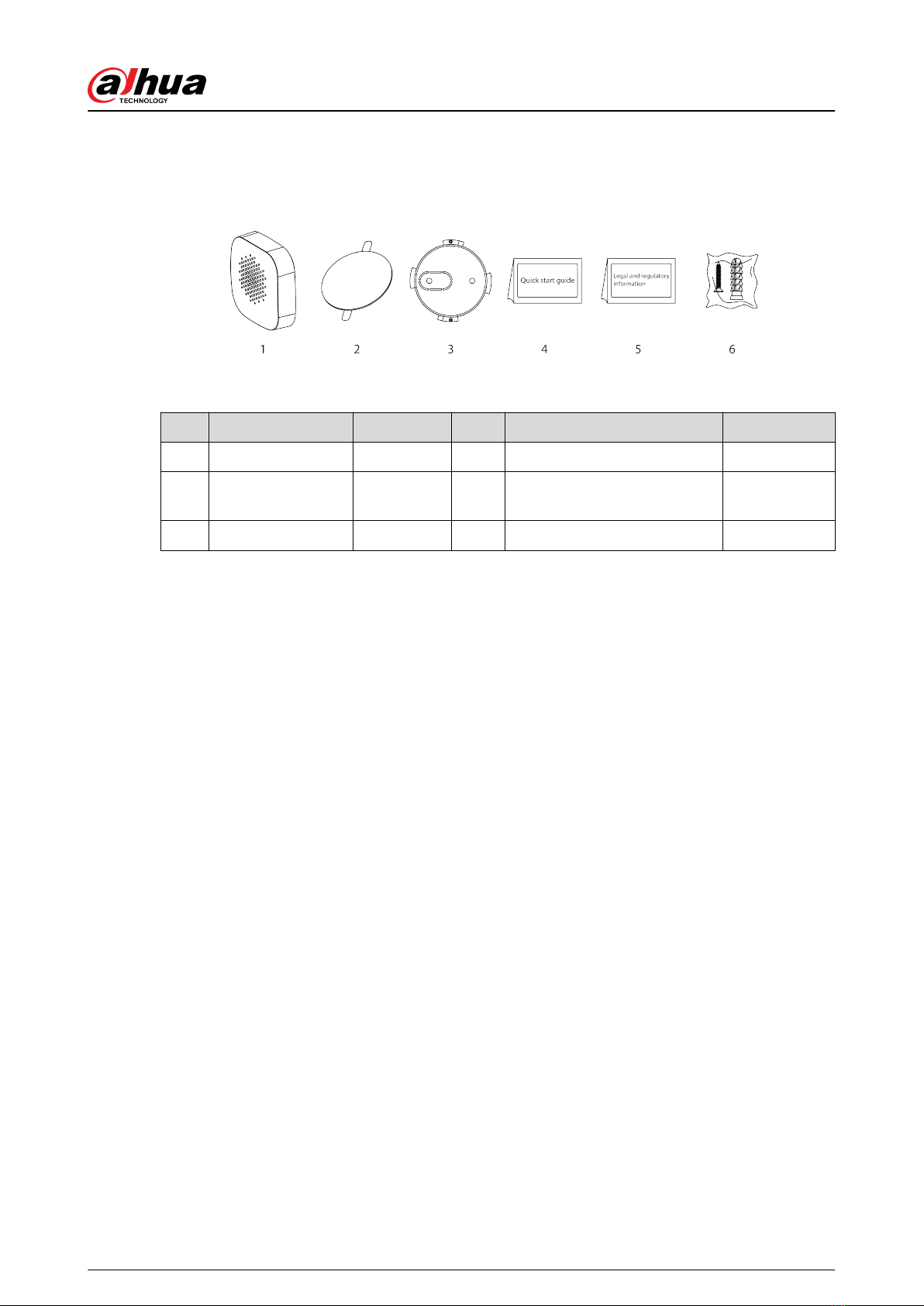
Figure 2-1 Checklist
Table 2-1 Checklist
No. Item Name Quantity No. Item Name Quantity
1 Siren 1 4 Quick start guide 1
2 Double-sided tape 1 5 Legal and regulatory
information 1
3 Back cover 1 6 Screw package 1
User's Manual
4
Indice
Altri manuali Dahua Sistema di sicurezza

Dahua
Dahua PZC-421 Manuale utente

Dahua
Dahua DHI-XVR5432L-X Manuale utente

Dahua
Dahua DSS4004-S2 Guida utente

Dahua
Dahua DHI-ARC3008C Guida utente

Dahua
Dahua DHI-ARD822-W2 Manuale utente

Dahua
Dahua Smart Professional Surveillance System Manuale utente

Dahua
Dahua ARC6416C series Manuale utente

Dahua
Dahua ARA10-W Manuale utente

Dahua
Dahua DSS4004 Manuale utente

Dahua
Dahua 4.3-inch VTH Manuale utente
Manuali Sistema di sicurezza popolari di altre marche

EDM
EDM Solution 6+6 Wireless-AE Manuale utente

Highway Safety Group
Highway Safety Group EA401 Manuale utente

Siren
Siren LED GSM Manuale utente

Detection Systems
Detection Systems 7090i Istruzioni per il montaggio

Se-Kure Controls
Se-Kure Controls MicroMini SK-4841 Manuale utente

Siemens
Siemens FDM273 Manuale utente