
Dante DLB5208 Manuale utente

DLB5208-DLB5216
8-16 Chan Standalone DVR
Installation and Operations Manual
Model Number: DLB5200
Description: Standalone Linux DVR
and 16 Channels

1
DESCRIPTION
The DLB520 -DLB5216 Series are standalone, and 16 channels
standalone Digital Video Recorder/Servers that utilize an embedded
processor, LINUX based real time operating system (RTOS) for the
highest reliability of operation. Units are available with H.264 video
compression for outstanding video quality and storage cost
performance. Additional features include duplex Audio, Alarm in/out,
Video Motion Detection, RS-4 5 PTZ Control Port, IE Browser, Ethernet
RJ-45 port and Client Software. Providing low power consumption via
100-240VAC, series DLB520 and DLB5216 are economical solutions
for commercial video surveillance installations.
FEATURES
* DVR/DVS with LINUX embedded Real Time OS
* H.264 Video compression for reduced storage
* Pentaplex operation: Live View, Record, Playback,
Network View and Back-up
* One SATA compatible H/D Slot with up to 1TB
* Multi-language On Screen Display (OSD)
* 200/240fps D1/CIF Recording resolution
* 1 BNC, 1 VGA Monitor Outputs
* RJ-45 10/100Mbps Ethernet Port
* 2 Audio inputs; 2 Audio outputs
* /16 Alarm inputs; 1 relay output
* USB Port (USB 2.0) for back-up
* RS-4 5 Terminal Block Data Port
* Network access: IE Browser, Client Software
* 100-240VAC Power Source

CAUTION
Place the DVR in ventilation space.
The DVR should be worked in right temperature and humidity.
Keep the DVR surfaces and the circuit board clean and dry. To clean the outside case of
the DVR, use lightly dampened cloth with water (no solvents). Use brush to clean the
circuit board and socket connector.
Please purchase high quality hard disk (HDD), which could meet the workingdemand of
the DVR.
Network Digital Video Recorder Operation Manual ( V3.0 )

Network Digital Video Recorder Operation Manual ( V3.0 )
Table of contents
Chapter II Installation Instructions
Chapter I Product Introduction
1.1 Summary
1.2 Functions and features
2.1 Installation Instructions
2.2 Installation environment
2.3 Rear panel connection
2.4 Rear panel connection
Chapter III Description for Operations
3.1 Panel operation
3.2 Remote control operation
2
5
5
5
7
7
7
8
12
13
13
18

Network Digital Video Recorder Operation Manual ( V3.0 )
4.1 Summary
4.2 System setup
4.3 Camera setup
4.4 Record setup
4.5 Schedule setup
4.6 Motion alarm
4.7 PTZ setup
4.8 Network setup
4.9 Alarm setup
4.10 Disk management
4.11 LOG list view
3.3 Mouse operation
Chapter IV Menu Setup
Chapter V Basic Operations
3
20
24
24
25
26
27
28
30
30
31
32
33
34
35

Network Digital Video Recorder Operation Manual ( V3.0 )
Appendix 1 Technical parameters
Appendix 2 Trouble shooting
5.1 Turn on DVR
5.2 Software update
5.3 PTZ control
5.4 Motion detection
5.5 Video recording preparation
5.6 Search and playback
5.7 Backup
5.8 SPOT output operation
5.9 Audio
5.10 Image quality selection and recordable time of hard disk
5.11 Use of PC Client software
4
35
35
36
37
39
42
43
45
46
46
46
47
48

1.1 Summary
Chapter I Product Introduction
This equipment is an embedded digital hard disk video recorder specially designed for security & protection. It adopts
the embedded processor and embedded operating system and integrates with each latest technologies in IT field,such as
video frequency /audio frequency compression/ decompression, large capacity hard disk storage, TCP/ IP network
remote control etc., investing the system with high intellectualization and stability.
This equipment supports various networks including Ethernet and Internet to realize remote audio/ video synchronization;
with easy operation, i t can be app lied to the security and protection for banks, telecom, schools, hospitals, supermarkets,
residential quarters, factories, companies, warehouses, restaurants, hotels, parks, museums, water conservancy facilities,
entertainment places and other fields.
1.2 Functions and features
Various recording mode: timer, motion detection, alarm, manual record and recording picture quality, resolution &
recording frame rate configurable.
USB2.0 interface; support USB software update.
Support IE browse function and network remote client.
Support network backup and USB backup.
Network Digital Video Recorder Operation Manual ( V3.0 )
5

Flexible Display mode: Full screen; Quad.
Four channels playback simultaneously.
Low stream, long recording time.
Support mouse and remote control operation.
Support PTZ control.
Support VGA output.
Support pre-record.
Support CD/DVD-RW.
Support OSD languages of multiple countries.
Support SATA HDD, support 1000G hard disk.
Support mobile surveillance by windows mobile.
Specially designed dedicated file system for video to increase more than 10 times of service life of hard disk.
Fully independent of PC platform and free from computer breakdown due to improper operations, complicated
management & operations as well as virus infection, and is of high stability.
Operating system: Linux; compressed chip: ASIC.
Network Digital Video Recorder Operation Manual ( V3.0 )
6

Chapter II Installation Instructions
2.1 Installation Instructions
In order to ensure your rights an d interest s, please read this manual carefully before you install and use this pr oduct .
This is an indoor equipment. For the prevention ofshort circuit or electric shock, please do not expose this product
to rain or use in wet & dusty environment.
In case any solid or liquid coming into the case, please disconnect the power supply immediately, and the DVR can be
restarted only after being checked by qualified servicemen.
This is a prec ise i nstru ment. Almost no part can be repaired by the user hims elf/herse lf. If fa ult occurs, it is necessary
to ask qualified servicemen to repair it or contact the dealer.
You'd better not use Western Digital hard disk.
2.2 Installation environment
If the DVR is not in use for a long period of time, it's better to dis connect the power supply of t he video recorder and pull
the power line plug out from the power socket.
Install this produ ct under good air circulation conditions to avoid overheating due to excessive working hours.
This DVR cannot be installed near the heater, ventilating shaft or other resources, or places with direct sunlight,
much dust or potential mechanical vibration or impact.
Network Digital Video Recorder Operation Manual ( V3.0 )
7
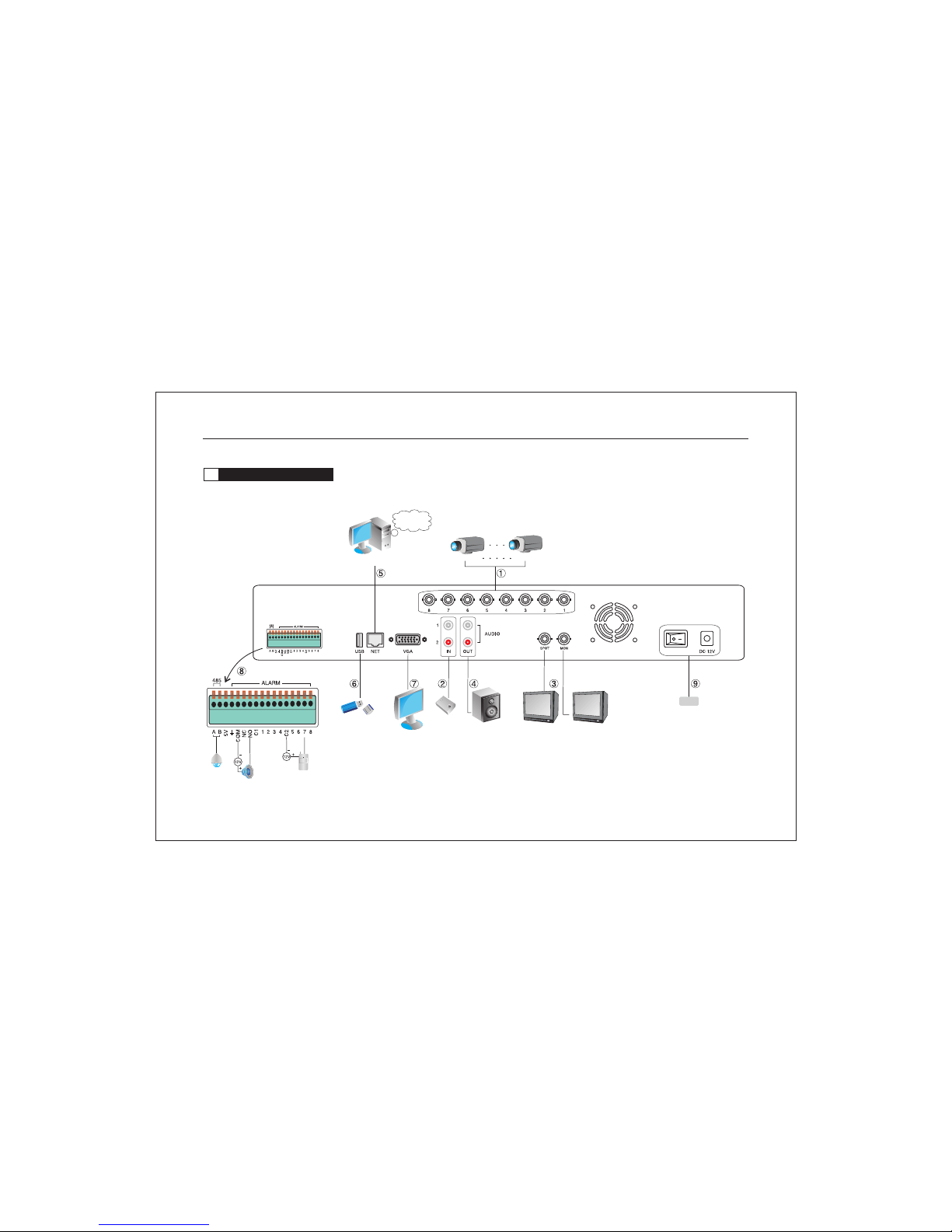
Alarm
USB port Audio input
Camera 8
Camera 1
Network user
Network
VGA Output
Audio output Spot Output
Video Output
2.3 Rear panel connection
Figure A. Rear panel connection of 8-CH Real time H.264 DVR:
POWER
Network Digital Video Recorder Operation Manual ( V3.0 )
8
Questo manuale è adatto per i seguenti modelli
1
Indice
Altri manuali Dante Registratore digitale


