Dante BEATRICE Series Manuale utente

BEATRICE
B1 & B2
Ultra-compact Dante network intercom
PRODUCT DETAILS
6 BROOKS PLACE, MAIDSTONE, KENT, ME14 1HE. ENGLAND. TEL: +44 (0) 1622 753662
Visit our Website at www.glensound.com FAX: +44 (0) 1622 762330

Page 2of 28
Glensound Electronics Ltd
Thank you for choosing a new Glensound product.
All rights reserved.
Information contained in this manual is subject to change without notice, if
in doubt please contact us for the latest product information.
If you need any help with the product then we can be contacted at:
Glensound Electronics Ltd
1 –6 Brooks Place
Maidstone
Kent
ME14 1HE
United Kingdom
Telephone: +44 (0) 1622 753662
Fax: +44 (0) 1622 762330
EMAIL ADDRESSES
General enquires: office@glensound.co.uk
Technical enquires: techinfo@glensound.co.uk
Sales enquires: sales@glensound.co.uk

Page 3of 28
PRODUCT WARRANTY
All equipment is fully tested before dispatch and carefully designed to
provide you with trouble free use for many years.
We have a policy of supporting products for as long as possible and
guarantee to be able to support your product for a minimum of 10 years.
For a period of one year after the goods have been despatched the
Company will guarantee the goods against any defect developing after
proper use providing such defects arise solely from faulty materials or
workmanship and that the Customer shall return the goods to the
Company’s works or their local dealer.
All non-wear parts are guaranteed for 2 years after despatch and any
defect developing after proper use from faulty materials or workmanship
will be repaired under this warranty providing the Customer returns the
goods to the Company's works or their local dealer.
SAFETY WARNING
This product can produce high sound levels via the headphone output.
Please take caution when operating this product as listening to
excessively high peak or sustained levels of volume may permanently
damage human hearing.

Page 4of 28
EU DECLARATION OF CONFORMITY
GS-BEATRICE B1 & B2
Ultra-compact Dante intercom
This declaration of conformity is issued under the sole responsibility of
the manufacturer.
This equipment is manufactured by Glensound Electronics Ltd of Brooks
Place Maidstone Kent ME14 1HE is marked and conforms to the
following Union harmonisation legislation:
Emissions: BS EN55032:2015
Immunity: BS EN55035:2017
Signed for and on behalf of Glensound Electronics Ltd.
Gavin Davis, Managing Director
Maidstone, Kent, England
Date: 12/10/2018

Page 5of 28
RoHS DIRECTIVE
RoHS 2 Directive 2011/65/EU restricts the use of the hazardous
substances listed below in electrical and electronic equipment.
This product conforms to the above directive and for these purposes, the
maximum concentration values of the restricted substances by weight in
homogenous materials are:
Lead
0.1%
Mercury
0.1%
Hexavalent Chromium
0.1%
Polybrominated Biphenyls
0.1%
Polybrominated Diphenyl
Ethers
0.1%
Cadmium
0.01%

Page 6of 28
WASTE ELECTRICAL AND ELECTRONIC
EQUIPMENT REGULATIONS 2006 (WEEE)
Glensound Electronics Ltd is registered for business to business sales of
WEEE in the UK our registration number is:
WEE/JJ0074UR

Page 7of 28
GLENSOUND BEATRICE B1 & B2
HANDBOOK CONTENTS
Issue 4
Description Page No.
Contents
PRODUCT WARRANTY.........................................................................................................................3
EU DECLARATION OF CONFORMITY .................................................................................................4
RoHS DIRECTIVE ..................................................................................................................................5
WASTE ELECTRICAL AND ELECTRONIC EQUIPMENT REGULATIONS 2006 (WEEE)...................6
HANDBOOK CONTENTS.......................................................................................................................7
OVERVIEW.............................................................................................................................................8
B1 & B2 FRONT PANEL LAYOUT .........................................................................................................9
B1 & B2 REAR PANEL LAYOUT..........................................................................................................10
SIDE PANEL LAYOUT..........................................................................................................................11
CONFIG MODE ....................................................................................................................................12
CALLING OTHER BEATRICE DEVICES.............................................................................................14
AUDIO BLOCK DIAGRAM (analogue representation of digital circuits) ..............................................15
Audio Circuits TO and FROM Dante/ AES67....................................................................................15
CONNECTING THE BEATRICE UNITS TO A DANTE NETWORK.....................................................15
Getting Dante Controller....................................................................................................................16
Connecting Beatrice D8 To the Network...........................................................................................16
Audio Over IP Network......................................................................................................................16
Running Dante Controller..................................................................................................................17
Dante Controller TIP..........................................................................................................................17
Device not showing up in Dante Controller .......................................................................................18
AES67 MODE .......................................................................................................................................19
Turning On AES67 Mode ..................................................................................................................19
Sending AES67 Audio.......................................................................................................................20
Receiving AES67 Audio ....................................................................................................................21
AES67 Restrictions............................................................................................................................21
UPDATING FIRMWARE.......................................................................................................................22
Equipment needed ............................................................................................................................22
Instructions ........................................................................................................................................22
UPDATING THE ULTIMO CHIPSET....................................................................................................27
Finding Out Current Installed Version...............................................................................................27
Finding Out What The Latest Available Version Is............................................................................27
Updating the device...........................................................................................................................27
WIRING INFORMATION.......................................................................................................................28
XLR & JACK Wiring...........................................................................................................................28


Page 8of 28
OVERVIEW
The BEATRICE range of IP intercoms was designed for broadcast, theatre and
professional audio applications.
Our Beatrice intercom system utilises the reliable and proven DanteTM network audio
transmission protocol to allow real time distribution of uncompressed audio across
standard networks. As such the BEATRICE B1 & B2 units are also fully compatible
with other manufacturers’ equipment using the DanteTM protocol. The Beatrice B1 &
B2 are also both AES67 compliant.
All units in the system are designed to be very easy to use for the operator and
simple to setup for the technician. They includes all the basic functionality required
for small intercom systems and none of the overly complex installation requirements
normally associated with large systems.
The name Beatrice was chosen for our intercom range as she was the love of Dante
Alighieri:
‘Dante had fallen in love with another, Beatrice Portinari (known as Bice),
whom he first met when he was only nine.’ Source Wikipedia.

Page 9of 28
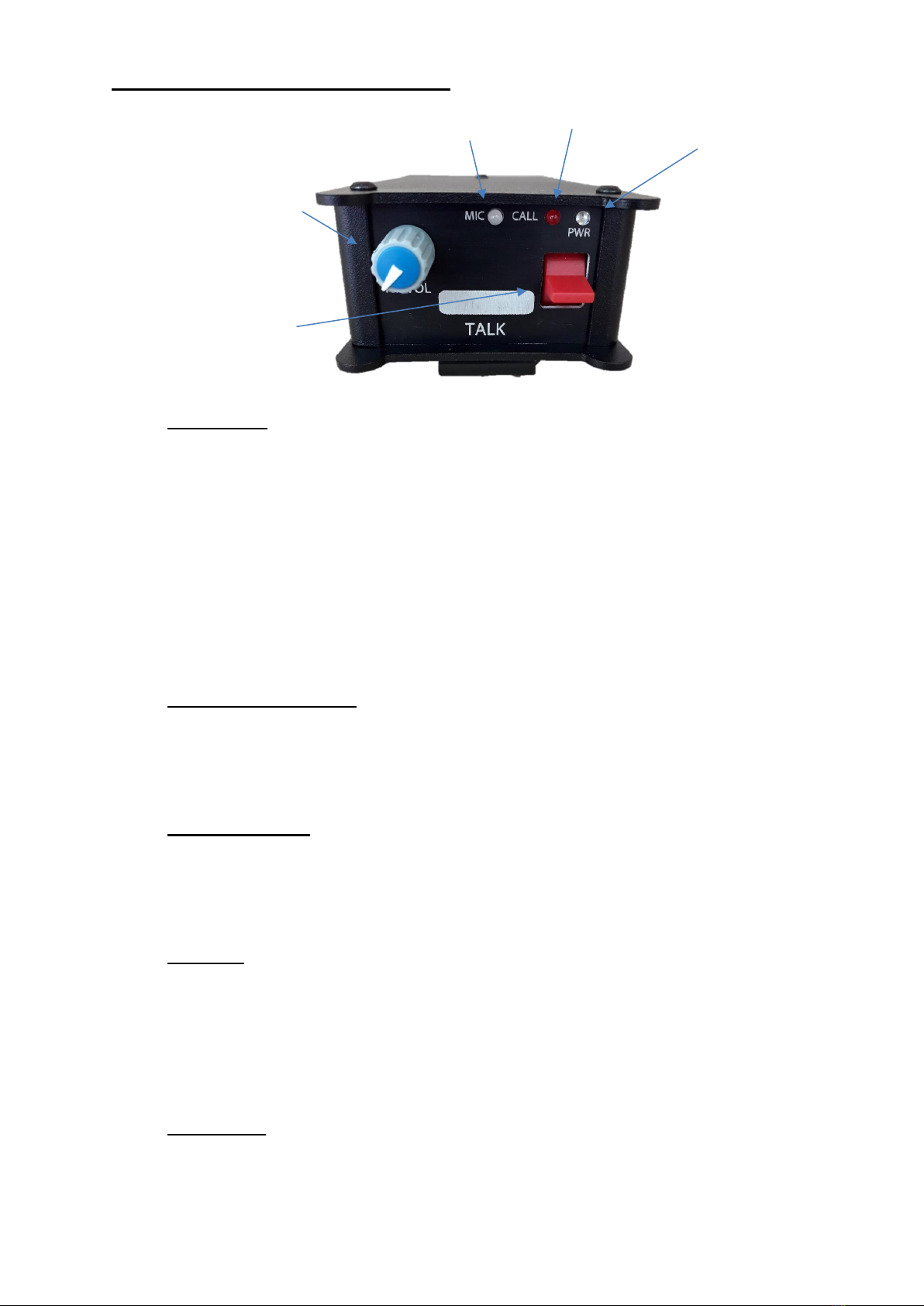
B1 & B2 FRONT PANEL LAYOUT
1. Talk switch
The front panel speak switches allow the operator to talk to the outgoing talk
circuits and hear sidetone. These lever switches can latch on permanently or
be momentarily activated depending on which orientation they are held,
therefore giving the operator immediate tactile feedback regarding the state of
their mic activation.
The speak lever keys also double as call switches, whereby a fast double
click of the speak lever will send a call signal to the network.
The keys are also used during config mode to toggle different features.
2. Incoming level adjust
This pot adjusts the volume of the incoming Dante audio for the headphones
mix. This pot also controls other parameters when the device is in config
mode.
3. Mic activity LED
This Red/Green LED indicates the level of the mic connected to the headset
and other parameters in config mode. It will only illuminate during config
mode.
4. Call LED
The Call LED(s) indicates the presence of an incoming audio from the Dante
network by illuminating solidly when the audio goes above a threshold of -
30dBFS. The Call LED(s) will flash for a few seconds upon receiving a call.
The Call LED(s) will also flash during config mode to indicate the state of the
config mode.
5. Power LED
This LED indicated the power status of the device. This LED also doubles to
indicate the status of the config mode.
5. Power LED
3. Mic activity LED
2. Incoming level adjust
1. Talk switch
4. Call LED

Page 10 of 28
B1 & B2 REAR PANEL LAYOUT
1. Network RJ45
The Neutrik Ethercon network socket can connect to both Neutrik Ethercon
and standard RJ45 cables. It is a 100M/bit standard IP network connection. The
status LED flashes to show when data is being correctly communicated
with the attached switch.
This is also how the device is powered using a Power Over Ethernet (PoE)
source. The PoE source can be a mid-span source or a network switch with PoE.
2. Headset connector
Headphone output
This 5 or 4 pin XLR socket accepts headphones from 30 to 1000 Ohms.
It has a unique headphone amplifier that allows it to provide the correct output
level regardless of the headphone impedance and it can also have mono
headphone jacks connected with no adverse effect.
Microphone Input
This is a balanced microphone input sharing the connector with the headphone
output. It can accept dynamic and condenser microphones and phantom power
(12v).
Refer to the end of this manual for wiring information.
3. Phantom power LED
This green LED will illuminate to indicate if +12v phantom power is active or
disabled.
3. Phantom power indicator
1. Network RJ45
2. Headset connector
Questo manuale è adatto per i seguenti modelli
2
Indice
Altri manuali Dante Sistema di interfono