
Dell CT3021 Manuale utente

User Guide
Dell Essential Charging Cart 24 Devices – CT3021
Securely store, efficiently charge and easily transport up to
24 Notebooks, Chromebooks, or Ultrabooks.
Intended for Institutional Use.
Regulatory Model: EC24U211b
YCTNK Rev 00
031-11127 Rev 0 07.30.20 DB
For service, visit www.bretford.com/Dell or dell.com/support
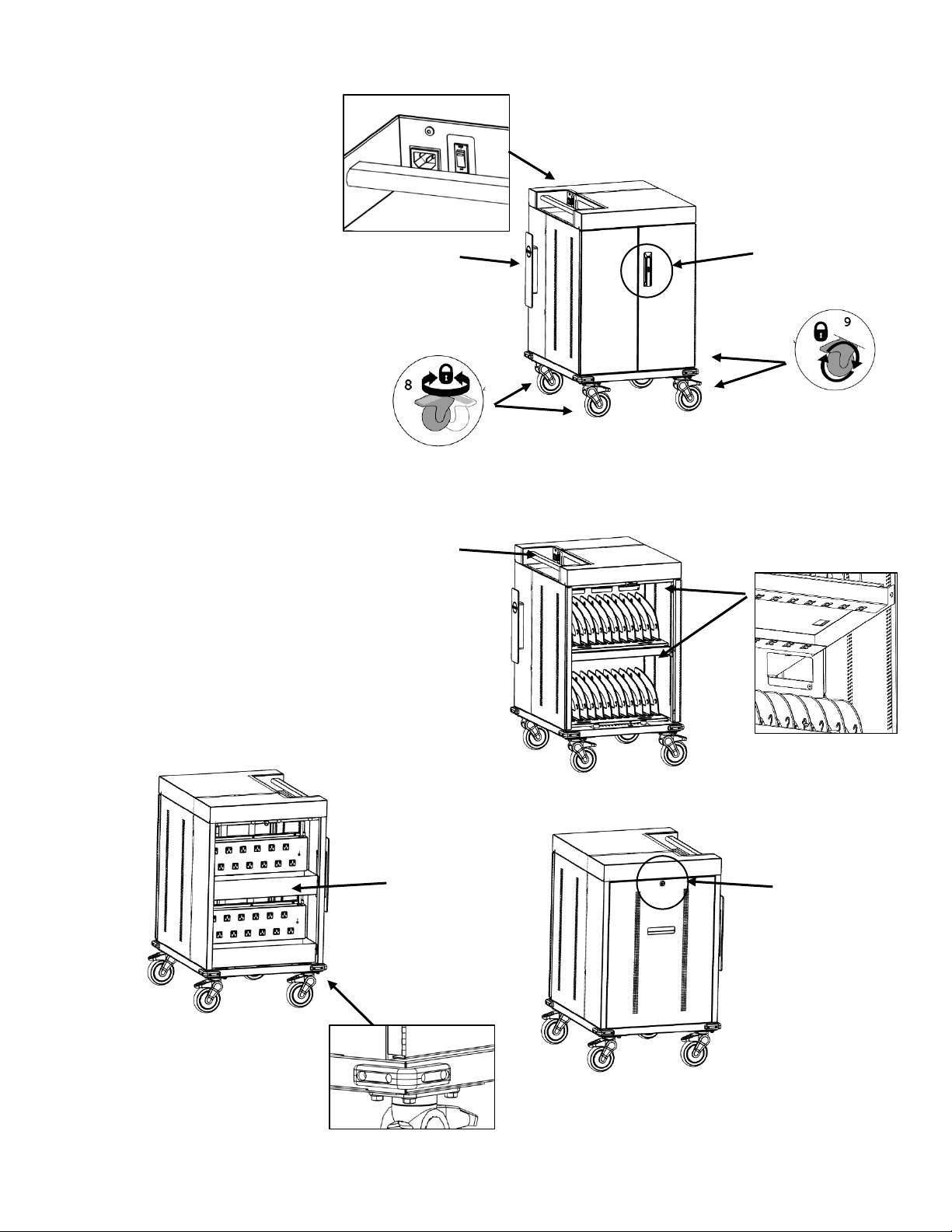
1. Swing Handle with Padlock
Latch on Front Door
2. Locking Rear Panel
3. Lighted Power Switch
4. Cord Wrap with Detachable
Power Cord
5. Cable Management Above
the Device
6. Ergonomic Handle
7. Power Adapter Storage Bins
8. Two Directionally Locking
Casters (Blue Tab)
9. Two Locking Casters
10. Corner Bumpers
Features
1
2
3
4
4
6
5
7
10
Set Up Instructions
1
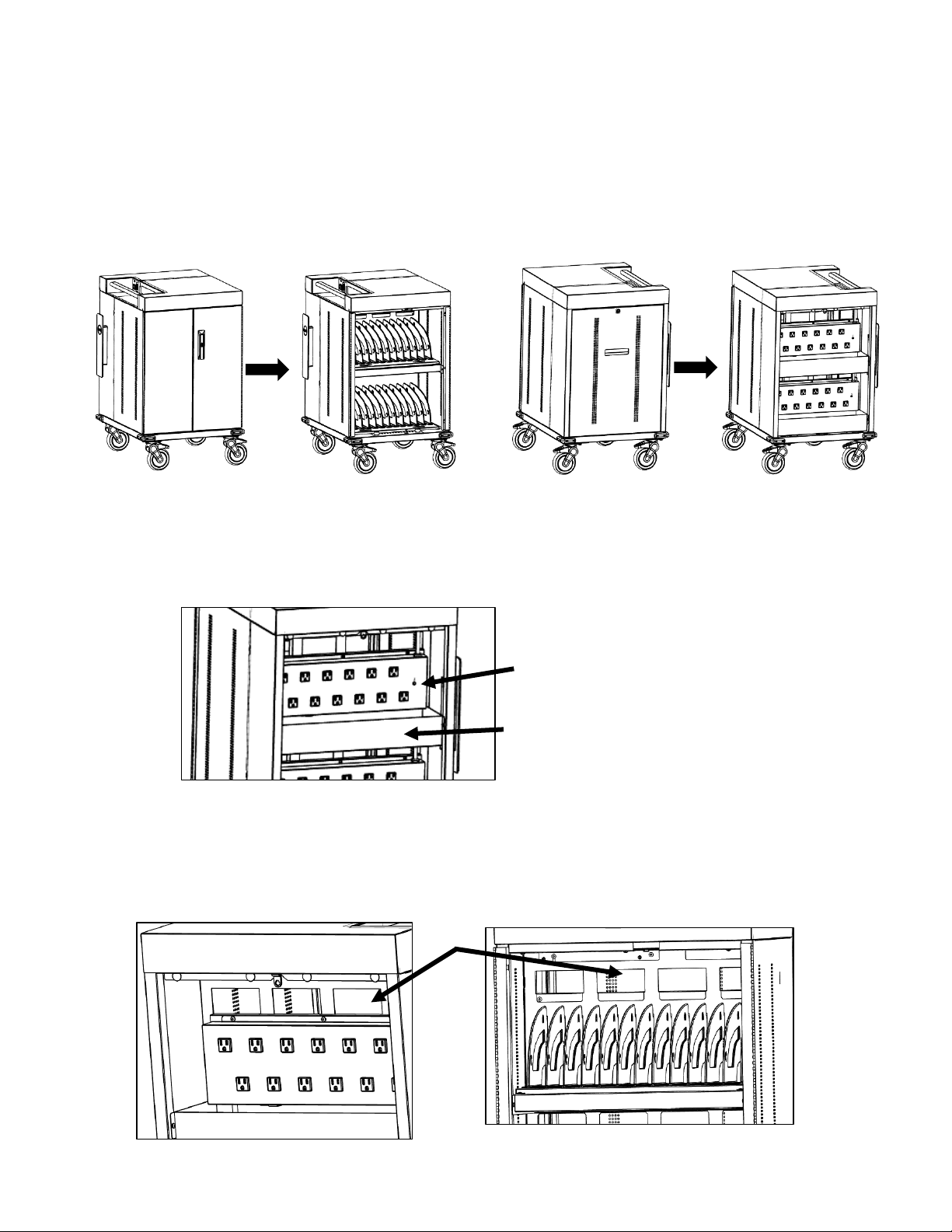
Route device cables through the openings in the center
divider panel from the rear to the front of the cart
3
Open the front doors and remove the rear panel
2
Place power adapters in bins mounted in rear of the cart
below each power strip and plug into power outlet.
Adapter storage bin
Power Outlets
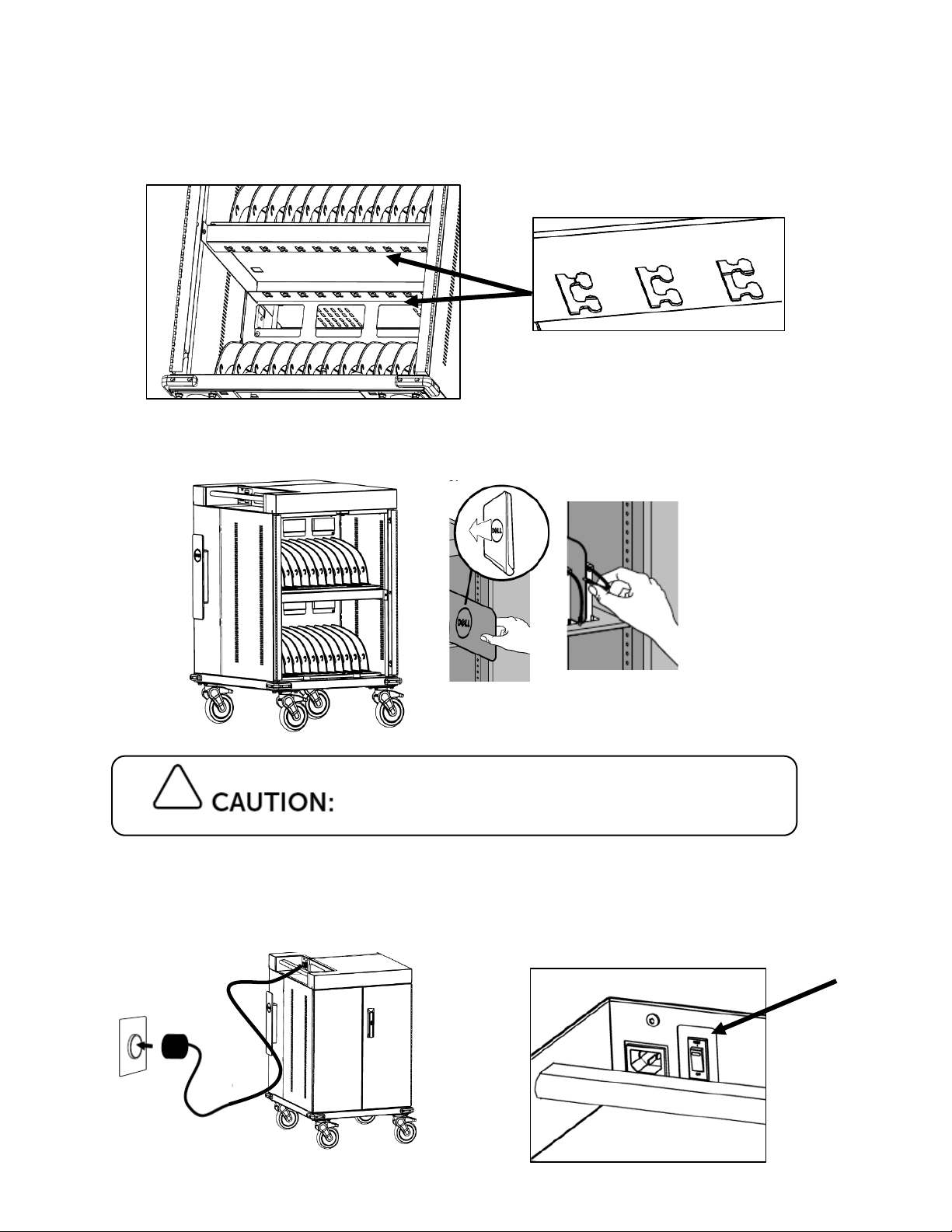
To prevent overheating, always power off
devices before placing in the cart to charge
5
Place device in storage slot and plug in power cable
Plug in power cord into an earthing type wall outlet
and power the cart using on/off switch
4
Secure cables in place using cable management features
above each shelf both at the center and front of the cart
6
For service, visit www.bretford.com/Dell or www.dell.com/support
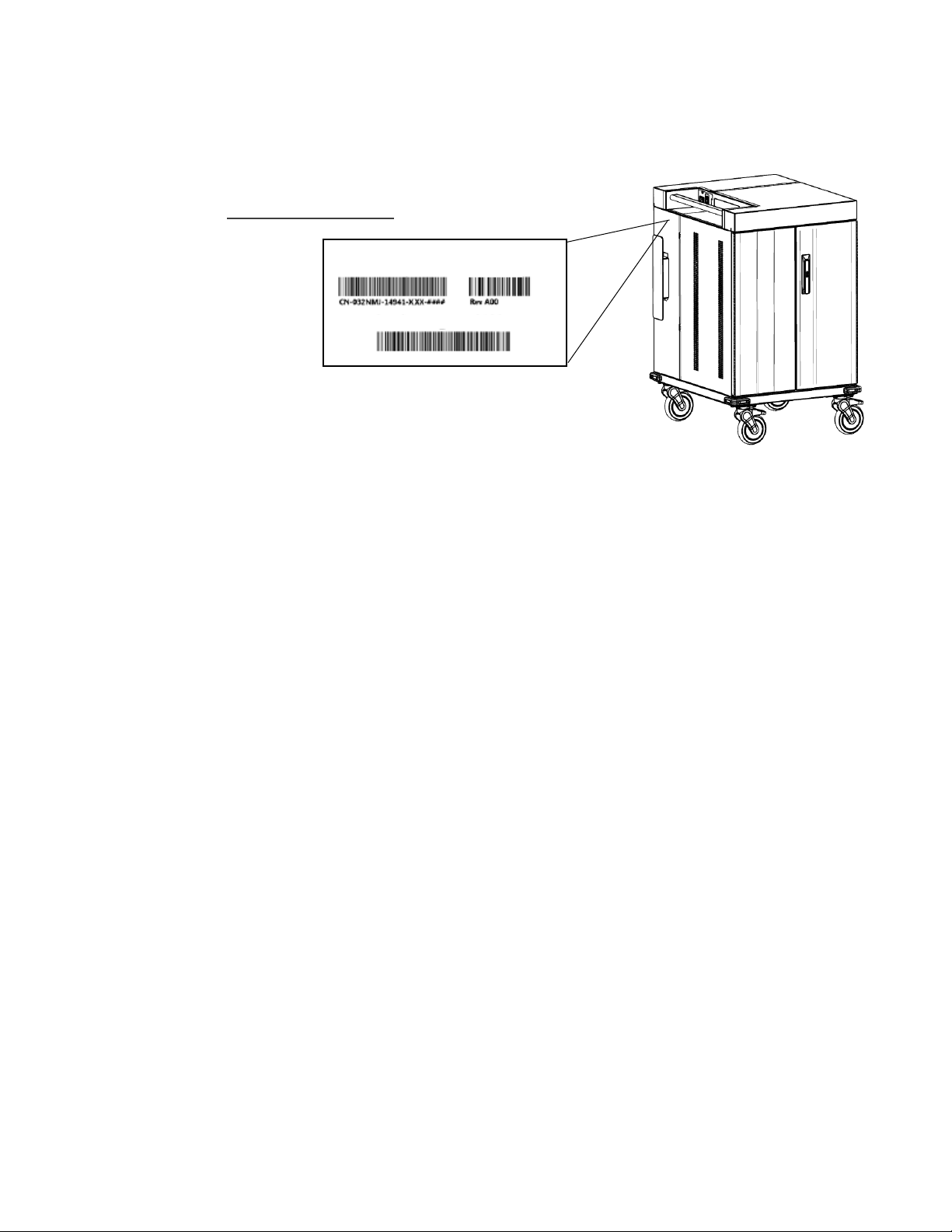
NOTE: When contacting customer service reference the serial
number located on label next to cord winder
Power Ratings
100-120 Vac, 12 A, 50/60 Hz
Socket: NEMA 5-15
Dimensions & Weight
Height: 97 cm (38.2 in.)
Length: 67 cm (26.4 in.)
Width: 60 cm (23.7 in.)
Weight (without Mobile Devices): 54 kg (120 lb)
Weight Capacity:
Top Surface: 11.3 kg (25 lb)
Shelves (Top and Bottom ea.): 22.7 kg (50 lb)
Adapter Bins (ea.): 6.8 kg (15 lb)
Specifications
Service & Warranty
Made in USA
P/N HF5N2
Service Tag: ABC1234

Safety Guidelines
The cart may tip over if transported incorrectly, which could cause injury.
• Do not allow children under the age of 16 to move the cart. Only adults should move this cart.
• Move the cart slowly.
• Apply moving force on the narrow dimension.
• Always push using the handles. Push the cart, do not pull it.
• Engage the directional lock casters when moving the cart for added stability & safety.
Relocating audio and/or video devices to a cart not specifically designed to
support audio and/or video devices may result in death or serious injury due to the cart
collapsing or overturning onto a child.
Death or serious injury may occur when children climb on a cart. A remote
control or toys placed on the cart may encourage a child to climb on the cart and as a result,
the cart may tip over on to the child.
Electrical cables can be hazardous. Misuse can result in fire or death by electrical shock.
• Inspect power cables thoroughly before each use and do not use cables that are damaged.
• Insert the plug completely into an earthing type wall outlet.
• Do not unplug by pulling on the cable.
• Use only Dell power adapters that come with Dell systems with this cart.
• Do not plug the power cable into an extension cable or power strip.
• Turn power switch off before plugging in device.
• Turn power switch off before unplugging the cart.
• The earthing type wall outlet must be near the cart and should be easily accessible.
• Do not plug the cart in if the switch, receptacle(s), or power cord has been damaged.
• Contact Bretford before attempting to make any type of electrical repair or parts replacement.

To avoid risk of electric shock, do not expose electrical components to water, cleaning solutions or other
potentially corrosive liquids or substances.
• Keep the cart away from water
• Do not place the cart near flammable liquids or gases.
• Do not immerse cart or cart components in liquid or allow liquids to flow into the cart
• Liquids should not be stored in, set on or placed inside the cart.
• Only clean the surfaces of cart with soft dry cloth. Do not use liquid, spray or abrasive cleansers.
• Use only disinfecting wipes containing no bleach.
• To prevent overheating, always power off devices before placing in the cart to charge.
• Check casters periodically to ensure they are clean and free of debris.
• Make sure equipment is balanced and installed securely to cart.
• Cart is not designed to be operated by a child; adult operation is always recommended.
• The cart is designed to be used indoors only.
Moving the Cart
• Only Adults should move this cart.
• Before moving the cart:
1. Turn the power to the cart off using the on/off switch.
2. Unplug the power cord from the wall.
3. Make sure the cable is wrapped and secure.
4. Ensure the doors are closed and locked.
5. Remove items from the top work surface.
6. Unlock the front rotational locking casters.
• Push (do not pull) the cart for optimum maneuverability and to prevent muscle strain.
• Do not move the cart across rough, uneven, or irregular surfaces such as gravel.
• Do not move cart by pulling the power cord.
• Use extra caution on ramps and over thresholds.
Parking the Cart
• Do not park the cart in heavy traffic areas.
• Do not run cables through doorways or through holes in ceilings or walls.
• Do not run cables across hallways, classrooms, or other areas where they could be walked on.
• Keep the front rotational locking casters locked whenever it is unattended.
• Do not allow anyone to sit, stand, or climb on the cart.
• Do not lift the cart from the bottom.
• Do not block the vent openings. To prevent overheating, leave at least 127 mm (5 in.) clearance
around vents.

Regulatory, Environmental, and Warranty Information
Regulatory Notices
For Electromagnetic Compatibility (EMC), regulatory information and Safety Best Practices information, see the Regulatory
Compliance home page on Dell.com at the following location: Dell.com/regulatory_compliance.
Dell has determined that this product is a Class A harmonized product.
FCC Notices
This device complies with Part 15 of the FCC Rules. Operation is subject to the following two conditions:
• This device may not cause harmful interference.
• This device must accept any interference received, including interference that may cause undesired operation.
Warranty
5 years for mechanical, 3 years for electrical components.

Guide de l’utilisateur
Chariot de charge pour 24 appareils Dell Essential – CT3021
Stockez en toute sécurité, chargez efficacement et
transportez facilement jusqu’à 24 ordinateurs portables,
chromebooks ou ultrabooks.
Destiné à un usage institutionnel.
Modèle de réglementation : EC24U211b
YCTNK Rev 00
031-11127 Rev 0 07.30.20 DB
Pour un entretien, visitez www.bretford.com/Dell ou dell.com/support
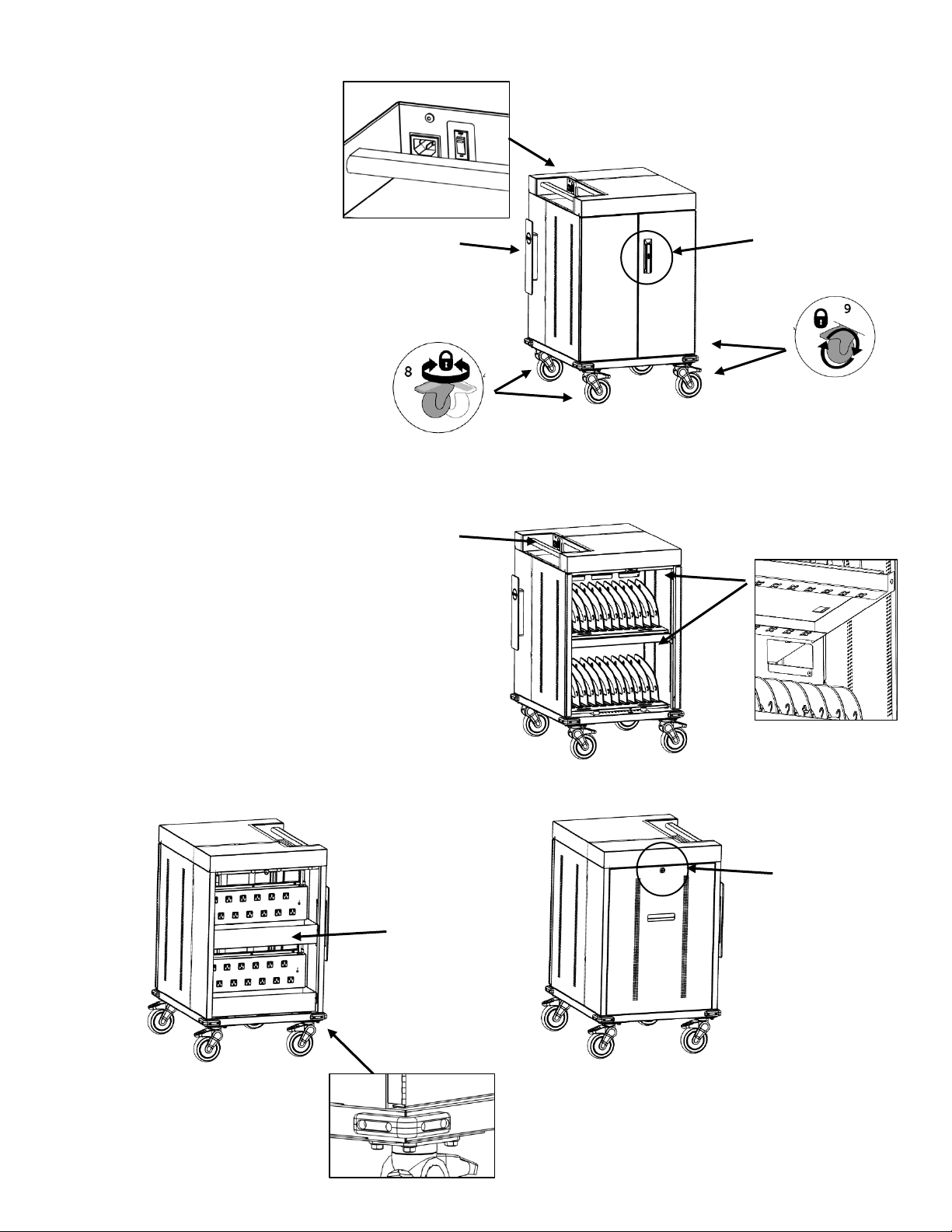
11. Poignée pivotante avec
loquet à cadenas sur la
porte avant
12. Panneau arrière
verrouillable
13. Interrupteur lumineux
14. Enrouleur de cordon avec
cordon d’alimentation
détachable
15. Gestion des câbles au-
dessus de l’appareil
16. Poignée ergonomique
17. Bacs de stockage des
adaptateurs de courant
18. Deux roulettes à
orientation verrouillable
(patte bleue)
19. Deux roulettes
verrouillables
20. Pare-chocs d’angle
Caractéristiques
1
2
3
4
4
6
5
7
10
Indice
Lingue:
Altri manuali Dell Caricabatterie per batterie

Dell
Dell C Series Manuale utente

Dell
Dell PM30W17 Manuale utente

Dell
Dell Latitude X300 Manuale utente

Dell
Dell Dual Charge Dock Manuale utente

Dell
Dell X0350 Manuale utente

Dell
Dell ergotron ERGITD-009 Manuale utente

Dell
Dell Latitude 7230 Rugged Extreme Manuale utente

Dell
Dell Latitude X300 Manuale utente

Dell
Dell CHRG01L Manuale utente

Dell
Dell Inspiron X200 Manuale utente


