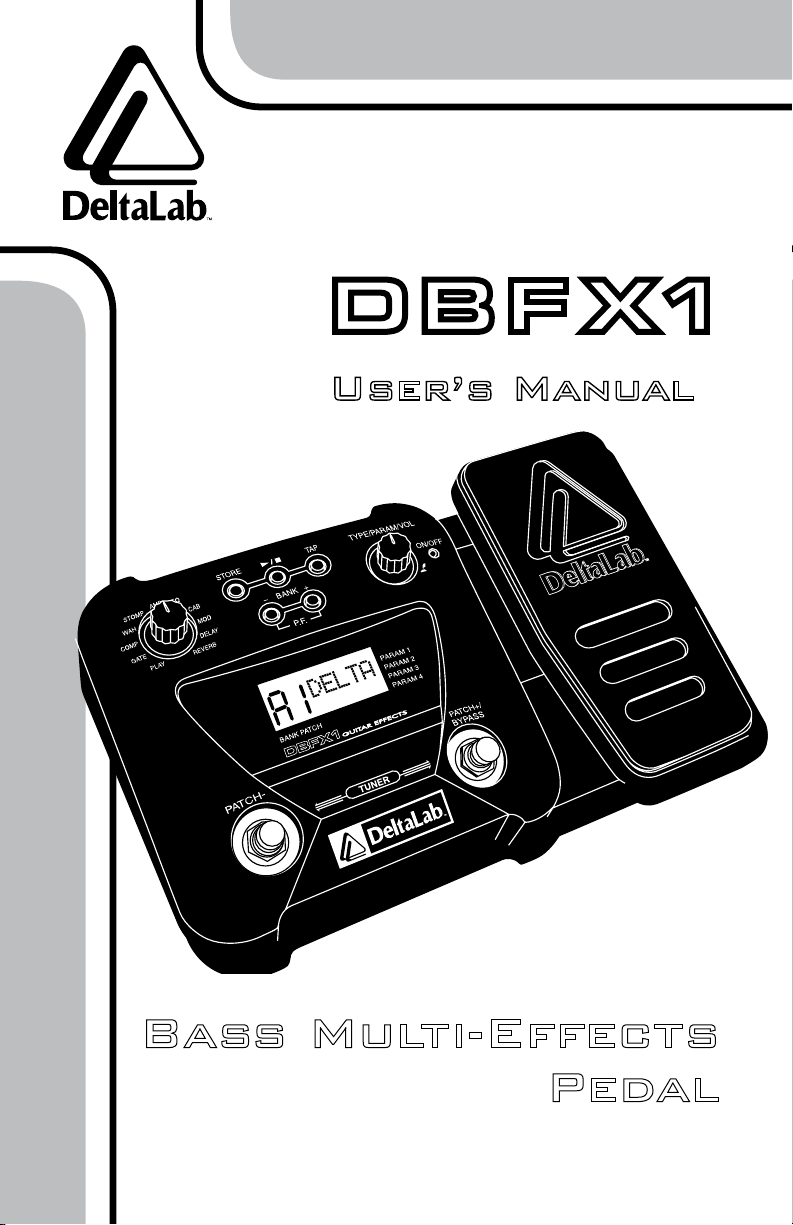
DeltaLab DBFX1 Manuale utente

Bass Multi-Effects
Pedal
User’s Manual

FCC statement
This device complies with Part 15 of the FCC rules. Operation is subject to the following two conditions:
(1) This device may not cause harmful interference, and (2) this device must accept any interference
received, including interference that may cause undesired operation.
•Keep away from children. In households with small children, an adult should provide
supervision until the child is capable of following all the rules essential for safe
operation of the unit. All cords and cables should be placed so they are out of
reach of children.
•Do not use this product near water, such as in or near a bathtub, sink, wet basement,
swimming pool, or in the rain. Never handle the AC adaptor with wet hands.
•Do not use this product in areas subject to temperature extremes, such as in direct
sunlight in an enclosed space, near a heat source, or on heat-generating equipment.
•This product and any AC adaptor should be located so that they do not interfere with
proper ventilation.
•Connect this product only to a power supply described in the operating instructions or
as marked on the unit. When using batteries, carefully follow the installation instructions
and make sure you observe the proper polarity. If used improperly, batteries may explode
or leak, causing damage or injury. Check to make sure that the AC receptacle holds
the power cord plug securely. If the power cord plug is loose or damaged, contact your
electrician to replace the defective and unsafe power cord.
•Place the power cord so that it is not likely to be walked on or pinched by having objects
placed on it. Prevent cords and cables from becoming entangled. Do not use the power
supply cord in an outlet with an unreasonable number of other devices. Excessive loads
can cause the insulation on the cord to heat up and eventually melt.
•Do not defeat the grounding or polarization feature of the AC power cord. If your AC
receptacle will not accept the power cord plug, contact your electrician to install a proper
AC receptacle.
•When left unused for an extended period of time, unplug the power cord from the outlet
and remove the batteries. To disconnect the power cord, pull it out by grasping the plug.
Never pull the plug out by the cord.
•Be careful that foreign objects and liquids do not enter the enclosure.
•Unplug the unit before cleaning. Do not use liquid or aerosol cleaners. Use a damp cloth
for cleaning and allow the unit to dry before plugging it in.
•Before using this unit in a foreign country, consult with your retailer or the manufacturer.
•Do not open or modify the unit or the AC adaptor. Unplug the unit and consult qualified
service personnel when:
•the power cord or the plug has been damaged
•an object or liquid has fallen into the unit
•the unit has been exposed to moisture
•the unit does not appear to be operating normally or exhibits a change in performance
•the unit has been dropped or damaged
• Do not attempt to repair or service the product beyond what is described in the operating
instructions. For all other servicing, refer to qualified service personnel.
Important Safeguards
This symbol is intended to alert the user to
the presence of non-insulated “dangerous
voltage” within the products enclosure.
This symbol is intended to alert the user to
the presence of important operating and
maintenance (servicing) instructions in
the literature accompanying the unit.
To prevent fire or hazard, do not
expose the unit to rain or moisture.
WARNING
For your protection, please read these safety
Instructions completely before operating the
appliance, and keep this manual for future
reference Carefully observe all warnings,
precautions and instructions on the appliance
and described in the operating instructions
supplied with the appliance.

Introduction .........................................3
Main Features .......................................3
Important Safety Notes.................................3
Front Panel .........................................5
Rear Panel/Connections ................................6
Power Supply ........................................7
Patches ............................................7
How to Select a Patch ..............................7
Patch Function ....................................8
Factory Reset........................................9
Tuner.............................................10
Bypass Effects......................................10
Drum.............................................11
Tap ..............................................12
Master Volume......................................13
Expression Pedal ....................................13
Expression Pedal Functions.............................14
Storing Programs ....................................15
Selecting Effects ....................................16
Parameters ........................................17
Adjusting Parameters ..............................17
Noise Gate .....................................18
Compressor.....................................18
Wah ..........................................19
Stomp .........................................19
Amp Sim .......................................20
EQ ...........................................21
Speaker........................................21
Modulation .....................................22
Delay..........................................23
Reverb.........................................23
Bypass Individual Effect ...............................24
Specifications ......................................25
Warranty ..........................................26
Table of Contents

User’s Manual
Bass Multi-Effects Pedal
Congratulations on your purchase of the DBFX1 Bass
Multi-Effects Processor, an advanced multi-effects pedal
with built-in drum machine.
To get the most out of your new pedal, we recommend you read
this manual carefully and keep it for future reference.
Introduction
3
Important Safety Notes
Power Supply
To avoid damage, please make sure that all power devices
(such as amplifiers) are turned off before connecting the DBFX1.
If an AC adapter is used, it should be unplugged from the
AC outlet if the instrument will not be used for an extended
period of time.
Avoid using this unit on the same electrical circuit with other
appliances that may generate line noises.
• 54 built-in effects
• Simultaneous use of up to 11 effects
• 48 user patches, 48 factory settings
• Expression pedal controls volume, wah and 8
other parameters.
• Built-in drum machine
• User-friendly interface with simple parameter adjustments
Main Features

Bass Multi-Effects Pedal
www.deltalabeffects.com 4
Handling and Transportation
Grab the unit firmly while plugging in or unplugging cables.
Physical shocks caused by dropping, bumping, or placing
heavy objects on top of DBFX1 can result in scratches or
more severe damage.
Never apply excessive force to controls, connectors, or other parts.
Strong vibrations and shocks will damage the DBFX1.
Location
To minimize interference, do not place this unit close to heat
sources such as radiators and amplifiers.
Do not expose the DBFX1 to excessive sunlight or moisture.
Cleaning
Clean the DBFX1 with a soft, dry cloth. To remove more stub-
born dirt, use a slightly dampened cloth with mild detergent.
Never attempt to clean the DBFX1 with thinners or alcohol.

User’s Manual
Bass Multi-Effects Pedal
5
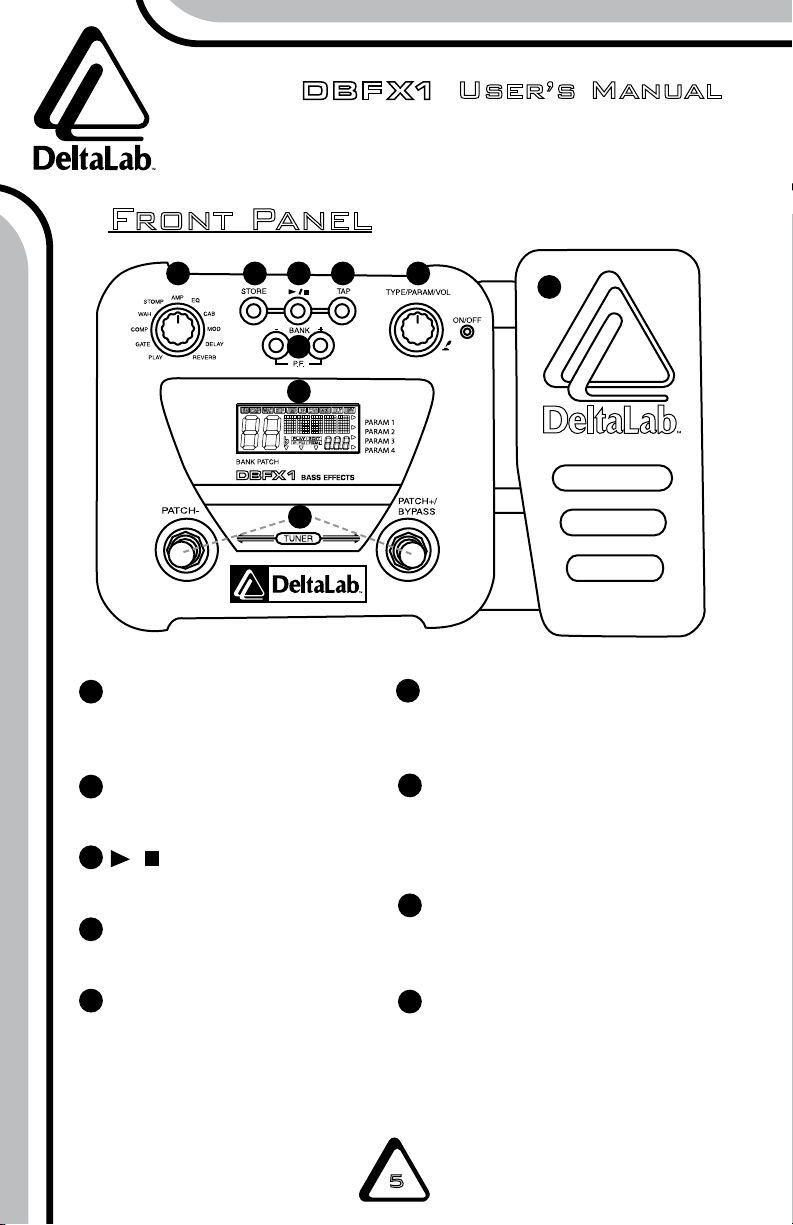
Front Panel
EFFECTSELECTIONKnob
Selects the effect and various
parameters.
STOREButton
Saves your settings.
/Button
Controls rhythm playback.
TAPButton
Adjusts rhythm tempo.
BANK+/–Buttons
Selects bank number and
enters patch function.
1
2
3
4
5
6
7
8
9
TYPE/PARAM/VOLKnob
Adjusts effect type, parameters,
and volume.
PATCH+/–FootSwitches
Selects patches, switches ef-
fect modules on and off, controls
tuner and other functions.
LCDDisplay
Displays current information and
bank number.
ExpressionPedal
Adjusts the volume and various
parameters in real-time.
1234
5
6
7
8
9

Bass Multi-Effects Pedal
www.deltalabeffects.com 6
Bass
Guitar
Bass Amplifiers
NOTES:
• Before connecting to the AC IN jacks, fasten the cord of the AC adapter around the hook
as shown in the diagram. This will prevent the plug from being disconnected if the cord is
accidentally pulled.
• To prevent malfunction and/or damage to speakers or other devices, always turn down the
volume of the DBFX1 and turn all devices off before connecting cables.
•If you turn on the DBFX1 while the amplifier is already powered up, damage to the speaker
may result. Always turn amplifiers off before connecting cables.
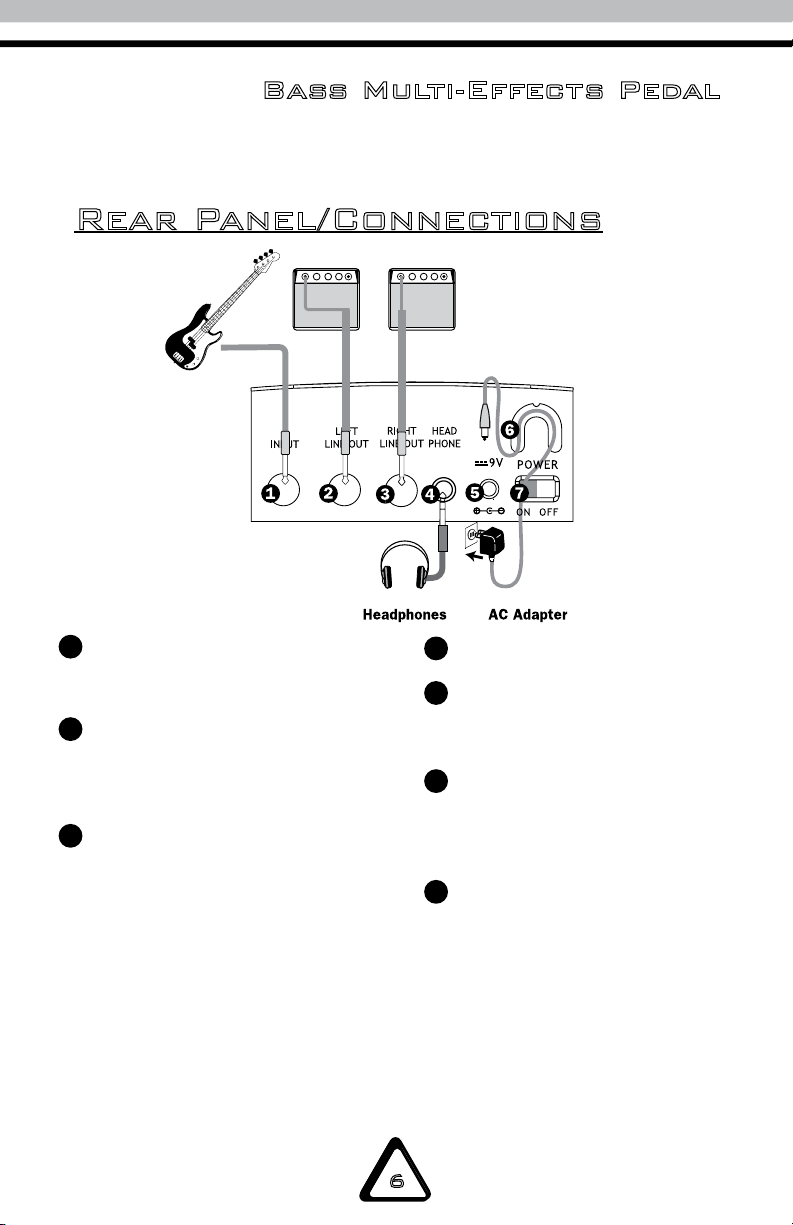
Rear Panel/Connections
INPUTJack
Connect your bass to this jack.
LEFTLINEOUTPUT
Connect your bass amplifier
to this jack.
RIGHTLINEOUTPUT
Connect a second bass
amplifier to this jack for
stereo effects.
1
2
3
HEADPHONEJack
DCINJack
Connect the AC adapter
(9V, 300mA) to this jack.
CORDHook
Hook the AC adapter cord
here to prevent the adapter
from disconnecting.
POWERSwitch
Turns power on and off.
4
5
6
7

User’s Manual
Bass Multi-Effects Pedal
7
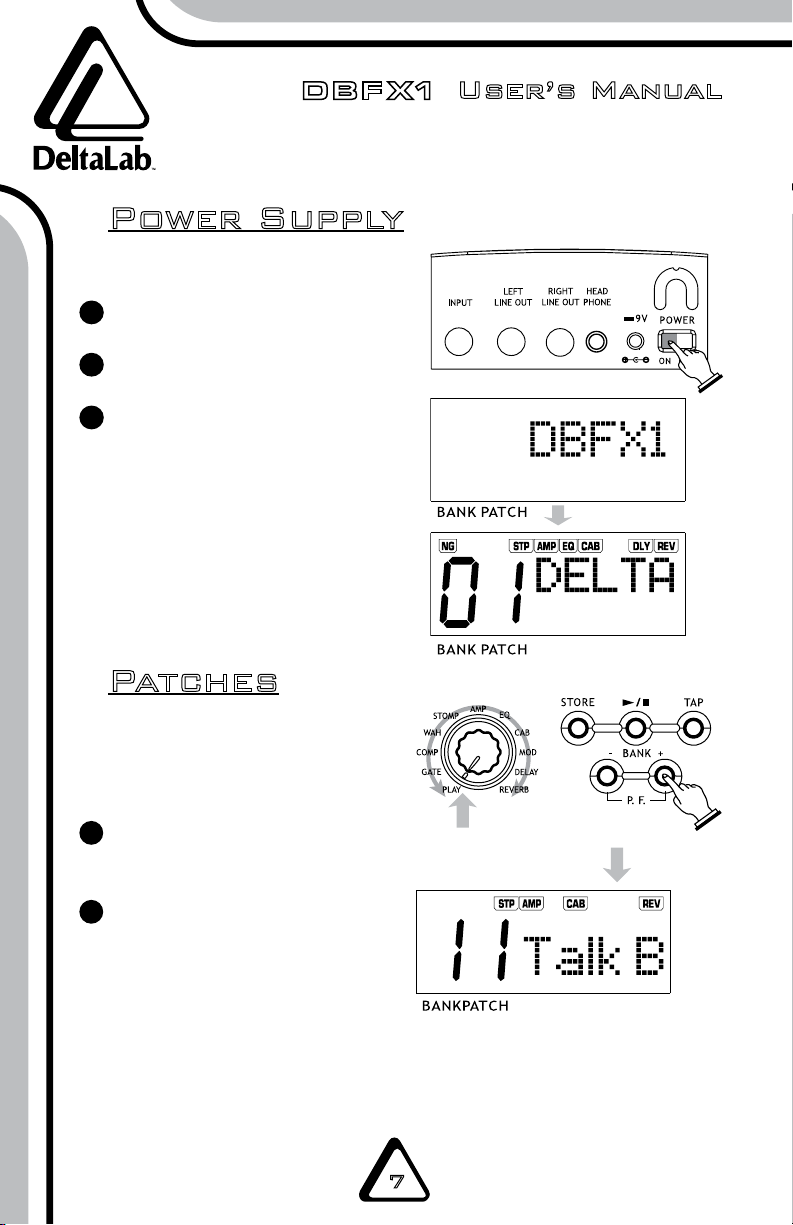
Power Supply
Patches
SettoPLAY
How to Select a Patch
Set the EFFECT SELECTION
knob button to PLAY.
Use BANK– or BANK+ button
to select a bank number.
The LCD displays the current
bank number (0–7 and A–H)
with the relevant tone name
and effect chain.
Connect all cables.
Switch on the DBFX1.
After the power is on,
the LCD will display “DBFX1”
followed by any previously
saved patch and effects chain.
1
2
3
NOTE: The unit has up to 96 patches:
48 default settings (0–1 and 7–6), and
48 user patches (A–1 and H–6).
1
2
NOTE: The PLAY mode will be automatically selected after you turn the unit on, even if
the knob has been set to a position other than PLAY.

Bass Multi-Effects Pedal
www.deltalabeffects.com 8
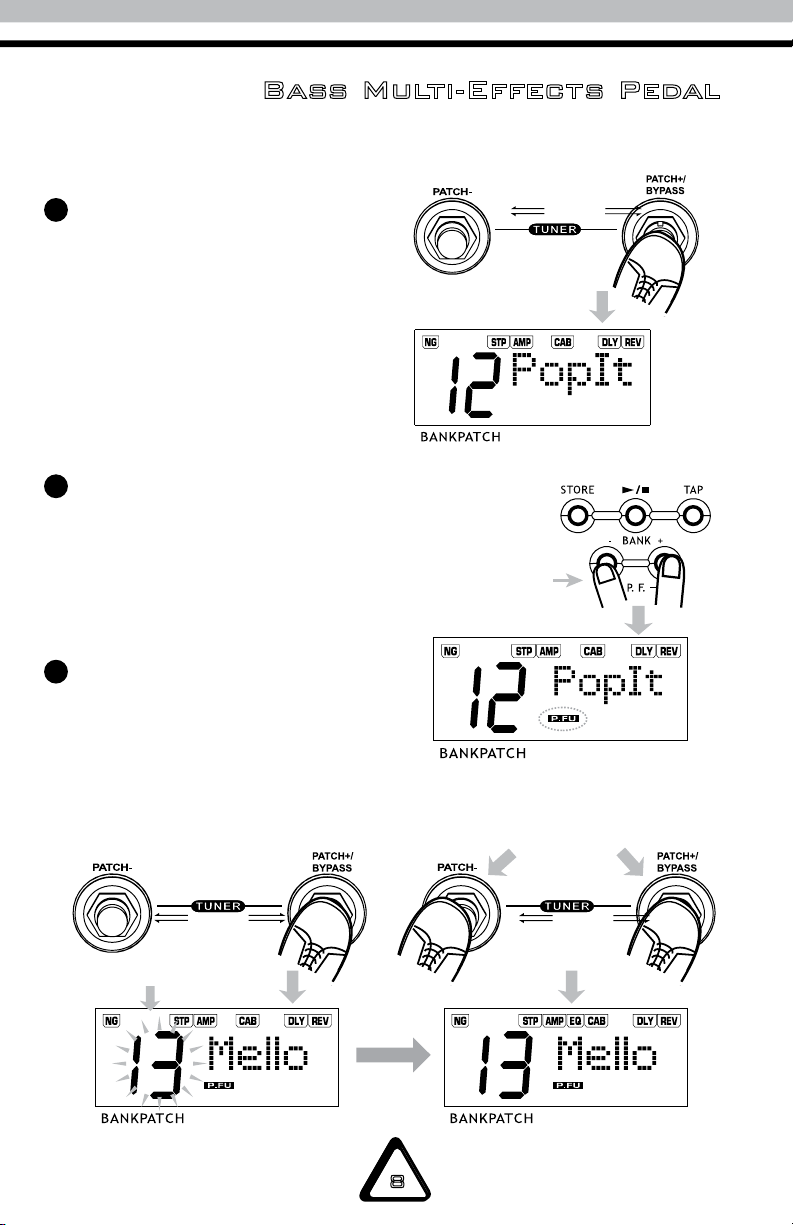
Press
simultaneously
Press
simultaneously
Flashing
Press the PATCH +/- to select the
PATCH. Press and hold PATCH +/-
again to change patches.
The screen displays the current
patch number (1–6) with the
relevant tone name and
effect chain.
Patch Function
Press the BANK– and BANK+
buttons simultaneously to
activate the patch function.
At the same time, the indicator
‘P.FU’ will be displayed.
Press PATCH+/- or BANK+/- to
change the patch display. The
patch number flashes until you
press the PATCH+ and PATCH-
switches simultaneously to
select the patch.
3
1
2

User’s Manual
Bass Multi-Effects Pedal
9
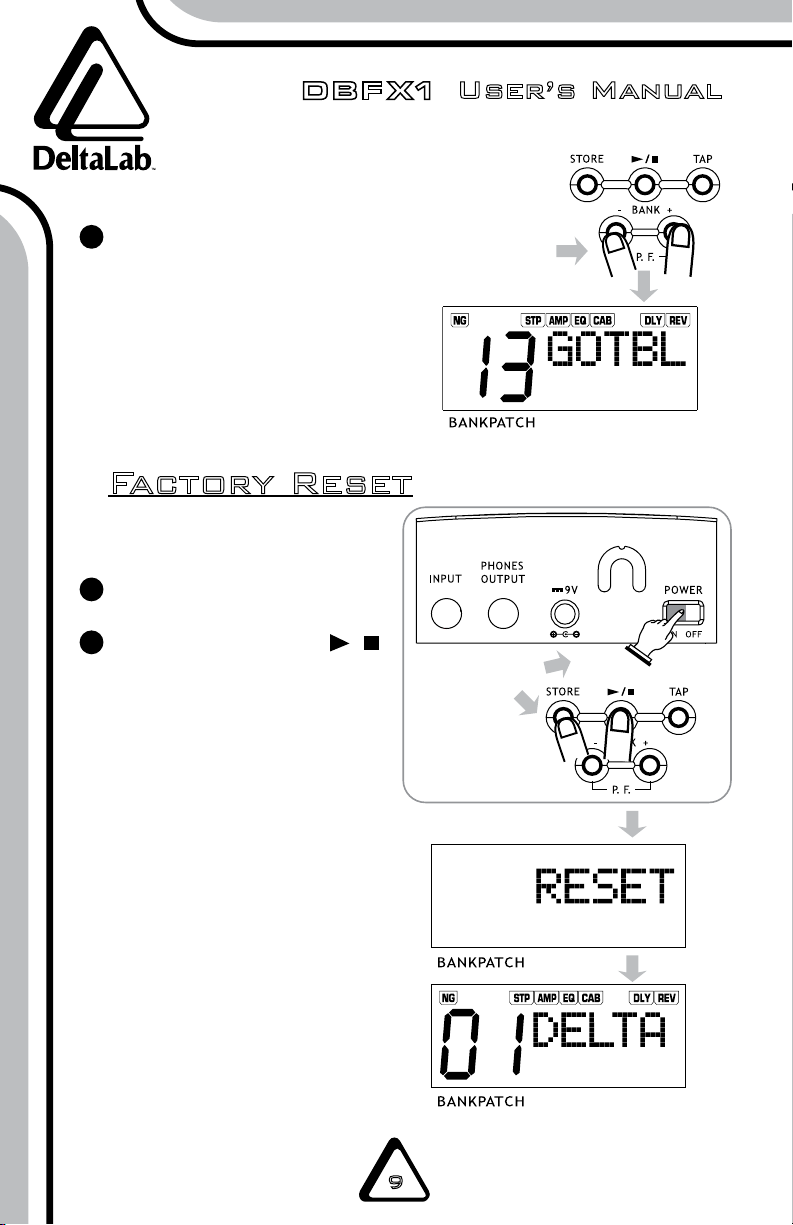
Factory Reset
Press
simultaneously
Then press BANK– and BANK+
simultaneously to disable the
patch function. The ‘P.FU’
symbol will disappear.
3
1
2
Turn off the power.
Hold down STORE and /
Buttons simultaneously,
then turn on the power.
The screen displays ‘RESET’
until the reset process is
finished. When finished, the
display window will show
‘01’ tone, its name, and the
effects chain.
WARNING: Using the
factory reset function will
wipe out all user data!
NOTE: The 48 user patches start as
duplicates of the 48 default patches.
Indice
Altri manuali DeltaLab Pedale musicale