
DELTALOGIC ACCON-MPI-Modem GSM Manuale utente
Th
e
b
est so
l
ut
i
ons
f
or
PLC
ACCON-MPI-Modem GSM
User Manual
from HW 1 & FW 3.10

1 PREFACE
This manual is for project developers, users and assemblers who utilize
the ACCON-MPI-Modem GSM. It shows the user the handling of the
ACCON-MPI-Modem GSM and explains signaling functions. All necessary
data for assembling should be provided to the assembler. © 1995 - 2009
DELTALOGIC
Automatisierungstechnik GmbH
Stuttgarter Strasse 3
73525 Schwaebisch Gmuend
Germany
Phone sale : +49-(0)7171-916-120
Phone support: +49-(0)7171-916-112
Fax sale: +49-(0)7171-916-220
Fax support: +49-(0)7171-916-212
www.deltalogic.de
All rights reserved. No part of this work is allowed to be copied, reproduced, conferred,
processed and stored into electronic media or translated into any other language without a
written permission of the author. S7-200®, S7-300®, S7-400®, HMI®, STEP® and
SIMATIC® are registered trademarks of Siemens AG, ACCON® and DELTALOGIC® are
registered trademarks of DELTALOGIC Automatisierungstechnik GmbH.
Note:
We have checked the content of this manual for conformity with the hardware and software
described. Nevertheless, because deviations cannot be ruled out, we cannot accept any
liability for complete conformity. The data in this manual have been checked regularly and any
necessary corrections will be included in subsequent editions. We always welcome
suggestions for improvement.
Last update 2009-03-09. All technical changes reserved.
ACCON-MPI-Modem GSM 2

TABLE OF CONTENTS
1PREFACE................................................................... 2
2TECHNICAL DESCRIPTION...................................... 4
3SCOPE OF DELIVERY............................................... 6
4DEVICE DESCRIPTION............................................. 7
5REQUIREMENTS FOR OPERATING .......................10
6COMMISSIONING ..................................................12
7INSTALLATION OF THE ACCON-MPI-MODEM
GSM AT THE PLANT...............................................18
8PARAMETRIZATION WITH ACCONFIGURATOR ...23
9TECHNICAL DATA ..................................................26
ACCON-MPI-Modem GSM 3

2 TECHNICAL DESCRIPTION
The ACCON-MPI-Modem GSM enables the remote maintenance of a S7
controller via the GSM network. The connection is done via GSM or
locally via RS232. The ACCON-MPI-Modem GSM is a compact device. It
contains an ACCON-MPI/TS-Adapter and a GSM modem. The ACCON-
MPI-Modem GSM uses the same communication protocol as the TS
Adapter. Thus the device can be used with all software which supports
this adapter. There is also an additional bushing to connect a further
station e. g. a control panel, to the bus plug of the ACCON-MPI-Modem
GSM. To use the ACCON-MPI-Modem GSM with STEP 7 via a modem
connection, you need the TeleService option package from Siemens.
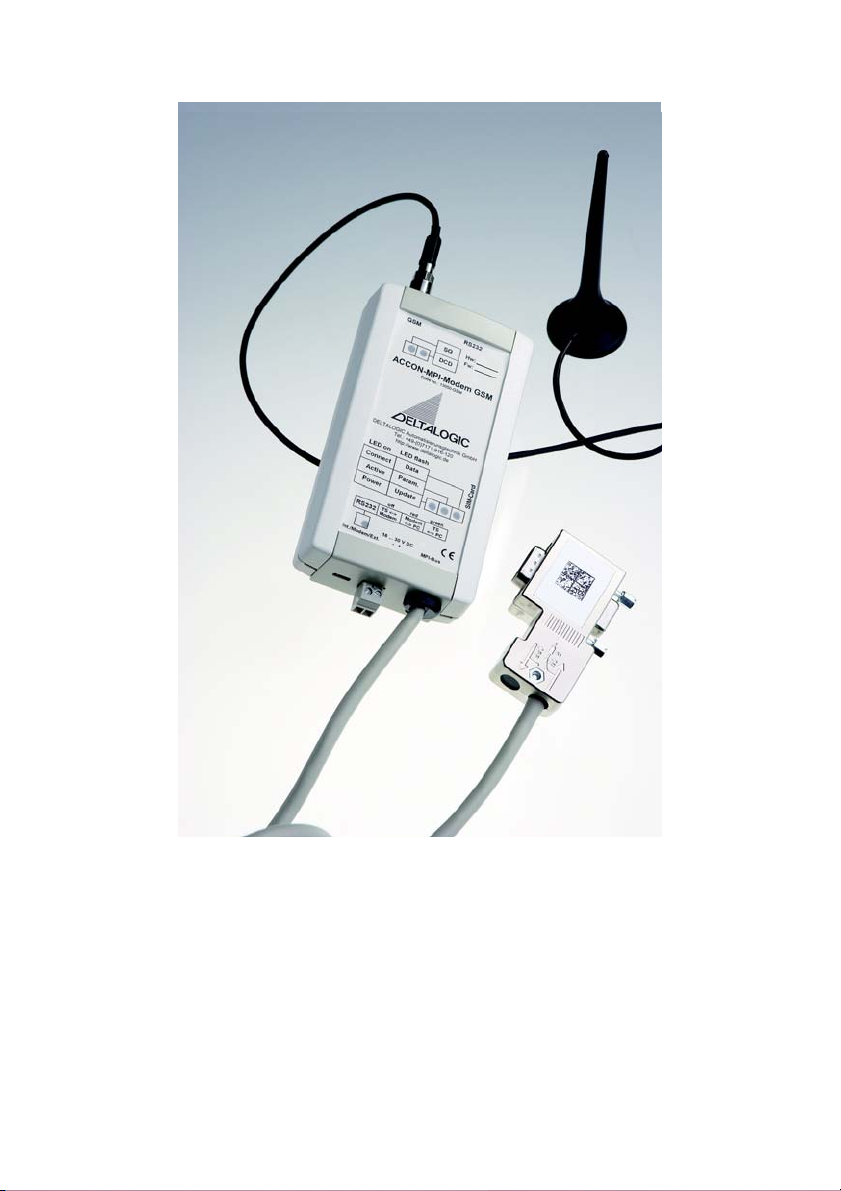
Figure 1: Build-up
The functions »PG_DIAL« and »AS_DIAL« are not implemented.
The ACCON-MPI-Modem GSM does not work with a S7-200 controller!
ACCON-MPI-Modem GSM 4

FM35x modules cannot be parametrized with the ACCON-MPI-Modem
GSM!
Features:
• Compact design
• Quick commissioning
• Modem and TS Adapter combined in one single device
• Can be used as local programming adapter
• Assembly on a top hat rail
ACCON-MPI-Modem GSM 5

3 SCOPE OF DELIVERY
• ACCON-MPI-Modem GSM
• PC-Anschlusskabel
• Hutschienenhalterung
• CD mit Software ACCONfigurator zur Parametrierung des
integrierten Modems
• Handbuch
Suitable accessories can be found on www.deltalogic.de.
ACCON-MPI-Modem GSM 6
4 DEVICE DESCRIPTION
8.
2.
5.
6
4.
3.
1. 9.
7.
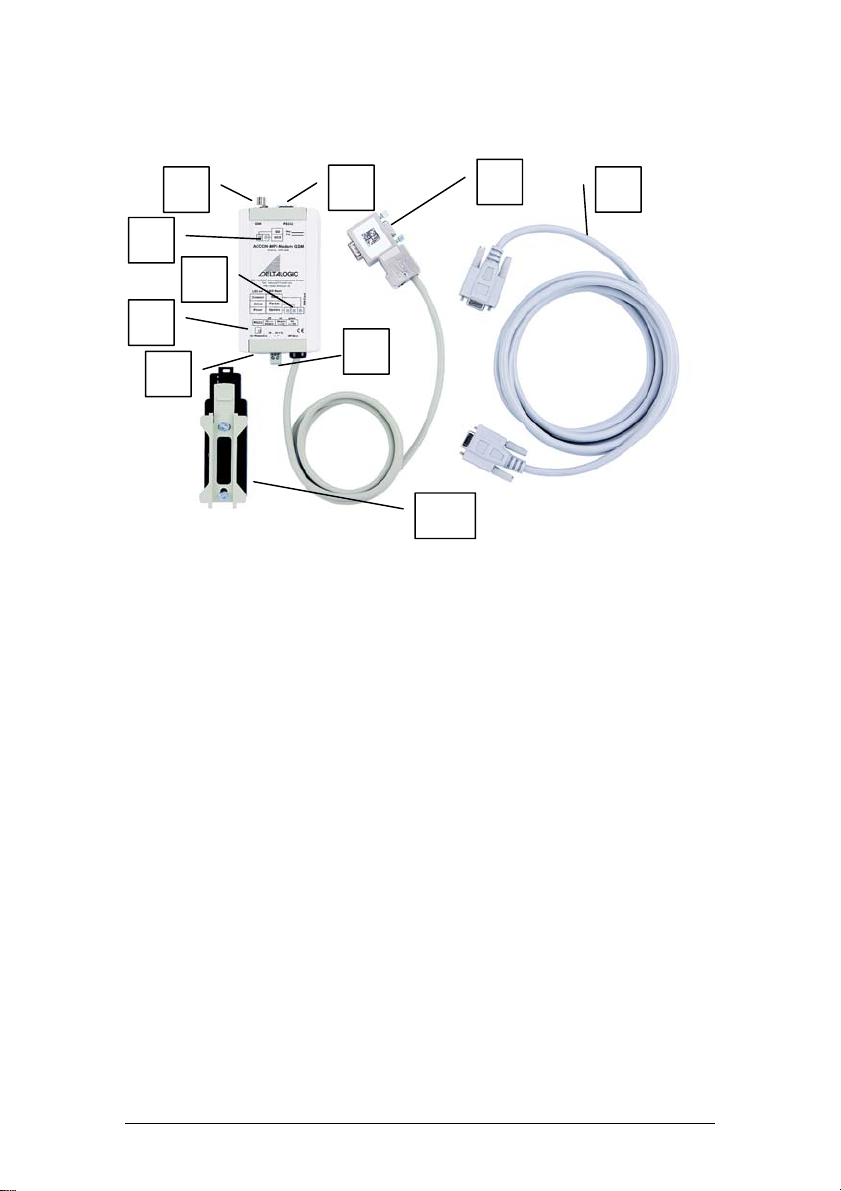
Figure 2: ACCON-MPI-Modem GSM
10.
1) RS232 interface for the communication with the PC
2) FME plug to connect GSM antennas
3) Modem LEDs
4) Status LEDs
5) RS232 LED
6) Switch to change between the different operating modes (microswitch)
7) Power supply bushing for 24 VDC. Please keep the polarity in mind
8) Bus plug with PG bushing, switchable terminator and a 1,2 m connection
line
9) PC connection cable
10) Top hat rail holder
ACCON-MPI-Modem GSM 7

LED display
The six LEDs on the front side of the device inform about the operating
state of the ACCON-MPI-Modem GSM. So sources of error can be
detected very quickly.
When the ACCON-MPI-Modem GSM is connected to the PLC a
connection with the MPI bus will be established if the initialization of the
internal modem was successful. Then the Active LED lights. If not the
initialization of the modem or the log in on the MPI bus does not work.
The device can only accept incoming connections when the Active LED
lights.
The LEDs can change to one of three possible states: ON, OFF,
BLINKING
Status LED Power/Update
LED
Active/Param.
LED
Connect/Data
LED
Adapter has no
voltage feed. OFF
Adapter has a 24 VDC
voltage feed and is
working
ON
Firmware update
being executed BLINKING ON
Adapter is logged on
at the MPI bus ON ON
Adapter is receiving
parametrization ON BLINKING
Adapter is connected
to the PLC ON ON ON
Adapter is
transmitting data ON ON BLINKING
Table 1: Status LEDs
ACCON-MPI-Modem GSM 8

Modem LED DCD LED SQ LED
Carrier signal has been
detected and GSM
connection established
ON
Radio network has been
detected and the ACCON-
MPI-Modem GSM is ready
to receive
ON BLINKING
YELLOW
Signal quality after logging
in on the GSM network. The
faster the blinking
frequency the better the
reception
ON GREEN
Table 2: DCD LED und SQ LED
RS-232 LED
The ACCON-MPI-Modem GSM
works directly with the internal
modem and can be connected to a
telephone connection for remote
maintenance. The RS232 interface
does not have any function.
OFF
The internal modem is shut down
and the RS232 interface can be
used for the communication with
the PLC (for parametrization or PC-
Adapter).
GREEN
The internal modem can be used
directly from a PC via the RS232
interface.
RED
Table 3: RS-232 LED
ACCON-MPI-Modem GSM 9

5 REQUIREMENTS FOR OPERATING
Hardware requirements
If possible put the ACCON-MPI-Modem GSM directly on the MPI
interface of the SIMATIC S7-300 or S7-400 controller. You always have
to use the 24 VDC external power supply for the ACCON-MPI-Modem
GSM.
Please keep in mind that the ACCON-MPI-Modem GSM cannot be used
with PROFIBUS!
When using the device abroad, it is recommended to get information
about the local radio networks and its frequencies. Contact the network
operators in the respective country. Please remember to use a suitable
antenna for the used frequency band.
Software requirements
To use the ACCON-MPI-Modem GSM as programming adapter you need
SIMATIC STEP 7 from version 5.1. And for an access via a modem
connection you need the TeleService options package from Siemens.
ACCON-MPI-Modem GSM 10
Indice
Altri manuali DELTALOGIC Modem


