DENTEC WDR-516S Manuale utente

WDR-516S
Installation Guide

FCC Compliance Statement
Caution : Any changes or modifications in construction of this device which are not expressly
approved the party responsible for compliance could void the user's authority to operate the
equipment.
NOTE : This equipment has been tested and found to comply with the limits for a Class B digital
device, pursuant to part 15 of the FCC Rules. These limits are designed to provide reasonable
protection against harmful interference in a residential installation. This equipment generates, uses
and can radiate radio frequency energy and, if not installed and used in accordance with the
instructions, may cause harmful interference to radio communications, However, there is no guarantee
that interference will not occur in a particular installation. If this equipment does cause harmful
interference to radio or television reception, which can be determined by turning the equipment off
and on, the user is encouraged to try to correct the interference by one or more of the following
measures:
-Reorient or relocate the receiving antenna.
-Increase the separation between the equipment and receiver.
-Connect the equipment into an outlet on a circuit different from that to which the receiver is
connected.
-Consult the dealer or an experienced radio/TV technician for help.
CAUTION
1. Danger of explosion if battery is incorrectly replaced. Replace only with the same or equivalent type.
2. Disposal of used batteries according to the general recommendations against the environmental
pollution.
3.
Do not throw the batteries into a fire, and do not heat, short-circuit or attempt to disassemble the
batteries.
4.
Do not attempt to recharge the batteries.

Important Notice
1. Do not place heavy objects on the top of the WDR-516S.
2. WDR-516S is not weatherproof. In case of outdoor use, equip a weatherproof case to protect WDR-
516S from water, moisture, or temperature (higher or lower than specifications). To clean the WDR-516S,
gently wipe the outside with a clean dry cloth.
3. Be sure to use a DC adapter that is provided by DENTEC Corp. Connecting WDR-516S directly to an
AC current will cause electric damages to WDR-516S.
4. Be careful not to drop the WDR-516S. Physical shocks may harm the product. In addition, be sure the
WDR-516S is secured after installation.
5. If WDR-516S does not operate properly, please contact the closest DENTEC distributor for after sales
service. Tampering or disassembling the product will void the warranty.
6. Security surveillance laws may differ for each country. Therefore, please contact the local region first
to avoid any surveillance law violations.

WDR-516S Installation Guide 4 Rev 1.0(93/11)
OVERVIEW.................................................................................................................................. 7
1. What is WDR-516S?............................................................................................................ 7
2. Supplied Accessories......................................................................................................... 8
3. Description & Function ...................................................................................................... 9
INSTALLATION AND CONNECTION ....................................................................................... 11
4. Connecting & Running WDR-516S.................................................................................. 11
4.1. Connecting camera.......................................................................................................11
4.2. Connecting Monitor...................................................................................................... 12
4.3. Connecting Audio ........................................................................................................ 12
4.4. Supplying Power.......................................................................................................... 13
5. Running OSD menu .......................................................................................................... 14
5.1. Using menu.................................................................................................................. 14
5.2. Dialogue Box to Edit a Word........................................................................................ 15
6. Setting remote controller ................................................................................................. 16
6.1. Setting remote control DIP switch................................................................................ 16
6.2. Set ID of WDR-516S................................................................................................... 16
6.3. Selecting WDR-516S................................................................................................... 17
6.4. Operable range of remote controller............................................................................ 18
6.5. Loading the batteries into remote controller................................................................. 18
7. WDR-516S Configuration ................................................................................................. 19
7.1. Basic Configuration...................................................................................................... 19
7.2. Advanced Configuration .............................................................................................. 19
7.3. External Storage & Backup Configuration ................................................................... 20
7.4. Internet/Intranet Configuration ..................................................................................... 20
8. WDR-516S Basic Setting .................................................................................................. 21
8.1. Viewing Image ............................................................................................................. 21
8.2. Setting Date & Time..................................................................................................... 22
8.2.1. Time Zone............................................................................................................. 22

WDR-516S Installation Guide 5 Rev 1.0(93/11)
8.2.2. Daylight Saving..................................................................................................... 22
8.2.3. Time Format ......................................................................................................... 23
8.2.4. Date ...................................................................................................................... 23
8.2.5. Time...................................................................................................................... 23
8.2.6. Apply Date/Time ................................................................................................... 23
8.3. Setting Recording Condition ........................................................................................ 24
8.3.1. Configuration Status ............................................................................................. 25
8.3.2. Channel Status ..................................................................................................... 25
8.3.3. Recording Speed/Quality...................................................................................... 25
8.3.4. Speed(ips) ............................................................................................................ 25
8.3.5. Quality .................................................................................................................. 26
8.3.6. Audio Recording ................................................................................................... 26
8.3.7. Apply..................................................................................................................... 26
9. Connecting and Configuring Sensor .............................................................................. 27
9.1. Connecting Sensor Input ............................................................................................. 27
9.2. Setting Sensor at OSD menu ...................................................................................... 28
10. Connecting & Configuring Relay Out .......................................................................... 29
10.1. Connecting Relay Out .............................................................................................. 29
10.2. Configuring Relay Out.............................................................................................. 30
11. Connecting External Device with Serial Port.............................................................. 31
11.1. Connecting Text Input Device (ATM / POS / Access Control) .................................. 31
12. Connecting & Configuring Serial Ports for Pan/Tilt/Zoom ........................................ 32
12.1. Connecting Serial Port ............................................................................................. 32
12.1.1. Connecting RS232............................................................................................ 32
12.1.2. Connecting RS485............................................................................................ 32
12.1.3. Connecting RS422............................................................................................ 32
12.2. Configuring Serial Port ............................................................................................. 33
13. Connecting USB Device ............................................................................................... 34
14. Connecting External Storage ....................................................................................... 36
14.1. IEEE1394 Bay.......................................................................................................... 36
14.2. Connecting IEEE1394 Device.................................................................................. 36

WDR-516S Installation Guide 6 Rev 1.0(93/11)
14.3. Available HDD.......................................................................................................... 36

14.4. Registering & Formatting HDD................................................................................. 37
15. Network Monitoring & Managing ................................................................................. 38
15.1. Connecting Ethernet ................................................................................................ 38
15.2. Configuring WDR-516S’s Network Information ........................................................ 39
16. Using WDR Manager ..................................................................................................... 40
16.1. PC System Requirements for running WDR Manager ............................................. 40
16.1.1. Installing WDR Manager ................................................................................... 40
16.1.2. Uninstalling WDR Manager............................................................................... 42
16.2. Configstation ............................................................................................................ 42
16.3. Monitor ..................................................................................................................... 43
16.4. Playback................................................................................................................... 43
APPENDIX ............................................................................................................................... 44
Appendix #1 Installing and Replacing internal HDD .......................................................... 45
Appendix #2 Video Input ...................................................................................................... 50
Appendix #3 Using CD-ROM ................................................................................................ 51
Appendix #4 Specification.................................................................................................... 52

WDR-516S Installation Guide 7 Rev 1.0(93/11)
OVERVIEW
1. What is WDR-516S?
The WDR-516S is a 4-Analog, 12-IP channel network digital video recorder. The WDR-516S can record
and display 4 analog video channels and 12 IP video channels simultaneously. Video, Audio, and Text
Event-Logs are digitized and stored on two internal hard-drives.
Key features
□Expandable up to 16 channels (4 analog video channels + 12 IP video channels)
□1 channel audio recording & playback
□Total 120 ips recording speed (Analogue video 60ips + IP video 60ips)
□Total 120 ips display speed (Max 60ips over Network)
□Built-in software multiplexer for all 16 live monitoring channels (1 / 4 / 9 / 13 / 16Ch Mode on
CCTV Monitor as well as PC)
□Maximum 4TB storage capacity (IEEE 1394 for external HDD)
□ATM/POS transaction information text recording and search with corresponding video
□4 pairs of sensor inputs and alarm outputs
□Built-in hardware motion detection with search function (64-division comparison)
□Various efficient back-up methods (IEEE 1394(FiWi), USB (V 1.1), Ethernet)
□PTZ Control (Preset support) via RS 232 and RS 485/RS422
□User-friendly 32bit True-colored Graphic OSD Menu
□Dynamic IP (DHCP, Floating IP) support (when xDSL and Cable Modem are used)
□IR remote controller (User controls PTZ with remote controller)
□Remote Management Software (WDR Manager)

WDR-516S Installation Guide 8 Rev 1.0(93/11)
2. Supplied Accessories
Unpack and check all the items as below.
1. WDR-516S (1)
2. DC Power Supply (1)
(110V~220V)
3. AC Power Cord (1)
4. CD-ROM (Including WDR Manager) (1)
5. Remote Controller (1)
6. Guide (2)
7. Plug Bracket (1)
8. HDD Fixing Screw (8)

WDR-516S Installation Guide 9 Rev 1.0(93/11)
3. Description & Function
WDR-516S Front
(1) LED
(2) IEEE1394 connecter
(3) Remote controller receiver
(4) USB connecter
(5) Function buttons
(6) Bracket fixing hole for rack mount
5
4
2
1
3
6

WDR-516S Installation Guide 10 Rev 1.0(93/11)
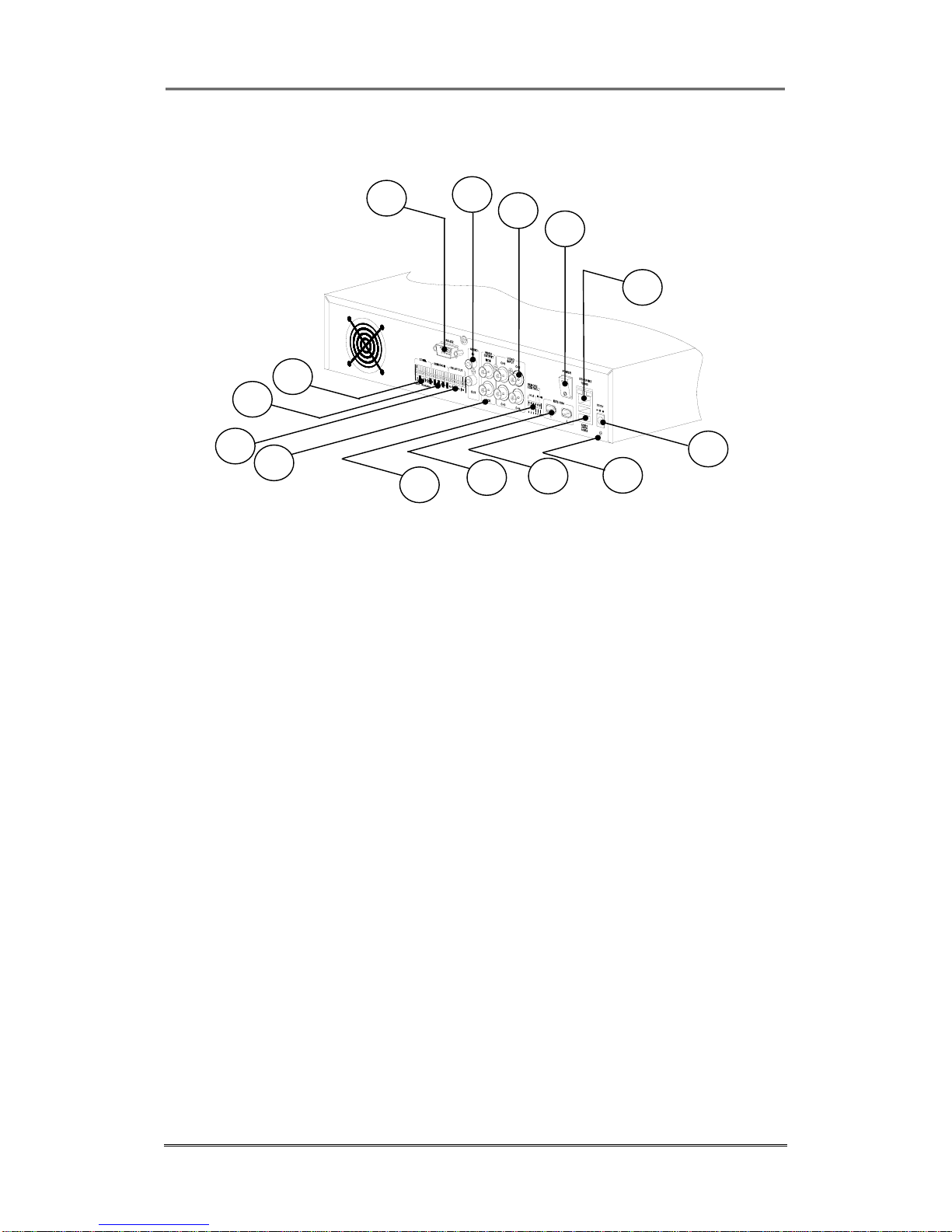
WDR-516S Rear
(7) Power switch
(8) Ethernet connector
(9) BNC connector for Video input
(10) Audio input / output connector
(11) RS232 connecter (9Pin D-Sub)
(12) Terminal block for RS232 & 422/485
(13) Terminal block for Sensor input
(14) Terminal block for Relay output
(15) Video output for MONITOR or VCR
(16) Video input type/impedance select & remote controller switch
(17) IEEE1394 connecter
(18) USB connecter
(19) Power connector (DC12V)
(20) GND
7
8
9
10
11
19
20
18
17
12
13
14 15 16
Indice