
Depaepe Telecom UC802P Manuale utente

1
ENTRY
LEVEL
HD
IP
PHONE
USER GUIDE
UC802(P)
Version:1.0.3.59
SAS HENRI DEPAEPE - 75/77 Rue du Pré-Brochet - 95110 Sannois - France

Notices Information
1
SAS HENRI DEPAEPE - 75/77 Rue du Pré-Brochet - 95110 Sannois - France
Notices Information
Safety cautions
ł
To use the Phone follow the instructions in this manual.
ł
To use the power adapter that delivered with the phone. Other power adapters may
damage the phone.
ł
The phone is only for indoor use. And also avoid in high humidity, water and some
other liquids.
ł
Do not use the phone during thunderstorms.
ł
CE
ł
FCC
Disposal of the phone
This symbol indicates that the product is classified as electrical or electronic
equipment and should not be disposed of with other commercial or household waste at
the end of its working life.
Cleaning
To clean the device, use an anti-static cloth. Please avoid cleaning liquids as they might
damage the surface or internal electronics of the phone

T
able of Content
SAS HENRI DEPAEPE - 75/77 Rue du Pré-Brochet - 95110 Sannois - France
Table of Content
Notices Information.......................................................................................................1
Safety cautions...........................................................................................................1
Disposal of the phone...............................................................................................1
Cleaning........................................................................................................................1
Table of Content..............................................................................................................2
Getting Started................................................................................................................4
Packing List.................................................................................................................4
Phone Installation.......................................................................................................6
1.Attach the Foot stand............................................................................................6
2. Connect the Handset and optional Headset ........................................................6
3. Connect the Network and Power.........................................................................7
Initialization..................................................................................................................7
Getting Familiar with Your Phone ............................................................................10
Hardware Components Preview...........................................................................10
Icon Preview ..............................................................................................................13
Memory Key Function Overview..........................................................................14
Basic Features Configuration...................................................................................16
Web Login...................................................................................................................16
Administrator Password.........................................................................................17
Language....................................................................................................................18
Time and Date............................................................................................................19
Screen Saver..............................................................................................................22
Ring Tone....................................................................................................................23
Volume.........................................................................................................................24
Directory.....................................................................................................................26
Basic Call Features......................................................................................................29
Place a Call.................................................................................................................29
End a Call....................................................................................................................30
Receive a Call............................................................................................................30
Auto Answer ..............................................................................................................31
Call Hold......................................................................................................................32
Call Transfer...............................................................................................................33
Call Conference ........................................................................................................34
Call Forward...............................................................................................................36
Call Return..................................................................................................................39
Anonymous Call.......................................................................................................40
Reject Anonymous...................................................................................................40
Call Mute.....................................................................................................................41
DND..............................................................................................................................41
Key as Send...............................................................................................................42
No Key Entry Timeout.............................................................................................42
Keypad Lock..............................................................................................................43
Hot Line.......................................................................................................................44
2

3
T
able of Content
SAS HENRI DEPAEPE - 75/77 Rue du Pré-Brochet - 95110 Sannois - France
Advanced Features......................................................................................................45
Voice Message...........................................................................................................45
Intercom......................................................................................................................46
Speed Dial ..................................................................................................................47
Direct Pickup.............................................................................................................48
Group Pickup.............................................................................................................49
BLF...............................................................................................................................49
Shared Line................................................................................................................51
Record.........................................................................................................................52
Call Park......................................................................................................................53
Paging..........................................................................................................................53
DTMF............................................................................................................................54
Prefix............................................................................................................................55
Upgrade...........................................................................................................................56
Factory Reset ............................................................................................................56
Upgrade.......................................................................................................................56
Troubleshooting............................................................................................................59
Why is the phone LCD screen blank?................................................................59
Why does the phone display "Network Unavailable"?..................................59
Why can’t I get a dial tone?...................................................................................59

Getting Started
SAS HENRI DEPAEPE - 75/77 Rue du Pré-Brochet - 95110 Sannois - France
Getting Started
Packing List
The package contains the following parts, please check if all the items are not missed:
The phone device
The footstand
Handset
4

Getting Started
SAS HENRI DEPAEPE - 75/77 Rue du Pré-Brochet - 95110 Sannois - France
Headset cord
Power adapter
Ethernet cable
Quick installation reference
5

Getting Started
6
SAS HENRI DEPAEPE - 75/77 Rue du Pré-Brochet - 95110 Sannois - France
Phone Installation
1.Attach the Foot stand
2. Connect the Handset and optional Headset

Getting Started
SAS HENRI DEPAEPE - 75/77 Rue du Pré-Brochet - 95110 Sannois - France
3. Connect the Network and Power
Initialization
After your phone has been powered up, the system boots up and performs the following steps:
Automatic Phone Initialization
The phone finishes the initialization process by loading the saved configuration. The phone LCD
screen will display "Booting"
7

Getting Started
8
SAS HENRI DEPAEPE - 75/77 Rue du Pré-Brochet - 95110 Sannois - France
And then show “Initializing “during the initialization.
By default the phone attempts to contact a DHCP server in your network in order to obtain its
valid network settings, e.g. IP address, subnet mask, default gateway, DNS server.
Getting Familia
r
with
Y
ou
r
Phone
10
SAS HENRI DEPAEPE - 75/77 Rue du Pré-Brochet - 95110 Sannois - France
Getting Familiar with Your Phone
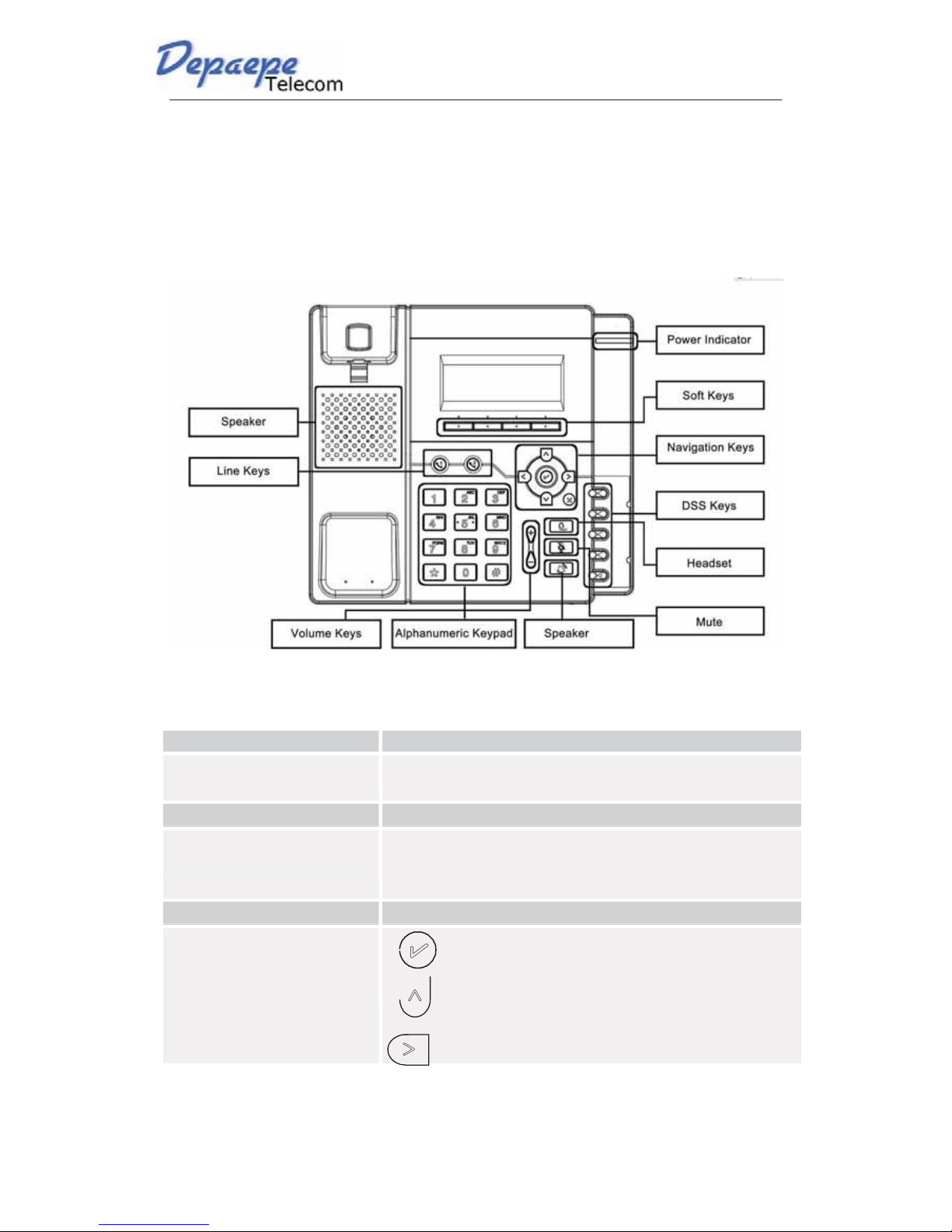
Hardware Components Preview
Item Description
LCD screen To Presentation all information about the date& time, accounts,
soft keys, messages, calls and other some information.
Power Indicator LED To indicate the power status
Line
key
s
The phone supported up to 4 accounts
Steady green: idle interface, during a call..
Blink red: a call incoming
Soft keys Labels automatically to identity their context-sensitivefeatures.
Navigation keys
1. OK.
Up arrow key: To move up of the selection shows on the
screen.
Right
arr
ow key:
T
o
move right
of
the selection
shows on the screen.
Questo manuale è adatto per i seguenti modelli
1
Indice
Altri manuali Depaepe Telecom Telefono IP

Depaepe Telecom
Depaepe Telecom UC806 Manuale utente

Depaepe Telecom
Depaepe Telecom progress Manuale utente

Depaepe Telecom
Depaepe Telecom UC862 Manuale utente

Depaepe Telecom
Depaepe Telecom Premium 300 Manuale utente

Depaepe Telecom
Depaepe Telecom HD 2000 series Manuale utente

Depaepe Telecom
Depaepe Telecom Securphone Manuale utente

Depaepe Telecom
Depaepe Telecom HD 2000 series Manuale utente


