4
11. Canadian Byo-yomi
When the Byo-yomi method is active it is possible to reload the Byo-
yomi time for the player whose time is currently counting down by
pressing and holding the BACK button for one second. After this
Byo-yomi time has appeared in the display a player must indicate their
turn is over.
Manual settings: Option 00
Option 00 offers the maximal freedom to set the DGT XL according to
your personal preferences. It is possible to choose from the different
timing methods, as well as to set your own preferred default settings,
or just to combine different systems. The maximum number of
personal default settings is 5; they can all be saved and recalled at a
time to your own choice.
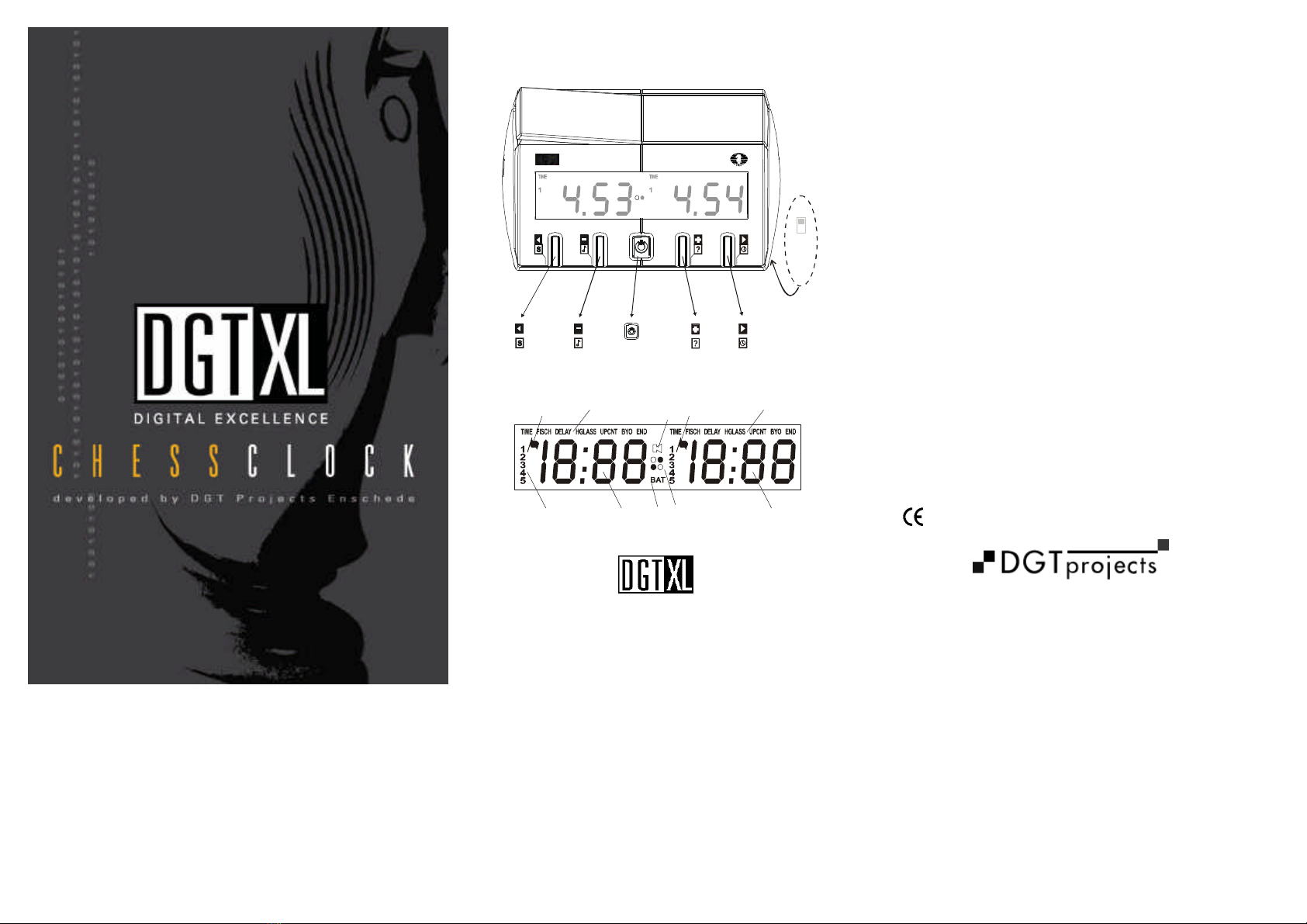
When starting the DGT XL select option 00 using the or buttons
and press to activate it.
1. Activating a default setting
To activate a default setting hold the Store button for a few
seconds while the option digit is flashing. (Load) will appear in the
left display. Then select one of the five default settings (1 .. 5, Fig. 2
B) by using the or buttons. Finally, press to confirm your
choice. By pressing the Run/Pause button briefly this default
setting is activated. By pressing the Run/Pause button again, the
timer will be activated for the start of a new game.
2. Manual settings
In a manual setting you can create up to five consecutive periods,
setting a standard method (Time, Fischer, Bronstein Delay, Hourglass,
Upcount, Byo-yomi) for each period with desired values for both time
and number of moves.
A manual setting can be saved after input.
Choose Option 00.
On the left the number 1 will appear (Fig. 2 B) to indicate the first
period has to be set.
Select a timing method (Fig. 2 C) by proceeding to the desired method
using the or buttons buttons. Confirm by pressing .
Set the standard time for the player on the left in the left display. Use
the or buttons and confirm by pressing . It is possible to return
to the previous digit using the (BACK) button. Set after each other:
Hours, tens of minutes, single minutes, tens of seconds, seconds.
Continue to the right display and repeat the procedure for the player on
the right.
When using ‘Fischer’ or ‘Bronstein’ Delay, subsequently set the extra
time per move or the delay time per move in minutes and seconds.
When using ‘Fischer’, you will also have to set the number of moves
for the first period afterwards.
When using ‘Fischer’ the following is of particular importance: When
using ‘Fischer’, it is possible to choose when to start the next period.
If you set the number of predetermined moves as 00, the next period
will start as soon as the first player has run out of time. However, if
you set a number between 01 and 99, the next period will start as
soon as the player has individually completed this number of moves.
If you just want to set one period, then proceed to END by pressing
or buttons and confirm by pressing .
If you want to set multiple periods, then first choose the timing
method you want to use for each period and then complete the
procedure per period as indicated above. After you have set the last
period, finish by pressing END.
Note: Not all sequences of methods are allowed to be set. If
logically a sequence of settings is impossible, it is impossible to
select these settings. If, for example, the second period has been
specified as Upcount, it is impossible to set a third period after
Upcount.
If you want to save the set time, hold the STORE button for a few
seconds. (Program) will now appear in the left display. Continue
choosing the number (1 to 5) (Fig. 2 B) of the default setting using
or buttons and confirm by pressing .You can start the game by
pressing Run/Pause .
Below you will find two examples of setting a program. On our
Internet site, www.dgtprojects.com, you will find more examples.
3. A simple example
Suppose you want to play a game with 15 minutes for the player on
the left and 30 minutes for the (slightly weaker) player on the right.
Suppose you want to save this as default setting number 3.
•Select option number 00
•Confirm by pressing
•Select TIME
•Confirm by pressing
•Set as follows: 0, , 1, , 5, , 0, , 0, , 0, , 3, , 0,
, 0, , 0,
•Select END
•Confirm by pressing
•Hold the button for a few seconds
•Select default setting number 3
•Confirm by pressing
4. A complex example
Suppose you want to play in 3 periods. 40 moves in 1 hour and 30
minutes, followed by 20 moves in 30 minutes, and finish playing
‘’Fischer’’ with an extra 20 seconds attracted per move. Suppose you
save it as default setting number 5.
•Select option number 00
•Confirm by pressing
•Select TIME
•Confirm by pressing
•Set as follows: 1, , 3, , 0, , 0, , 0, , 1, , 3, 0, ,
0, , 0,
•This completes period 1
•Again select TIME
•Confirm by pressing
•Set as follows: 0, , 3, , 0, , 0, , 0,
•This completes period 2
•Select ‘FISCH’
•Set as follows: 0, , 1, , 0, , 0, ,0, , (= 10 minutes
standard time) 0, , 2, , 0, (=20 seconds extra per move)
0, , 0, (=number of moves 0, for a final period using
‘Fischer’ set 0 as the number of moves, for multiple periods set
the number of moves per period)
•Select END
•Confirm by pressing
•Hold the button for a few seconds
•Select default setting number 5
•Confirm by pressing .