
DH-Vision Auto-tracking High Speed Dome Camera Manuale utente

About this Manual: Before installation and use of this machine, please read this manual carefully.
Please make sure to keep this manual for future reference
AUTO TRACKING
HIGH SPEED DOME CAMERA
User’s Manual

CONTENTS
1. PRECAUTIONS‑ 1
1.1. TRANSPORTATION SECURITY‑ 1
1.2. INSTALLATION‑ 1
1.3. DISMANTLEMENT‑ 1
1.4. INTERNAL ENVIRONMENT ‑ 1
1.5. ELECTRICAL SAFETY‑ 1
1.6. CAMERA PROTECTION‑ 1
1.7. CLEANING METHOD‑ 1
2. FEATURES‑ 2
2.1. BUILT‑IN DECODER‑ 2
2.2. INTEGRATED UNIVERSAL SPEED CHANGE ROTATOR‑ 2
2.3. BUILT‑IN HIGH DEFINITION DAY/NIGHT CAMERA‑ 2
2.4. ALL‑WEATHER OUTDOOR DESIGN‑ 3
3. TECHNICAL DATA‑ 3
4. INSTALLATION GUIDE‑ 4
4.1. INSTALLATION PREPARATION‑ 4
4.2. STRUCTURE ‑ 4
4.3. INSTALLATION SIZE‑ 5
4.4. INSTALLATION PROCEDURES ‑ 5
5. SETTINGS‑ 9
5.1. INTERFACE‑ 9
5.2. DOME ADDRESS, TRANSMISSION SPEED, PROTOCOL SETTING‑ 9
6. THE OSD MENU SETTING‑ 11
6.1. OPERATION METHOD OF THE MENU‑ 11
6.2. OSD MENU TREE‑ 12
7. TROUBLE SHOOTING‑ 28
CONTENTS

PRECAUTIONS
1
1. PRECAUTIONS
1.1. TRANSPORTATION SECURITY
No heavy stress, violent vibration or water splash are allowed during transportation,
storage. The unit should be transported in separated packing. In shipments of
distributor and delivery of maintenance, any damages caused by integral packing
are not covered by warranty.
1.2. INSTALLATION
Avoid heavy stress and violent vibration during installation. Don’t touch the dome
cover directly by hand. When connecting the power source, please follow all electric
safety standards and only use the power supply designated for this device. Keep the
video and control signal in a decent distance from high voltage devices and cable.
Don’t apply power to the dome before nishing the installation.
1.3. DISMANTLEMENT
Please don’t dismantle the devices in the dome body. Only the professional
personnel authorized can operate the maintenance.
1.4. INTERNAL ENVIRONMENT
Keep metal and inflammable material away from dome body to avoid fire, short
circuit and damage. Please prevent all liquids material from entering the dome.
If occur this, please shut down the power and pull out the plug. Then inform the
technical personnel immediately.
1.5. ELECTRICAL SAFETY
The video image would be interfered when the dome is installed near television,
radio transmitter, voltage changer and audio amplier.
1.6. CAMERA PROTECTION
Avoid shooting very bright objects directly into the camera’s CCD (such as the sun
or light ttings).
1.7. CLEANING METHOD
Please don’t use abrasive and violent detergent to clean the dome. Please choose
dry fabric and neutral detergent. Use lens paper to clean the lens.

FEATURES
2
2. FEATURES
2.1. BUILT-IN DECODER
• Support auto tracking function, support area setting valid tracking area
• Support alarm function of cross line detection
• Support alarm function of object leave over detection
• Support alarm function of object loss detection
• Power-o protection, no data loss
• 220 programmable presets
• 8 cruising tracks, each cruising track has 32 preset positions
• 4 pattern tours, each one with 180s memory
• RS-485 bus
• 8 groups of auto scan, the left and right boundary and scan speed can be set
• Pelco_P and Pelco_D compatible
• 6 alarm inputs and 2 outputs
• Message display function, lens coordinate value, temperature and alarm
information can be showed
• Guard location, the dome can operate preset, auto scan, cruising and pattern
tours functions after a short pause
• Alarm triggering, the alarm can trigger preset, auto scan, cruising and pattern
tours functions
2.2. INTEGRATED UNIVERSAL SPEED CHANGE ROTATOR
• Delicate stepping motor, stable, sensitive and accurate
• 360°continuous pan without blind area
• Stepless speed change, auto zoom/speed matching
• Auto overturn function
• Manual speed: Pan: 0.01°- 180°/S, Tilt: 0.01°- 120°/S
• Presets calling speed: 500°/S
2.3. BUILT-IN HIGH DEFINITION DAY/NIGHT CAMERA
• Auto iris, auto back light compensation
• Auto/manual white balance
• Auto/manual focus
• Auto/manual brightness control
• 480TV line
• Multiple kinds of camera for options

TECHNICAL DATA
3
2.4. ALL-WEATHER OUTDOOR DESIGN
• Built-in heater
• Built-in fan, can operate in 60°C
• High Die-cast Aluminum Construction
• IP66 water proof
• 3000V lightning and surge current proof
3. TECHNICAL DATA
TECHNICAL PARAMETERS OF THE HIGH-SPEED DOME
Model
Power Supply AC24V/2.5A
Operating Temperature -35 °C—60°C
Operating moisture < 95%
Power Consumption 50W
Communication RS-485 bus,
Communication transmission speed 2400/4800/9600BPS
Protocols Pelco-D, Pelco-P Compatible
Pan Rotation 0.01°-180° /s
Tilt Rotation 0.01° -120° /s
Pan/Tilt Accuracy +/- 0.07°
Preset Speed 500° /s
Pan Angle 360° Continuously
Tilt Angle 90°
Size 364 x 350 x 202mm
Weight 5.6kg
Preset Positions 220
Auto Scan 8 Groups
Cruise Track 8 Groups
Cruise Points Qty per cruise group 32 Preset Positions
Pattern Tours 4 Groups
Alarm 6 alarm inputs and 2 outputs
Privacy Zone 8 zones
Protection IP66 water proof/3000V lightning proof
Fan, Heater Fan and heater auto-starts 24VAC
Auto-tracking High Speed Dome Camera

INSTALLATION GUIDE
4
4. INSTALLATION GUIDE
4.1. INSTALLATION PREPARATION
VIDEO COAXIAL CABLES
MODE MAX DISTANCE
RG59/U 750ft(229m)
RG6/U 1,000ft(305m)
RG11/U 1,500ft(457m)
4.2. STRUCTURE

INSTALLATION GUIDE
5
4.3. INSTALLATION SIZE
4.4. INSTALLATION PROCEDURES
*Notice: The wall must be thick enough to install the expansion screws and can bear
4 times the weight of the dome camera itself.
(1) Bore 4 holes by using templates included on the wall.
(2) Mount 4 expansion screws into the holes.

INSTALLATION GUIDE
6
(3) Put the cables through the bracket. Fix the dome base and the bracket with M6
screws
(4) Use M 8 screw-caps and shims to x the bracket on the wall.
(5) Attach the dome cover to the dome base with rope.

INSTALLATION GUIDE
7
(6) Set the dome address, system baud rate and protocol by configuring DIP
switches SW1 and SW3 located on the side of dome body. The Plug-in on the dome
body must be seated rightly with the socket on the dome base.
(7) To lock the dome body to the dome base, line up the A and B tabs on the dome
body with the A and B label on the dome base. Push in on the tabs. Insert one side
and then the other side. Continue pushing one the ends of the tabs until both
sides click into place. Make sure the plug-in on the dome body is fully locked by the
socket on the dome base. Then press the dome body lightly and check if the dome
body is fully locked to avoid shedding and abrasion with the dome cover.
INSTALLATION GUIDE
8
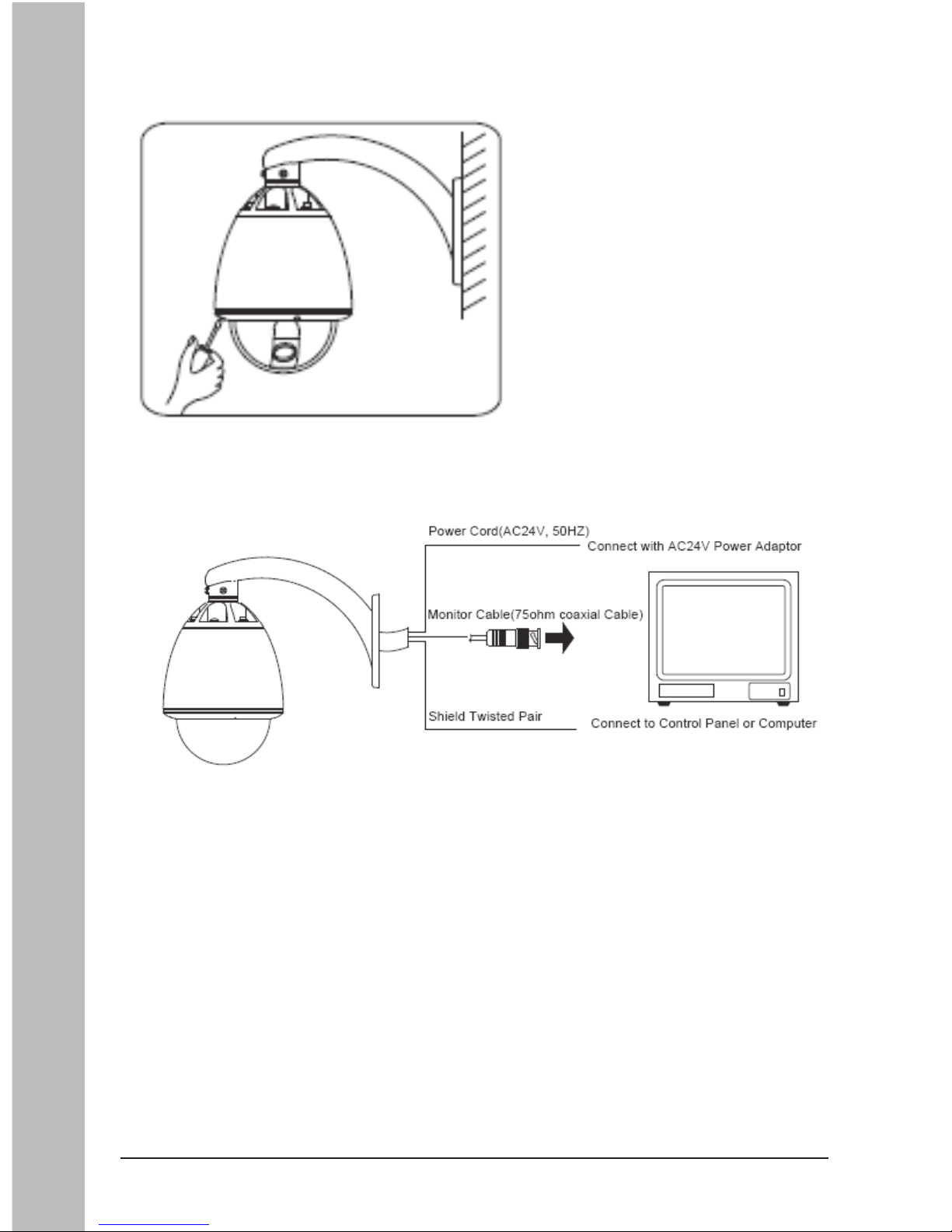
(8) Fix the dome cover with screws.
(9) Cable Connection:
Indice


