digi-tech HardWire HT-2 Manuale utente
HARDWIRE HT-2
CHROMATIC TUNER
OWNER’S MANUAL

DECLARATION OF CONFORMITY
Manufacturer’s Name: Harman Signal Processing
Manufacturer’s Address: 8760 S. Sandy Parkway
Sandy, Utah 84070, USA
declares that the product:
Product name: HT-2
Product option: All (requires Class II power adapter
that conforms to the requirements
of EN60065, EN60742, or
equivalent.)
conforms to the following Product Specifications:
Safety: IEC 60065 -01+Amd 1
EMC: EN 55022:2006
EN 55024:1998
FCC Part 15
Supplementary Information:
The product herewith complies with the requirements
of the:
Low Voltage Directive 2006/95/EC
EMC Directive 2004/108/EC.
RoHS Directive 2002/95/EC
WEEE Directive 2002/96/EC
EC Regulation 278/2009
With regard to Directive 2005/32/EC and EC Regulation
1275/2008 of 17 December 2008, this product is designed,
produced, and classified as Professional Audio Equipment and
thus is exempt from this Directive.
With regard to the PS200R and Directive 2005/32/EC and EC
Regulation 278/2009 of 6 April 2009, this regulation applies to
Class A (single output) external power supplies.The PS200R
used with this product is a multi-output power supply and
thus is exempt from this Directive.
Roger Johnsen
Vice-President of Engineering
8760 S. Sandy Parkway
Sandy, Utah 84070, USA
Date: October 4, 2010
European Contact:Your local DigiTech Sales and Service
Office or
Harman Signal Processing
8760 South Sandy Parkway
Sandy, Utah 84070 USA
Ph: (801) 566-8800
Fax: (801) 568-7583
WARNING
For your protection, read the following:
Important Safety Instructions
1. Read these instructions.
2. Keep these instructions.
3. Heed all warnings.
4. Do not use this apparatus near water.
5. Clean only with dry cloth.
6. Do not block any ventilation openings. Install in accordance
with the manufacturer’s instructions.
7. Do not install near any heat sources such as radiators, heat
registers, stoves, or other apparatus (including amplifiers)
that produce heat.
8. Protect the power cord from being walked on or pinched
particularly at plugs, convenience receptacles, and the point
where they exit from the apparatus.
9. Unplug this apparatus during lightning storms or when
unused for long periods of time.
10. No user serviceable parts inside. Refer all servicing to
qualified service personnel. Servicing is required when
the apparatus has been damaged in any way, such as power-
supply cord or plug is damaged, liquid has been spilled
or objects have fallen into the apparatus, the apparatus
has been exposed to rain or moisture, does not operate
normally, or has been dropped.
11.WARNING:To reduce the risk of fire or electric shock, do
not expose this apparatus to rain or moisture.
12. Refer to labels on the unit, including bottom cover, for
other markings and pertinent information.
ELECTROMAGNETIC
COMPATIBILITY
This device complies with part 15 of the FCC Rules
and the Product Specifications noted on the Declara-
tion of Conformity. Operation is subject to the fol-
lowing two conditions:
• this device may not cause harmful interference,
and
• this device must accept any interference received,
including interference that may cause undesired
operation.
Operation of this unit within significant
electromagnetic fields should be avoided.
• use only shielded interconnecting cables.
If you want to dispose of this product, do not mix it with general household waste.
There is a separate collection system for used electronic products in accordance with
legislation that requires proper treatment, recovery, and recycling.
Private households in the 25 member states of the EU, in Switzerland and Norway may return their
used electronic product free of charge to designated collection facilities or to a retailer (if you
purchase a similar new one).
For countries not mentioned above, please contact your local authorities for a correct method of
disposal.
By doing so you will ensure that your disposed product undergoes the necessary treatment, recovery,
and recycling and thus prevent potential negative effects on the environment and human health.

WARRANTY:
We at DigiTech® are very proud of our products and back-up each one we sell with the following warranty:
1. Please register online at www.digitech.com within ten days of purchase to validate this warranty.This warranty is
valid only in the United States.
2. DigiTech warrants this product, when purchased new from an authorized U.S. DigiTech dealer and used solely within
the U.S., to be free from defects in materials and workmanship under normal use and service.This warranty is valid
to the original purchaser only and is non-transferable.
3. DigiTech liability under this warranty is limited to repairing or replacing defective materials that show evidence of
defect, provided the product is returned to DigiTech WITH RETURN AUTHORIZATION, where all parts and labor
will be covered up to a period of one year (this warranty is extended to a period of six years when the product
has been properly registered through our website).A Return Authorization number may be obtained from DigiTech
by telephone.The company shall not be liable for any consequential damage as a result of the product’s use in any
circuit or assembly.
4. Proof-of-purchase is considered to be the responsibility of the consumer. A copy of the original purchase receipt
must be provided for any warranty service.
5. DigiTech reserves the right to make changes in design, or make additions to, or improvements upon this product
without incurring any obligation to install the same on products previously manufactured.
6. The consumer forfeits the benefits of this warranty if the product’s main assembly is opened and tampered with by
anyone other than a certified DigiTech technician or, if the product is used with AC voltages outside of the range
suggested by the manufacturer.
7. The foregoing is in lieu of all other warranties, expressed or implied, and DigiTech neither assumes nor authorizes
any person to assume any obligation or liability in connection with the sale of this product. In no event shall DigiTech
or its dealers be liable for special or consequential damages or from any delay in the performance of this warranty
due to causes beyond their control.
NOTE: The information contained in this manual is subject to change at any time without notification. Some information
contained in this manual may also be inaccurate due to undocumented changes in the product or operating system since
this version of the manual was completed.The information contained in this version of the owner’s manual supersedes all
previous versions.

1
Introduction
More than a remarkable achievement, DigiTech’s HardWire®series represents
a collection of significant improvements in guitar effects pedals.The HardWire
series pedals provide a suite of well-known effects, each with superior tone and
control. But these pedals go above and beyond their peers to provide such
distinguishing features as true bypass and high voltage operation, making them
essential additions to the signal chain of players who know about sound quality
and demand the utmost in performance.
Included Items:
• HardWire HT-2 Tuner
• Foot Switch Glow Sticker
• Hook-and-loop Pedalboard Pad
• Online Warranty Registration Information Card
2
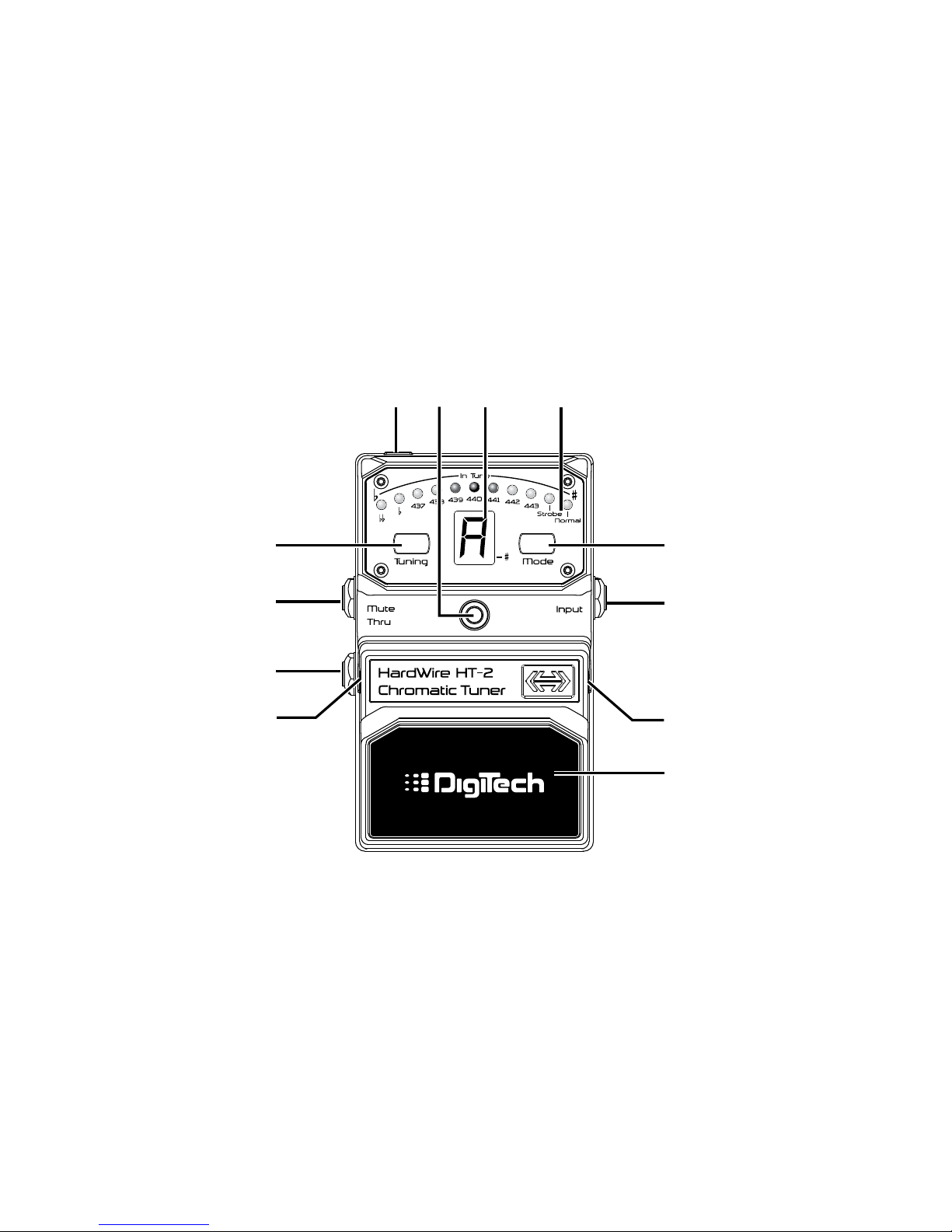
Pedal Interface
2
4
5
6
11
1
3
7
3
8 9 10

3
What Does This Do?
1. Mode Button - Selects the display mode (Normal or Strobe) for the
Tuning LED Array.The modes are labeled below the last two LEDs of
the Tuning LED Array.
2. Input - Connect your instrument here.This jack enables battery
power to the pedal when connected.To prolong battery life,
disconnect the cable from the Input jack when not in use. If the
optional Harman power supply is used, cables can remain connected.
3. Foot Switch Release Pins - These two pins are spring loaded
hinges that hold the Foot Switch in place. See page 14 for information
on accessing and changing the battery.
4. Foot Switch - Turns the Tuner on and off.

4
5. Thru Output - Connect this output to the input of your amp or
the input of another pedal if you want the output signal from your
instrument to be audible when the tuner is enabled.
6. Mute Output - Connect this output to the input of your amp or
the input of another pedal if you want the output signal from your
instrument to be muted when the tuner is enabled.
7. Tuning Button - Selects the different tuning references.The tuning
references are labeled below the first 9 LEDs of the Tuning LED Array.
8. DC Adapter Jack - Connect the optional Harman power supply to
this jack. Use the proper supply for your area’s mains line voltage.

5
9. LED Indicator - Lights when the effect is turned on.When battery
power is low (approximately 15 minutes before it dies), the Indicator
LED begins to dim giving you advanced warning that very shortly you
will need to replace the battery.
10. Note Display - Displays the note being tuned.The decimal point in
the lower right corner of the display will light to indicate the sharp of
the note is played (i.e. G. = G#).
11. Tuning LED Array - These eleven LEDs are used for displaying
whether the note being tuned is sharp or flat.They are also used to
indicate tuning references and tuning LED array modes.

6
Connecting the Tuner
The HT-2 Tuner has a single 1/4" Input and two 1/4" Outputs – MUTE and
THRU.The HT-2 offers true hardwire bypass when not in use to preserve your
guitar’s signal without any loss or buffering into your amp and other effects.
If you use the HT-2 on a pedal board with other effects devices, it doesn’t
really matter where in your effects chain the HT-2 is placed as long as any
effects placed before it are bypassed before you use the HT-2.Therefore, we
recommend placing the HT-2 before the rest of your pedal effects so you don’t
have to bypass other effects on your pedal board just to tune.
Altri manuali per HardWire HT-2
1
Indice
Altri manuali digi-tech Amplificatore per strumenti musicali