digico DQ-Rack Manuale utente

DQ & MQ-Rack User Guide
Issue A - August 2021

DQ & MQ-Rack User Guide 1.1 Introduction
1

DQ & MQ-Rack User Guide 1.1 Introduction
2

DQ & MQ-Rack User Guide 1.1 Introduction
3
Copyright © 2021 Digico UK Ltd
All rights reserved.
No part of this publication may be reproduced, transmitted, transcribed, stored in a retrieval system, or translated into any language in any form by any
means without the written permission of Digico UK Ltd. Information in this manual is subject to change without notice, and does not represent a
commitment on the part of the vendor. Digico UK Ltd shall not be liable for any loss or damage whatsoever arising from the use of information or any
error contained in this manual.
All repair and service of the SD products should be undertaken by Digico UK Ltd or its authorised agents. Digico UK Ltd cannot accept any liability
whatsoever for any loss or damage caused by service, maintenance, or repair by unauthorised personnel.
Software Licence Notice
Your license agreement with Digico UK Ltd, which is included with the SD product, specifies the permitted and prohibited uses of the product. Any
unauthorised duplication or use of Digico UK Ltd software, in whole or in part, in print or in any other storage and retrieval system is prohibited.
Licences and Trademarks
The SD logo and SD name are trademarks, and Digico UK Ltd and the Digico UK Ltd logo are registered trademarks of Digico UK Ltd. Microsoft is a
registered trademark and Windows is a trademark of Microsoft Corp.
Digico (UK) Ltd
Unit 10
Silverglade Business Park
Leatherhead Road
Chessington
Surrey
KT9 2QL
England
Telephone: +44 (0)1372 845600
Fax: +44 (0)1372 845656
Email: sales@digiconsoles.com
WWW: http://www.digico.biz
Manual Issue and Date: Issue A –August 2021

DQ & MQ-Rack User Guide 1.1 Introduction
4
Licence Agreement
"Product": SD software product produced by Digico UK Ltd intended for use on Target Platform identified below.
"Target Platform": Digico SD Digital Console systems.
In return for the payment of the one-time fee, the Customer (identified at the end of this Agreement) receives from Digico UK Ltd a licence to use the
Product subject to the following terms and conditions.
1. The Product may be used without time limit by the Customer on the Target Platform.
2. The Customer must register the Product with Digico UK Ltd. Registering the Product is deemed an acceptance of the terms and conditions in this
agreement.
3. The Product and its licence are not transferable, and the Customer is not permitted to onward-license to any third party. The Customer indemnifies
Digico UK Ltd against any and all claims and actions arising from third party use of copies of the Product made by the Customer.
4. The Customer agrees not to attempt to decompile the object code of the Product otherwise than in circumstances specifically provided for by law,
and then only after consultation with Digico UK Ltd.
5. The Customer agrees not to use, or licence the Product for use, with equipment other than the Target Platform.
6. The Customer agrees not to modify the Product without the prior written consent of Digico UK Ltd.
7. This Agreement applies to any enhancement or upgrades that may become available for the Product.
8. This Agreement does not transfer any right, title, or interest in the Product to Customer except as specifically set forth herein.
9. Digico UK Ltd reserves the right to terminate this Agreement upon breach, in which event Customer shall thereafter only be authorised to use the
Product to the extent that its contractual commitments to third parties require and then only where such commitments relate to use of the Product as
authorised in the foregoing provisions of the Agreement.
LIMITED WARRANTY - Digico UK Ltd warrants for a period of 1 year from the date of purchase of the Product, the Product will reasonably execute its
programming instructions when properly installed on the Target Platform. In the event that this Product fails to execute its programming instructions
during the warranty period, the Customer's remedy shall be to return the Product to Digico UK Ltd for replacement or repair at Digico UK Ltd option.
Digico UK Ltd makes no other express warranty, whether written or oral with respect of this Product.
LIMITATION OF LIABILITY - Except as otherwise expressly provided by law, (a) the remedies provided above are the Customer's sole and exclusive
remedies and (b) Digico UK Ltd shall not be liable for any direct, indirect, special, incidental, or consequential damages (including lost profit whether
based on warranty, contract, tort, or any other legal theory.)
This agreement is made under the Laws of England.
LICENCE NO: ..................................................................................................................................................
REGISTRATION DATE:
..................................................................................................................................................

DQ & MQ-Rack User Guide 1.1 Introduction
5
Contents
1.1 Introduction............................................................................................................................. 6

Q-Rack Unit and Modules, Installation Notes ................. ................................................... 6
1.2 Q-Rack Power .......................................................................................................................... 8
1.3 Q-Rack Clocking ....................................................................................................................... 8

1.4 Q-Rack Sockets ........................................................................................................................ 8

Analogue Line/AES Output sockets ...................................... ............................................. 8
1.5 Using the Q-Rack Menu System................................................................................................ 9
MQ-Rack navigation ........................................................................................................10
DQ-Rack navigation .........................................................................................................10
Main Display.....................................................................................................................11
Status Menu....................................................... ..............................................................12

Line/AES Menu ................................................... .............................................................12
Oscillators Menu...............................................................................................................13
PSU Status Menu ..............................................................................................................13
Version Menu ..................................................................................................................13
Display Menu ...................................................................................................................14
Default Rack Menu ...........................................................................................................14
MADI Sync Menu (MQ-Rack only) .....................................................................................15
Out Routing Menu (MQ-Rack only) .............................................................. .....................15

Internal SR Menu (MQ-Rack only) .....................................................................................15
Network Menu (DQ-Rack only) .........................................................................................16
1.6 Connecting a DANTE rack ........................................................................................................17
1.7 Rack Connections with MADI...................................................................................................20
Single Console to Rack with MADI at 48KHz......................................................................20
Single Console to Rack with MADI at 96KHz......................................................................20
Sharing Racks with MADI .................................................................................................21

DQ & MQ-Rack User Guide 1.1 Introduction
6
1.1 Introduction
Q-Rack Unit and Modules, Installation Notes .................
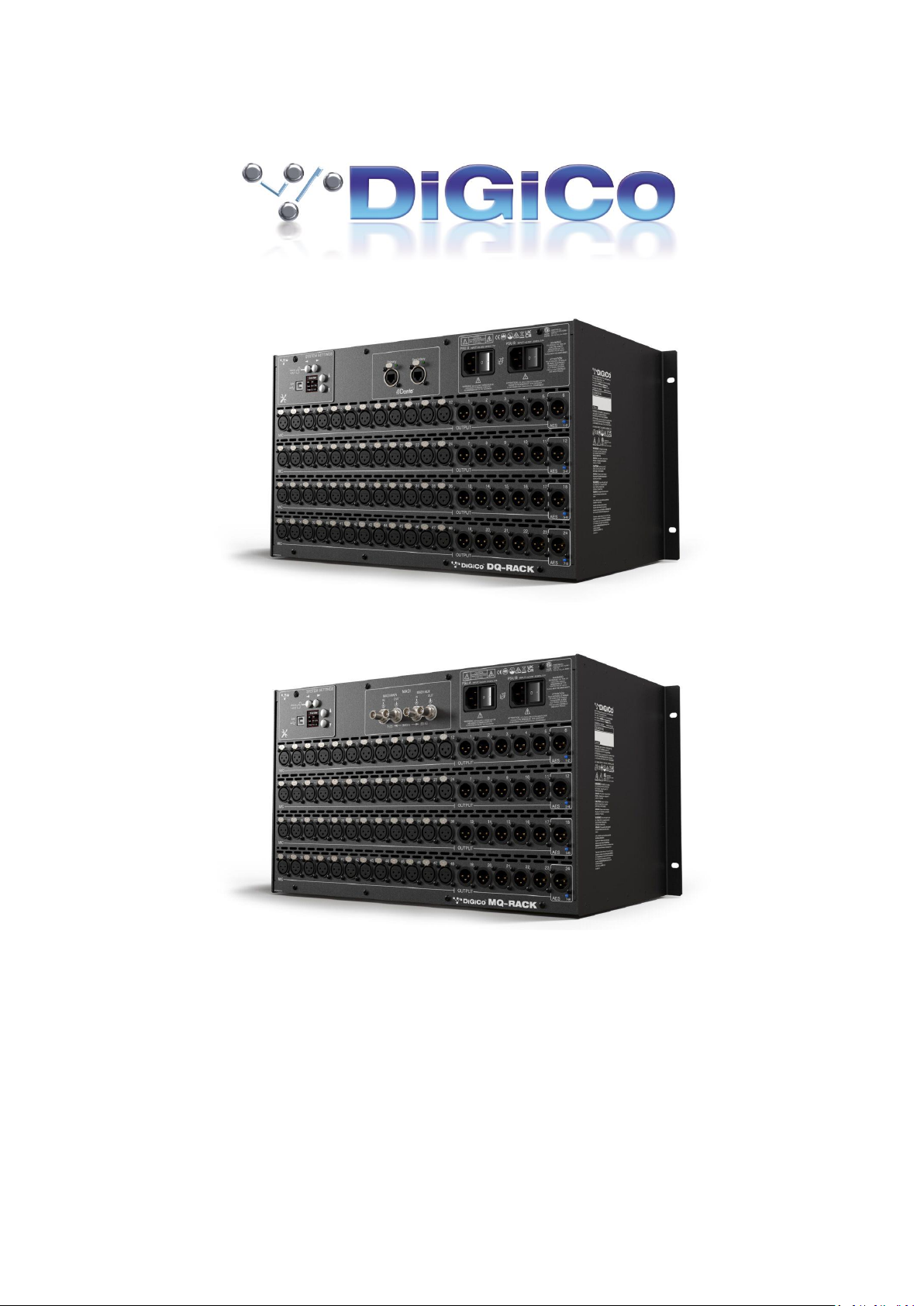
The Q-Rack Unit is a 19-inch chassis with a control panel and PSUs at the top. It is a standard 19" rack mount
wide - Dimensions: 482.7mm (w) x 253mm (d) x 265.9mm (h). Weight: 11kg
Rack Mains Earthing
The Q-Rack Unit must be earthed to the mains earth according to the safety instructions included with the
rack. The rack has twin supplies each with their own separate mains power connections, with 2 IEC mains
inputs per rack, which must be separately connected to the mains earth.
Rack Control Panel Connections
MADI I/O BNC 4 sockets (2 Pairs) of I/O to Console
USB type B
Mains Power IEC power x 2 Dual redundant supplies
Power Requirements: 100-240V~, 50-60Hz, 2.0A
Requires 2 separate mains connections.
Input / Output Slots
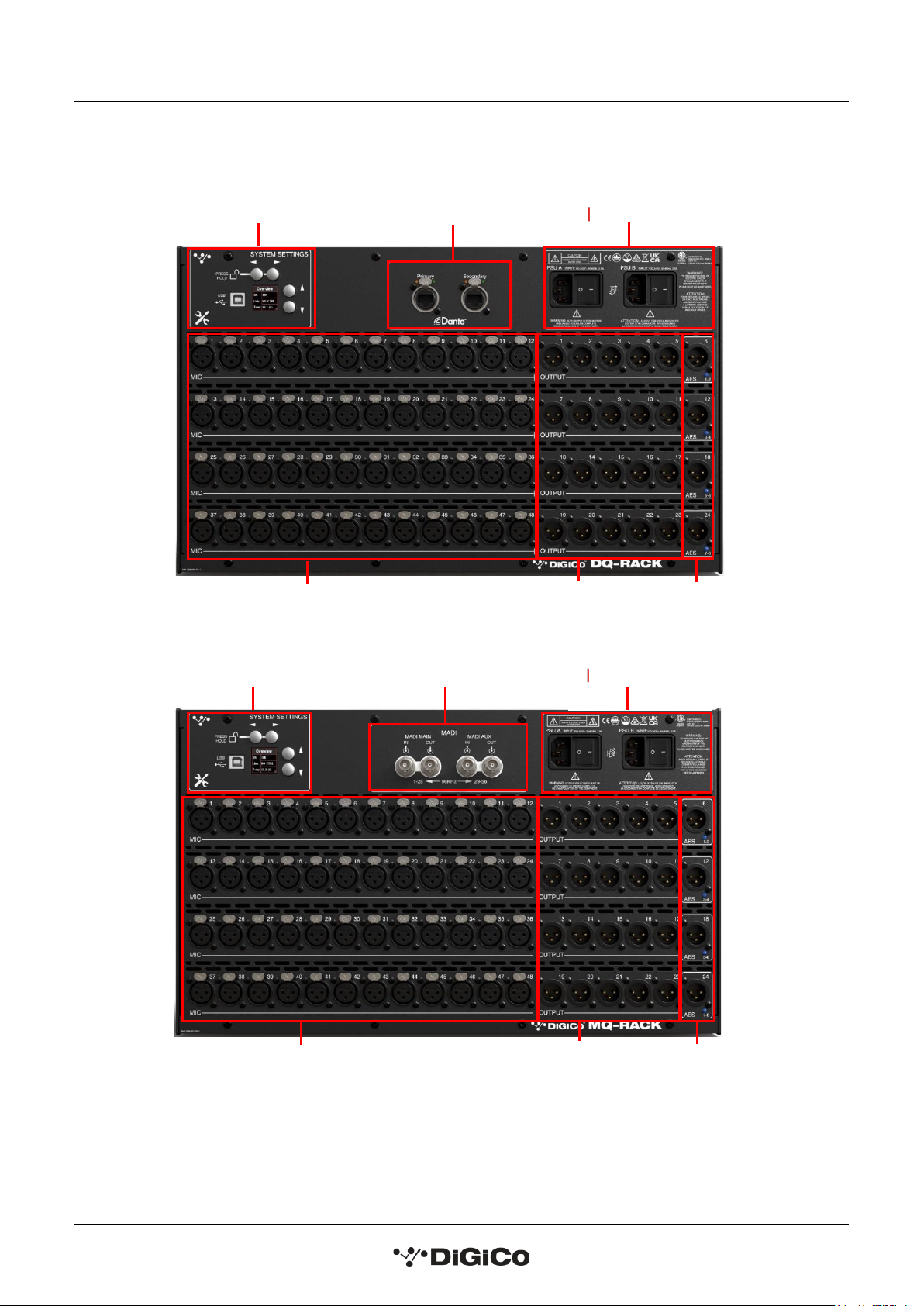
Below the panel, the Rack Unit has Input and Output slots consisting of 48 Analogue Mic/Line Inputs and 24
Analogue outputs (4 of these are switchable to AES Mode).

DQ & MQ-Rack User Guide 1.1 Introduction
7
NOTE: DQ & MQ-Racks are only compatible with SD and Quantum consoles running
V1454+ of application software
System Settings
Controls
D ual Redundant PSUs
48 MIC inputs
20 Analogue
Outs
4 Line Out/AES
Switchable Outs
DANTE Ports
D ual Redundant PSUs
MADI Pod
System Settings
Controls
20 Analogue
Outs
4 Line Out/AES
Switchable Outs
48 MIC inputs

DQ & MQ-Rack User Guide 1.2 Q-Rack Power
8
1.2 Q-Rack Power
The Q-Rack has dual redundant power supplies. The rack should be operated with both power supplies on
whenever possible.
1.3 Q-Rack Clocking
The Q-Rack will receive clock sync from the connected console in normal operation. It can run at 48KHz or
96KHz when clocked by the console.
The MQ-Rack can also receive sync from its own internal clock- see section 1.5.13 Internal SR Menu.
1.4 Q-Rack Sockets
The Q-Racks have a set of 48 mic inputs and 24 line outputs, 4 of which can be changed to AES or line out via
the system settings on the rack.
Note: On Quantum consoles, the status of the 4 switchable Line Out/AES sockets can be viewed and
changed between AES and Line outputs in the Audio I/O panel.
Analogue Line/AES Output sockets ......................................
The 4 switchable output sockets (6, 12, 18 and 24) have a LED indicator light below the socket.
A blue light on one of the switchable AES/Line output sockets indicates that the socket is set to be an AES
output in its current state.

DQ & MQ-Rack User Guide 1.5 Using the Q-Rack Menu System
9
1.5 Using the Q-Rack Menu System
The LCD Menu System on the rack is normally in a locked state and cannot be accessed.
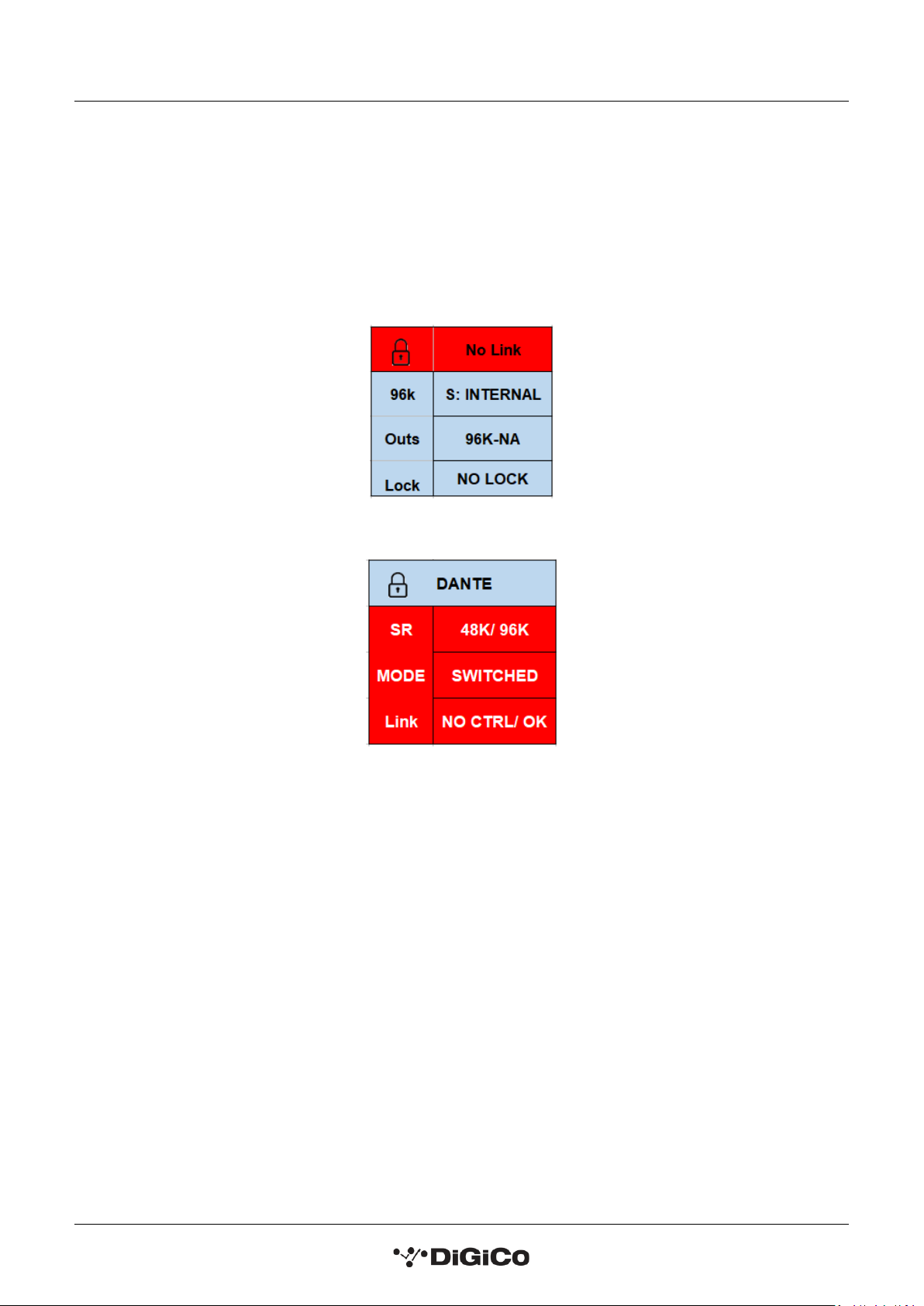
The main display will be visible and if the rack is not connected to a console the background colour will be light
blue with a band of red on the MQ-Rack and flashing red on the DQ-Rack.
If the rack is connected to a console the display will flash green.
MQ-Rack Lock screen
DQ-Rack Lock screen
Pressing and holding the 2 buttons marked with left and right arrows for 2 seconds unlocks the Menu System.
The Left/Right buttons scroll through the pages in the Menu System and the Up/Down buttons are used to
select each item within pages that have multiple items. When an item's value can be changed the Left/Right
arrows are used for this.
If the rack is left in an idle state for 2 minutes, it will relock itself.
Please refer to the following diagram for menu navigation details.
Questo manuale è adatto per i seguenti modelli
1
Indice
Altri manuali digico Miscelatore


