
DIGIWEB Fritz!Box 4040 Manuale utente

1
Quick Start Guide
Fritz!Box 4040 / Fritz!Box 7560
Digiweb Electric Broadband
2
Contents
Step 1: Unpack Contents Page 3
Introducing SIRO’s Optical Network Terminal (ONT) Page 4
Step 2: Connect the 12V 2A DC Power Supply Unit (PSU) Page 5
Step 3: Fritz!Box 4040 Connect the Ethernet Cable Page 6
Step 3: Fritz!Box 7560 Connect the Ethernet Cable Page 7
Step 4: Enable Wi-Fi Connection Page 8
Step 5: Activate Wireless Connection Page 9
Step 6: Choose your Wireless Network Page 10
Step 7: Wi-Fi Network Security Key / Password Page 11
Step 8: Broadband Talk VoIP Phone Setup Page 12
Internet Connection Status Page 13
Manual Configuration Settings Page 14
Troubleshooting - Fritz!Box Page 15
Troubleshooting - SIRO’s Optical Network Terminal (ONT) Page 16
Factory Reset Page 17
User Manuals / Parental Controls Page 19
Digiweb Contact Details Page 20
3
FON
FON
WLAN
DECT
Step 1: Unpack Contents
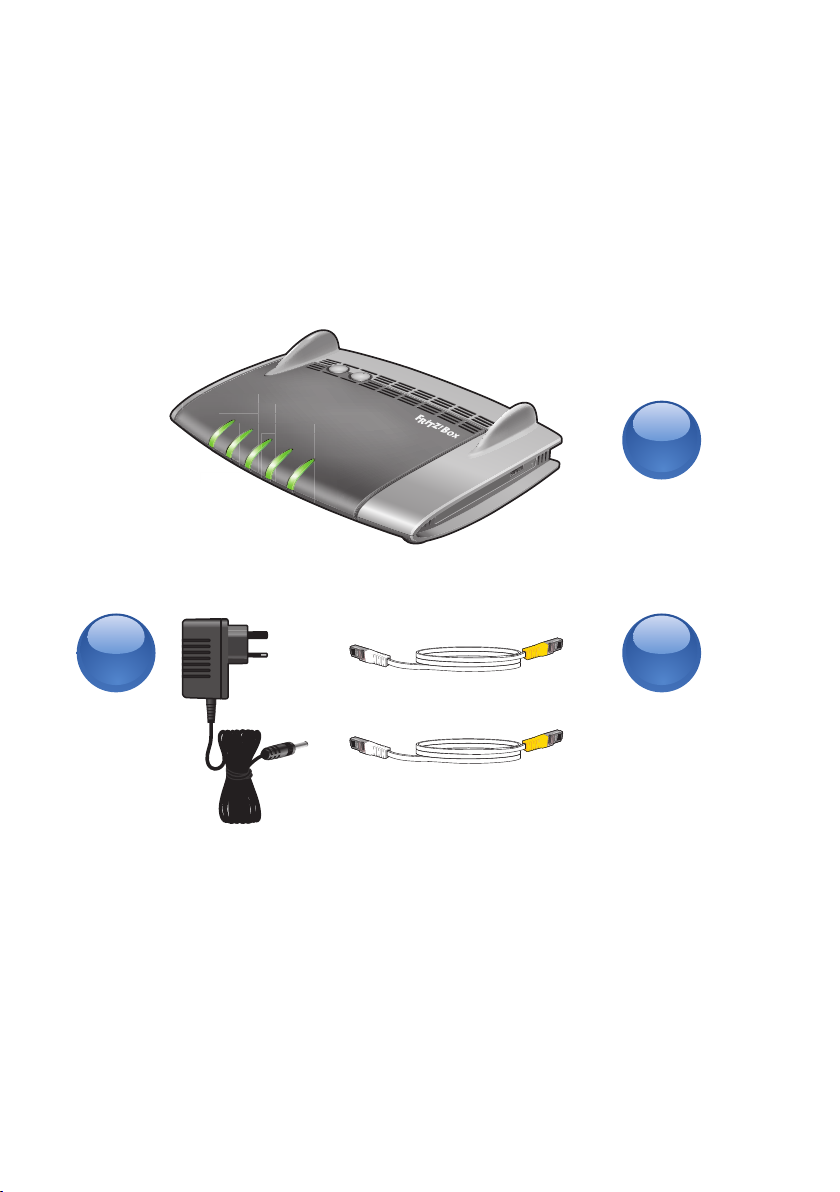
You will find the following items included in your
new Broadband Pack.
A. 1 x Fritz!Box 4040 or Fritz!Box 7560
B. 1 x 12V 2A DC Power Supply Unit (PSU)
C. 2 x Ethernet / Network Cable
Fritz!Box Quick Start Guide
Welcome to your Quick Start Guide for Fritz!Box 4040 & Fritz!Box 7560.
We would like to thank you for choosing Digiweb Electric Broadband -
Powered by SIRO. We really appreciate your custom.
CB
A

4
Introducing SIRO’s Optical Network Terminal (ONT)
SIRO’s Optical Network Terminal (ONT) establishes the handover point between
SIRO’s network and the Digiweb network. Digiweb’s Fritz!Box directly connects
to the ONT, thus establishing connectivity to the internet.
PLEASE NOTE: SIRO’s Optical Network Terminal (ONT), wall socket and fibre
cabling are the property of SIRO and must remain in-situ at the installed
location. Please do not tamper with or remove any of this equipment from the
place of installation. If you’re moving residence, the SIRO equipment must
remain at the installed location.
SIRO’s Optical
Network Terminal
LED’s on the SIRO ONT
SIRO’s Interior
Wall Socket
Power Button & Ports on the SIRO ONT
5
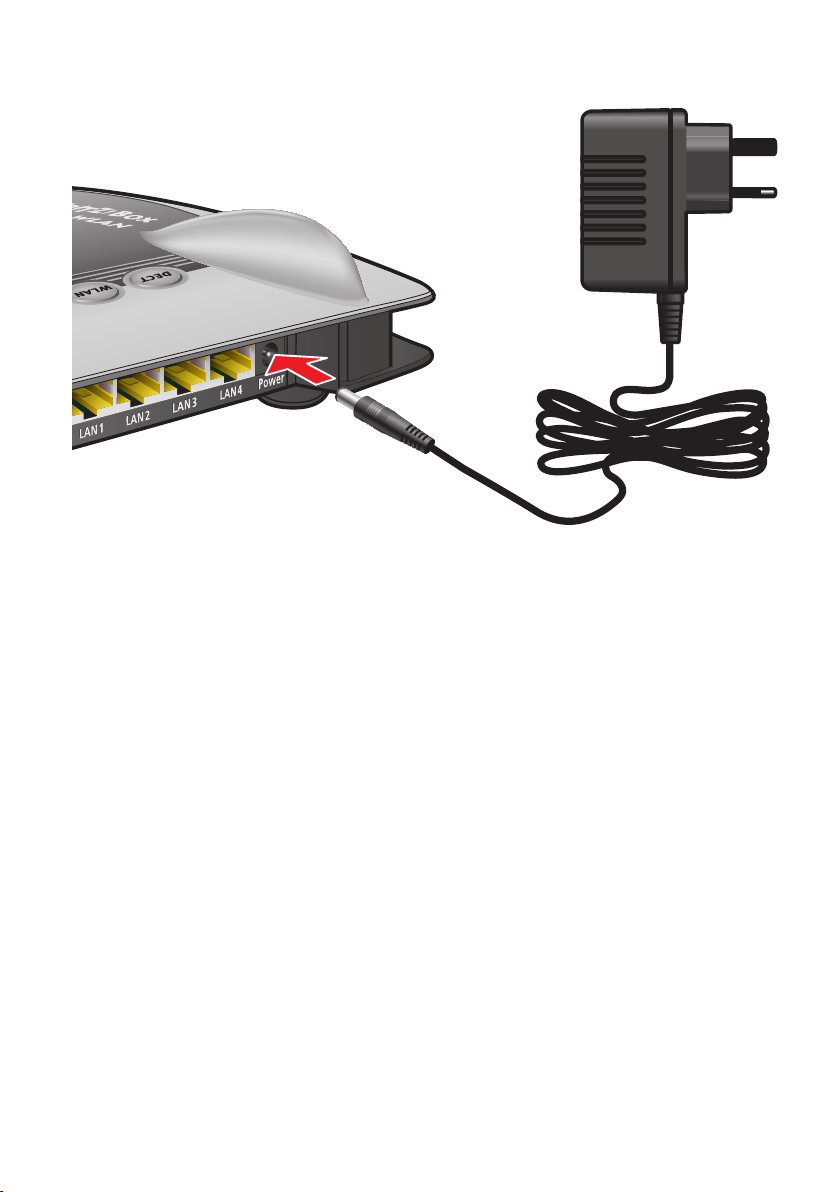
Step 2: Connect the 12V 2A DC Power Supply Unit
(PSU) to the Fritz!Box
•ConnectthePSU(B)totheFritz!Box(A)asperabovediagram.•ConnectthePSU(B)tothenearestpowersocket.

6
Step 3: Connect the Ethernet / Network Cable
For Fritz!Box 4040
•ConnecttheEthernet/NetworkCablefromtheOpticalNetworkTerminal(ONT) to the WAN port on the Fritz!Box 4040.
•Waitupto5minsforthePowerlightandInternetlightonyourFritz!Boxtogo steady green.
•IfthePowerandInternetlightsonyourFritz!Boxfailtogosteadygreen, please check your cable connections are firmly connected and
ensure that you are connected to the correct dedicated LAN port on the
Optical Network Terminal (ONT).
•UponcompletingtheabovechecksandwherethePowerandInternetlights on your Fritz!Box fail to go steady green, please contact the Digiweb
Technical Support team as per contact details provided on the back of this
Quick Start Guide.
Note: The Installation technician on behalf of Digiweb will complete this step
for you during installation.
LAN
LAN
LAN
LAN
LAN
LAN
WAN
WAN
INFO
Info
W
LAN
WPS

7
Step 3: Connect the Ethernet / Network Cable
For Fritz!Box 7560
•ConnecttheEthernet/NetworkCablefromtheOpticalNetworkTerminal(ONT) to the LAN 1 port on the Fritz!Box 7560.
•Waitupto5minsforthePower/DSLlightonyourFritz!Boxtogosteadygreen.
•IfthePower/DSLlightonyourFritz!Boxfailstogosteadygreen,pleasecheck your cable connections are firmly connected and ensure that you are
connected to the correct dedicated LAN port on the Optical Network
Terminal (ONT).
•UponcompletingtheabovechecksandwherethePower/DSLlightonyourFritz!Box fails to go steady green, please contact the Digiweb Technical
Support team as per contact details provided on the back of this Quick Start
Guide.
Note: The Installation technician on behalf of Digiweb will complete this step
for you during installation.
LAN 3
LAN 4
Power
DSL
FON 1
LAN 1
DECT
W
LAN

8
Step 4: Enable Wi-Fi Connection
For Windows PC / Laptop:
•Clickthewindowsbuttontypicallyplacedinthebottomleft hand corner of your desktop.
•Choose“ControlPanel”•Choose“NetworkandInternet”•Choose“NetworkandSharing”or“NetworkandSharingCentre”•Choose“Changeadaptersettings”•Rightclick“WirelessNetworkConnection”•Select“Enable”.DONOTselect“Disable”ifadapterisalreadyenabled.Note: Your computer setup and screen may dier from the above.
For Tablet / Smartphone:
•Gotosettings>Wi-Fi>EnsureswitchisonperAndroidandAppleiOSscreenshots above.

9
WLAN
Step 5: Activate Wireless Connection
•EnsurethattheWLANLEDisONsteadygreenasperabove.
•IfWLANLEDisopressWLANbuttononce-
(do not hold down) to activate WLAN.
For Windows PC / Laptop:
•Rightclickonthe“WirelessNetworkConnection”•Select“Connect/Disconnect”For Tablet / Smartphone:
•Noadditionalstepsrequiredatthispoint.
10
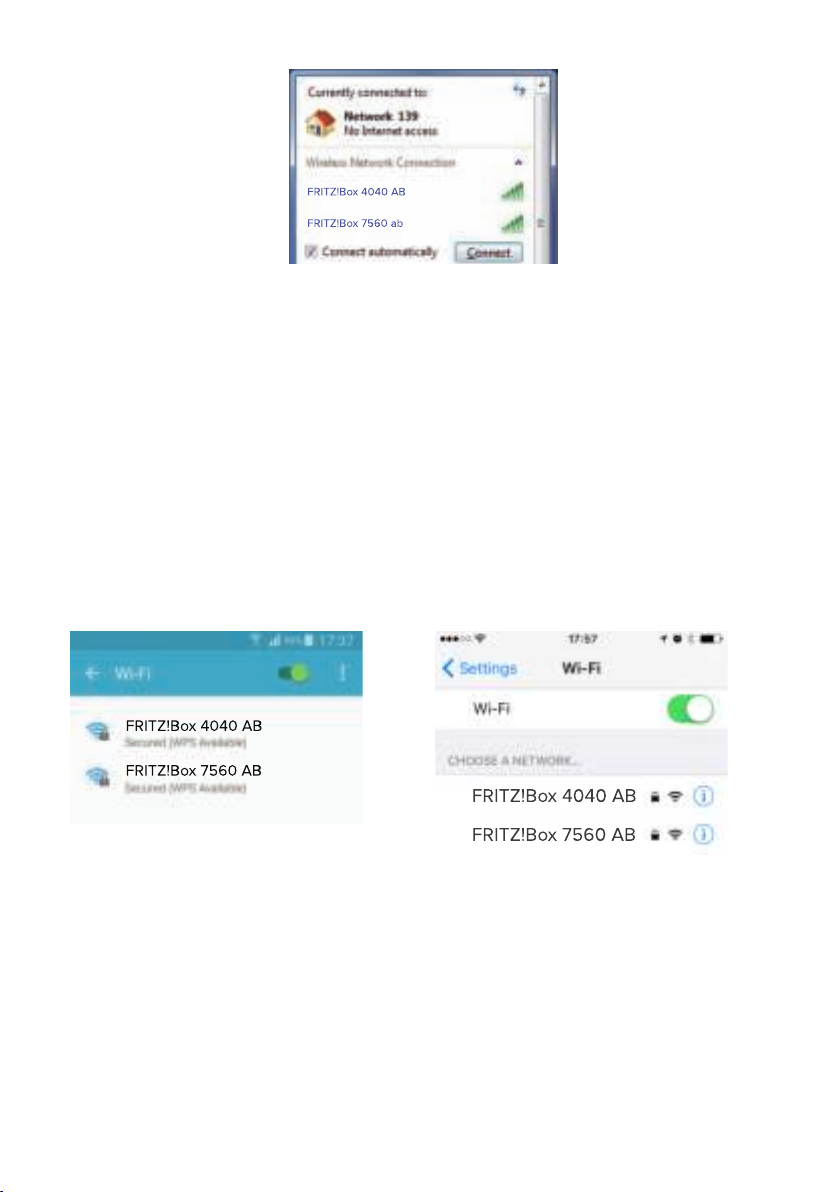
Step 6: Choose your Wireless Network
For Windows PC / Laptop:
•OnthebaseofyourFritz!Boxmodemyouwillndthenetworknameforexample“FRITZ!Box4040AB”or“FRITZ!Box7560AB”•Select“FRITZ!Box4040AB”or“FRITZ!Box7560AB”SSIDfromthelist
currently appearing on your screen from Step 5.
•Selectthe“Connectautomatically”optionsothatyourcomputerremembersthe Wi-Fi network and automatically connects every time you turn on your
computer.
•Click“Connect”For Tablet / Smartphone:
•Select“FRITZ!Box4040AB”SSID
•Select“FRITZ!Box7560AB”SSID
Questo manuale è adatto per i seguenti modelli
1
Indice


