m-Dimension AutoGet Wifi Manuale utente

Please read this manual thoroughly before use.
Properly keep this manual with the equipment
for future reference.
AutoGet Wifi
Intelligent Fiber Endface Microscope

Introduction
Dear customer:
Thank you for choosing AutoGet Wifi product. This product has high quality and excellent perfor-
mance. To make full use of this product, please read this manual carefully before using. Whenever
you have any questions, please contact us and we are happy to support.
1.Any change of this manual will not be prior informed. Please kindly understand.
2.Every effort was made to ensure the accuracy of the manual. However , If there is no clear,
erroneous or ambiguous content founded in the manual, please contact us.
1.Keep the optics clean.
2.Keep the monitor clean. Prevent TFT LCD screen from the sharp cut, or being crushed by the
weight.
3.Put the device in suit box if no use for long time.
4.Please check the battery level of the device before use, If only one battery indicator is on and
flashing, please recharge the device before using.
The following symbols are used for the important information in this manual.
The notice and restrictions in the process.
Symbols
Attention
About the product
Prompt
1
AutoGetWifi Intelligent Fiber Endface Microscope

Product Warranty
We warrant that for a period of one (1) year from the shipping date, the product purchased by
customer shall be free of defects in material and workmanship under normal authorized use.
In the event that we receives notice during the warranty period that any part does not conform to
its warranty, our sole and exclusive liability shall be, at its sole option, to either repair or replace
the non-conforming part in accordance with this limited warranty.
No warranty will apply if
1) Device damage caused by wrong operation;
2) Unconventional repair or modification;
3) The causes of failure outside of the instrument;
4) Used in high temperature and humidity, corrosive gas, harsh conditions such as vibration;
5) Fires, earthquakes and other natural disasters as well as the pollution caused by radioactive
substances and harmful substances, and when the other force majeure such as war, riot, crime.
6) Consumables and consumable parts.
2
AutoGetWifi Intelligent Fiber Endface Microscope
Warranty Term
Warranty Content
Warranty Exception

About the Manual
This chapter describes the name and function of each part.
This chapter describes performance characteristics and the basic operation of the
equipment.
3
AutoGetWifi Intelligent Fiber Endface Microscope
Profile
Hardware basic operation
This chapter introduces software installation, features, interface and basic operation
instructions.
This chapter mainly list the contact information.
Software basic operation
Contact us
1
2
3
4

CONTENTS
4
AutoGetWifi Intelligent Fiber Endface Microscope
1 PROFILE...................................................................................................................6
2 Hardware basic operation....................................................................................9
3 Software basic functions....................................................................................14
1.1 Check the packaging..................................................................................6
1.2 Product description....................................................................................6
2.3.1 Power On/Off.........................................................................................10
2.3.2 Remove the battery..............................................................................10
2.3.3 Handle angle adjustment......................................................................11
2.3.4 Install WiFi module..............................................................................12
2.3.5 Measurement.........................................................................................12
2.3.6 Floodlight switch...................................................................................13
2.3.7 Replace the adapter.............................................................................13
2.3.8 MT adapter use.....................................................................................14
3.1.1 Device software installation and update..............................................14
3.1.2 PC software installation and update.....................................................14
3.2.1 Device software main interface...........................................................15
3.2.2 Device software measurement task setting ........................................16
3.2.3 Device softwareSettings........................................................................17
3.2.4 Device software CCD Verification.......................................................18
3.2.5 About.....................................................................................................18
3.3.1 SF measurement.....................................................................................19
3.3.2 MT measurement...................................................................................19
2.1 Features................................................................................................................9
2.2 Performance.........................................................................................................9
2.3 Hardware operation..........................................................................................10
3.1 Software installation and update......................................................................14
3.2 Device software interface.................................................................................15
3.3 Device software operation instructions............................................................19
3.3.3 Image brightness setting......................................................................25
3.3.4 CCD Verification operation..................................................................26
3.3.5 Layer.......................................................................................................27
3.3.6 Image magnification and reduction.................................................27
3.3.7 File view................................................................................................28

5
AutoGetWifi Intelligent Fiber Endface Microscope
4 Contact us.............................................................................................................31
3.3.1 SF measurement.....................................................................................19
3.3.2 MT measurement...................................................................................19
3.4.1 PC software main interface................................................................28
3.4.2 PC software settings.............................................................................29
3.4.3 PC software FTP function.....................................................................30
3.4 PC software interface.........................................................................................28
3.3.3 Image brightness setting......................................................................25
3.3.4 CCD Verification operation..................................................................26
3.3.5 Layer.......................................................................................................27
3.3.6 Image magnification and reduction.................................................27
3.3.7 File view................................................................................................28

6
AutoGetWifi Intelligent Fiber Endface Microscope
1 Profile
1.1 Check the packaging
1.2 Product description
Referring the packing list of the products, please check whether all items are contained. If there are any
missed items, please contact us immediately.
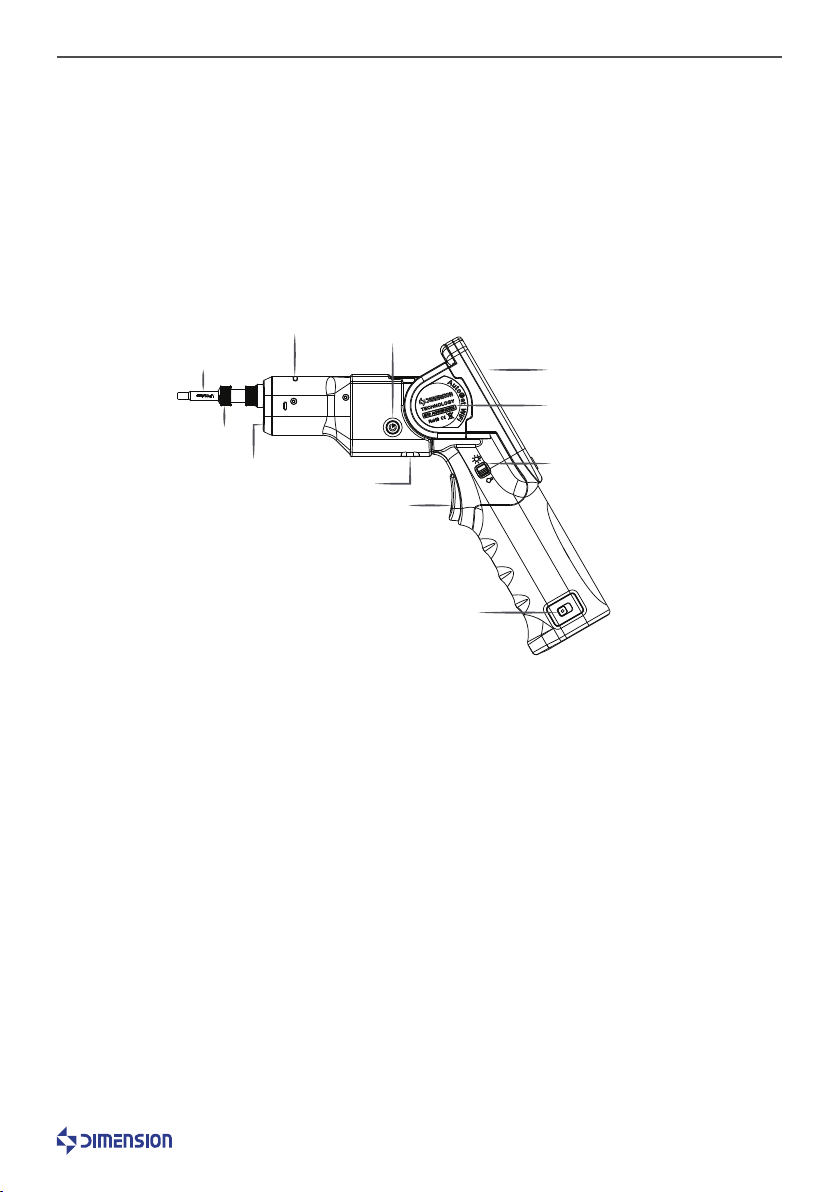
Figure1-1
Adapter interface: Connect different connectors. Nut: To fix the adaptor interface.
Floodlight LED: Assist the operation in dark conditions.
Status Indicator: Indicates the status of the device. The operating status is blue. If the measurement
passes, it is green; if the measurement fails, it is red.
Power button: Press and hold the Power Button to turn the power on.
Touch screen: Display image and software operation interface. Label: Indicates important information
about the product.
WiFi module:Support wireless transmission.
Floodlight switch: To turn floodlight LED on/off.
Measurement button:Trigger measurement. Battery slot control switch: To load and unload battery.
Label
Adapter Interface
Nut
Power Button
Status Indicator
Floodlight LED
WiFi Module
Measurement Button
Battery slot control switch
Floodlight Switch
Touch Screen

7
AutoGetWifi Intelligent Fiber Endface Microscope
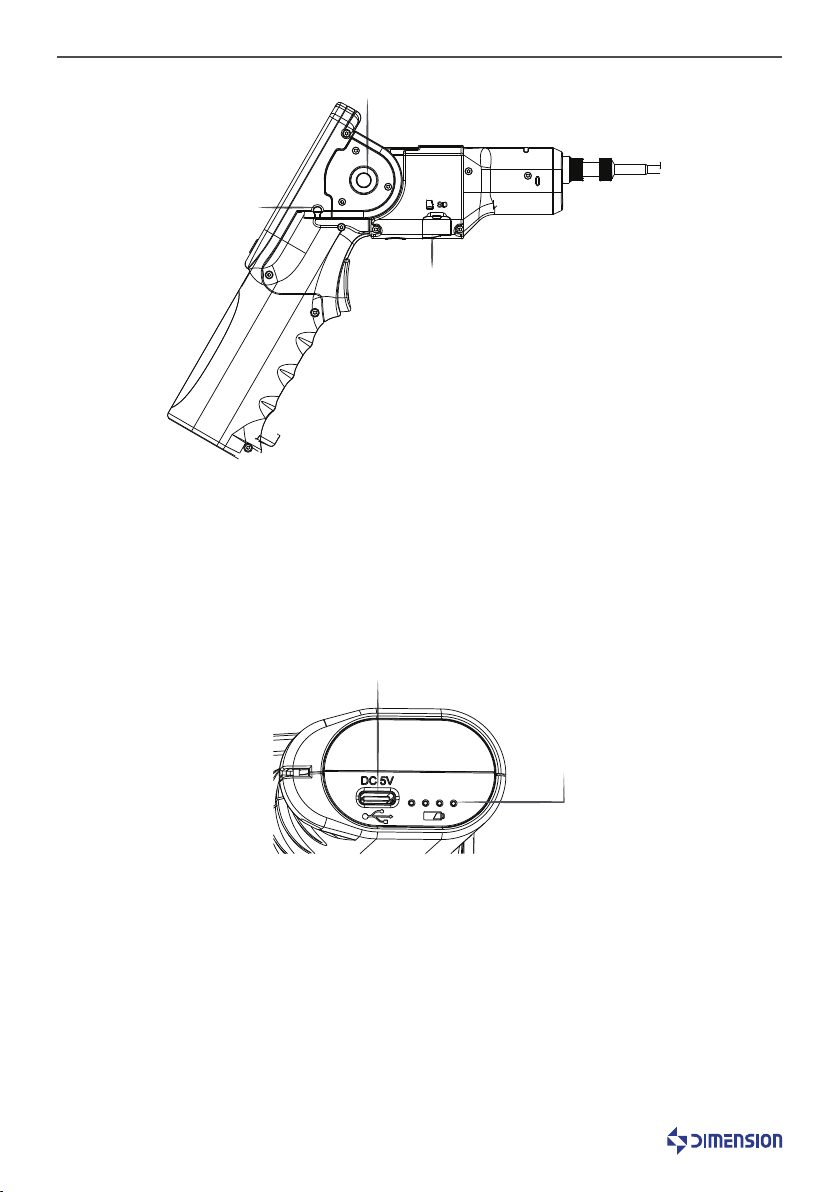
Figure1-2
Figure1-3
Touch pen: For touch screens.
Handle angle adjustment button:
SD card slot: Install SD card to store data and reports.
USB interface: DC 5V, Type C
Battery status LED indicator: Displays the battery power and the storage status during the charging
process.
Handle Angle Adjustment Button
Touch Pen
SD Card Slot
USB Interface
Battery status LED
indicator

8
AutoGetWifi Intelligent Fiber Endface Microscope
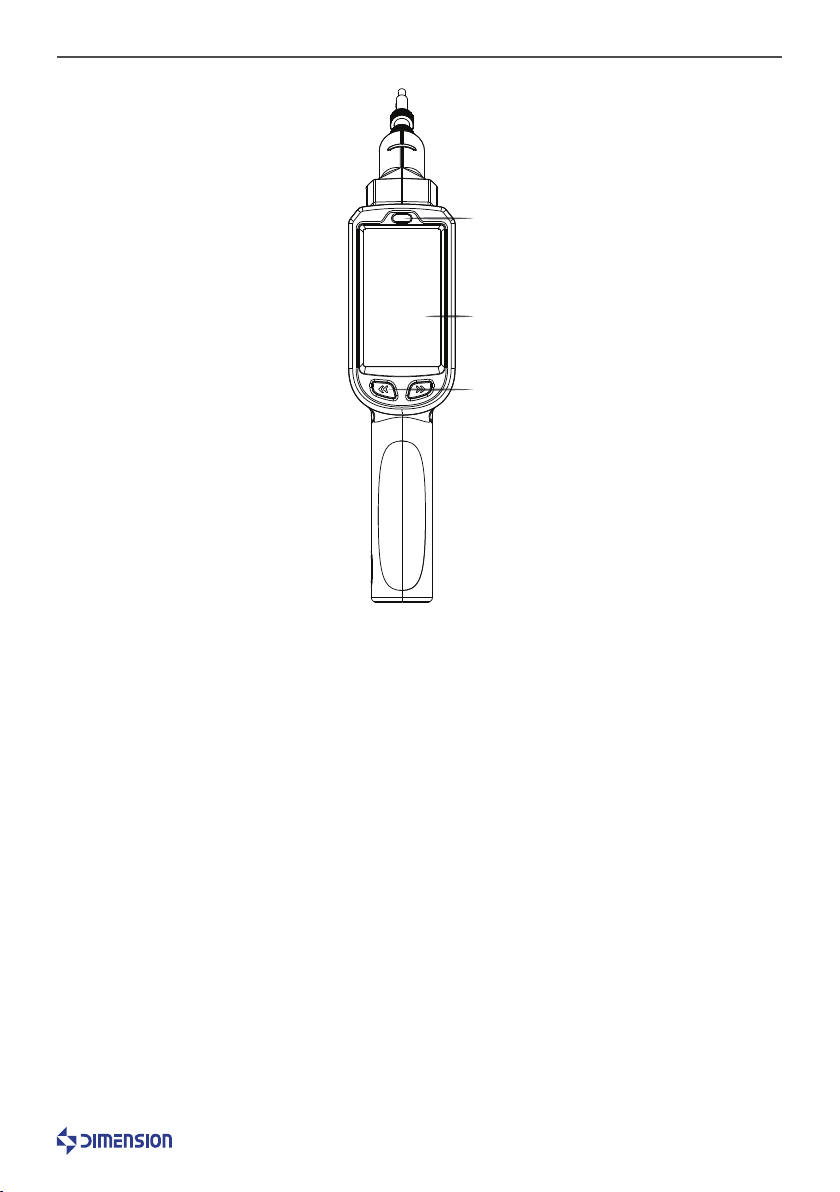
Figure1-4
Light-Sensor: The screen brightness can be adjusted according to the ambient light intensity.
Touch screen: Display image and software operation interface.
Focus button: Manual focus button.
Light-Sensor
Touch Screen
Focus Button

AutoGetWifi Intelligent Fiber Endface Microscope
9
2 Hardware basic operation
2.1 Features
2.2 Performance
1.Varies of adapters meet different requirements on inspect male fiber connectorfemale fiber connector,
such as FC SC ST E2000 LCMU and TOSA ROSA fiber end-face.
2.AutoGetWiFihas high quality optical component and high resolution CCD sensor.
3.Support SD card storage.
4.Dedicated rechargeable battery, durable for 9 hours continues inspection.
5.User-friendly design, floodlight for use in dark conditions; the use of protective cover in the use of
transport process; the rubber edge design to protect from dust and damage from falling and shock.
6.The device is equipped with a quick measurement button function, which can record the measurement
of the optical fiber end face at any time by data and report and store it on the SD card.
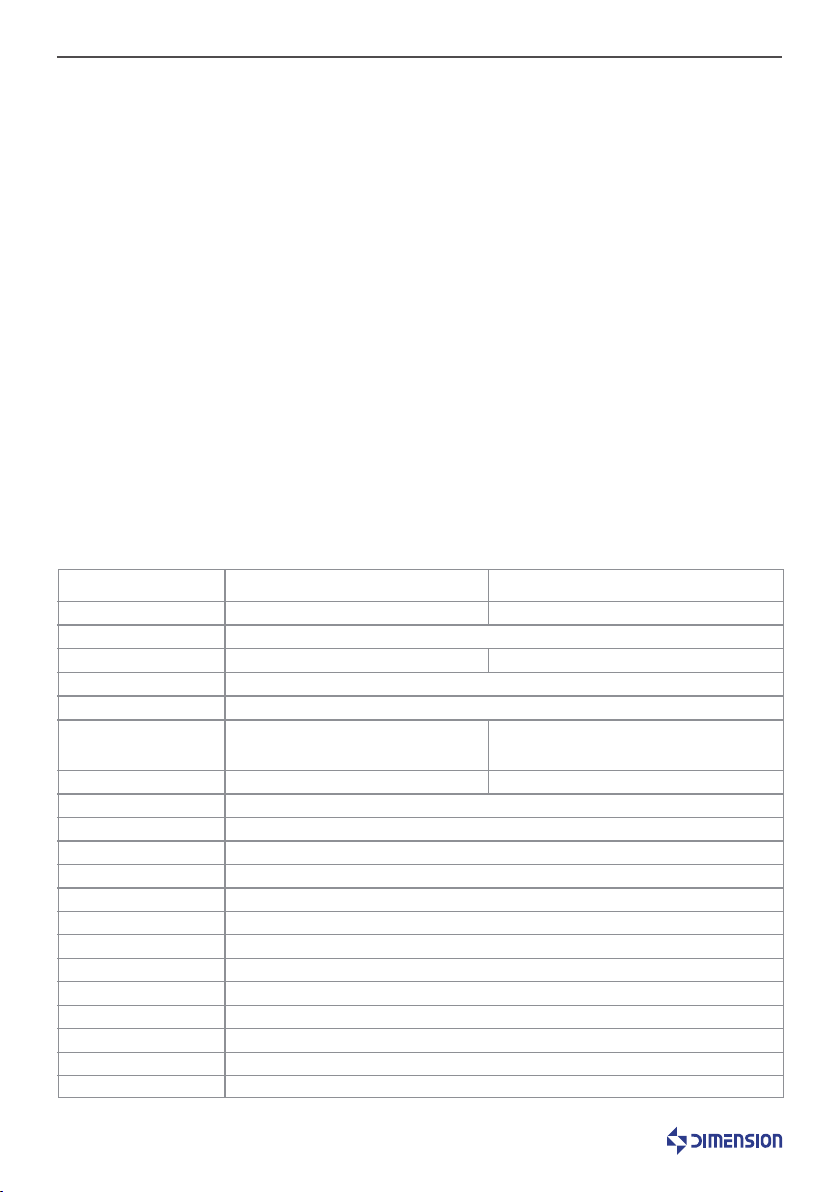
Projects
0.92um 0.52um
1/1.8” CMOS
×5 ×8.72
______
480X800 3.2” LCD touch screen
MT Parameters Common Interface Parameters
Display
Display Frame Rate
3 levels
Operating Temp.
Storage Temp.
Relative Humidity
Weight
Dimensions
-5°C~+40°C
-20°C~+55°C
<90%(Working/Storage)
565g
281mm×201mm×57mm(foldable)341mm×67mm×57mm (straight)
4hours(charging current:2A)
25fps
1440um×1100um(Preview mode)
220um×220um(Measure mode)
620um×620um(Preview mode)
250um×250um(Measure mode)
130um×130um(Core mode)
WiFi 、USB Type C
Built-in Li-ion battery(chargeable、replaceable)
9 hours
Field of View
<1um
Auto
Resolution
Image Sensor
Optical Magnification
Image Magnification
Particle Detection
Focusing Mode
Signal Output
Power Supply
Life time
Charge Time
Charge Adapter
Accessibility
USB DC adaptor 5V/2A, including US,EU,UK,AU…adapters
With white LED environment lighting, 60° foldable body
Indice