
DirekTronik 20112738 Manuale utente

1
4K60Hz HDMI 4X4 Seamless Matrix
Video Wall / Multi-Viewer
Best.nr: 20112738

2
Operating Instruction
Thank you for purchasing this product. For optimum performance and safety, please
read these instructions carefully before connecting, operating or adjusting this
product. Please keep this manual for future reference.
SURGE PROTECTION DEVICE RECOMMENDED
This product contains sensitive electrical components that may be damaged by
electrical spikes, surges, electric shock, lightning strikes, etc. Use of surge protection
systems is highly recommended in order to protect and extend the life of your
equipment.

3
Operating Instruction
Catalogue
1. Features ................................................................................................................................................... 5
2. Package Contents .................................................................................................................................... 5
3. Specifications ..........................................................................................................................................6
4. Panel Descriptions .................................................................................................................................. 6
4.1 Front Panel ....................................................................................................................................6
4.2 Rear Panel ..................................................................................................................................... 7
5. Wiring Diagram ...................................................................................................................................... 7
5.1 Seamless Matrix Mode ................................................................................................................. 7
5.2 Video Wall Mode .......................................................................................................................... 8
5.3 Multi-Viewer mode .......................................................................................................................8
7. Panel Control .......................................................................................................................................... 9
7.1 Video ............................................................................................................................................. 9
7.2 Main Menu ..................................................................................................................................10
7.3 Output ......................................................................................................................................... 10
7.4 Audio ...........................................................................................................................................18
7.5 Power .......................................................................................................................................... 20
7.6 Input ............................................................................................................................................ 21
7.7 Preset ...........................................................................................................................................24
7.8 Config ......................................................................................................................................... 26
7.9 Info .............................................................................................................................................. 34
8. Remote Control .....................................................................................................................................34
9. Audio Extraction ...................................................................................................................................35
9.1 HDMI audio ................................................................................................................................35
9.2 Audio Extraction .........................................................................................................................35
10. RS232 Control ................................................................................................................................... 36
11. Scene Instructions ............................................................................................................................... 38
11.1 Video Wall Mode ...................................................................................................................... 38
11.2 Multi-Viewer Mode .................................................................................................................. 41
11.3 Image cropping and TV coordinate change ..............................................................................44
11.4 Cascading .................................................................................................................................. 45
12. Web Control ........................................................................................................................................ 46
12.1 Change IP address of PC .......................................................................................................... 46
12.2 Log in by browser .....................................................................................................................47
13. WEB ....................................................................................................................................................48
13.1 Status .........................................................................................................................................48
13.2 Input Menu ................................................................................................................................48
13.3 Output Menu .............................................................................................................................49
13.4 Matrix ........................................................................................................................................50
13.5 Preset Menu .............................................................................................................................. 51
13.6 Advance .....................................................................................................................................52
13.7 System .......................................................................................................................................53

4
14. Firmware Updating .............................................................................................................................53
14.1 MCU application layer upgrade ............................................................................................... 53
14.2 GUI Web Page Upgrade ........................................................................................................... 54
15. Maintenance ........................................................................................................................................55
16. Product Service ................................................................................................................................... 55
17. Warranty ..............................................................................................................................................55

5
Operating Instruction
1. Features
4x HDMI Inputs which can be independently routed to HDMI Outputs. No switching
delay or picture loss during transitions
Supports resolution up to 4K@60HZ 4:4:4
Supports Video Wall up to 7 different modes with each monitor with 4K@60Hz 4:4:4
resolution.
It can display 4 pictures on the same screen and has multiple split display modes
Supports HDMI audio formats including Dolby-5.1, DTS-5.1
Analog audio extraction, and the audio can be independently switching
Compliant HDCP 2.2 with EDID management
Control via panel button, Remote Control, RS232 Control, TCP/IP Control
Supports device cascading. Up to a maximum of 81 displays can be supported (9x9
video wall).
2. Package Contents
1). 1x Main Unit (4x4 HDMI Matrix )
2). 1x DC 12V/3A power adapter
3). 1x Remote control
4). 1x Wide-Band IR Receiver cables
5). 1x CD for user manual & Command list
6). 1x 3Pin Phoenix terminal plug

6
Operating Instruction
3. Specifications
Operating Temperature Range
-5 to +40°C(23 to +104 °F)
Storage Temperature Range
-10 to +60°C(-14 to +140 °F)
Operating Humidity Range
5 to 90 % RH (no condensation)
Input Video Signal
0.5-1.0 volts p-p
Input DDC Signal
5 volts p-p (TTL)
Bandwidth
18Gbit/s
Video Format Supported
4K@60Hz,YUV4:4:4 8bit
4k@30Hz/1080P/1080i/720P
Audio Formats Supported
HDMI digital audio DTS-5.1/Dolby-5.1
HDCP Compliant
HDCP 2.2 and HDCP 1.4
Input ports
4xHDMI
Output ports
4xHDMI
Matrix mode
4x4 seamless switching
Video wall mode
Multiple video wall modes
Multi-viewer mode
Multiple multi-viewer modes
Power Consumption
23 watts (Max.)
Dimensions
Matrix: L262 x W163 x H36 mm
Mass (Main Unit)
2710g
4. Panel Descriptions
4.1 Front Panel
①LCD screen and IR receiving port, indicator light
②Output button OUT1~4 & Input button IN1~4
③MENU button: PRESET; MANU; UP; DOWN; LOCK; ENTER
7
Operating Instruction
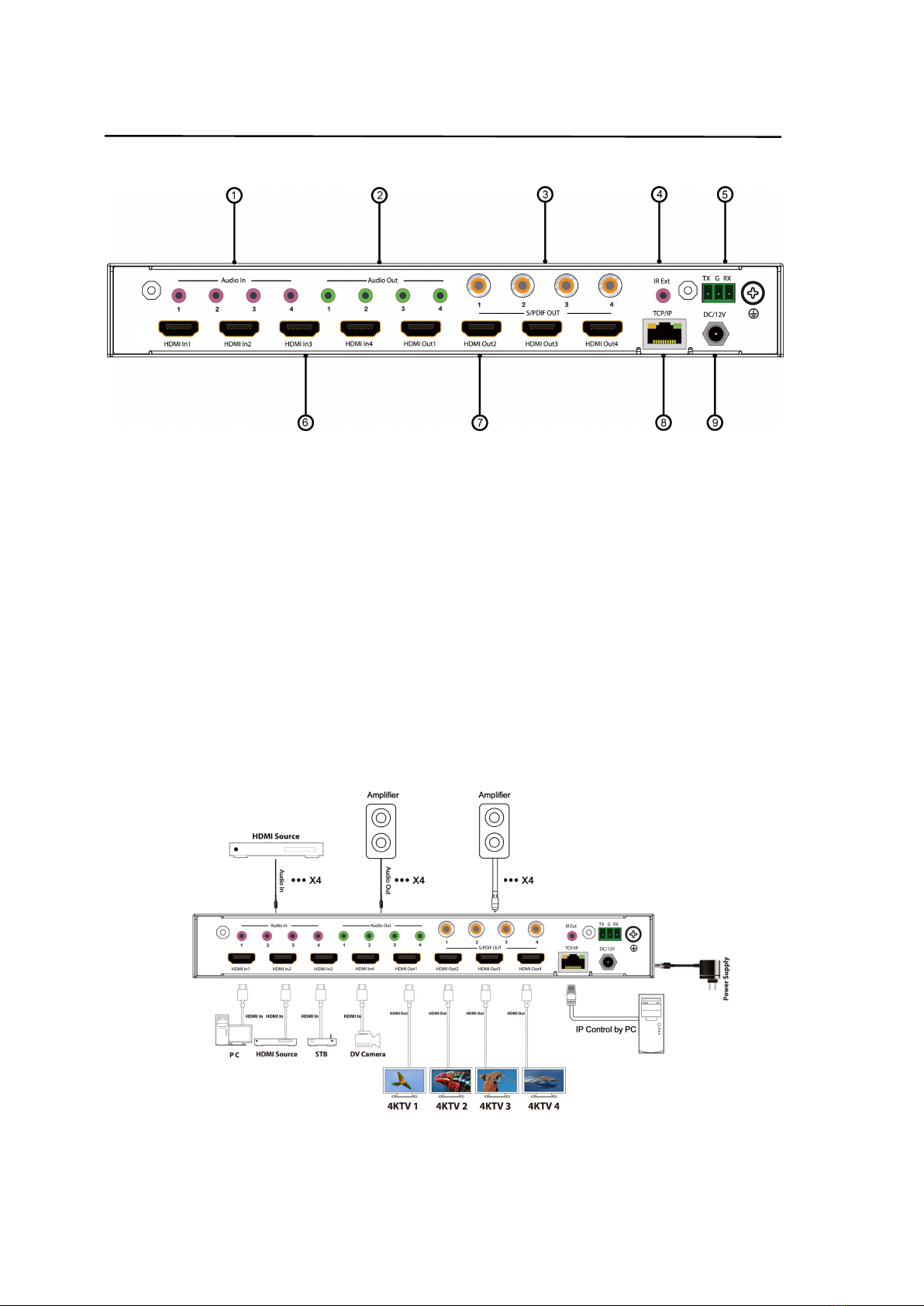
4.2 Rear Panel
①Audio In
②Audio Out
③S/PDIF OUT
④IR Ext
⑤RS232 port
⑥HDMI IN x4
⑦HDMI OUT x4
⑧Ethernet port
⑨Power input 12V/3A
5. Wiring Diagram
5.1 Seamless Matrix Mode

8
Operating Instruction
5.2 Video Wall Mode
5.3 Multi-Viewer mode

9
Operating Instruction
6. Input / Output Channel Key Operation
Channel
Button Method
OUT1-4
1. Directly press the number key, such as input channel 1, and select "1" to press (only
when the output port is selected, the input channel number will be valid)
2. Long press means all outputs select current input
IN1-4
Directly press the number key, such as the output channel 2, press button "2" and press it
again to cancel the selection;
Long press output 4 to select all channels, and long press again to cance
MENU
Function Button; Enter the function option or back to previous option
ENTER
Confirm Button: enter function selection mode
UP
Button for UP option
DOWN
Button for NEXT option
PRESET
Preset, short press to quickly enter the preset call function
LOCK
Long press to LOCK, Long press again to UNLOCK
7. Panel Control
7.1 Video
Signal switching includes 4 switching channels, which can be configured as input/output according to
requirements to form a matrix of 1×4~4×4. It can switch any input signal to 1 channel of output or all
channels of output.
Operation format: “output channel” + “input channel”
Such as:
1. Switch output 1 to input 4 source
Operation: press “1” in Output area + “4” in IN area to complete the switch
2. Output 2, 1, 3 switch to input 2 source
10
Operating Instruction
Operation: press “2”, “1” and “3” in Output area + “2” in IN source area to complete the switch
3. Switch all output to input 4 source
Operation: press “4” in Output area + “4” in IN area to complete the switch
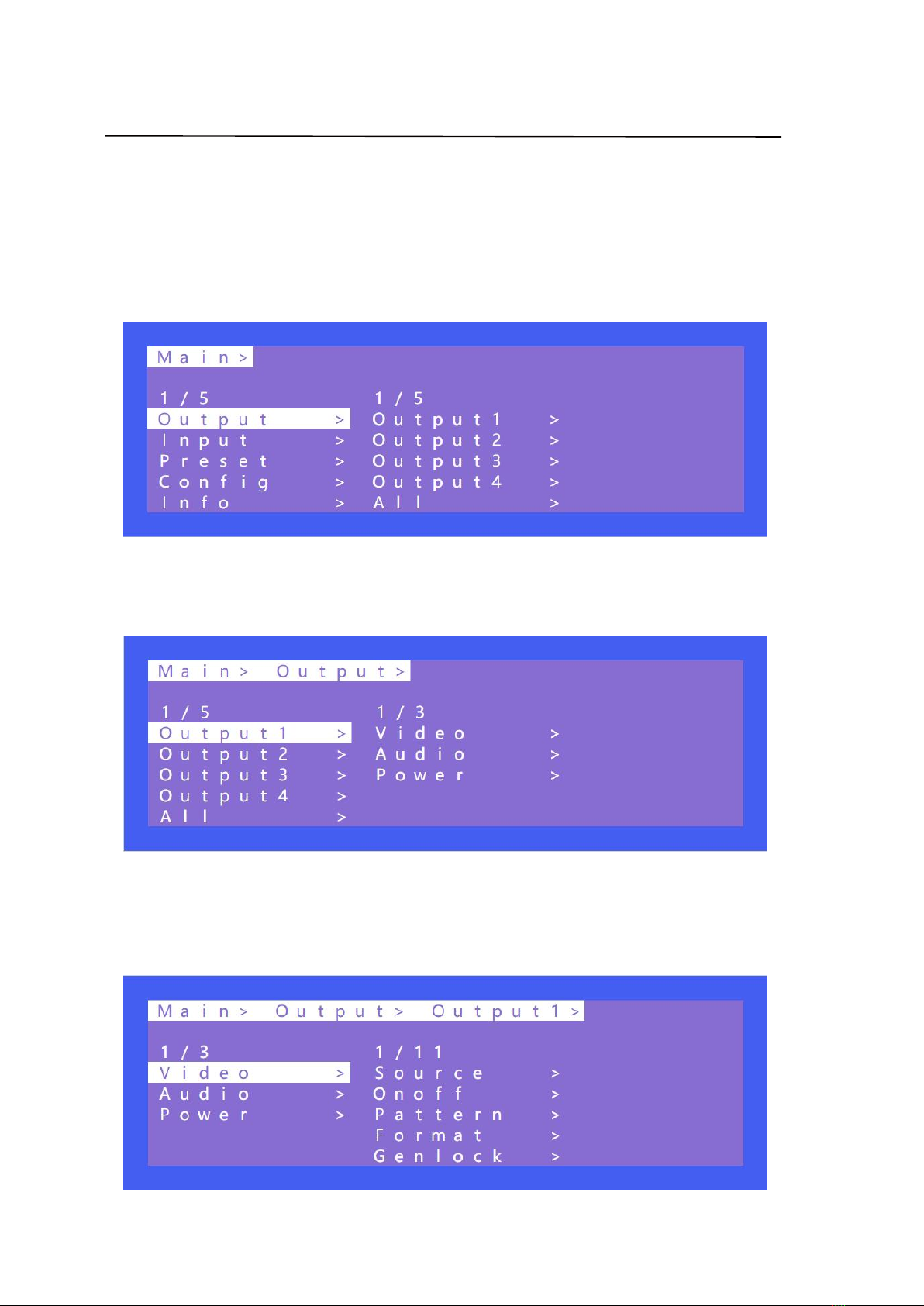
7.2 Main Menu
Main menu is divided into 5 module, which are Output, Input, Preset, Config, Info. Each module has
multiple sub-menus that need to be set up accordingly.
7.3 Output
There are 5 sub-menus in Output interface: output1~4 + all, which are used for individual or all output
settings. Each channel contains 3 function items, which are video, audio and power.
Choose a desired output before setting each video or audio.
There are 11 options in video: Source, Onoff, Pattern, Format, Genlock, Rotate, Mirror, Coord, PIP,
Wall, Image, Audio.
There are 4 options in Audio: HDMI onoff, HDMI SRC, DEC onoff, DEC SRC.
Indice
Altri manuali DirekTronik Commutatore a matrice

DirekTronik
DirekTronik SDVN-44-X-S Manuale utente

DirekTronik
DirekTronik SX-SMX99B Manuale utente

DirekTronik
DirekTronik 20111545 Manuale utente

DirekTronik
DirekTronik 25-0572 Manuale utente

DirekTronik
DirekTronik 20110146 Manuale utente

DirekTronik
DirekTronik 20102284 Manuale utente

DirekTronik
DirekTronik 25-2572 Manuale utente


