
DitoGear DMC-16 Manuale utente

1
Welcome
Thank you very much for purchasing DitoGear™ motion
control equipment. We hope that the devices will meet
your expectations bringing a great value to your productions.
We really strive for delivering the best unboxing and
equipment usage experience. If we (or someone else)
failed at some point, just let us know and we’ll do our
best to fix it promptly.
Here’s where to get started.
» ditogear.com/welcome
More resources
Latest user manuals are available at
» ditogear.com/user-manuals
For advanced connection diagrams check
» ditogear.com/charts
In case you need further assistance contact us at
» ditogear.com/support
3
CH2 OUT
CH1 OUT
CH2 IN
CH1 IN
1
2
DitoGear™ OmniHead
Dragonframe DMC-16
DMC-16 Adapter
Power
2
Quick Start GuideDitoGear™ DMC-16 Adapter
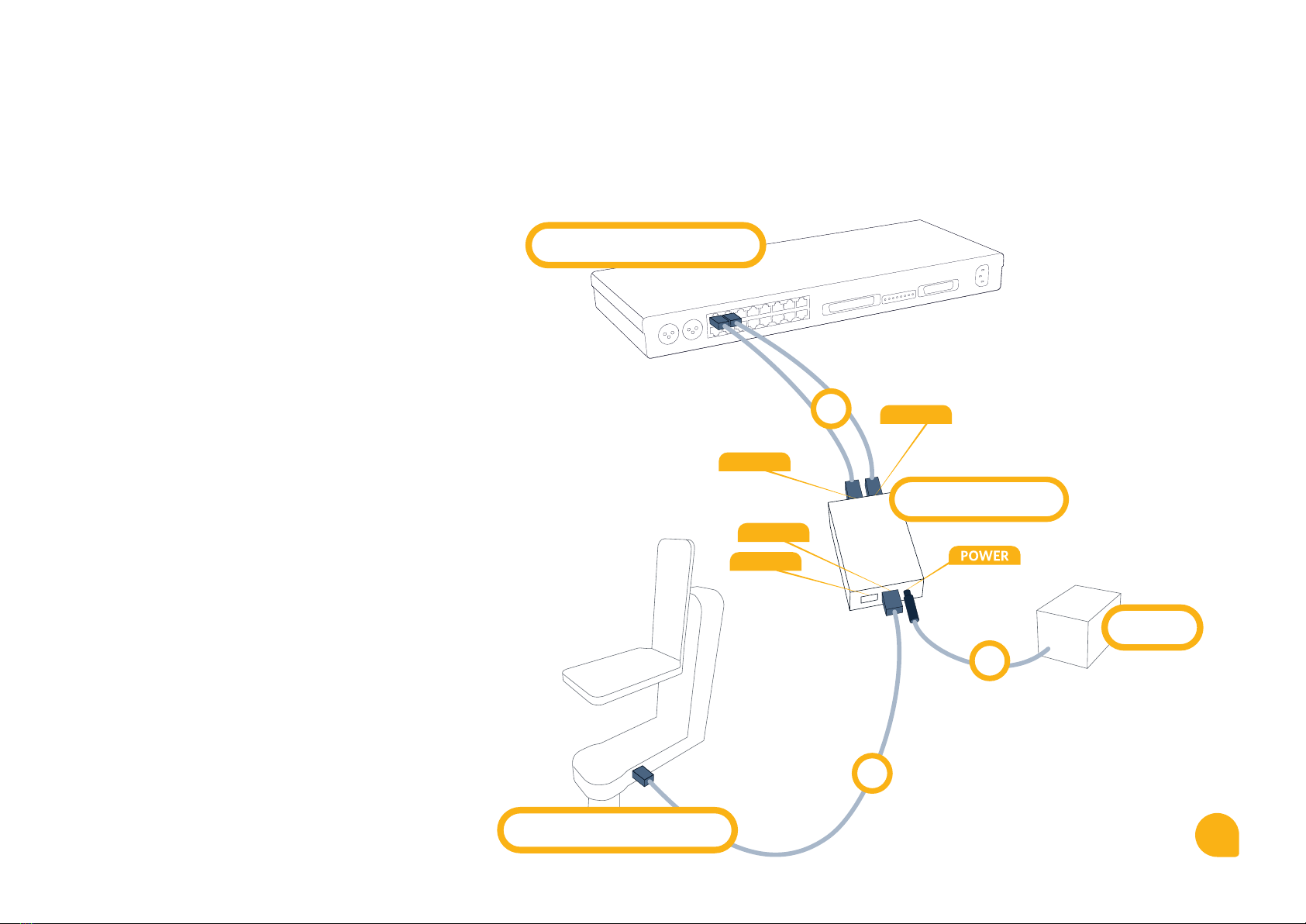
Connection Diagram for OmniHead
1. Signal cable
Connect two RJ45 type signal cables to Dragonframe
Master Controller (DMC-16) and to CH1 IN & CH2 IN
ports of a DitoGear™ DMC-16 Adapter.
2. Signal cable
Connect an RJ45 type signal cable to DitoGear™ OmniHead
and to CH1 OUT port of a DitoGear™ DMC-16 Adapter.
3. Power
Connect the power source – a DitoGear™ PowerPack
7Ah/14Ah, a DitoGear™ AC/DC power adapter
or a 3rd party compatible power source to power port
of DitoGear™ DMC-16 Adapter.
3
CH2 OUT
CH1 OUT
CH2 IN
CH1 IN
2
1
DitoGear™ Devices
Dragonframe DMC-16
DMC-16 Adapter
Power
2
Quick Start GuideDitoGear™ DMC-16 Adapter
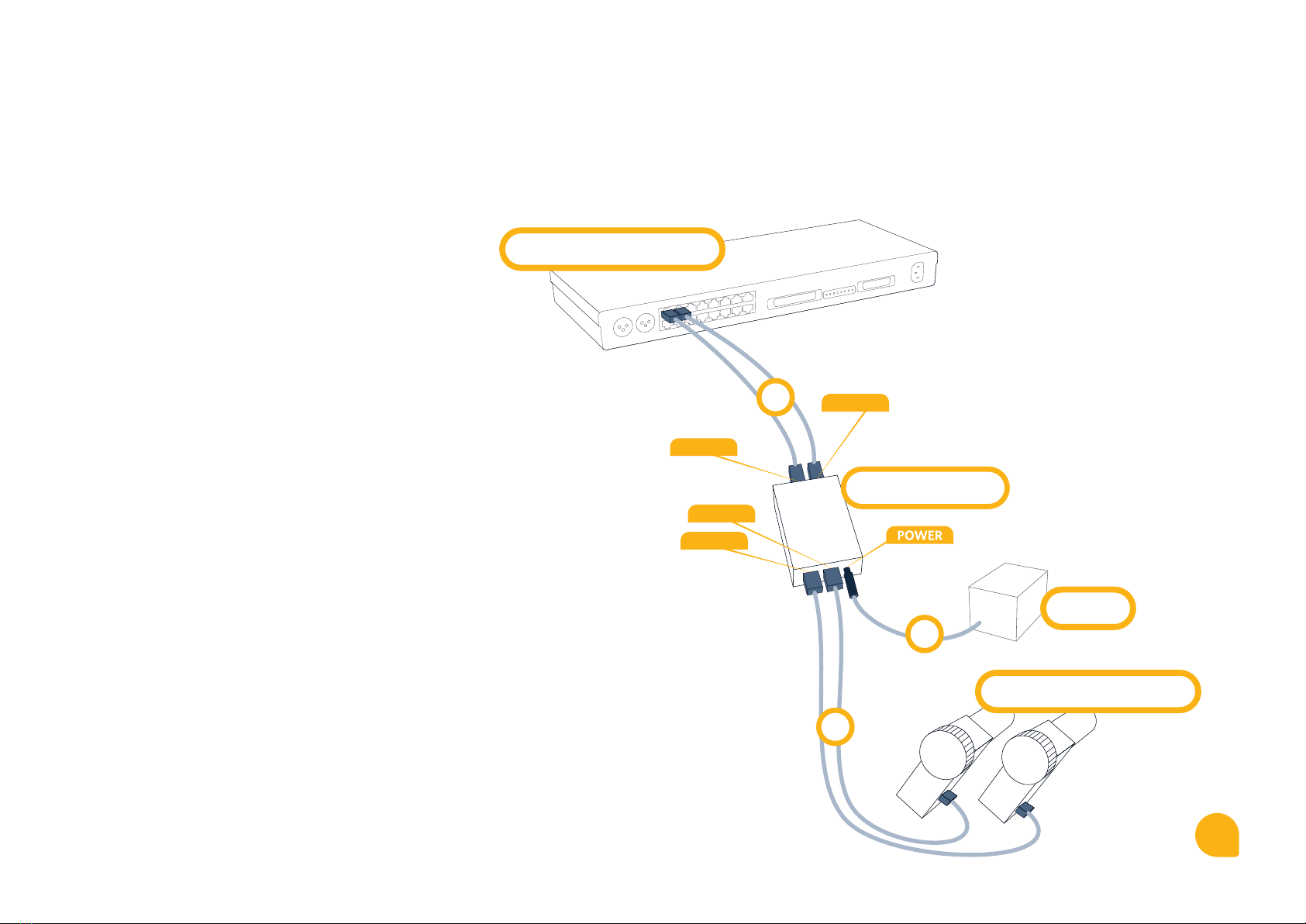
Connection Diagram for 1-Axis DitoGear™ Hardware
1. Signal cable
Connect two RJ45 type signal cables to Dragonframe
Master Controller (DMC-16) and to CH1 IN & CH2 IN
ports of a DitoGear™ DMC-16 Adapter.
2. Signal cable
Connect an RJ45 type signal cable to DitoGear™ hardware
and to CH1 OUT port of a DitoGear™ DMC-16 Adapter.
Use CH2 (IN & OUT) for the 2nd 1-axis DitoGear™ device.
3. Power
Connect the power source – a DitoGear™ PowerPack
7Ah/14Ah, a DitoGear™ AC/DC power adapter
or a 3rd party compatible power source to power port
of DitoGear™ DMC-16 Adapter.
1
Dragonframe DMC-16
Power
2
3
CH2 OUT
CH1 OUT
CH2 IN
CH1 IN
DMC-16 Adapter
2
Quick Start GuideDitoGear™ DMC-16 Adapter
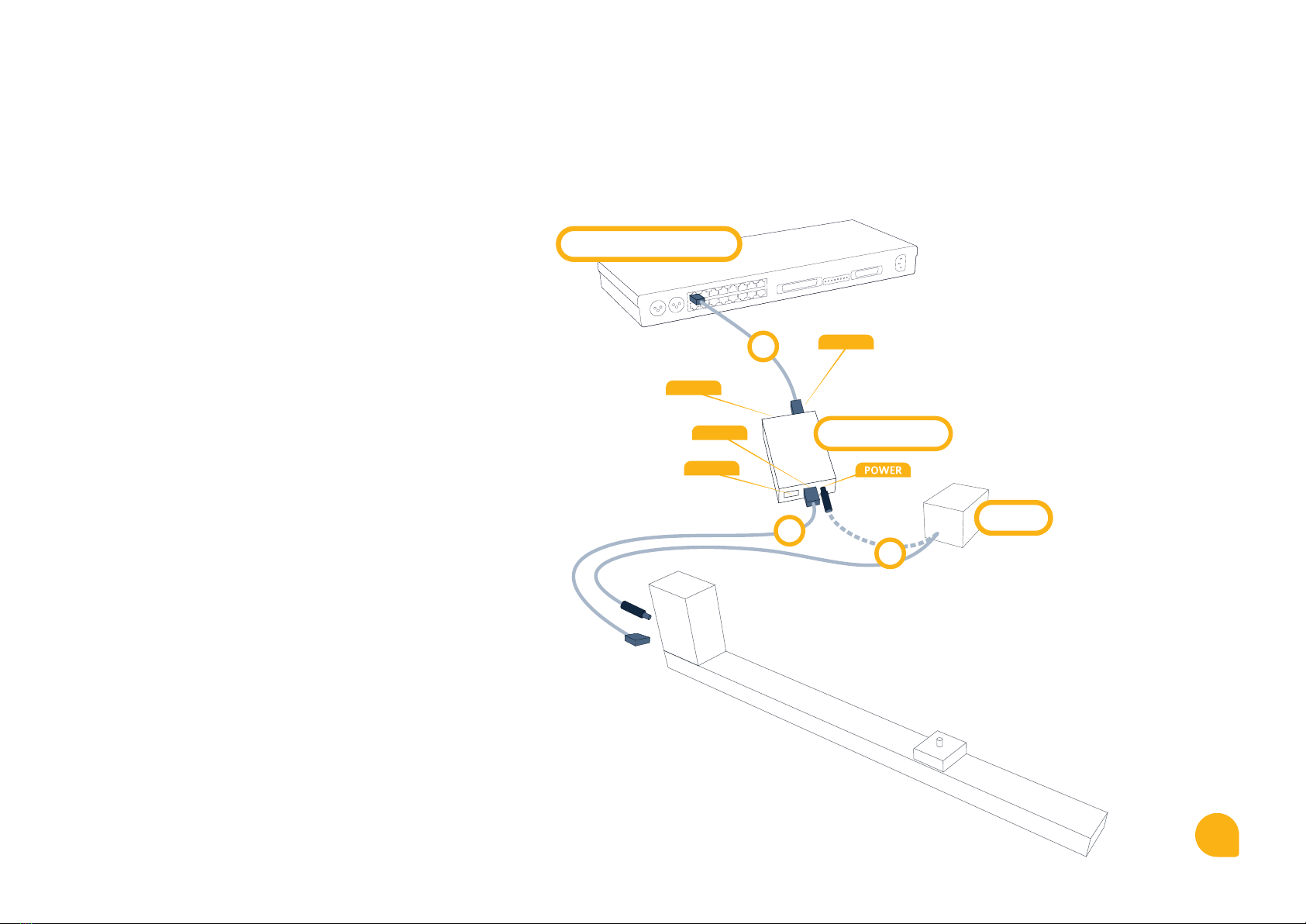
Connection Diagram for OmniSlider
1. Signal cable
Connect RJ45 type signal cable to Dragonframe Master
Controller (DMC-16) and to CH1 IN port of a DitoGear™
DMC-16 Adapter.
2. Signal cable
Connect an RJ45 type signal cable to DitoGear™ OmniSlider
and to CH1 OUT port of a DitoGear™ DMC-16 Adapter.
3. Power
Connect the power source – a DitoGear™ PowerPack
7Ah/14Ah, a DitoGear™ AC/DC power adapter
or a 3rd party compatible power source directly
to DitoGear™ OmniSlider Power port.
For low-payload operation, you can alternatively connect
the power to the Power port of the DMC-16 Adapter
(dashed line).


