
DMX4ALL ArtNet-DMX TWIN PoE Manuale utente

ArtNet-DMX TWIN PoE
User manual

ArtNet-DMX TWIN PoE 2
Description
The ArtNet-DMX TWIN PoE is a compact ArtNet (DMX via Ethernet) Interface which
can be used for ArtNet to DMX or DMX to ArtNet.
Via a standard RJ45-network connection occurs the connection to ArtNet-Network.
Two DMX In- or Outputs
The DMX-Direction is adjustable separately on both DMX-Connections.
Adjustable DMX-Frame rate
Within the DMX-OUTPUT-Mode the DMX-Frame rate is adjustable for each DMX-
Output, so this Interface is compatible to „slower“ DMX-Devices.
ArtNet Merge-Function
Two ArtNet sources are outputted merged to the DMX-Output via LTP (Latest) or
HTP (Highest).
Power supply via PoE
In connection with a PoE-Switch / PoE-Injector the ArtNet-DMX TWIN PoE needs no
separate power supply. The activation of the PoE-Supply occurs after PoE-
Identification via the PoE-Switch / PoE-Injector.
Disengageable LED-Display
The LED-Display at the ArtNet-DMX TWIN PoE is disengageable via ArtNet-
Command (AcLedMute) or time-controllable. This is very helpful on stages to avoid
disturbing light points.
Easy Configuration
A user-friendly Configuration via a web browser allows a fast and uncomplicated
setting of all parameters. No special software is needed; a standard web browser is
enough. The configuration is possible anytime via PC, Smartphone or Tablet.
For an easy IP-Setting the IP-Configurator is available free as PC-Tool or Android-
App. So, you can leave the net work settings unchanged and configure the IP
unproblematic.
High-quality and compact performance
The ArtNet-DMX TWIN PoE is built in a compact aluminium housing.
All connections are arranged on one side.
Firmware-Update-Function
To use prospective and further functions the ArtNet-DMX TWIn PoE provides an
integrated Firmware-Update-Function. It can be started by web browser. So, no direct
device access is necessary!
DMX4ALL Communication-Port
The ArtNet-DMX TWIN PoE has another TCP-Communication-Port. This port uses
DMX4ALL-Commands via TCP-Packages to Port 10001.

ArtNet-DMX TWIN PoE 3
Data sheet
Power supply: PoE according to IEEE 802.af
or included 5V DC-Power supply
Ethernet: RJ45
DMX: 2x 3 pin screw connector
Separated adjustable:
- 512 Channels OUT
- 512 Channels IN
DMX-Framerate: Adjustable
Protocol: Art-Net™ or DMX4ALL Commands
Dimensions: 135mm x 78mm x 27mm
ArtNet-DMX TWIN PoE 4
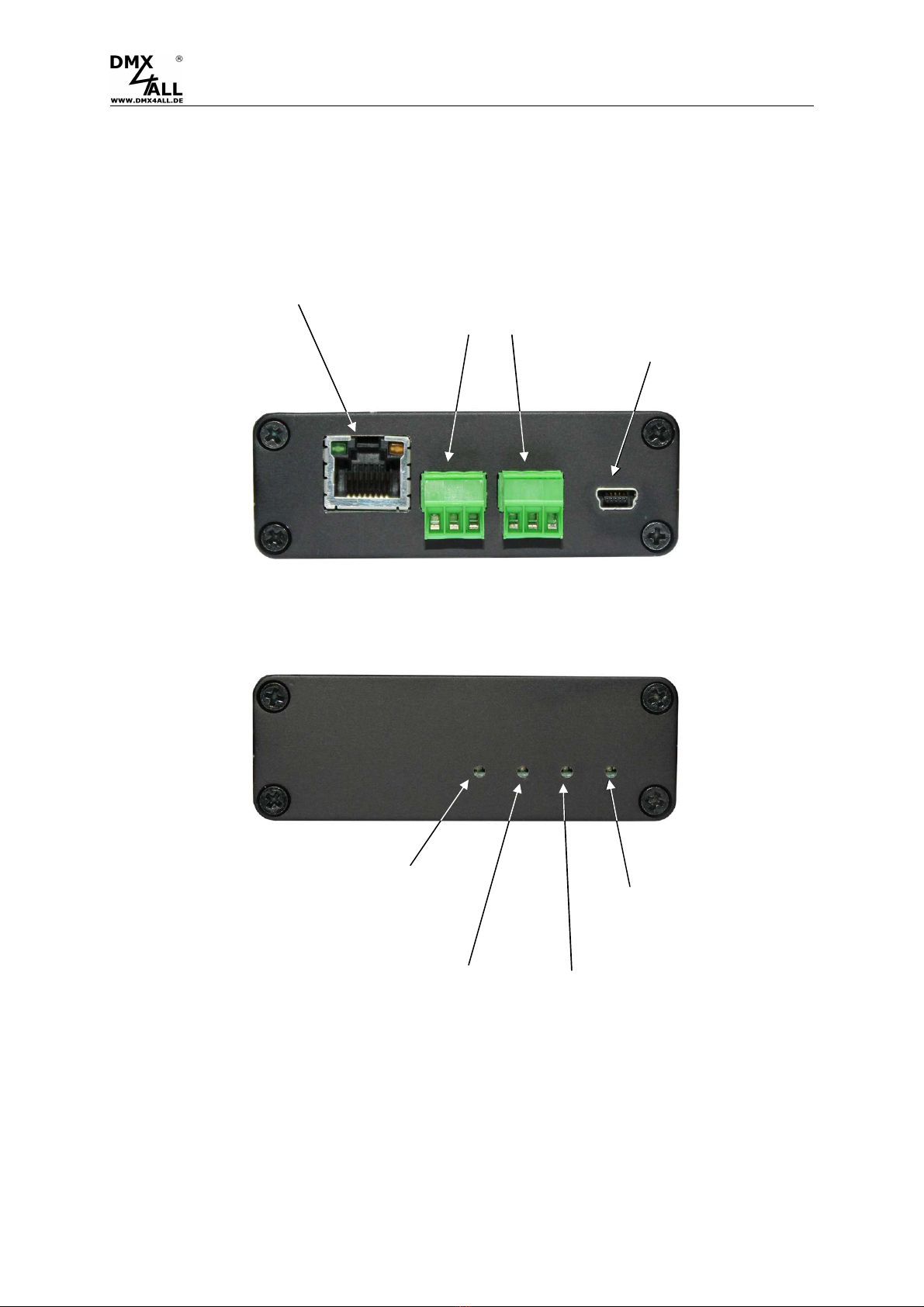
Connection
2x
DMX
-
In
-
/
Output
1GND
2DMX-
3DMX+
USB /
POWER 5V
ETHERNET
USB-LED PoE-LED
PORT1-LED PORT2-LED

ArtNet-DMX TWIN PoE 5
LED-Display
USB-LED
The USB-LED shines as soon as the USB-Connection is used for transferring data
with the ArtNet-DMX TWIN PoE.
PORT1 / PORT2 LED
The PORT-LED lights up as soon as the DMX-Data are outputted or received at the
port.
The PORT-LED flashes if the port puts no DMX-Signal out or received none.
PoE-LED
The PoE-LED shines, as soon as the device is supplied via PoE.

ArtNet-DMX TWIN PoE 6
Configuration
The ArtNet-DMX TWIN PoE configuration occurs via a web-Interface which can be
called via an arbitrary web browser.
Adjust the IP with IP-Configurator
The IP-Configurator allows the IP-Address and net mask setting also, if the net work
settings of the PC are not within the IP-Range of the ArtNet-DMX TWIN PoE.
-Install the program IP-Configurator
-Connect the ArtNet-DMX TWIN PoE with the net work
-Turn on the ArtNet-DMX TWIN PoE
-Start the program IP-Configurator
-An ArtNet-DMX TWIN PoE is shown in the list
-Select the entry (click)
-Enter a new IP and net mask
-Click SET
ArtNet-DMX TWIN PoE 7
Set the IP with web browser
In the delivery state is the assigned IP-Address 2.0.0.10 which can be used for the
Web-Interface.
Please adjust the net work card from the PC to this IP-Range to call the web browser
via IP-Address 2.0.0.10 .
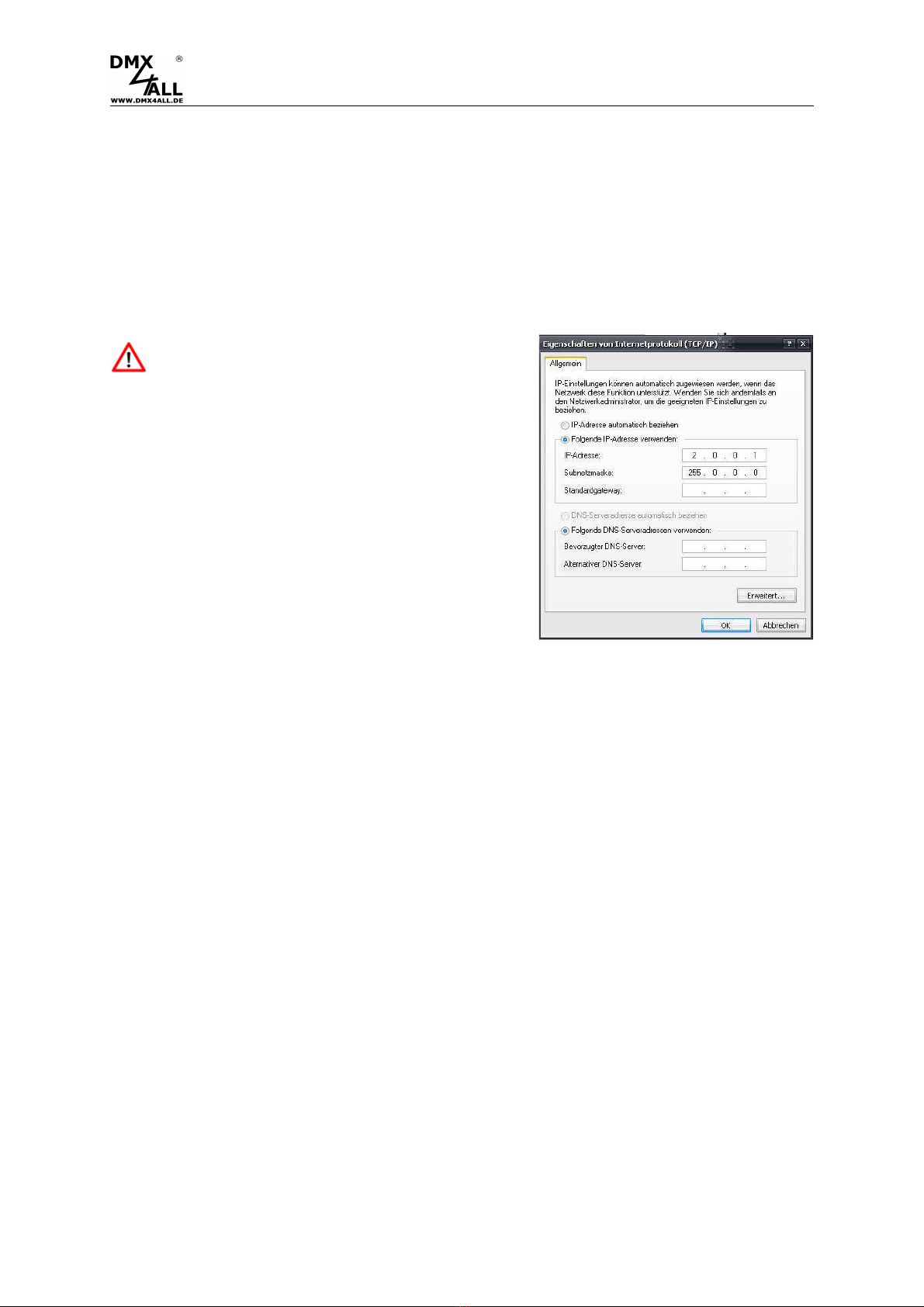
The computers net work setting must be
adjusted to the IP-Address 2.0.0.1 and sub
net mask 255.0.0.0 .
Please take further details in the ArtNet-
Specification.

ArtNet-DMX TWIN PoE 8
Device Configuration
Please call within the web browser and within the address-bar the IP of the ArtNet-
DMX Twin PoE (delivery state: 2.0.0.10) to get the following Configuration site:
Each node needs an own
IP
-
Address
so that the assignment can occur
clearly. Use in accordance to the ArtNet-Specifications the IP-Address 2.x.x.x
or 10.x.x.x
Any other IP-Address can also be used e.g. 192.168.1.10 . In this case the net-
mask has to be fit to 255.255.255.0 !
You can assign each node with any name for a better distinction.
The Short-Name is limited up to 18 signs and the Long-Name up to 64 signs.
The ArtNet-Parameter SubNet, Net and Port are to set according to the ArtNet-
Specifications and specify the aim for the DMX-Data.
The Netmask is to leave according to the ArtNet-Specification 255.0.0.0 .
With Port Mode is to specify for each port, if it should work as DMX-Input (DMX to
ArtNet) or DMX-Output (ArtNet to DMX).
With the activated option LED indicator auto off the LEDs at the device are shut
down after 10 minutes with permanent net work connection.
SAVE stores the Configuration respectively restores the Factory Settings.

ArtNet-DMX TWIN PoE 9
DMX-Output
For the DMX-Output the according ArtNet-DMX TWIN PoE port must be configured
as DMX-Output. Select within the Global-Settings the setting DMX-Output.
By clicking Port 1 or Port 2 you get the following configuration site:
Framerate shows the maximum DMX-Frame rate.
MAX complies to the maximum Frame according to the maximum frame rate of ca.
44fs (Frames/Second).
With ArtNet Fail the behavior is adjustable which starts, if ArtNet-Data stay away for
over 5 seconds.
The following options are available:
-HOLD last data All channels are leaved unchanged
-CLEAR all to 0% All DMX-Input channels will be set to 0
-SET all to 100% All DMX-Input channels will be set to 255
-NO OUTPUT No DMX-Signal is outputted
-DEFAULT VALUES The stored Default-Values are outputted
In Port 1 the option HTP-Merge DMX-INPUT 2 is available as soon as port 2 is
configured as DMX-INPUT. If this option is activated, the DMX-Data from Port 2 is
merged to the DMX-Output (port 1) HTP (Highest).
Via Enable Madrix-Sync / ArtNet-Sync the DMX-Output of several ArtNet-Devices
can be synchronized via ArtSync or by usage the Software MADRIX
® .
The option Save current DMX values as defaults stores the current DMX-Data and
restores these after turning on.
ArtNet-DMX TWIN PoE 10
DMX-Input
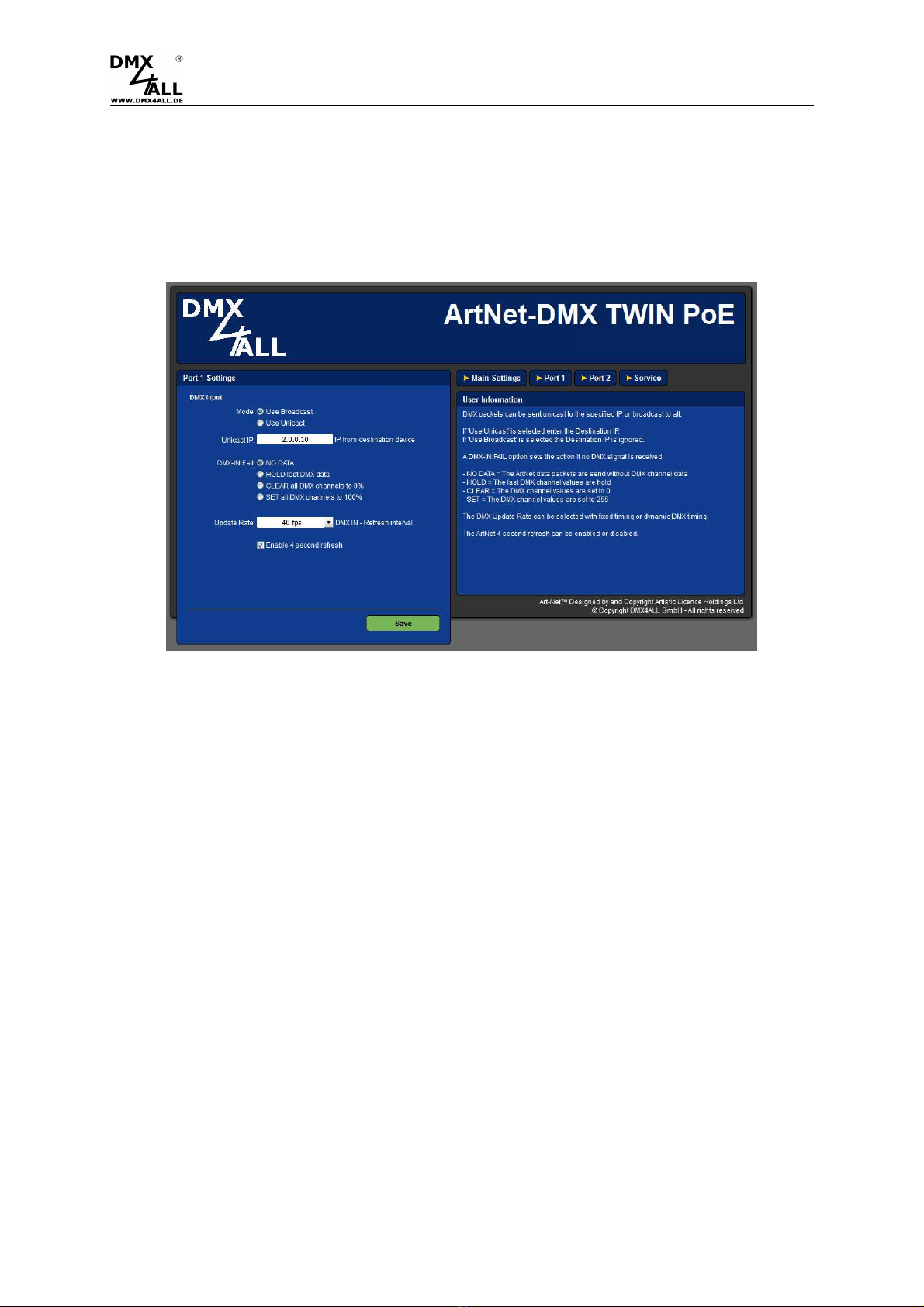
To receive DMX via a port, the according ArtNet-DMX TWIN PoEs Port must be
configured as DMX-Input. Select in the Global-Settings the setting DMX-Input.
Click Port 1 or Port 2 to get the following Configuration-Site:
Use Broadcast: The DMX-Data are sent to all ArtNet devices
Use Unicast: The DMX-Data are sent to one certain device with the Unicast IP
within the ArtNet.
For the DMX-Input several actions can be selected in the case of a DMX-Signals
failure (DMX-IN FAIL).
NO DATA - No DMX-Input is received via ArtNet
HOLD last DMX data - The latest data are maintained
CLEAR all DMX channels to 0% - All DMX-Channels are set to 0
SET all DMX channels to 100% - All DMX-Channels are set to 255
The Update-Rate, outputting the DMX-Input data, can be adjusted in several times.
On change data transferred the DMX-Input data only if these change, max all 0,1
seconds.
DMX Framerate transferred the received DMX-Values as soon as a frame ends. So
the frame rate of the incoming DMX-Signals is used for the Update-Rate.
By deactivating the function Enable 4 second refresh no Refresh-Data package is
sent.
Indice
Altri manuali DMX4ALL Hardware per computer

DMX4ALL
DMX4ALL DMX-Player L Manuale utente

DMX4ALL
DMX4ALL WirelessDMX RX board Manuale utente

DMX4ALL
DMX4ALL DMX-Servo-Control 2 Manuale utente

DMX4ALL
DMX4ALL DMX-Relais 2 INRUSH Manuale utente

DMX4ALL
DMX4ALL MaxiRGB Manuale utente

DMX4ALL
DMX4ALL ArtNet-DMX Mux24 Manuale utente

DMX4ALL
DMX4ALL DMX-Universal-Demux Manuale utente
Manuali Hardware per computer popolari di altre marche

EMC2
EMC2 VNX Series Manuale del proprietario

Panasonic
Panasonic DV0PM20105 Manuale utente

Mitsubishi Electric
Mitsubishi Electric Q81BD-J61BT11 Manuale utente

Gigabyte
Gigabyte B660M DS3H AX DDR4 Manuale utente

Raidon
Raidon iT2300 Manuale utente

National Instruments
National Instruments PXI-8186 Manuale utente


