Dormakaba RAC5 MFC Manuale utente

RAC5 MFC
Installation Guide
PK3738-
06/2023
Original document
EN

06-2023 dormakaba Canada Inc. RAC5 MFC Installation Guide –PK3738 | 1
Table of Contents
1 Introduction and Disclaimers ................................................................. 3
1.1 Safety Procedures ...................................................................................................................... 4
2 Product Description ................................................................................ 5
2.1 Features ....................................................................................................................................... 5
2.2 Components ............................................................................................................................... 6
2.2.1 Controller Box ............................................................................................................................................. 6
2.2.2 Contactless Card Reader ........................................................................................................................ 7
3 Checklist and Exploded Views ............................................................... 7
3.1 Parts and Tools List .................................................................................................................... 7
3.1.1 RAC5 MFC Enclosure ................................................................................................................................. 7
3.1.2 Relay Expansion Board ............................................................................................................................. 7
3.1.3 Cables (not shown) .................................................................................................................................. 7
3.1.4 Card Reader(s) .......................................................................................................................................... 7
3.1.5 Power Adapter ........................................................................................................................................... 8
3.1.6 Installation Hardware Bag....................................................................................................................... 8
3.1.7 Tools Required (not supplied)................................................................................................................. 8
3.2 Exploded View ............................................................................................................................ 9
4 System Installation Overview ................................................................ 9
4.1 Pre-installation Procedures .................................................................................................... 10
4.2 Installation and Wiring Procedures......................................................................................... 11
5 Annex A: Quick Troubleshooting Guide ............................................... 15
5.1 Power Troubleshooting ............................................................................................................ 15
5.2 Card Reading Troubleshooting ............................................................................................... 15
5.3 External Inputs Troubleshooting ............................................................................................ 16
5.4 Relay Expansion Board Troubleshooting ............................................................................... 16
6 Annex B: Multi-Floor Controller RAC5 MFC ......................................... 17
7 Annex C: Electromagnetic Interference ............................................. 18
8 Annex D: RAC5 MFC Components ........................................................ 19
9 Annex E: Single Reader Wiring ............................................................. 20
10 Annex F: Dual Reader Wiring ............................................................... 21

06-2023 dormakaba Canada Inc. RAC5 MFC Installation Guide –PK3738 | 2
11 Annex G: RAC5 MFC Wall Reader Mounting Instructions ................ 22
11 Annex H: Access Override Panel Wiring ............................................. 31
12 Annex I: Reader Drilling Templates .................................................... 32

06-2023 dormakaba Canada Inc. RAC5 MFC Installation Guide –PK3738 | 3
1 Introduction and Disclaimers
Please read and follow all directions carefully.
These instructions are designed for use by qualified installers or individuals with knowledge of common safety
practices and the competence to perform the steps described herein.
dormakaba Canada Inc. is not responsible for damage or malfunction due to incorrect
installation. The dormakaba RAC5 MFC is intended for guest pass level elevator floor
control only and is not designed to provide any Emergency/Fire Recall operations or
control. Emergency/Fire Recall operations and control are managed by separate elevator
control systems and outside of the dormakaba RAC5 MFC system.
Carefully inspect windows, doorframes, doors, etc. to ensure that the installation
not cover damages caused by installation.
Installation of card readers or other peripherals within elevators must only be done with
prior consultation of the elevator manufacturer. A technician from the elevator
manufacturer should always be present for installation. Do not connect to a receptacle
controlled by a switch.
If installing the RAC5 MFC in an elevator cage environment, or in proximity to any other equipment that may
generate high levels of electromagnetic interference, follow the installation requirements as indicated in
Annex C to prevent any operational instability.
The Table below outlines Access Control Levels as they pertain to certain Features.
Feature
Level
Destructive Attack Level
I
Line Security
I
Endurance Level
IV
Standby Power
I
Single Point Locking Device with Key Locks
I
RAC5 MFC Model #: T53-XXXXX
Firmware #: FW-516334
CAUTION
WARNING
IMPORTANT

06-2023 dormakaba Canada Inc. RAC5 MFC Installation Guide –PK3738 | 4
1.1 Safety Procedures
Installation is to be done following standard safety procedures and using adequate equipment and protection
as prescribed. Power is to be off during the installation process as well as for any maintenance procedures.
Wear safety glasses when using any tools.
NOTE: This equipment has been tested and
found to comply with Part 15 of the FCC Rules.
These limits are
designed to provide reasonable
protection against harmful interference in a residential installation. This
equipment generates,
uses, and can radiate radio frequency energy and, if not installed and used in accordance
with
the instructions, may cause harmful interference
to radio communications. However, there is no
guarantee
that interference will not occur in a particular installation. If this equipment does
cause harmful interference to
radio or television
reception, which can be determined by turning the
equipment off and on, the user is
encouraged to
try to correct the interference by one or more of
the following measures:
• Reorient or relocate the receiving antenna
• Increase the separation between the equipment and receiver
• Connect the equipment into an outlet on a circuit different from that to which the receiver is connected
• Consult the dealer or an experienced radio/TV technician for help
Adhere to UL STD 294
Adhere to the National Electrical Code ANSI/NFPA 70
Statement according to FCC part 15
This device complies with Part 15 of the FCC Rules. Operation is subject to the following two
conditions:
(1)
This device may not cause harmful interference, and
(2)
This device must accept any interference
received, including interference that may cause undesired
operation.
CAUTION

06-2023 dormakaba Canada Inc. RAC5 MFC Installation Guide –PK3738 | 5
2 Product Description
2.1 Features
The RAC5 MFC is designed to operate either online or stand-alone elevator control units (ECUs). It provides
access control and secure stops for multiple floors and functions with RAC5 NFC wall readers and AMBIANCE
features. The system can control the RAC5 NFC wall readers up to 1,000 feet (300m) away.
* Recommended cable is 22AWG CMP cable (Belden 8723 or equivalent).
NOTE: For installation of the contactless reader of distances greater than 1,000 feet (300m) please contact
dormakaba Canada Inc. Technical Support.
The Contactless Card Reader can be mounted directly on the inside of the elevator car, typically on the
elevator call button panel. For surface mount, the surface area required for the contactless reader is 2 7/8" L
(73mm) x 1 7/8" W (47.7mm) x 2" D (50.8mm), 2" depth behind panel required. The RAC5 MFC is an access
control solution that can operate 2 individual card readers, provides multiple relays, and much more as per the
feature list below. See Figure 1 for a typical configuration.
Figure 1 RAC5 MFC System
Features
• Relay Expansion Board (up to
8) with 8 relays each
• Control up to two
card readers
• Tamper Alarm Input
• Power failure 3-way auto-
recovery; real time clock
(RTC)
• Variable access delay
programmable via an
M-Unit
• Power Status LEDs
feedback
• Relay bypassing (passing
function)
• Access Override Input
• Configurable fail safe
or fail secure modes

06-2023 dormakaba Canada Inc. RAC5 MFC Installation Guide –PK3738 | 6
2.2 Components
Refer to Annex D for RAC5 MFC component breakdown.
2.2.1 Controller Box
Figure 2 RAC5 MFC Controller Box
(A)
RAC5 MFC Enclosure & Access Door: Holds the controller board (PCB), power supply and relay expansion
board. Knockouts are available on 3 sides for routing of peripheral cables
(B)
Power Supply: Provides the DC power required for operation of the controller PCB and all peripherals
(C)
Controller Board: Controls all the features of the RAC5 MFC system
(D)
Tamper Switch: Attached to the RAC5 MFC enclosure to generate an alarm if the box is opened during
operation
(E)
Power & Battery Status LEDs: Provides visual indication of the operational status of the RAC5 MFC
system. Battery status LED is only used on battery back-up equipped systems
(F)
Cam-lock with Key: To provide secure locking and to control access to the RAC5 MFC enclosure
(G)
Relay Expansion Board: Interface board providing 8 relay outputs that can be used to control relay-
equipped equipment. For example, it can be used with an elevator to call the elevator or to provide
access only to specific floors for certain guests and staff. Up to 8 expansion boards of 8 relays each
giving up to 64 individual control relays can be added
Not Shown:
(H)
Cables: Cables required for connections of the LEDs, power supply and controller PCB. If equipped, will
also include cable for connection of relay expansion board

06-2023 dormakaba Canada Inc. RAC5 MFC Installation Guide –PK3738 | 7
2.2.2 Contactless Card Reader
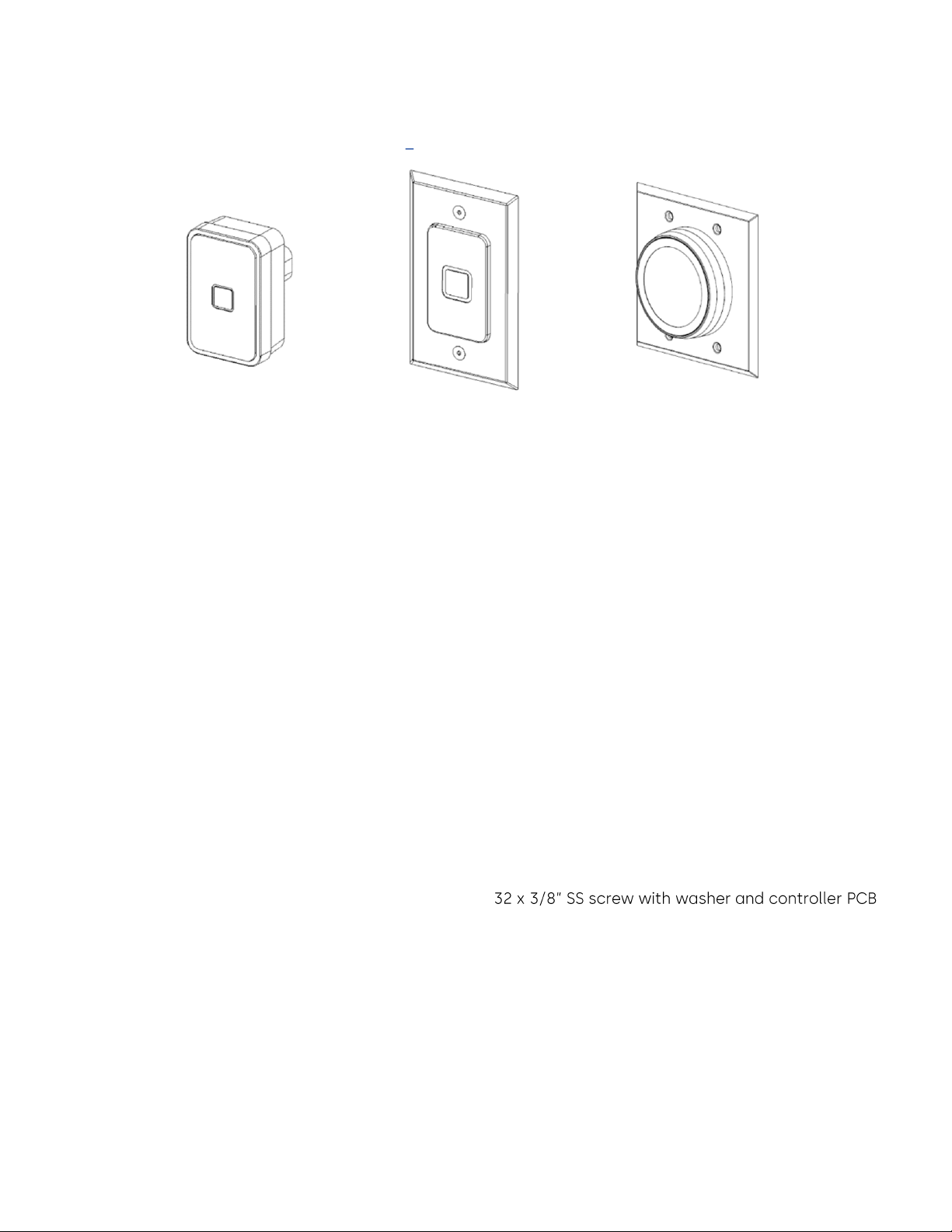
The Contactless Card Reader is a small, mounted unit that protrudes from the wall and is used with RFID-
based keycards.
Figure 3 Contactless Card Reader
*NOTE: The included trim plate can be removed for direct mounting of the reader to the elevator panel.
3 Checklist and Exploded Views
3.1 Parts and Tools List
NOTE: Some items are dependent on the options or configuration purchased. Please ensure all parts ordered
and required for installation are available before starting. Parts are subject to change without notice. For
letter designations, refer to Figures 3 and 4.
3.1.1 RAC5 MFC Enclosure
NOTE: All items below come factory installed.
(A)
RAC5 MFC enclosure with access door
(B)
Power Supply: 24 VAC / 24 VDC input, 12 VDC output
(C)
Controller PCB
(D)
Tamper switch
(E)
2-panel mounted LEDs (green) for power and battery status
(F)
Cam-lock
3.1.2 Relay Expansion Board
(G)
Up to 8 Relay expansion PCB boards, including 4 x 6-
connection cable (not shown)
3.1.3 Cables (not shown)
NOTE: All items come factory installed.
(H)
System cables: Power supply to LEDs, controller PCB and controller PCB jumpers
3.1.4 Card Reader(s)
(I)
Contactless Reader Options (see Figure 3)
SURFACE MOUNT
FLUSH MOUNT*
ROUND READER*

06-2023 dormakaba Canada Inc. RAC5 MFC Installation Guide –PK3738 | 8
3.1.5 Power Adapter
NOTE: Dependent
(J)
1x International 24 VDC output Adapter with integrated 6-foot (1.8m) power cable and interchangeable
AC outlet prongs. Input power requirements of 100-240 VAC, 50 60 Hz, 1.0A
Or
(K)
1x North America 24 VAC output power adapter with 2 separate 10-foot (3m) power cable assembly (2x
18 AWG cables terminated on one end with fork terminals). Input power requirements of 110-120 VAC, 60
Hz.
3.1.6 Installation Hardware Bag
(L)
4x Philips wood screw, #8 x 1-
(M)
4x Nylon anchor, #6-10
(N)
4x Concrete anchor, #7-9
(O)
2x Strain relief connector with locking nut
(P)
Ring terminal connector
(Q)
5x Steel flat washer, #8
(R)
2x Crimp fork terminals, 18-22 AWG
3.1.7 Tools Required (not supplied)
Additional tools may be required dependent on the peripherals being installed. The list below covers the
installation of the RAC5 MFC enclosure only.
• Safety glasses
• Ink marker
• Electric drill
•
•
•
•
• Philips screwdriver - #2
• Slotted screwdriver
• Adjustable wrenches
• Crimp tool 18-22 AWG
• Pliers
• Wire cutter/stripper
• Hammer or rubber mallet
• Awl or center punch

06-2023 dormakaba Canada Inc. RAC5 MFC Installation Guide –PK3738 | 9
3.2 Exploded View
Figure 4 Exploded View
4 System Installation Overview
Before starting installation:
• Ensure all components ordered and materials/tools required are available
• Ensure all cabling is available for the peripherals/components being installed
All installations and wiring of RAC5 MFC enclosure & peripherals must comply with all
applicable local building codes and regulations and National Electric Code, ANSI/NFPA 70.
Do not connect power to the enclosure until the end of the installation.
IMPORTANT
CAUTION
Altri manuali per RAC5 MFC
1
Indice
Altri manuali Dormakaba Controllori