Doro PHONEEASY 520X Manuale utente

DoroPhoneEasy®520X
English(US)

22
2
3
13
1
4
7
511
14
12
10
9
8
6
16
18
17
15
19 2120 23

English
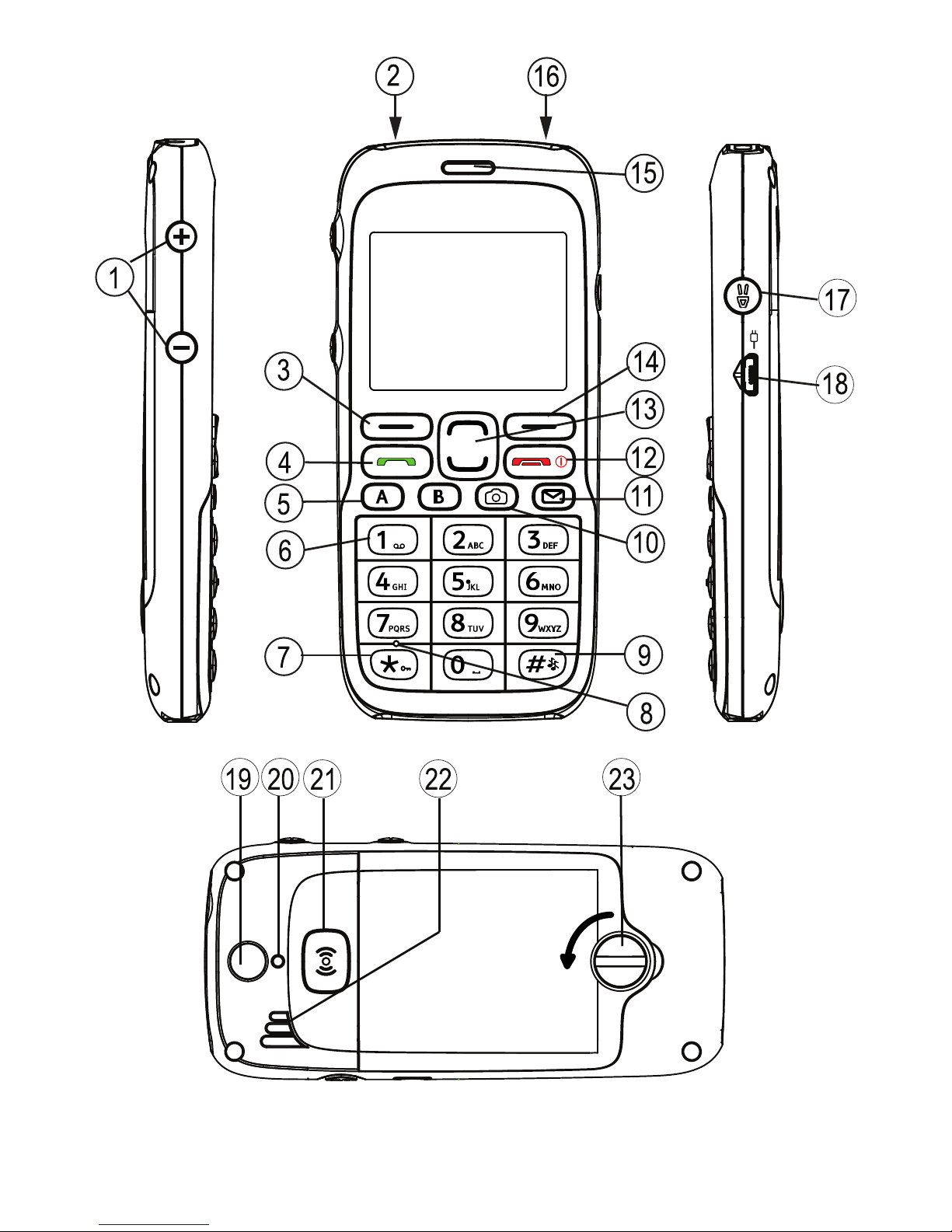
1.Volumecontrol
2.Headsetsocket
3.Leftselectionbutton
4.Callbutton
5.Speeddial
6.Voicemail
7.Keylock
8.Microphone
9.Silent/Inputmethod
10.Camerashortcut
11.SMSshortcut
12.Endcall/Poweron/off
13.Arrowbuttons
14.Rightselectionbutton
15.Earpiece
16.Flashlight
17.Flashlightbutton
18.Chargingsocket
19.Cameralens
20.Cameraash
21.Assistancebutton
22.Loudspeaker
23.Batterycover/lock
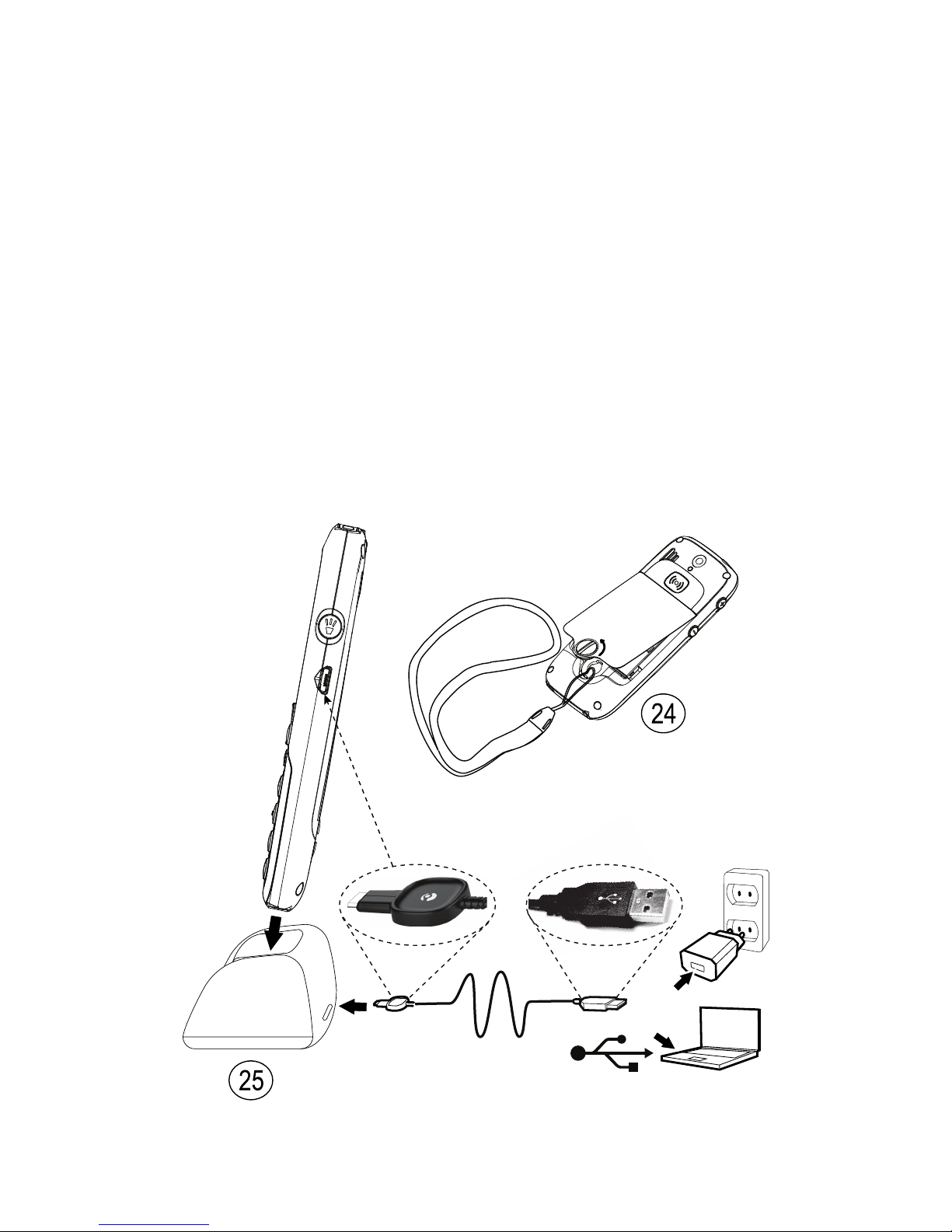
24.Lanyard
25.Chargingstand
25
24

English(US)
Contents
Installation................................................................................1
InstalltheSIMcard,memorycardandthebattery..................1
Charging....................................................................................2
Gettoknowyourphone..............................................................3
Assistivefunctions...............................................................3
Turnthephoneonandoff....................................................3
Navigatethephone..............................................................4
Enteringtext...................................................................5
Displaystatussymbols.........................................................7
Displaymainsymbols...........................................................7
Callfunctions.............................................................................8
Makeacall.........................................................................8
Callfromthephonebook.......................................................8
Receiveacall......................................................................8
Volumecontrol.....................................................................9
Calloptions.........................................................................9
Callwaiting.........................................................................9
Callinformation...................................................................10
Speeddial......................................................................10
Silent..................................................................................10
Headset..............................................................................10
SOScalls............................................................................10
Assistancebutton............................................................11
Phonebook.................................................................................12
Addcontact.........................................................................12
CreateICEcontact(InCaseofEmergency)........................13
Managephonebookcontacts.................................................13
ICE(InCaseofEmergency).....................................................15
Messages...................................................................................16
Createandsendtextmessages(SMS)...................................16
Createandsendpicturemessage(MMS)...............................16
Createandsendavoicemessage..........................................17
Inbox,OutboxandSent........................................................18
Calllog......................................................................................19
Retrieveanddial..................................................................19
Camera......................................................................................19

English(US)
Cameraadjustments.............................................................20
Imageviewer..............................................................................20
Connectingthephonetoacomputer............................................21
Draganddropcontentbetweenphoneandacomputer...........21
DisconnecttheUSBcablesafely...........................................21
Settings.....................................................................................22
General...............................................................................22
Sound.................................................................................25
Display................................................................................27
Calls...................................................................................28
Messages............................................................................32
Camera...............................................................................35
Assistance.......................................................................36
Bluetooth®...........................................................................38
Security..............................................................................40
Filemanager.......................................................................43
Additionalfunctions....................................................................44
Organizer............................................................................44
Troubleshooting..........................................................................53
Safetyinstructions......................................................................54
Networkservicesandcosts...................................................55
Operatingenvironment.........................................................55
Medicalunits......................................................................55
Areaswithexplosionrisk......................................................56
Protectyourhearing.............................................................56
Emergencycalls...................................................................56
Vehicles..............................................................................56
Drivingsafely.......................................................................57
Hearingaidcompatibility......................................................58
TTYcompatibility.................................................................58
RFexposureinformation(SAR).............................................58
RFexposureinformation(SAR)....................................................59
ICRadiationExposureStatement..........................................60
DisclaimerandLimitationofLiability...........................................60
FCC/IndustryCanadanotice.........................................................61
Careandmaintenance................................................................61
Batterydisposalandrecyclinginformation....................................63
Warranty....................................................................................63

English(US)
Support.....................................................................................63
Specications............................................................................64

English(US)
Installation
IMPORTANT!
Turnoffthephoneanddisconnectthechargerbeforeremovingthe
batterycover.
InstalltheSIMcard,memorycardandthebattery
TheSIMandmemorycardholdersarelocatedinsidethebattery
compartment.
1234
GB
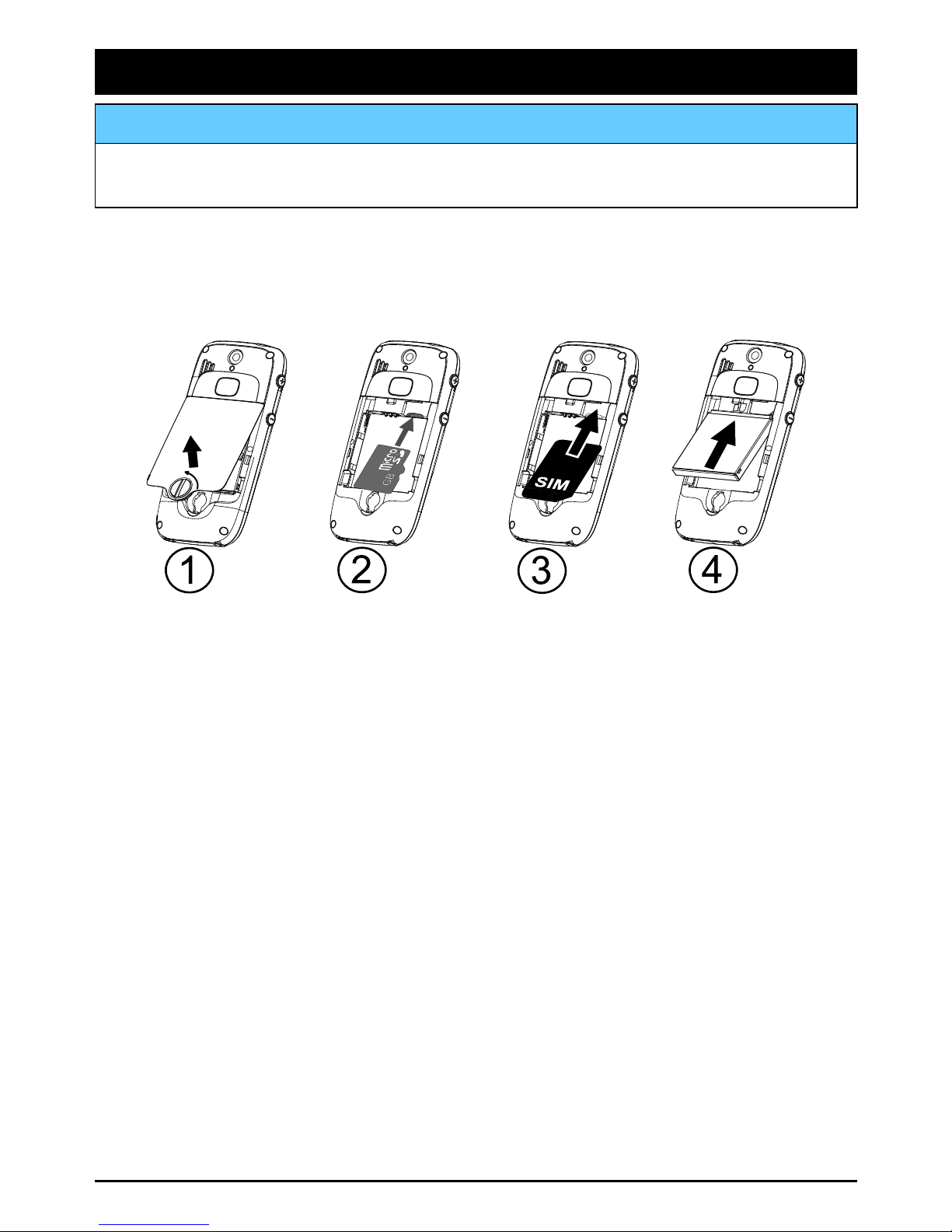
1.Removethebatterycoverandthebatteryifitisalreadyinstalled.
Unlockthebatterycoverbyturningthescrewaquarterofaturn
counterclockwise.
2.Optional:InsertthememorycardintotheslotundertheSIM
cardholder.Makesurethatthememorycardcontactsarefacing
inwardsandpushthecardin,untilyouhearaclick.Takecare
nottoscratchorbendthecontactsonthecard.Toremoveor
replacethecard,pushthecardinuntilyouhearaclickand
thenpullthecardout.
3.InserttheSIMcardbygentlyslidingitintotheholder.Makesure
thattheSIMcard’scontactsarefacinginwardsandthatthecut
offcornerispointingdownwards.Takecarenottoscratchor
bendthecontactsontheSIMcard.
4.Insertthebatterybyslidingitintothebatterycompartmentwith
thecontactsfacingupwardstotheleft.Replacethebatterycover
andlockitbyturningthescrewaquarterofaturnclockwise.
1

English(US)
IMPORTANT!
Useonlycompatiblememorycardsforusewiththisdevice.Compatible
cardtype:microSD,microSDHC.
Incompatiblecardsmaydamagethecarditself,thedeviceandcorrupt
datastoredonthecard.Dependingonthemarketsomephonesmay
haveapre-installedmemorycard.
Charging
CAUTION
Onlyusebatteries,chargerandaccessoriesthathavebeenapprovedfor
usewiththisparticularmodel.Connectingotheraccessoriesmaybe
dangerousandmayinvalidatethephonestypeapprovalandguarantee.
Whenthebatteryisrunninglow,isdisplayedandawarningsignal
isheard.Tochargethebattery,connectthemainsadaptertoawall
socketandtothechargingsockety.
isdisplayedbrieywhenthechargerisconnectedtothephone,
andwhenitisdisconnected.Thebatterychargeindicatorwill
beanimatedwhilecharging.Ittakesapproximately3hourstofully
chargethebattery.
isdisplayedonthescreenwhenchargingiscompleted.Ifthe
phoneisturnedoffwhenthechargerisconnectedtothephoneonly
thebatterychargeindicatorwillbeshownonthedisplay.
Note!
TosavepowertheLCDbacklightgoesoffafterawhile.Pressanybutton
toilluminatethedisplay.Fullbatterycapacitywillnotbereacheduntil
thebatteryhasbeencharged3–4times.Batteriesdegradeovertime,
whichmeansthatcalltimeandstandbytimewillnormallydecrease
withregularuse.
Saveenergy
Whenyouhavefullychargedthebatteryanddisconnectedthecharger
fromthedevice,unplugthechargerfromthewalloutlet.
2

English(US)
Gettoknowyourphone
Assistivefunctions
Thefollowingsymbolsindicateinformationinthemanualabout
assistivefunctionsfor:
SeeingHandling
HearingSafety
Turnthephoneonandoff
Pressandholdtheredbuttononthephonetoturniton/off.
ConrmwithYestopoweroff.
IftheSIMcardisvalidbutprotectedwithaPINcode(Personal
IdenticationNumber),PINisdisplayed.
•EnterthePINcodeandpressOK(upperleftcornerof
keypad).DeletewithClear(upperrightcornerofkeypad).
Note!
IfPINandPUKcodeswerenotprovidedwithyourSIMcard,please
contactyourserviceprovider.
Attempts:#showsthenumberofPINattemptsleft.Whennomore
attemptsremain,PINblockedisdisplayed.TheSIMcardmustnow
beunlockedwiththePUKcode(PersonalUnblockingKey).
1.EnterthePUKcodeandconrmwithOK.
2.EnteranewPINcodeandconrmwithOK.
3.Re-enternewPINcodeandconrmwithOK.
Start-upwizard
Whenstartingthephoneforthersttime,youcanusetheStart-up
wizardtosetsomebasicsettings.
•PressYestochangeorNoifyoudonotwanttochange.
Tip:
YoucanruntheStart-upwizardlaterifyouwant,seeStart-upwizard,
p.23.
3

English(US)
Changingthelanguage,timeanddate
ThedefaultlanguageisdeterminedbytheSIMcard.SeeGeneral,
p.22onhowtochangelanguage,timeanddate.
Navigatethephone
Standby(idlemode)
Whenthephoneisreadytouse,andyouhavenotkeyedinany
characters,thephoneisinstandby.
•Presstoreturntostandbymode.
•PressleftselectionbuttontoaccessthephoneMenuor
rightselectionbuttonNametoaccessyoursavedcontactsin
thephonebook.
Tip:
Youcanalwayspresstoreturntostandby.
Scroll
•Usethearrowbuttons/toscrollinmenus.
Openitem/tickoruntickoption
•Usethearrowbuttons/toselectortick/unticktheitem
andpressOK(leftselectionbutton)toconrm.
Step-by-stepinstructions
Thearrow()indicatesnextactioninstep-by-stepinstructions.To
conrmanaction,pressOK.Toselectanitem,scrollorhighlightthe
itemusing/andthentopressOK.
Example:
•PressMenuPhonebook-Newcontact-Add.
ToperformtheexampleonyourDoroPhoneEasy®520Xyoushould
dothefollowing:
1.PressMenu,scrolltoPhonebookandpressOK.
2.Select-Newcontact-andpressAdd.
4
Altri manuali per PHONEEASY 520X
2
Indice
Altri manuali Doro Telefono cellulare

Doro
Doro 2400 Manuale utente

Doro
Doro 6520 Manuale utente

Doro
Doro HANDLEEASY 326GSM Manuale utente

Doro
Doro 6881 Manuale utente

Doro
Doro 2820 Manuale utente

Doro
Doro 8035 Manuale utente

Doro
Doro 824 Manuale utente

Doro
Doro PHONEEASY 410GSM Manuale utente

Doro
Doro 6520 Manuale utente

Doro
Doro 1360 Manuale utente