
Doro Primo 405 Manuale utente
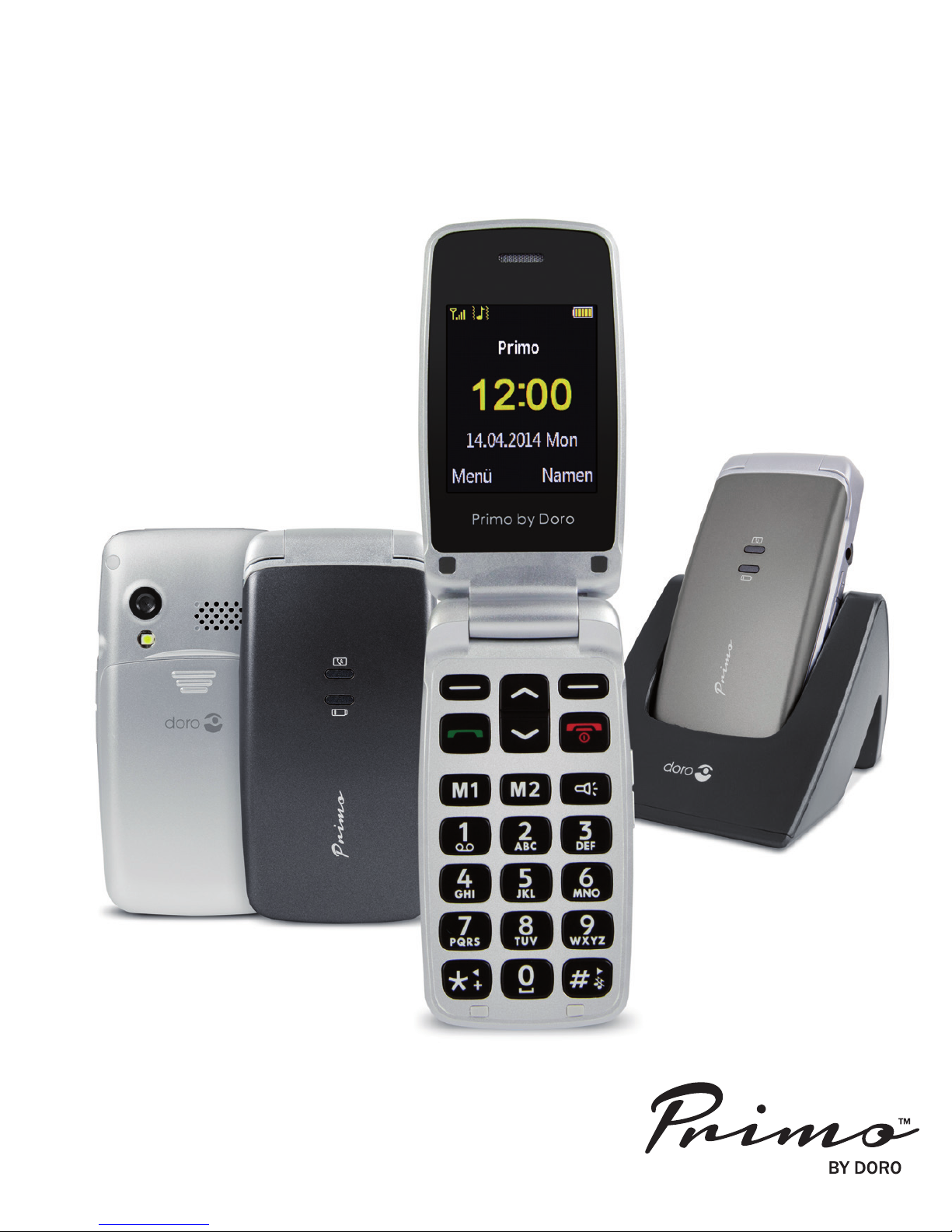
Primo 405 by Doro
Operating Instructions

U2
1
2
3
4
5
6
78
9
10
11
12 13
14
17
16
15
18
20
19
21

i
1. Receiver
loudspeaker Making phone calls holding the cell phone to the ear
2. Display
3. Left soft key Selection of the main menu
Right soft key Opening the telephone directory
4. Call button Dialling and answering call; opening the call log.
5. Arrow keys In idle state for opening the quick access list.
for opening the message.
Scrolling up and down in menus and lists.
6. Speed-dial buttons Speed-dialling of the numbers saved under
M1 and M2 with one keystroke
7. *key In idle state: to enter: “*”/ “+” / “P”/“W“;
Input of text: input of special characters
8. #key In idle state: long keystroke to toggle between ring tone
on/off; or inputs: shifting between input modes.
9. Microphone
10. Numerical keys In idle state: input of phone number;
long keystroke on 1: calling the voice mail box (tele-
phone number must be saved);
11. Torch button Switches the torch on/off
12. Exit key Exiting a call, returning to idle state; switching the phone
on/off
13. Headset connector or standard headset with 3.5 mm phone jack
14. +/- keys Sets the volume of ring tone/loudspeaker
15. LEDs Notification of missed calls and received text mes-
sages
Charging of battery
16. Camera lens
17. lash LED / Torch
18. Loudspeaker or hands-free mode and ringing
19. Micro USB port or battery charger or connection to PC
20. Charging contact To charge the device in the charging cradle
21. Charging cradle To charge the telephone

ii

1
Co te ts
Installation . . . . . . . . . . . . . . . . . . . . . . . . . . . . . . . . . . . . . . . . . . . . . . . . . . . .4
Package contents . . . . . . . . . . . . . . . . . . . . . . . . . . . . . . . . . . . . . . . . . . . . . .4
Inserting the SIM card, memory card and rechargeable battery . . . . . . . . . .4
Charging . . . . . . . . . . . . . . . . . . . . . . . . . . . . . . . . . . . . . . . . . . . . . . . . . . . . . .5
Symbols . . . . . . . . . . . . . . . . . . . . . . . . . . . . . . . . . . . . . . . . . . . . . . . . . . . . . .6
Auxiliary functions . . . . . . . . . . . . . . . . . . . . . . . . . . . . . . . . . . . . . . . . . . . . . .7
Display status symbols . . . . . . . . . . . . . . . . . . . . . . . . . . . . . . . . . . . . . . . . . .7
peration . . . . . . . . . . . . . . . . . . . . . . . . . . . . . . . . . . . . . . . . . . . . . . . . . . . . .7
Activating the phone . . . . . . . . . . . . . . . . . . . . . . . . . . . . . . . . . . . . . . . . . . . .8
Standby (Idle mode) . . . . . . . . . . . . . . . . . . . . . . . . . . . . . . . . . . . . . . . . . . . .8
Changing the language, time and date . . . . . . . . . . . . . . . . . . . . . . . . . . . . . .8
Making phone calls . . . . . . . . . . . . . . . . . . . . . . . . . . . . . . . . . . . . . . . . . . . . .9
Selecting phone numbers from the phone directory . . . . . . . . . . . . . . . . . . . .9
Answering a call . . . . . . . . . . . . . . . . . . . . . . . . . . . . . . . . . . . . . . . . . . . . . . .9
Volume control . . . . . . . . . . . . . . . . . . . . . . . . . . . . . . . . . . . . . . . . . . . . . . . .9
Entering text . . . . . . . . . . . . . . . . . . . . . . . . . . . . . . . . . . . . . . . . . . . . . . . . .10
Call options . . . . . . . . . . . . . . . . . . . . . . . . . . . . . . . . . . . . . . . . . . . . . . . . . .10
Call waiting . . . . . . . . . . . . . . . . . . . . . . . . . . . . . . . . . . . . . . . . . . . . . . . . . .11
Call information . . . . . . . . . . . . . . . . . . . . . . . . . . . . . . . . . . . . . . . . . . . . . . .11
Silent . . . . . . . . . . . . . . . . . . . . . . . . . . . . . . . . . . . . . . . . . . . . . . . . . . . . . . .11
Headset . . . . . . . . . . . . . . . . . . . . . . . . . . . . . . . . . . . . . . . . . . . . . . . . . . . .12
Emergency calls . . . . . . . . . . . . . . . . . . . . . . . . . . . . . . . . . . . . . . . . . . . . . .12
Telephone book . . . . . . . . . . . . . . . . . . . . . . . . . . . . . . . . . . . . . . . . . . . . . . .12
Creating an entry in the telephone book . . . . . . . . . . . . . . . . . . . . . . . . . . . .13
My number . . . . . . . . . . . . . . . . . . . . . . . . . . . . . . . . . . . . . . . . . . . . . . . . . .13
Creating ICE entry (In Case of Emergency) . . . . . . . . . . . . . . . . . . . . . . . . .14
Managing phonebook entries . . . . . . . . . . . . . . . . . . . . . . . . . . . . . . . . . . . .14
ICE (In Case of Emergency) . . . . . . . . . . . . . . . . . . . . . . . . . . . . . . . . . . . . .16

2
Messaging . . . . . . . . . . . . . . . . . . . . . . . . . . . . . . . . . . . . . . . . . . . . . . . . . . . .17
Creating and sending SMS . . . . . . . . . . . . . . . . . . . . . . . . . . . . . . . . . . . . . .17
Creating and sending MMS . . . . . . . . . . . . . . . . . . . . . . . . . . . . . . . . . . . . .17
Inbox, Sent, Outbox . . . . . . . . . . . . . . . . . . . . . . . . . . . . . . . . . . . . . . . . . . .19
Call history . . . . . . . . . . . . . . . . . . . . . . . . . . . . . . . . . . . . . . . . . . . . . . . . . . .20
Camera (take photos) . . . . . . . . . . . . . . . . . . . . . . . . . . . . . . . . . . . . . . . . . . .21
Image viewer . . . . . . . . . . . . . . . . . . . . . . . . . . . . . . . . . . . . . . . . . . . . . . . . .22
Audio player . . . . . . . . . . . . . . . . . . . . . . . . . . . . . . . . . . . . . . . . . . . . . . . . . .22
FM radio . . . . . . . . . . . . . . . . . . . . . . . . . . . . . . . . . . . . . . . . . . . . . . . . . . . . .23
File manager . . . . . . . . . . . . . . . . . . . . . . . . . . . . . . . . . . . . . . . . . . . . . . . . . .24
Connecting the phone to a computer . . . . . . . . . . . . . . . . . . . . . . . . . . . . . .25
Drag and drop content between phone and a computer . . . . . . . . . . . . . . .25
Disconnect the USB cable safely . . . . . . . . . . . . . . . . . . . . . . . . . . . . . . . .26
Settings . . . . . . . . . . . . . . . . . . . . . . . . . . . . . . . . . . . . . . . . . . . . . . . . . . . . . .26
Basic settings . . . . . . . . . . . . . . . . . . . . . . . . . . . . . . . . . . . . . . . . . . . . . . . .27
Call settings . . . . . . . . . . . . . . . . . . . . . . . . . . . . . . . . . . . . . . . . . . . . . . . . .29
Voice mail (Mailbox) . . . . . . . . . . . . . . . . . . . . . . . . . . . . . . . . . . . . . . . . . . .31
Network settings . . . . . . . . . . . . . . . . . . . . . . . . . . . . . . . . . . . . . . . . . . . . . .33
Security settings . . . . . . . . . . . . . . . . . . . . . . . . . . . . . . . . . . . . . . . . . . . . . .33
Restore factory settings . . . . . . . . . . . . . . . . . . . . . . . . . . . . . . . . . . . . . . . .35
Bluetooth® . . . . . . . . . . . . . . . . . . . . . . . . . . . . . . . . . . . . . . . . . . . . . . . . . .35
Data accounts . . . . . . . . . . . . . . . . . . . . . . . . . . . . . . . . . . . . . . . . . . . . . . . .36
SMS settings . . . . . . . . . . . . . . . . . . . . . . . . . . . . . . . . . . . . . . . . . . . . . . . .38
MMS settings . . . . . . . . . . . . . . . . . . . . . . . . . . . . . . . . . . . . . . . . . . . . . . . .39
Settings for service message . . . . . . . . . . . . . . . . . . . . . . . . . . . . . . . . . . . .39
User profiles . . . . . . . . . . . . . . . . . . . . . . . . . . . . . . . . . . . . . . . . . . . . . . . . . .40

3
rganizer . . . . . . . . . . . . . . . . . . . . . . . . . . . . . . . . . . . . . . . . . . . . . . . . . . . . .41
Calendar . . . . . . . . . . . . . . . . . . . . . . . . . . . . . . . . . . . . . . . . . . . . . . . . . . . .41
Calculator . . . . . . . . . . . . . . . . . . . . . . . . . . . . . . . . . . . . . . . . . . . . . . . . . . .41
Alarm . . . . . . . . . . . . . . . . . . . . . . . . . . . . . . . . . . . . . . . . . . . . . . . . . . . . . .42
Stopwatch . . . . . . . . . . . . . . . . . . . . . . . . . . . . . . . . . . . . . . . . . . . . . . . . . . .42
ile manager . . . . . . . . . . . . . . . . . . . . . . . . . . . . . . . . . . . . . . . . . . . . . . . . .43
Magnifying glass . . . . . . . . . . . . . . . . . . . . . . . . . . . . . . . . . . . . . . . . . . . . . .43
Appendix . . . . . . . . . . . . . . . . . . . . . . . . . . . . . . . . . . . . . . . . . . . . . . . . . . . . .44
Safety instructions . . . . . . . . . . . . . . . . . . . . . . . . . . . . . . . . . . . . . . . . . . . .44
Network services and fees . . . . . . . . . . . . . . . . . . . . . . . . . . . . . . . . . . . . . .44
Operating environment . . . . . . . . . . . . . . . . . . . . . . . . . . . . . . . . . . . . . . . . .44
Medical devices . . . . . . . . . . . . . . . . . . . . . . . . . . . . . . . . . . . . . . . . . . . . . .44
Cardiac pacemakers . . . . . . . . . . . . . . . . . . . . . . . . . . . . . . . . . . . . . . . . . . .45
Explosive areas . . . . . . . . . . . . . . . . . . . . . . . . . . . . . . . . . . . . . . . . . . . . . .45
Protection from too high volume at the ear . . . . . . . . . . . . . . . . . . . . . . . . . .46
Emergency calls . . . . . . . . . . . . . . . . . . . . . . . . . . . . . . . . . . . . . . . . . . . . . .46
Vehicles . . . . . . . . . . . . . . . . . . . . . . . . . . . . . . . . . . . . . . . . . . . . . . . . . . . .46
Care and maintenance . . . . . . . . . . . . . . . . . . . . . . . . . . . . . . . . . . . . . . . . .47
Warranty and service information . . . . . . . . . . . . . . . . . . . . . . . . . . . . . . . . .48
Technical data . . . . . . . . . . . . . . . . . . . . . . . . . . . . . . . . . . . . . . . . . . . . . . . .50
Specific Absorption Rate (SAR) . . . . . . . . . . . . . . . . . . . . . . . . . . . . . . . . . .U3
Approval and Conformity . . . . . . . . . . . . . . . . . . . . . . . . . . . . . . . . . . . . . . .U3
4
I stallatio
Package contents
• 1 mobile phone
• 1 energy-efficient switch-mode power supply
• 1 charging cradle
• 1 rechargeable battery Li-Ion 3.7 V / 1.000 mAh
• 1 micro-SD memory card (128 MB/already installed)
• 1 stereo headset
• 1 operating instructions
IMPORTANT!
irst switch the phone off and disconnect it from the battery charger before you
remove the cover of the battery compartment.
Inserting the SIM card, memory card and rechargeable battery
The SIM card and memory card holder are located behind the rechargeable bat-
tery.
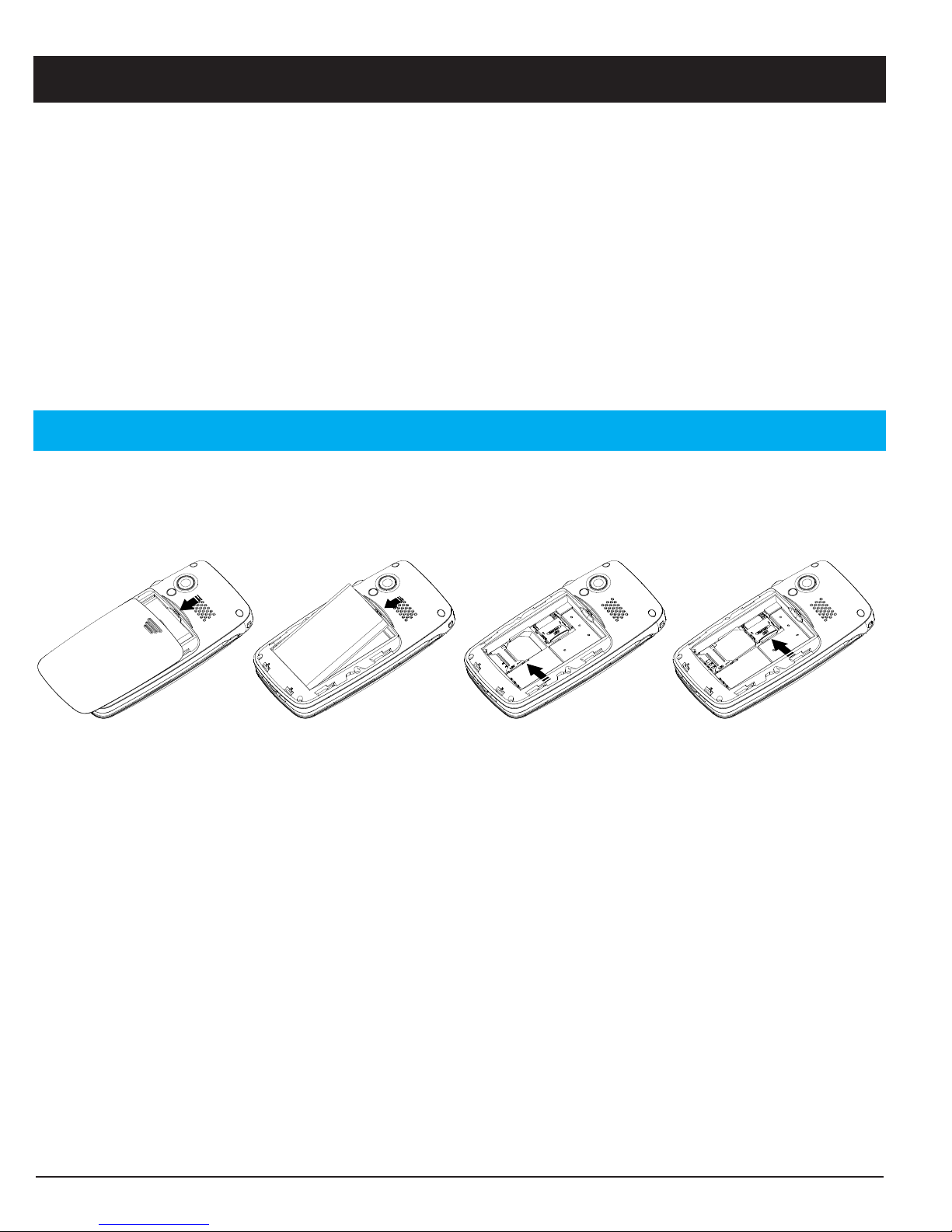
1. Remove the cover of the battery compartment by placing a thumb on the
cover’s riffle on the rear of the telephone casing and pushing the cover
downwards. If the rechargeable battery is inserted, remove it by lifting it on
the notch at the top using a finger nail.
2. Insert the SIM card by carefully pushing it under the metal bracket on the
lower side. Make sure the contacts of the SIM card point downwards and the
cut-off corner fits exactly in the recessed shaping of the holder. The contacts
of the SIM card must not be scratched or bent. Try not to touch the contacts
with your fingers.

5
3. Micro-SD card
To use the performance features of your phone that require more memory, in
particular photos, music etc., a micro SD memory card is needed. In your
phone a 128 MB memory card is already installed.
or replacing proceed as follows:
Slightly press onto card holder on the left side and carefully push it in
towards the left hand casing edge. The memory card holder now can be fol-
ded up vertically. Remove the old memory card and place the new memory
card in the black plastic holder in a form- locking manner. Make sure the
contacts of the memory card point downwards and the "lug" is placed in the
marked area. The contact of the memory card must not be scratched or
bent.
Push the metal bracket back down, pressing it flat and slide it away from the
edge of the housing until it snaps into place.
4. Insert the rechargeable battery by pushing it into the battery compartment
ensuring that the three contacts on the front touch the three spring contacts
on the bottom in the battery compartment.
5. Replace the cover and push it upward using gentle pressure with the thumb
until it snaps securely into place again.
IMPORTANT!
Use memory cards that are compatible with this device only. Compatible card
types are: micro SD, micro SDHC. Incompatible cards may damage the card
itself, the device as well as the data saved on the card.

6
Chargi g
CAUTION
Use rechargeable batteries, battery chargers and accessories that are
approved for this specific model only. Connecting other accessories involves
risks and may lead to the lapse of the approval of the device type and the loss
of warranty.
When the battery performance is low, the empty battery symbol flashes to indi-
cate the battery state and an alarm signal will sound. To recharge the battery,
connect the mains adapter to the micro USB connector on the bottom side of the
phone. Alternatively, you can place the telephone into the charging cradle con-
nected to the mains adapter.
When the battery charger is connected to the phone, the red charging LED is
on. The battery charge status moves when the battery is charging (visible in the
upper right corner of the display).
A complete charging process of the rechargeable battery takes approximately 3
hours. When the battery is fully charged the animation of the battery charging
status stops.
Note!
To save energy, the lighting goes out after a while. Press any key to activate
the display lighting.
The full battery power is reached once the rechargeable battery has been
charged 3 - 4 times. The battery performance decreases over time. This
means calling and stand- by times become shorter with regular use.
Saving energy
When the rechargeable battery is fully charged and you have disconnected the
battery charger from the device, remove the plug of the charger from the main
socket.
Altri manuali per Primo 405
1
Indice
Altri manuali Doro Telefono cellulare

Doro
Doro 1360 Manuale utente

Doro
Doro PhoneEasy 508s Manuale utente

Doro
Doro 6620 Manuale utente

Doro
Doro 2404 Manuale utente

Doro
Doro 2404 Manuale utente

Doro
Doro 6050 Manuale utente

Doro
Doro PhoneEasy 740 Manuale utente

Doro
Doro PhoneEasy 508 Manuale utente

Doro
Doro Secure 681 Manuale utente

Doro
Doro 6051 Manuale utente

Doro
Doro Primo 401 Manuale utente

Doro
Doro Primo 413 Manuale utente

Doro
Doro PhoneEasy 409s gsm Manuale utente

Doro
Doro 8050 Manuale utente

Doro
Doro Secure 580IUP Manuale utente

Doro
Doro 1372 Manuale utente

Doro
Doro PhoneEasy 624 Manuale utente

Doro
Doro Liberto 820 Mini Manuale utente

Doro
Doro PHONEEASY 612 Manuale utente

Doro
Doro PhoneEasy 613 Manuale utente


