Dragino PAB2 Manuale utente

Yun Shield User Manual
VERSION: 1.1
www.ekt2.com
Electronics Katrangi Trading

Index:
1 INTRODUCTION.........................................................................................................4
1.1 What is Yun Shield..............................................................................................4
1.2 Specifications .....................................................................................................4
1.3 Features ..............................................................................................................4
1.4 LEDs..................................................................................................................5
1.5 System Structure.................................................................................................6
2 CONFIGURE YUN SHIELD ........................................................................................8
2.1 Find the ip addresses...........................................................................................8
2.2 Configure Method...............................................................................................9
2.2.1 Access via web interface..........................................................................9
2.2.2 Access via SSH........................................................................................9
2.3 Web Configure Pages........................................................................................10
2.3.1 General Set Up.......................................................................................10
2.3.2 Arduino related set up............................................................................10
2.3.3 Upgrade.................................................................................................11
3 USE WITH ARDUINO BOARDS...............................................................................12
3.1 Connects to Arduino Boards..............................................................................12
3.1.1 Connect to Leonardo..............................................................................12
3.1.2 Connect to Arduino Uno ........................................................................12
3.1.3 Connect to Arduino Duemilanove/Diecimila ..........................................14
3.1.4 Connect to Arduino Mega2560...............................................................14
3.2 Detect Yun Shield .............................................................................................15
3.3 Upload Sketch ..................................................................................................17
3.4 Bridge Library..................................................................................................17
4 EXAMPLES................................................................................................................18
4.1 Example 1: Say hello to Linux ..........................................................................18
4.2 Example 2: Upload data to IoT Server...............................................................20
4.3 Example 3: Log Data to USB flash....................................................................23
4.4 Example 4: Use MQTT.....................................................................................25
5 FAQ.............................................................................................................................26
5.1 What is the difference between the official Arduino Yun and Yun Shield?..........26
5.2 Is Yun Shield compatible with a variant Arduino Board? ...................................26
5.3 How to set up /www/sd and /mnt/sd? ................................................................27
5.4 Arduino IDE doesn’t detect Yun Shield .............................................................27
5.5 Where can I find the source code of Yun Shield?...............................................27
www.ekt2.com
Electronics Katrangi Trading

5.6 How to Upload, Download or Edit files in Yun Shield.......................................27
5.7 How to reset the Yun Shield?.............................................................................29
5.8 How to recover the Yun Shield in case firmware crash.......................................29
6 REFERENCE..............................................................................................................32
www.ekt2.com
Electronics Katrangi Trading

1INTRODUCTION
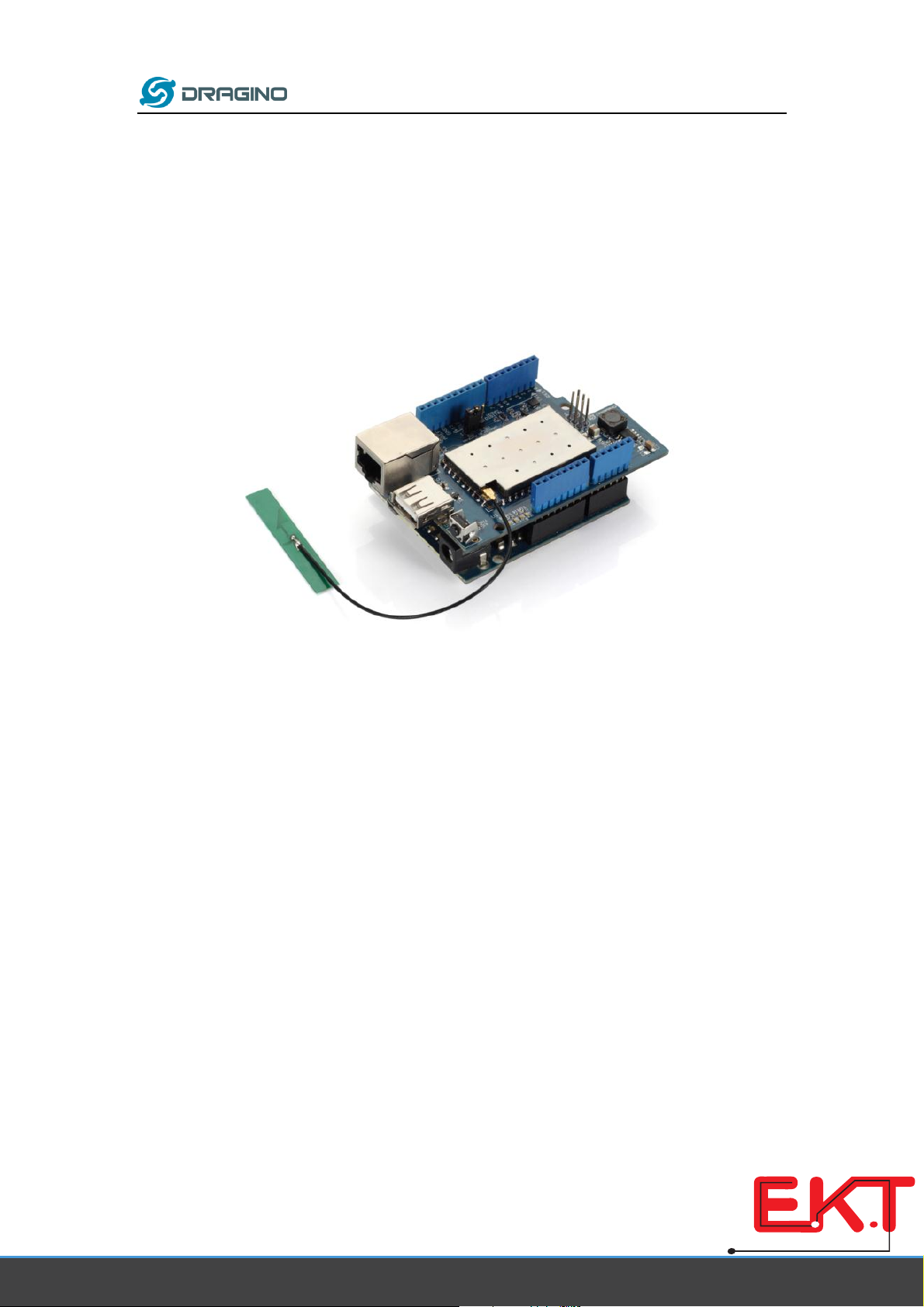
1.1 What is Yun Shield
Yun Shield is one of the most powerful shields for Arduino Board. Yun Shield is designed to solve
the Internet connectivity and storage issue for Arduino Board.
Yun Shield runs Open Source OpenWrt system (Same system as runs in Arduino Yun) and it is fully
compatible with Arduino IDE v1.5.4 or later. Yun Shield is the ideally choice for Arduino Projects
which require various internet connections and more storage.
Basically, Yun Shield + Leonardo equally to the official Arduino Yun, but Yun Shield is more flexible
because it can work with other Arduino board such as Uno, Duemilanove, Mega etc. And Yun
Shield uses external wifi antenna which provides stability and possibility for various
environments.
1.2 Specifications
Processor: 400MHz, 24K MIPS
Flash: 16MBytes
RAM: 64MBytes
Power Input: 4.75v ~ 23v via Arduino VIN pin
1 x 10M/100M RJ45 connector
150M WiFi 802.11 b/g/n
External Antenna via I-Pex connector
1 x USB 2.0 host connector, used for USB storage or 3G connection
1 x Reset button
Compatible with 3.3v or 5v I/O Arduino.
1.3 Features
Open source Linux (OpenWrt) inside
www.ekt2.com
Electronics Katrangi Trading

Low power consumption
Compatible with Arduino IDE 1.5.4 or later, user can program, debug or upload sketch
to Arduino board via Arduino IDE.
Managed by Web GUI, SSH via LAN or WiFi
Software upgradable via network
Built-in web server
Support internet connection via LAN port, WiFi or 3G dongle.
Support USB flash to provide storage for Arduino projects.
Failsafe design provides robustly system.
Compatible with Arduino Leonardo, Uno , Duemilanove, Diecimila, Mega
1.4 LEDs
There are four LEDs on the Yun Shield. The functions of these LEDs are:
PWR: Power Indicate LED. Turn on once there is power.
LAN: Indicate there is LAN connection when it is on or blinking.
WLAN: Indicate WiFi status.
SYS: LED for USB storage. It is on if the USB flash are link to Arduino Yun default SD
directory /mnt/sd and /www/sd
www.ekt2.com
Electronics Katrangi Trading

1.5 System Structure
POWER:
The Dragino HE is the core module of Yun Shield. The HE module requires around 200ma current
when in full load, so it is powered by the Arduino VIN pins to avoid overheated in the Arduino
onboard 5v LDO. So when Yun shield is in used, the Arduino board should be powered by DC port
instead of USB port. The DC input can be 7v ~ 15v.
VIN
+5V
Yun Shield
Dragino HE
module
RJ45
Failsafe
Button
WiFi
USB
Host
SPI
UART
Arduino
Leonardo,
UNO,
www.ekt2.com
Electronics Katrangi Trading

The USB Host of Yun Shield gets power from the Arduino +5v pin, since the +5v from Arduino
comes from the +5V LDO, to avoid overheated on the Arduino Board, when the USB host is in
used, it is recommended to use +7v DC.
Interface:
The RJ45, WiFi, USB Host and Failsafe are connected to the Dragino HE module directly. And the
Dragino HE module use SPI and UART to communicate with Arduino Board. Yun Shield is
compatible with 3.3v and 5v Arduino board. The on board jumper SV1 is used to set the SPI and
UART to 3.3v or 5v level.
The SPI interface is used to upload the sketches comes from the Arduino IDE. SPI interface only
connects to Dragino HE during uploading so the Arduino SPI can still be used to connect to other
SPI slave devices.
The UART interface is used for the Bridge class in Arduino, there are lots of examples explain how
to use the bridge class in the Arduino IDE. It is the core of Yun solution. We must make sure the
serial Interface of Arduino is not used by other hardware.
www.ekt2.com
Electronics Katrangi Trading

2CONFIGURE YUN SHIELD
2.1 Find the ip addresses
The Yun Shield has a WiFi interface and a LAN port. Either of them has IP address, can be used for
internet connection and device management.
Factory IP of WiFi port
At the first boot of Yun Shield, it will auto generate an unsecure
WiFi network call Dragino2-xxxxxx
User can use their laptop to connect to this WiFi network. The
laptop will get an IP 192.168.240.xxx and the Yun Shield has the
default IP 192.168.240.1
Fall Back IP
A fall back IP 172.31.255.254/255.255.255.252 is
assigned to Yun Shield's LAN port so user can always
access Yun Shield with this ip if their laptop has the IP
172.31.255.253/255.255.255.252.
Detect IP from Arduino IDE
If Yun Shield’s Ethernet port is connected to the uplink router or the WiFi interface is associated
to the WiFi router. The PC in the same network can use Arduino IDE to detect Yun Shield’s IP
address as described in Detected Yun Shield.
www.ekt2.com
Electronics Katrangi Trading

2.2 Configure Method
The Yun Shield runs Open Source Linux system. If user has a PC at the same network as Yun Shield,
user can access its system via either Web Interface or Secure Shell (SSH).
2.2.1 Access via web interface
The recommended browsers to configure Yun Shield are Firefox and Chrome. Simply type the IP
address into your browser and you will see the log in page of Yun Shield.
Default User name and Password for Yun Shield is root/dragino.
2.2.2 Access via SSH
Via SSH access, user can access to the Linux system directly and customized the system to
support more features and applications.
SSH Access:
IP address: IP Address of Yun Shield
Port: 22
User Name: root
Password: dragino (default)
www.ekt2.com
Electronics Katrangi Trading

2.3 Web Configure Pages
2.3.1 General Set Up
After log in, the GUI will show the WIFI / ETH interface status. Click the Configure button and now
user can configure the device password and network parameters.
2.3.2 Arduino related set up
Arduino Board Type: Define the bootloarder/mcu type/ fuse setting during Sketch upload.
Operation Mode: make sure it is in Arduino Bridge mode so the Bridge class for Arduino Yun
works.
Select WiFi network and key in the password
to connect your wifi router
www.ekt2.com
Electronics Katrangi Trading
Questo manuale è adatto per i seguenti modelli
1
Indice
Altri manuali Dragino Hardware di rete
Manuali Hardware di rete popolari di altre marche

Matrix Switch Corporation
Matrix Switch Corporation MSC-HD161DEL Manuale utente

B&B Electronics
B&B Electronics ZXT9-IO-222R2 Manuale utente

Yudor
Yudor YDS-16 Manuale utente

D-Link
D-Link ShareCenter DNS-320L Manuale utente

Samsung
Samsung ES1642dc Istruzioni per l’uso

Honeywell Home
Honeywell Home LTEM-PV Istruzioni per il montaggio