
Dreamwave Rock Star Manuale utente

CONTENTS
What’s in the box ...............................................................................................................................1
Top Panel .............................................................................................................................................2
Rear Panel ............................................................................................................................................3
Instruments Connections ................................................................................................................4
2.4G Wireless Multi-Pairing .............................................................................................................5
Bluetooth/Charging............................................................................................................................6
LED Indicator ......................................................................................................................................7
Mobile APP ..........................................................................................................................................8
Strap Assembly ...................................................................................................................................9
Specifications .............................................................................................................................10-13
Troubleshooting ..............................................................................................................................14

What’s in the box
1
User Manual * 1 Warranty Card * 1 AUX Connector Convertor
3.5mm in / 6.5mm out * 1
6.5mm in / 3.5mm out * 1
Screw * 8 L-shape screwdriver * 1 Strap * 1 Metal plate * 2
Strap Assembly Pack
Music that moves
RockStar * 1 AC Adaptor * 1 AUX Cable * 1 XLR Microphone Cable * 2
2
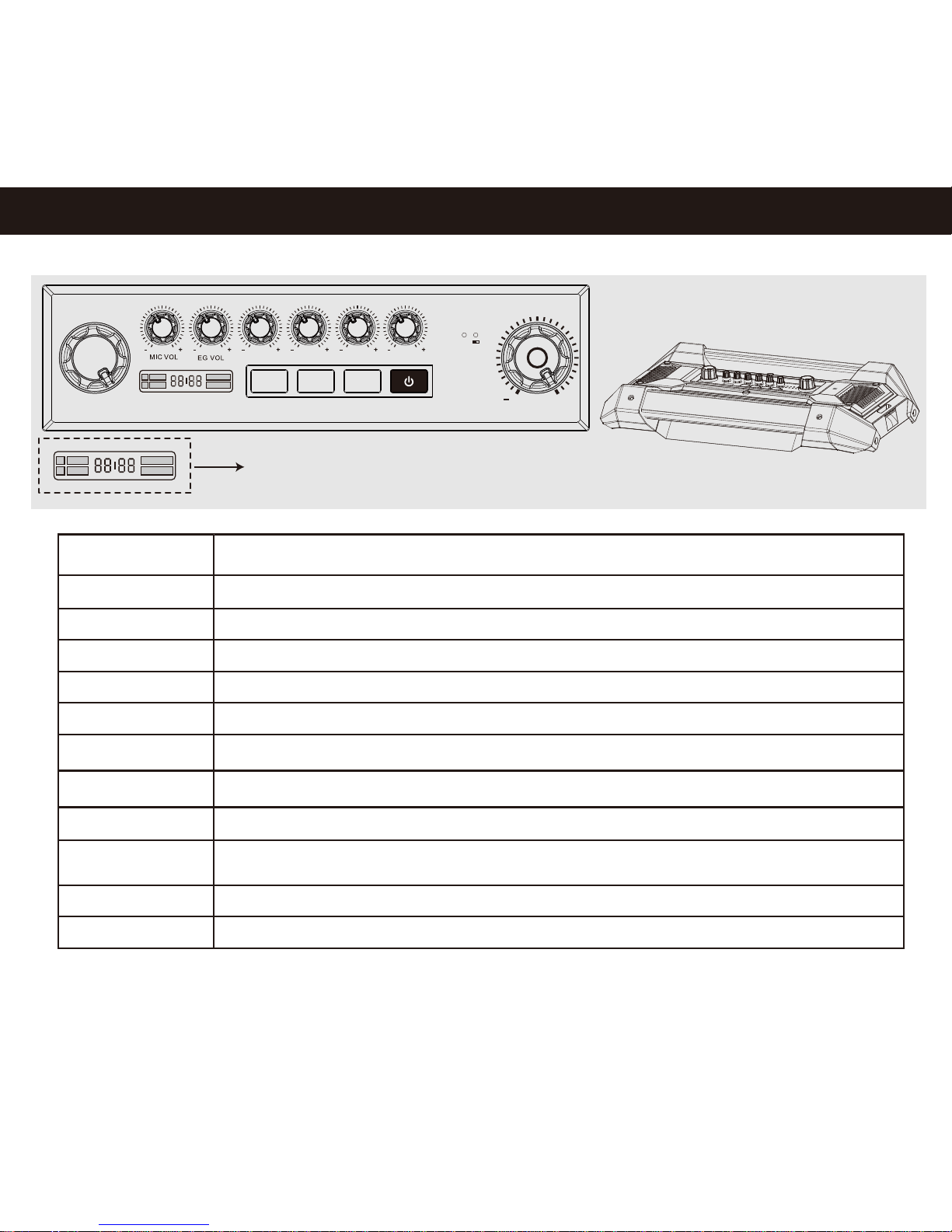
Top Panel
DSP MODE:
MIC VOL:
EG VOL:
AUX/BT VOL:
AG VOL:
KB/BASS VOL:
DRUM/LINE VOL:
MASTER VOL:
DSP ON/OFF:
BT:
2.4G/PAIR:
POWER:
Short press to select Default DSP or User DSP;
Turn the knob to select DSP sound effects
Adjust volume of Microphone for Input CH1 / CH2
Adjust volume of Electric Guitar for Input CH3
Adjust volume of Audio source for Input CH4
Adjust volume of Acoustic Guitar for Input AUX 1
Adjust volume of Keyboard or Bass for Input AUX 2
Adjust volume of Drum or Audio source for Input AUX 3
Press to turn On/Off DSP mode
Turn On/Off the RockStar
Connect or disconnect the MASTER and SLAVE speakers via 2.4G (Refer to Page 5)
Press and hold for 3 seconds to search for Bluetooth pairing;
While playing via Bluetooth devices, short press to Pause/Play.
Turn the knob to adjust volume for the audio system
Refer to Page 7
2.4G
K B /BA S S V O LAG V OL DRU M /L I NE V O L
BT 2 .4 G/PA IR
DSP MOD E MAST ER VOL
DSP ON /O F F
AU X/ BT V OL
P OWE R
+

3
Rear Panel
Audio Inputs
Others
Input
CH1
DC OUT
5V/2.1A Built-in power bank for charging mobile devices, output 5V/2.1A (Refer to Page 6)
2.4G Wireless pairing for Master and Slave RockStar(Refer to Page 5 )
External Power Supply, AC100-240V, 50/60Hz Output 24V /4A (Refer t o Page 6 )
2.4G Switch
DC IN 24V
CH2
CH3
CH4
REC OUT
AUX 1
AUX 2
AUX 3
Function
Mic
Electric Guitar
Mic
Acoustic Guitar
AUX in / Audio source
Keyboard or Bass
Electric Drum
Line in /
6.5mm, Mono
6.5mm, Mono
6.5mm, Mono
6.5mm, Mono
6.5mm, Stereo
3.5mm, Stereo
3.5mm, Stereo
3.5mm, Mono
-34dBV
-34dBV
-20dBV
-14dBV
-14dBV
-14dBV
-9dBV
Type of Jack Sensitivity of 1KHz
*For optimum result, Stomp-box or Guitar e ects pedal is recommended for connecting Electricff
Guitar t o RockStar
Recorder
Inputs with DSP e ectsffInputs without DSP e ectsff
Mic Acoustic GuitarLine In K Electric drum Line InRecorderElectric Guitar

Inputs without DSP effects
Electric drum
4
Inputs with DSP effects
Mic Electric Guitar
*Initialisation may take 5 seconds upon plugging into CH1~CH4
Acoustic Guitar
Recorder Keyboard / Bass
Audio Source
Audio Source
5
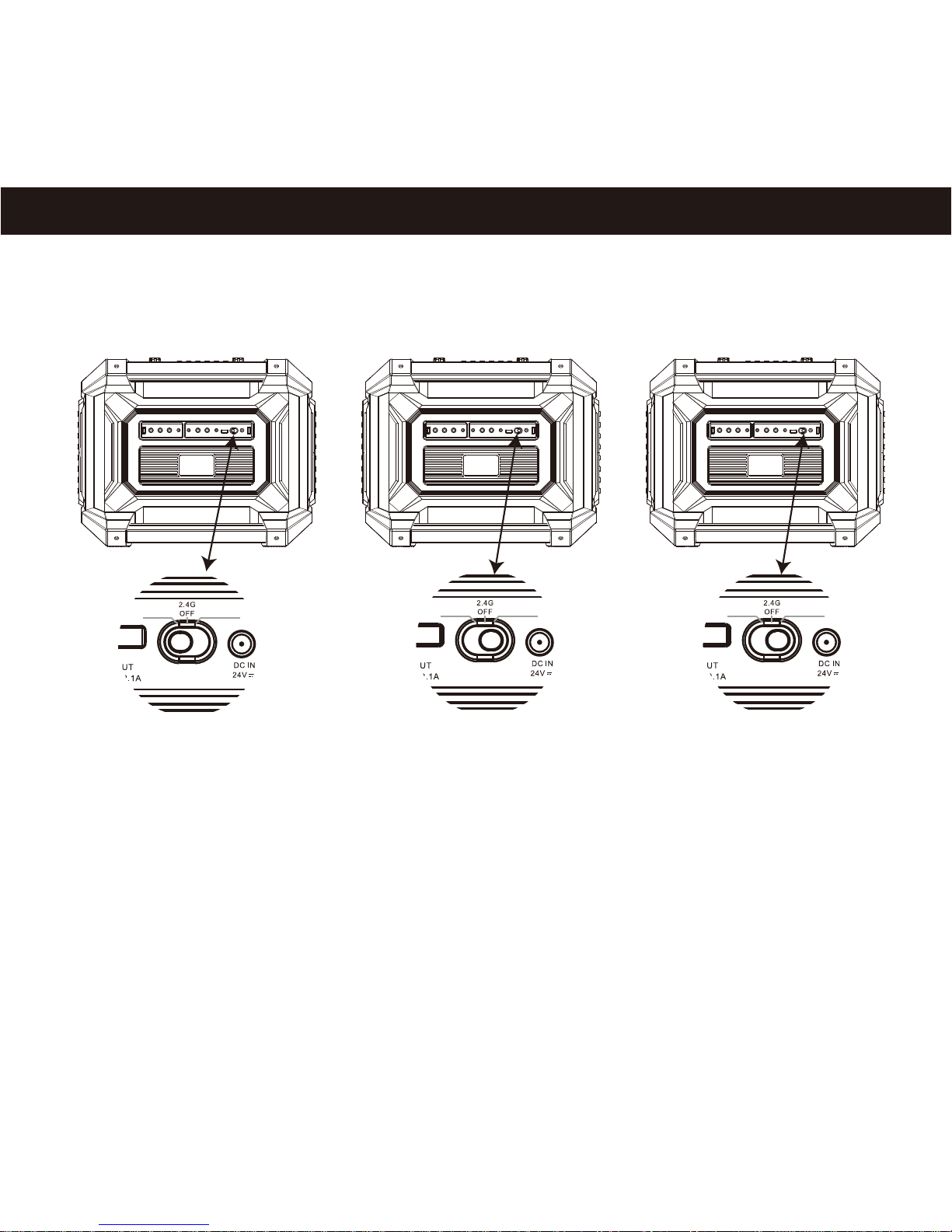
2.4G Wireless Multi-Pairing
MASTER SLAVE MASTER SLAVEMASTER SLAVE
* More than one piece RockStar can be set as SLAVE speaker, within the 10M distance wireless range from the MASTER speaker.
MASTER SLAVE 1 SLAVE 2
Step 1. Choose one RockStar as Master speaker, turn it on and switch to MASTER, press button “2.4G/PAIR” for 3 seconds,
LED “2.4G” (Refer to Page 7) quick flash indicating searching for Slave speakers.
Step 2. Connect SLAVE 1 : Turn on the second RockStar and switch to SLAVE mode, press button “2.4G/PAIR” for 3 seconds,
pairing complete automatically after 3~5 second reaction.
Step 3. Connect SLAVE 2: Press MASTER speaker’s “2.4G/PAIR” button for 3 seconds, then turn on the third RockStar and switch to SLAVE mode,
press button “2.4G/PAIR” for 3 seconds as well. Pairing complete automatically after 3~5 second reaction.
Step 4. If more SLAVE speakers to be connected, repeat Step 3 operation.
*Wireless range: 10M between MASTER and SLAVE speakers.
*Under 2.4G pairing, SLAVE speakers are non-functional except the “2.4G/PAIR” button.
*To disconnect either SLAVE speaker from MASTER, press “2.4G/PAIR” on SLAVE speaker for 3 seconds.
*To disconnect all SLAVE speakers from 2.4G pairing, press “2.4G/PAIR” on MASTER speaker for 3 seconds.
*Do not slide over the “OFF” position when switching from MASTER to SLAVE, shall pause at “OFF” for two seconds.

RockStar
Bluetooth
Charging
6
Charge RockStar
Charge mobile devices
BT LED
K B /BA S S V O LAG V OL DRU M /L I NE V O L
BT 2 .4 G/PA IR
DSP MOD E MAST ER VOL
DSP ON /O F F
AU X/ BT V OL
P OWE R
Short press BT button, BT LED quick flash in red light,
indicating to search for Bluetooth pairing.
BT LED in solid red -- Bluetooth pairing complete.

7
LED Indicator
DSP On/Off
Low Power
Default DSP
Light on: Using Default DSP effects now
Light off: Default DSP effects are not being used
Light on: Power on
Light off: Power off
Light on: Using USER DSP effects now
Light off: USER DSP effects are not being used
Power
Bluetooth
User DSP
DSP Mode Type
2.4G Indicator:
Solid Red - 2.4G pairing complete
Quick Flashing Red - searching for 2.4G pairing
Charging Indicator:
Solid Red - charging
LED off - charging complete
2.4G
DSP On/Off
Low Power
Default DSP
Power
Bluetooth
User DSP
DSP Mode Type
②
②
③
③
④
④
⑦
⑦
⑤
⑤
⑥
⑥
①
①
Quick flashing: Searching for Bluetooth pairing
Solid on: Bluetooth connected
Light on: DSP mode off
Light off: Under DSP mode
Flashing: Power capacity less than 20%
Light off: Power capacity more than 20%
DSP Effect selection (11 Default effects + 11 User effects)
RockStar APP
Modulation
Equalizer
Amplifier
LEVEL GAIN
Rate
MIN
MIN MIN
MAX
MAX MAX
MAX MAXMIN MIN
Res Depth
Advonced Options
30-Surround
Dynamic Loudness
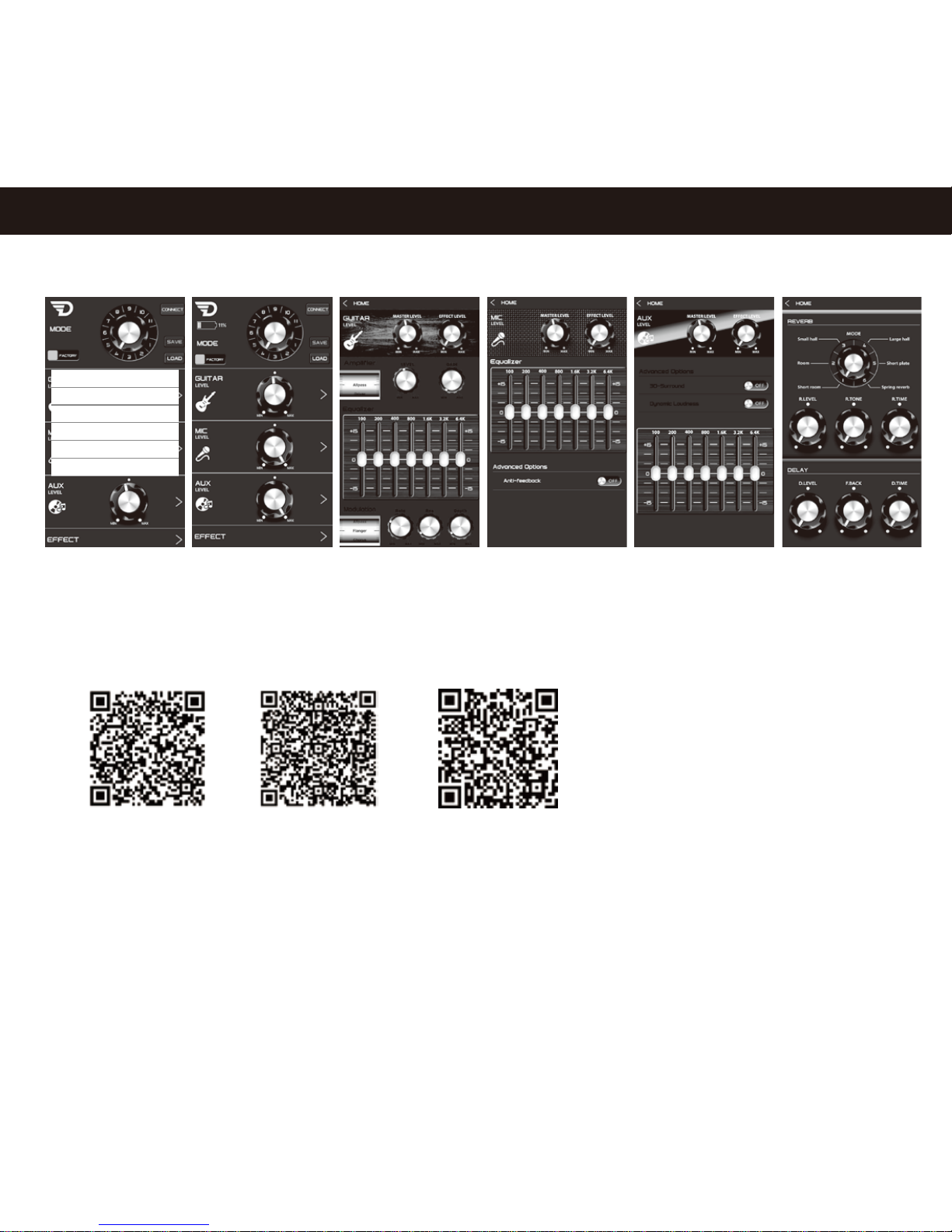
Please download RockStar mobile APP using QR scanner:
Please download Mobile APP User Guide from: http://www.godreamwave.com/Manuals.aspx
iOS Google Play Store
8
Android
Mobile APP
Indice


