Drone X1 MAX Manuale utente

Doc #1227191 (888) 820-3690
X1 MAX Installation Guide
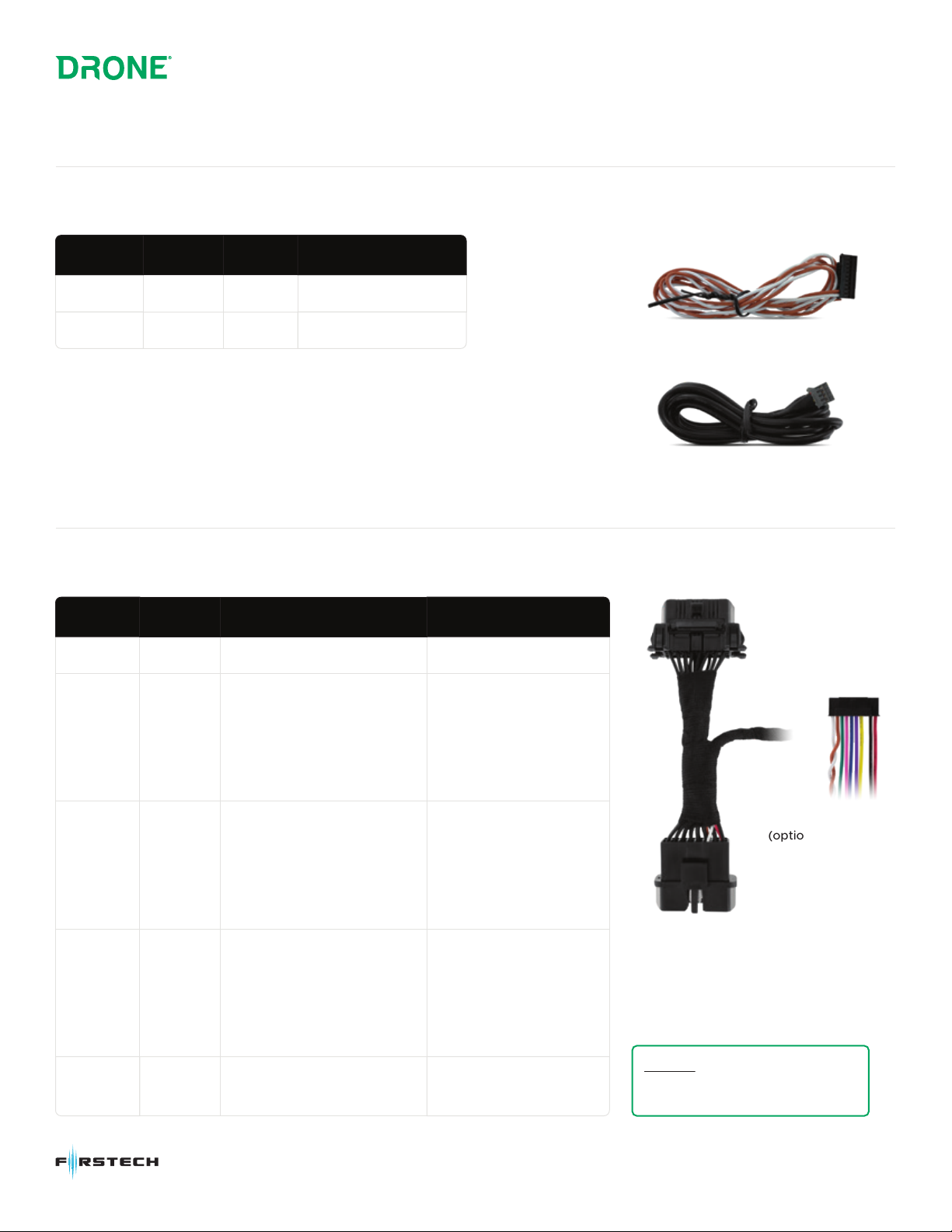
Data-to-Data Installation (Included)
Hardwire T-Harness Installation (Sold Separately)
Serial Cable
Serial cable (4-pin) plugs into the gray port of the remote starter
FT-HRN-X1-OBD
ColorWire Type Output Configuration
Ignition Green Input (+) --
POC 1 Yellow • Aux 1
• Aux 2
• Lock/Arm
• Unlock/Disarm
• Starter Kill
(can only be set as latched)
•Single Pulse
•Double Pulse
•Latched
POC 2 Purple • Aux 1
• Aux 2
• Lock/Arm
• Unlock/Disarm
• Starter Kill
(can only be set as latched)
•Single Pulse
•Double Pulse
•Latched
POC 3 Blue • Aux 1
• Aux 2
• Lock/Arm
• Unlock/Disarm
• Starter Kill
(can only be set as latched)
•Single Pulse
•Double Pulse
•Latched
PIC 1 Pink •Pre-warn
•Instant Trigger
--
CAN Hi/Low Harness
ColorWire Type Location
CAN Hi Brown Data PIN 6 OBD Connector
CAN Low White Data PIN 14 OBD Connector
Caution: Do not insert 3A fuse
when connected to a remote start
through data.
(optional)
BLUE Port on idatastart

Doc #1227191 (888) 820-3690
LED Status
2) X1 Status
SIM Card Error
Carrier Disconnected
Server Disconnected
Power Save Mode
(Sleep)
1sec
1sec
1sec
10sec
100ms 100ms
3) GPS Status
GPS Off
GPS Searching
GPS Locked
2sec
100ms 100ms
1) LTE Status
Network Searching
Connected
Communicating
2sec
200ms 200ms
2sec
200ms 200ms 200ms
125ms

Delivery / Entrega ·/ Livraison
Enclosed
with
every
Drone
X1MAX are
two
essential
del
i
very
items
for
your
customer:
Coda
Drone
X1MAX
incluye
dos
ortfculos
muy
importontes
que
su
cliente
debe
recibir:
Choque
Drone
X1MAX
est
livre
ovec
deux
elements tres
importonts
pour
votre
client:
o D
D
install.myfirstech.com
Keychain
Tag
with Serial
Number
Etiqueta
de
1/avero con
el
numero
de
serie
Etiquette
de
cle
avec
numero
de
serie
Please
attach
this
tag
to
the
customer's
keys
or
any
aftermarket
remotes.
Por
favor,
colocor
esto
etiqueto
en las /loves de/ cliente o
en
cuolquier
control
remoto
.
Veuillez
attacher
cette
etiquette
aux
cles
du
client
ou
a
toutes
Jes
telecommondes
de
morche
.
Rearview Mirror Hang
Tag
Etiqueta
para
espejo retrovisor
Etiquette volante
pour
retroviseur
Please
attach
the
Rearview
mirror
hang
tag
to
the
customer's
vehicle
rearview
mirror
.
Por
favor,
co/ocor
la
etiqueta
tipo
colgonte
en el espejo
retrovisor
de/ vehfculo de/ cliente.
Veuillez
attacher
/'etiquette
volonte
au
retroviseur
du
vehicule
du
client.
(888)820
3690

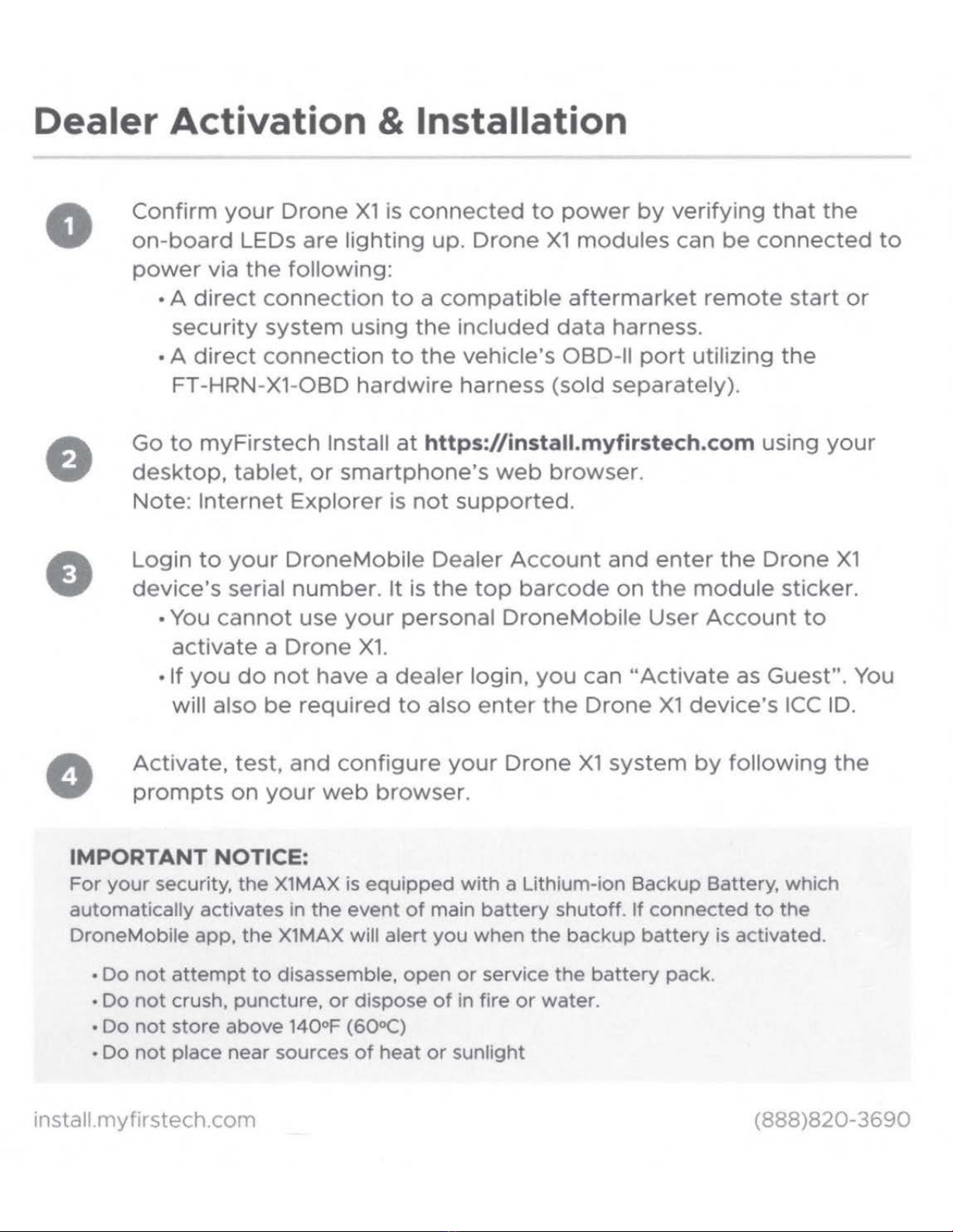
Dealer Activation & Installation
•
0
Confirm
you
r
Drone
X1
is
connected
to
power
by
verifying
th
at
the
on-board
LE
Ds
are
light
ing
up. Dr
one
X1
modules
can
be
con
n
ected
to
powe
r via
the
following:
•A
di
r
ect
co
n
nection
to
a
compatible
afte
r
market
re
m
ote
start
or
secu
r
ity
system
using
the
included
data
harness.
•A
direct
connec
t
ion
to
the
vehicle's
OBD-11
por
t
utilizing
the
FT-HRN-X1-OBD
hardwire
harness
(sold
separately).
Go
to
myFirstec
h Install
at
https://install.myfirstech.com
using
your
desktop,
tablet,
or
smartp
h
one's
web
browser.
Note:
Internet
Explorer
is
no
t
supported.
Logi
n
to
your
DroneMob
ile
Dealer
Account
and
enter
th
e
Drone
X1
device's
serial nu
mber.
It
is
the
top
barcode
on
the
modu
le
sticker.
•You
cannot
use
your
pe
rsonal
DroneMobile
User
Account
to
activa
te a
Drone
X1.
• If
you
do
not
have
a
dealer
login,
you
can
"Activate
as
Guest".
You
will
also
be
required
to
also
enter
the
Drone
X1
device's
ICC
ID.
Activate,
test,
and
configure
your
Dro
ne
X1
system
by
fo
ll
owing
the
prompts
on
your
web
browser.
IMPORTANT
NOTICE:
For
your
security,
the
X1MAX is
equipped
with
a Lithium-ion Backup Battery, which
automatically activates in
the
event
of
main
battery
shutoff
.
If
connected
to
the
DroneMobile app,
the
X1MAX
will alert
you
when
the
backup
battery
is activated.
•
Do
not
attempt
to
disassemble,
open
or
service
the
battery
pack
.
•
Do
not
crush, puncture.
or
dispose
of
in fire
or
water.
•
Do
not
store
above 140°F (60°C)
•
Do
not
place
near
sources
of
heat
or
sunlight
install.myfirstech.
com
(888)820-3690

User Registration ·
•
0
D~ONE
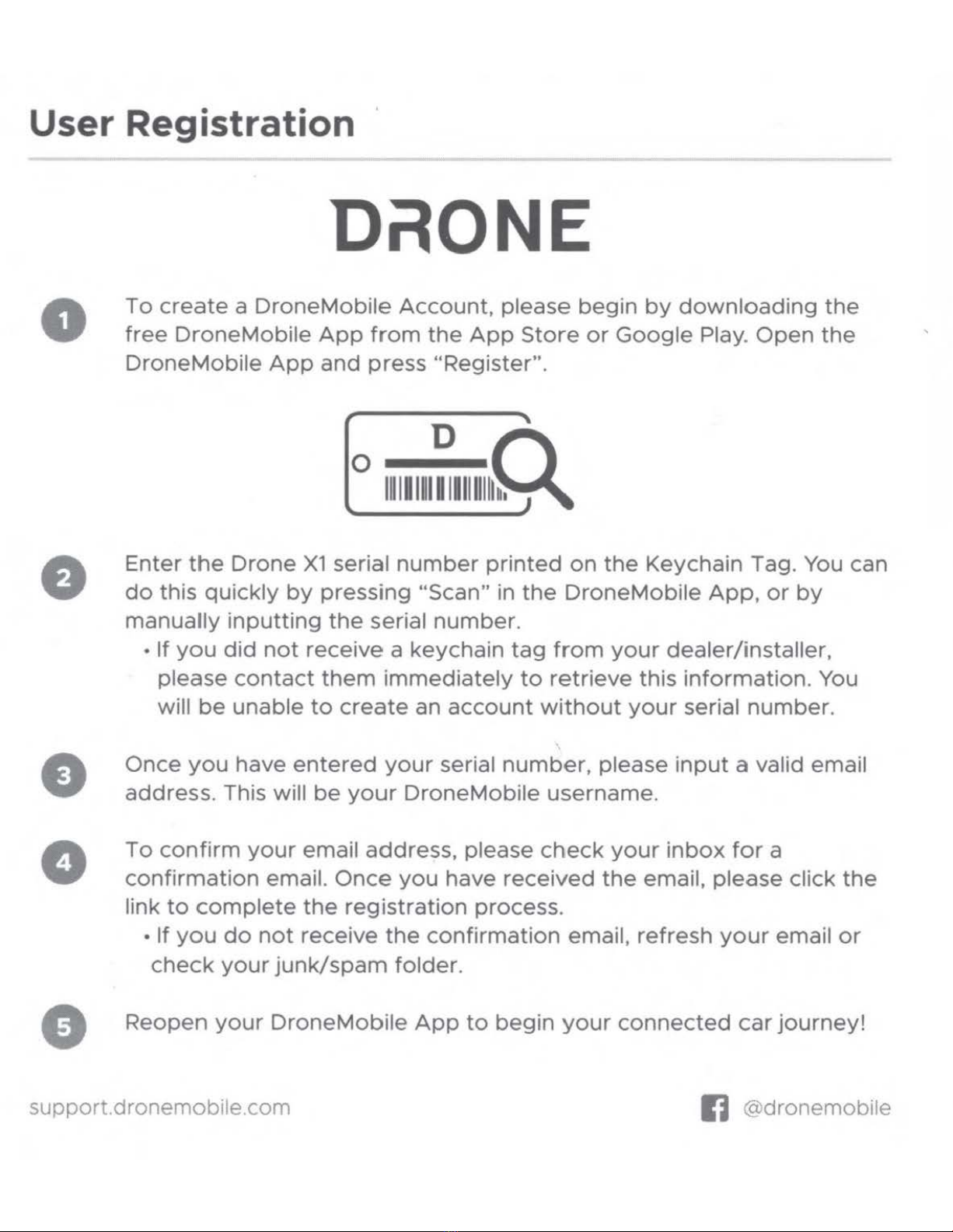
To
create
a
DroneMobile
Account,
please begin
by
downloading
the
free
DroneMobile
App
from
the
App
Store
or
Google
Play.
Open
the
DroneMobile
App
and
press "Register".
o
1111
1
11
~
1111111
~
Enter
the
Drone
X1
serial
number
printed
on
the
Keychain Tag. You can
do
this
quickly
by
pressing "Scan" in
the
DroneMobile
App,
or
by
manually
inputting
the
serial number.
• If
you
did
not
receive a keychain
tag
from
your
dealer/installer,
please
contact
them
immediately
to
retrieve
this
information.
You
will
be
unable
to
create
an
account
without
your
serial number.
Once
you
have
entered
your
serial
number,
please
input
a valid email
address. This will
be
your
DroneMobile username.
To
confirm
your
email address, please
check
your
inbox
for
a
confirmation
email.
Once
you
have
received
the
email, please click
the
link
to
complete
the
registration
process.
• If
you
do
not
receive
the
confirmation
email, refresh
your
email
or
check
your
junk/spam
folder.
Reopen
your
DroneMobile
App
to
begin
your
connected
car
journey!
support.dronemob1le.com IJ @dronemobile

Let's
Get
Connected!
Our
team
at
Firstech
would
be
more
than
happy
to
assist
you
with
the
installati
on
of
your
Drone
X1.
Nuestro
equipo
de
Firstech
estar6
encantado
de
ayudarle
con
la
instalaci6n
de
su
Drone
X1.
Notre
equipe
chez Firstech se
fera
un
plaisir
de
vous
aider
ainstaller
votre
Drone
X1.
Online Support / En
If
nea /
En
ligne:
https://support.dronemobile.com
Toll-Free
Support/
Telefono gratuito / Sans frais:
1(888)820-3690
Facebook:
@dronemobile
support
dronemobile.com
fi
@dronemobile
Indice