Dry-Lam Element CL-270DX Manuale utente

Dry-Lam Element Series
Standard, Deluxe and Professional 27”
Roll Laminators
DO NOT DISCARD BOX AND/OR ORIGINAL PACKAGING!!!
IF, FOR ANY REASON, YOU NEED TO SHIP YOUR MACHINE BACK AND YOU DISCARD THE ORIGINAL
PACKAGING, YOU WILL BE RESPONSIBLE FOR PURCHASING ANOTHER BOX AND THE FREIGHT TO SHIP
THE BOX TO YOU.
Operation Manual

2
PLEASE READ THESE INSTRUCTIONS PRIOR TO OPERATING THE LAMINATOR. FAILURE TO LOAD FILM
CORRECTLY WILL VOID ALL WARRANTIES.

3

4
TABLE OF CONTENTS
Introduction………………………………………………………………………………….3
Laminator Features……………………………………………………………………..3
Important Safety Instructions & Important Safeguards……………………………..3-5
Initial Set-up……………………………………………………………………………...….5-9
Components……………………………………………………………………………...5-7
Heat Control…………………………………………………………………………...…8
Set Temperature…………………………………………………………………………8-9
Operation……………………………………………………………………………….…….9-12
Loading Laminating Film……………………………………………………………….9
Threading Laminating Film…………………………………………………………….10-11
Adjusting Mandrel/Film Tension…………………………………………………….…12
Laminating……………………………………………………………………………………12
Mounting and Laminating…………………………………………………………...….....13
Safety Features………………………………………………………………………………13
Trouble Shooting………………………………………………………………………..….14-15
Maintenance…………………………………………………………………………...…….15-16
Cleaning Rollers……………………………………………………………………..…..15
Removing Wrap-arounds……………………………………………………………….16
Warranty & Return Policy……………………………………………………………...….17

5
Please read before use and please retain these instructions for future reference. Do not
attempt to operate the laminator prior to completely reading the instruction manual.
Thank you for choosing the Element Series Roll Laminator by Dry-Lam. Our goal is to produce
quality, user-friendly laminating machines with features that enable you to easily create
excellent results with each use. Before using the machine for the first time, please take a few
minutes to read this user manual. We hope this enables you to achieve a perfect lamination
every time.
The Standard Model will accept rolls of laminating film up to 27” wide and up to 3 mil in
thickness.
The Deluxe Model will accept rolls of laminating film up to 27” wide and up to 5 mil in
thickness.
The Standard Model will accept rolls of laminating film up to 27” wide and up to 10 mil in
thickness.
IMPORTANT SAFETY INSTRUCTIONS
This safety alert symbol precedes any safety message in this manual. This
symbol indicates a potential safety hazard that could hurt you or others, as well
as result in product and/or property damage. Please read carefully.
Do not attempt to service or otherwise repair this laminator. Please have it
serviced by a qualified service professional.
Do not connect the laminator to an electrical supply or attempt to operate the
laminator until you have completely read these instructions.
INTRODUCTION
Running the machine in reverse when there is film on the front rollers, especially
hot film can cause a wrap-around. This can cause the film to displace the
temperature sensor away from the roller causing the heat controller to receive
and display an incorrect reading. This may result in overheating of the rollers
and possibly damage.
Before reversing the machine to remove a wrap-around, cut the film from the
supply roll and pull the film away from the front rollers.
To avoid any damage, please do not use razors or sharp objects near the rollers.
It is best to not leave machine on when not in use or turn the heat down to
prolong the life of the rollers and avoid damage.

6
IMPORTANT SAFEGAURDS
For your protection, do not connect the laminator to electrical power or attempt to operate it
until you read these instructions completely. Keep these instructions in a convenient location
for future reference. This instruction manual and labels affixed to the laminator are important
safety messages. Read these messages carefully.
• Use this laminator only for its intended purposes as according to the specifications
outlined in this instruction manual.
• Keep hands, long hair, loose clothing and articles such as ties and necklaces away from
the pull rollers.
• Avoid contact with heated rollers during operation and shortly after operations as heated
rollers can reach temperatures in excess of 300°F and can cause burns. Allow the rollers
to cool before touching.
• Place laminator on a sturdy cart, stand, or table. A laminator placed on an unstable
surface may fall, causing serious bodily injury. Move laminator with caution. Quick stops,
excessive force, or uneven floor surfaces may cause the laminator and cart to overturn.
• Unplug laminator before moving, or when not in use for an extended period of time.
• Never override or attempt to defeat electrical or mechanical interlock devices.
• Never insert objects or spill liquids in or on the laminator. They may contact dangerous
voltage points or short out components that could result in fire or electrical shock.
• Do not overload electrical outlets as this can potentially lead to fire or shock.
• The laminator should only be operated from the type of power source indicated in these
Operating Instructions and on the data plate located on the rear panel of the laminator.
• The three-pronged grounding plug is a safety feature and will only fit into a grounding-
type power outlet. If you are unable to insert the plug into an outlet, contact a qualified
electrician to have a suitable outlet installed.
• Do not leave the laminator power on overnight. Unplug the laminator at the end of the
day.
• Unplug the laminator before moving it or when it is not in use for an extended period of
time as a precaution against the possibility of an internal malfunction that could create a
fire hazard.
• Never attempt to open or otherwise repair the machine. Unplug the laminator from the
electrical outlet and contact an authorized service representative under any of the
following conditions:
o The power supply cord or plug is damaged or frayed.
o If liquid has been spilled into the laminator or it has been exposed to water.
o If the laminator has been subjected to excessive jarring through being dropped or
bumped.
o If the laminator does not operate normally when following the operating
instructions.

7
Unpacking and Assembly…
• Inspect shipping container and unit for signs of damage. Notify carrier and dealer
immediately should any damage be noted.
• Retain packaging in case you need to return the machine for repair.
• This machine is big and bulky. Use two people when removing the machine from the
shipping container.
• Place the laminator on a flat and stable surface that is capable of supporting the weight
of the machine.
• Position the laminator so as to allow film exiting the machine to drop freely to the floor.
• Connect power cord to an appropriate power source.
IMPORTANT SAFEGUARDS (Continued)
• Do not operate the laminator with a damaged power supply cord or plug, or after it
malfunctions or has been damaged in any manner.
• Keep the power cord away from hot or wet surfaces
• Do not overload electrical outlets beyond their capacity as this can result in fire or
electrical shock. This unit is rated at 15A and should be the only item plugged into a
15A. When connected to a 20A branch, any items in addition to the Laminator must not
exceed 4A.
• Adjust only those controls that are specified in these Operating Instructions.
INITIAL SETUP

8
Heat Shield: Protects against accidental contact with heated rollers
Feed Table: Surface used to position documents to be laminated
Supply Mandrels: Metal rods that hold film supply rolls in place; two rolls of laminating film with the
same width must be present while laminating; failing to do so will result in damage to the machine
Supply Mandrel Washers: Ensures that film is securely in place on the supply mandrel
Heated Rollers: Silicon rubber coated steel rollers that simultaneously compress and heat the adhesive
of laminating film onto the document as it passes through the laminator.
Pull Rollers: Located at the rear of the laminator; these rollers pull the laminated document through
the laminator.
Tension Adjustment Knobs: Screws located near the supply roll that when tightened increase tension.
Rubber Foot: Provides nonslip grip for laminator
Idler Bars: Located close to supply rolls; used to direct film to heated rollers
Rear Horizontal Trimmer: Used to trim lamination after it exits the rear of the laminator; trimmer
contains a sharp blade and must be used with caution; only on PLUS and PRO models
Power On/Off Switch: Located in the rear of the machine; flip switch to “ON” position to power on
laminator
Components…
The figures below show the location of the major components and controls on the Element
Series laminators. You should become familiar with the components and controls of your Dry-
Lam model prior to operating the unit.
TOP SUPPLY
MANDREL
SUPPLY MANDREL
WASHERS
TENSION
ADJUSTMENT KNOB
HEAT SHIELD
FEED TABLE
TIE BAR
CONTROL
PANEL*
TENSION
ADJUSTMENT KNOB
TOP IDLER
BAR
TOP HEATED
ROLLER
BOTTOM SUPPLY
MANDREL
POWER ON/OFF
SWITCH

9
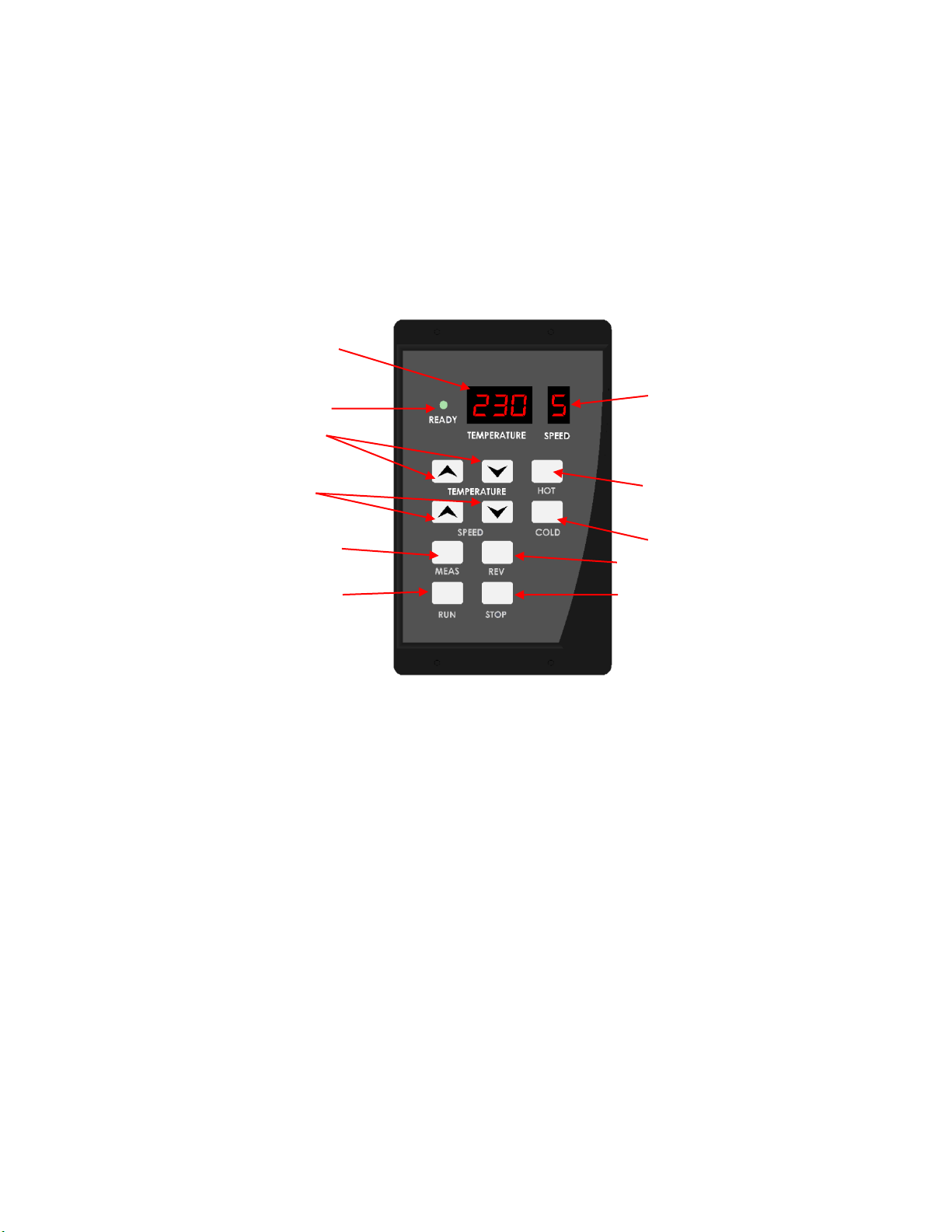
Control Panel: Control panel options may vary depending on the model of the laminator; see figures
below for the control panel on your particular model
Control Panel
[a] Temperature Readout – displays set temperature of the laminator
[b] Ready Indicator Light – LED light would come on and remains completely illuminated when the
machine has reached the set laminating temperature.
[c] Hot Button – When pressed, the front top & bottom rollers’ temperature are set by default to 230F.
[d] Temperature Control Buttons – press the ▲ to increase the temperature; press ▼ to decrease the
temperature.
[e] Cold Button – When pressed or when machine is powered up, the “Cold” button would be set by
default to 32F.
[f] Speed Readout – By default, when the machine is powered up the display shows speed “5”.
[g] Speed Control Buttons – press the ▲ to increase the speed; press ▼ to decrease the speed; only on
the PRO model.
[h] Measure Button – when pressed and held down, the temperature display shows the ACTUAL
temperature of the machine at that given moment.
[i] Run Button – when pressed, initiates roller movement
[j] Stop Button – when pressed, stops the movement of the rollers.
[k] Reverse Button – must be when pressed and held on speed 5 or more, moves rollers in the reverse
direction; ensure the rollers have been stopped using the Stop Button prior to using the reverse button;
to use, press and hold to reverse roller direction; useful clearing wrap-arounds and for clearing film from
[a]
[b]
[d]
[f]
[h]
[i]
[g]
[k]
[e]
[i]
[C]
Indice
Altri manuali Dry-Lam Plastificatrice

Dry-Lam
Dry-Lam SL27 Manuale utente

Dry-Lam
Dry-Lam Element Standard Manuale utente

Dry-Lam
Dry-Lam Fujipla LPE-6510 Manuale utente

Dry-Lam
Dry-Lam CL-27SD Manuale utente

Dry-Lam
Dry-Lam Element CL-40PR Manuale utente

Dry-Lam
Dry-Lam 27" Manuale utente

Dry-Lam
Dry-Lam DRYLAM SL Manuale utente

Dry-Lam
Dry-Lam Element Series Manuale utente

Dry-Lam
Dry-Lam LPV1200 DUO SYSTEM Manuale utente

Dry-Lam
Dry-Lam 27STA Manuale utente