
Duke TSC-6/18M Manuale utente
MAINTENANCE MANUAL
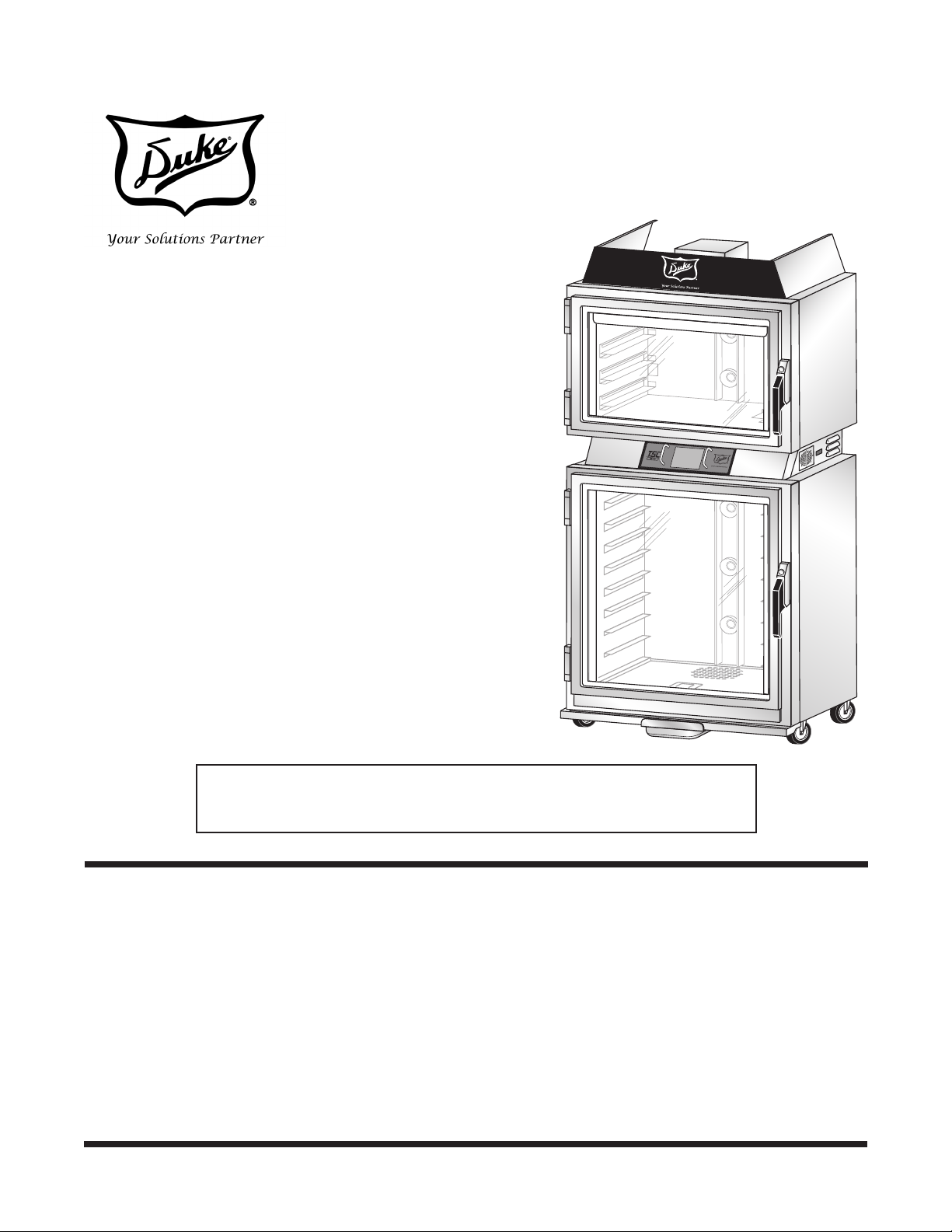
PROOFER OVEN
WITH TOUCH SCREEN
CONTROLS (TSC)
Models:
TSC-6/18M TSC-3/9M
IMPORTANT INFORMATION, READ BEFORE USE.
PLEASE SAVE THESE INSTRUCTIONS.
This manual is Copyright © 2013 Duke Manufacturing Company. All rights reserved.
Reproduction without written permission is prohibited. Duke is a registered
trademark of the Duke Manufacturing Company.
Duke Manufacturing Company
2305 N. Broadway
St. Louis, MO 63102
Phone: 314-231-1130
Toll Free: 1-800-735-3853
Fax: 314-231-5074
www.dukemfg.com
P/N 120086
REV E 6/8/2017
MAINTENANCE BY QUALIFIED,
TRAINED PERSONNEL ONLY

Maintenance Manual for DUKE TSC Proofer
Oven with Touch Screen Controls
2

3
Maintenance Manual for DUKE TSC Proofer
Oven with Touch Screen Controls
TABLE OF CONTENTS
IMPORTANT SAFETY INSTRUCTIONS ............................................................................4
OVEN/PROOFER START-UP .............................................................................................6
PROGRAMMING CONTROLS............................................................................................7
CARE AND CLEANING.......................................................................................................10
DOOR ADJUSTMENTS AND GASKET MAINTENANCE ...................................................14
TROUBLESHOOTING .......................................................................................................21
PARTS LIST AND ILLUSTRATIONS ...................................................................................22
WIRING DIAGRAM .............................................................................................................25
Maintenance Manual for DUKE TSC Proofer
Oven with Touch Screen Controls
4
IMPORTANT SAFETY INSTRUCTIONS
Throughout this manual, you will nd the following safety words and symbols that signify important
safety issues with regards to operating or maintaining the equipment.
WARNING
Indicates a hazardous situation which, if not avoided, could result
in death or serious injury.
CAUTION
Indicates a hazardous situation which, if not avoided, could result
in minor or moderate injury.
CAUTION
Indicates Important Information
Indicates electrical shock hazard which, if not avoided, could
result in death or serious injury and/or equipment damage.
Indicates hot surface which, if not avoided, could result in minor or
moderate injury. Specically, risk of burn from heating elements.
Indicates rotating fan blade hazard which, if not avoided, could
result in minor or moderate injury.
Indicates hot surface which, if not avoided, could result in minor or
moderate injury.
In addition to the warnings and cautions in this manual, use the following guidelines for safe operation
of the unit.
• Read all instructions before using equipment.
• Do not attempt to defeat the grounded connector.
• Install or locate the equipment only for its intended use as described in this manual.
• Do not use corrosive chemicals, water jet equipment, or other pressurized liquid spraying
equipment to clean this unit.
• This equipment should be serviced by qualied personnel only. Contact the nearest Duke
authorized service facility for adjustment or repair.
• Do not block any openings on the unit.
• A minimum clearance of 6″ (152.4 mm) from the top of the unit to the ceiling must be provided.
• Secure unit to a wall with brackets provided to prevent tipping.
• Unit may start operation with inadvertent contact with touch screen display or from other
extraneous sources. Turn off all poles mains disconnects should abnormal or unwanted operation
occur.
5
Maintenance Manual for DUKE TSC Proofer
Oven with Touch Screen Controls
• Install the Restraining Device Kit to prevent damage to main supply connections.
• This appliance can be used by children aged from 8 years and above and persons with reduced
physical, sensory or mental capabilities or lack of experience and knowledge if they have been
given supervision or instruction concerning use of the appliance in a safe way and understand the
hazards involved. Children shall not play with the appliance. Cleaning and user maintenance shall
not be made by children without supervision.
• Turn off external mains supply disconnect and allow unit to cool down before servicing or
performing maintenance.
• The procedures in this manual may include the use of chemical products. You must read the
Material Safety Data Sheets before using any of these products.
• Properly rated all poles mains protection and earthing compliance with local electric codes are
required for safe operation of this unit.
• Water supply connections to the unit must comply with local plumbing code and/or standards.
• Disposal of the unit must be in accordance with local environmental codes and/or any other
applicable codes.
• SAVE THESE INSTRUCTIONS
Technical Description and Application Notes for TSC Proofer Oven Backow Preventer Assembly
This equipment is intended to be connected to a
potable water supply system under pressure and is
to be installed with adequate backflow protection
to comply with all applicable federal, state, and
local codes.
Water supply pressure for proper operation shall be:
Minimum 40 PSIG(275 KPa)
Maximum 65 PSIG(448 KPa)
measured at water line inlet to the equipment.
If so equipped, regular maintenance is required to
replace the water filter cartridge at least once per
year, and to clean the inlet water screen at least
once per year. Consult state/local codes for any
additional requirements.
INSTALLATION OF WATER FILTER
Install new filter by removing sanitary cap from top
of cartridge, insure two black O-rings are in place,
then lift up into filter head and rotate cartridge
1/4 turn counter clockwise until it comes to a complete
stop. Flush 2 gallons (7.5 Liters) of water through the
new filter before using proofer to purge air from filter.
Remove hose from bottom of proofer by loosening
the compression nut at the disconnect fitting
and pull hose out. Place hose over container and
turn on water. It will take a minute for the filter
to fill before water flows out of hose into container.
Once filter is flushed with 2 gallons (7.5 Liters) of water,
turn off water supply again, insert hose into water line
disconnect, tighten compression nut and turn
water supply on again. Check for leaks at
connection fittings.
Patent(s) Pending
512776 D
Check with your local authority having jurisdiction
regarding approvals for connecting the Duke
TSC Proofer Oven to a potable water supply
before making any plumbing connections.
Plumbing code requirements vary, but Duke has
a kit (P/N 600187) available or installed as a
factory option, for backow prevention to protect
water supply systems by preventing the reverse
ow of non-potable water into the potable
domestic water system. The device consists of
two independently acting check valves, internally
force-loaded to a normally closed position
and designed/constructed to operate under
intermittent or continuous pressure conditions.
The two main components of the Duke backow
preventer system are:
• Dual Check Valve type backow preventer
that conforms to ANSI/ASSE standard
#1024 and is CSA standard B64.6 certied.
• Inlet water strainer equipped with 100-
mesh screen and installed up stream of
the backow preventer. The screen is
conveniently located on the rear panel of the
proofer, below the backow preventer, for
easy access during cleaning/replacement.
Maintenance Manual for DUKE TSC Proofer
Oven with Touch Screen Controls
6
WARNING
ELECTRICAL SHOCK HAZARD.
DISCONNECT POWER TO SERVICE
UNIT.
TASKS MUST BE PERFORMED BY A
QUALIFIED SERVICE TECHNICIAN OR
ELECTRICIAN.
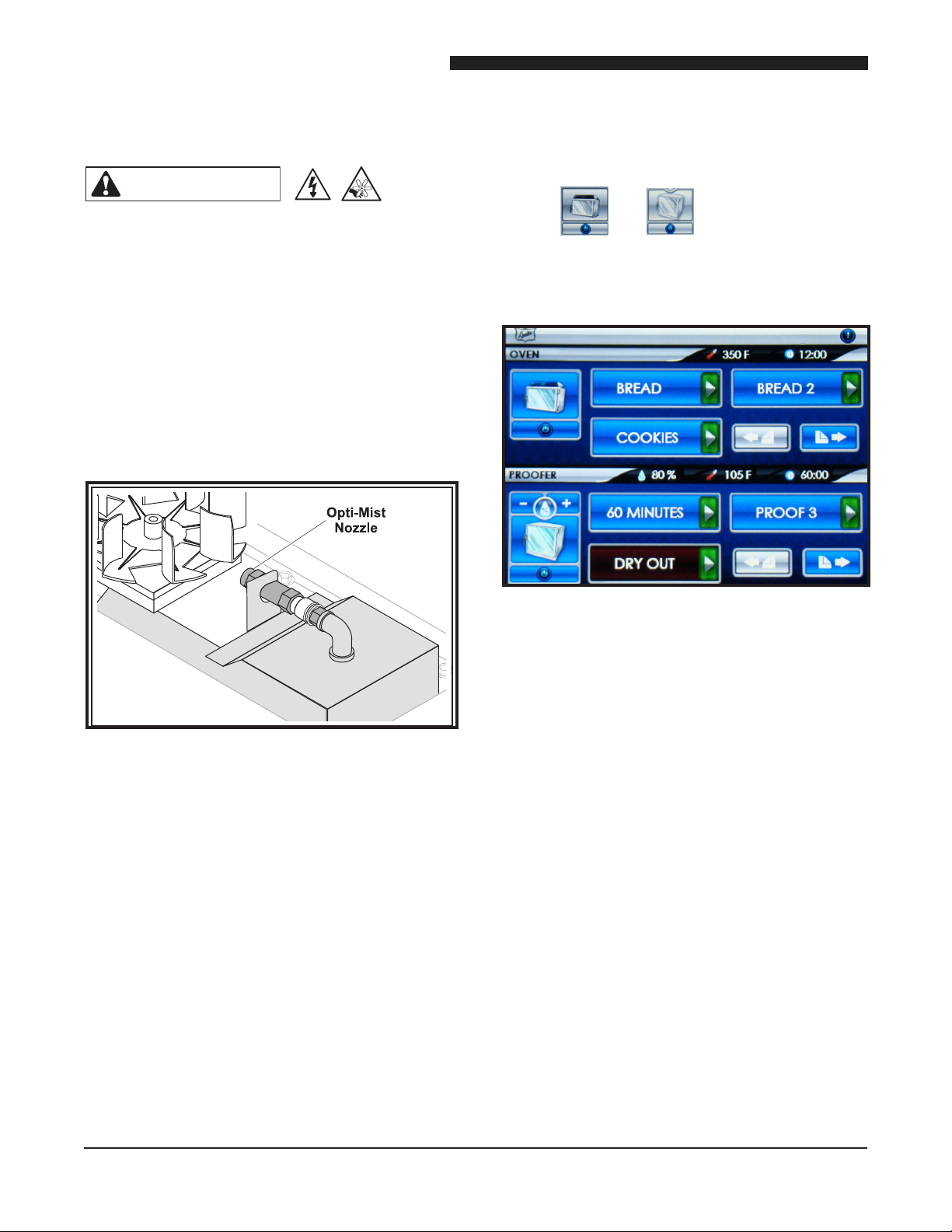
1. Remove Proofer bottom panel and verify
that the Opti-MistTM nozzle is clear of
obstructions.
TM
6. Check to make sure that the oven and
proofer fans are running.
7. Open the oven door; the oven fan should
stop.
8. Close the door; the fan should resume.
9. Allow the oven and proofer to pre-heat for
at least 30 minutes. An audible alarm will
sound (3 short chirps) when the oven and/
or proofer reach the ready state. Your Duke
Proofer Oven is now ready to operate.
If there are any problems refer to the Trouble
Shooting section of this manual.
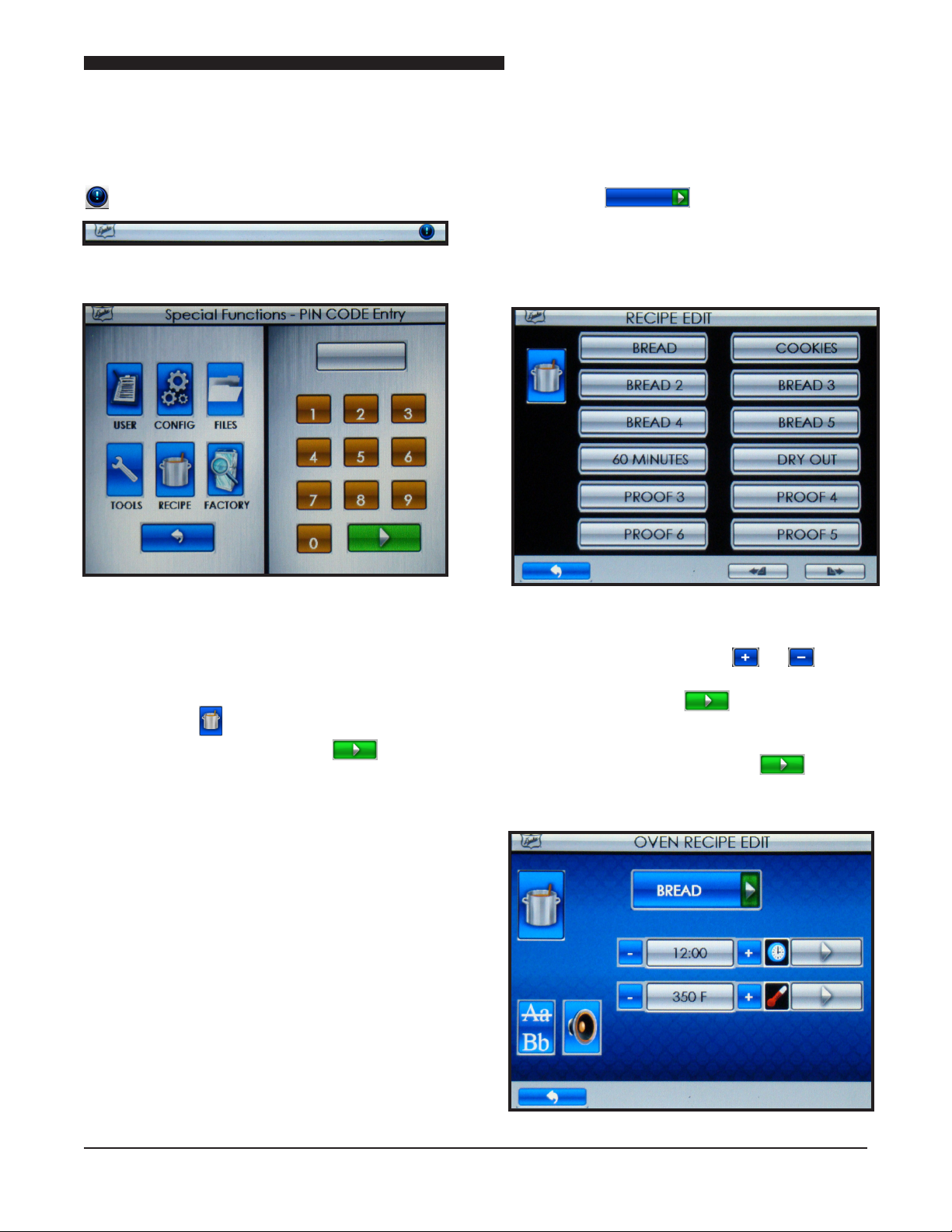
Figure: Main Screen
5. Turn the oven and proofer ON by touching
the and buttons located at the
left of the touch screen. The Oven, Proofer
and Recipe Buttons will turn to BLUE
background. The Oven and Proofer lights
will turn on and start preheating.
PROOFER OVEN START-UP
Figure: Opti-MistTM
2. Check the door seals and make sure both
doors close completely.
3. Have a qualied service technician or
electrician connect the oven to the power
supply.
4. Turn power on to the unit with the power
switch on the left side of the unit. Boot
Screen is displayed and automatically
transitions to the Main Screen.
7
Maintenance Manual for DUKE TSC Proofer
Oven with Touch Screen Controls
PROGRAMMING CONTROLS
RECIPE EDIT PROGRAMMING
INSTRUCTIONS
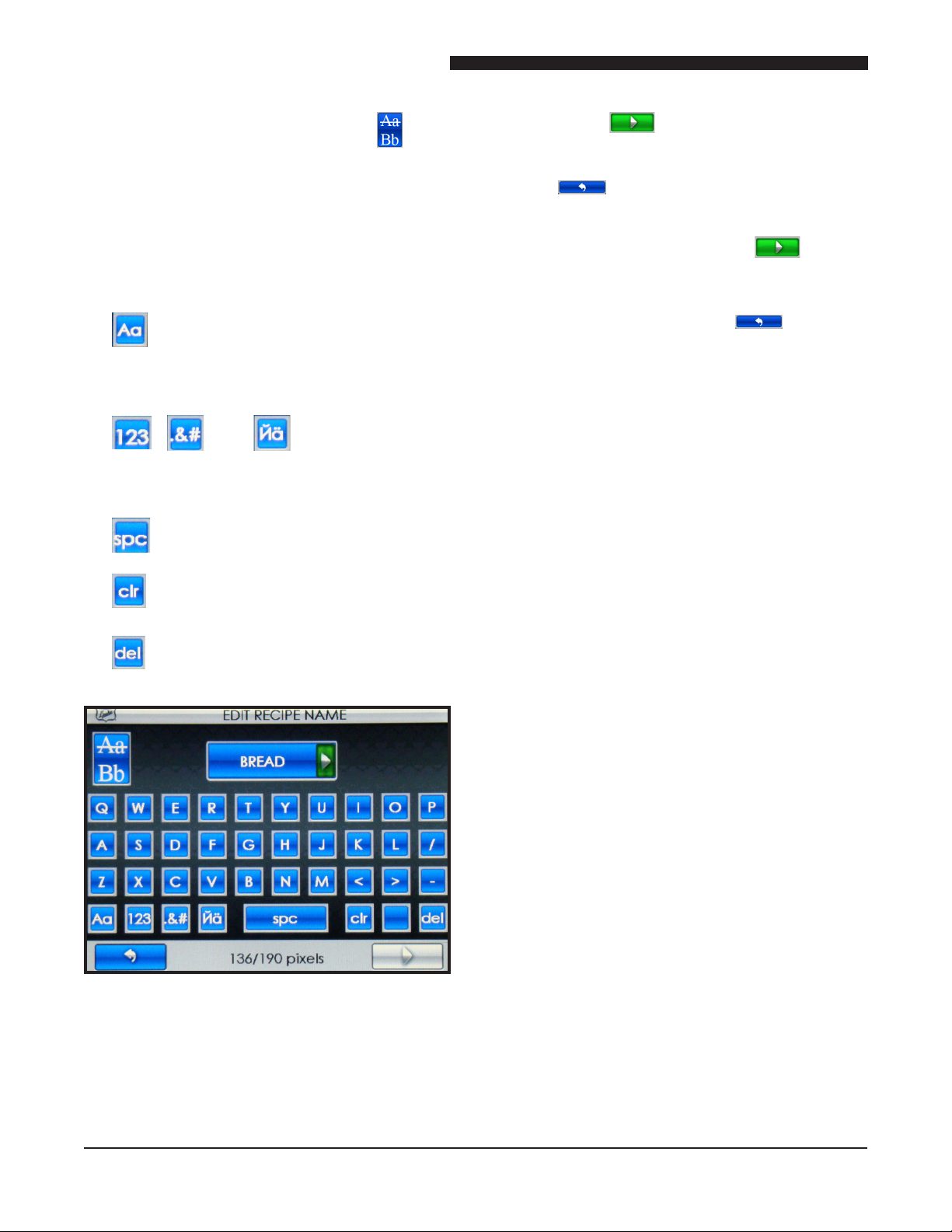
1. Touch the button and then enter pin
code 5 6 7 8 and Touch the button
when prompted.
2. Touch the button for the recipe you want to
edit (i.e. BREAD ).
NOTE: The 6 oven recipes are listed in
the top 3 rows and the 6 proofer recipes
are listed in the bottom 3 rows.
3. To edit Time, Temperature or Humidity
(Proofer Only), touch the or
button adjacent to the eld you want to
change. Touch the button to save
the changes.
NOTE: You must touch the button
in each eld to save the changes you
made.
FIGURE: Recipe Edit Selection Screen
Figure: Recipe Edit Screen
Figure: Main Tool Bar
Figure: Special Functions Screen
To access the SPECIAL FUNCTIONS, touch
button on the Main Tool Bar.
Maintenance Manual for DUKE TSC Proofer
Oven with Touch Screen Controls
8
5. Touch the button to save the
changes and return to the RECIPE EDIT
Screen. If no changes are required touch
the button to go back to the RECIPE
EDIT Screen.
NOTE: You must touch the button
to save the changes you made.
6. When complete, touch the button
to go back to the previous screen. Press
multiple times to return to the main screen.
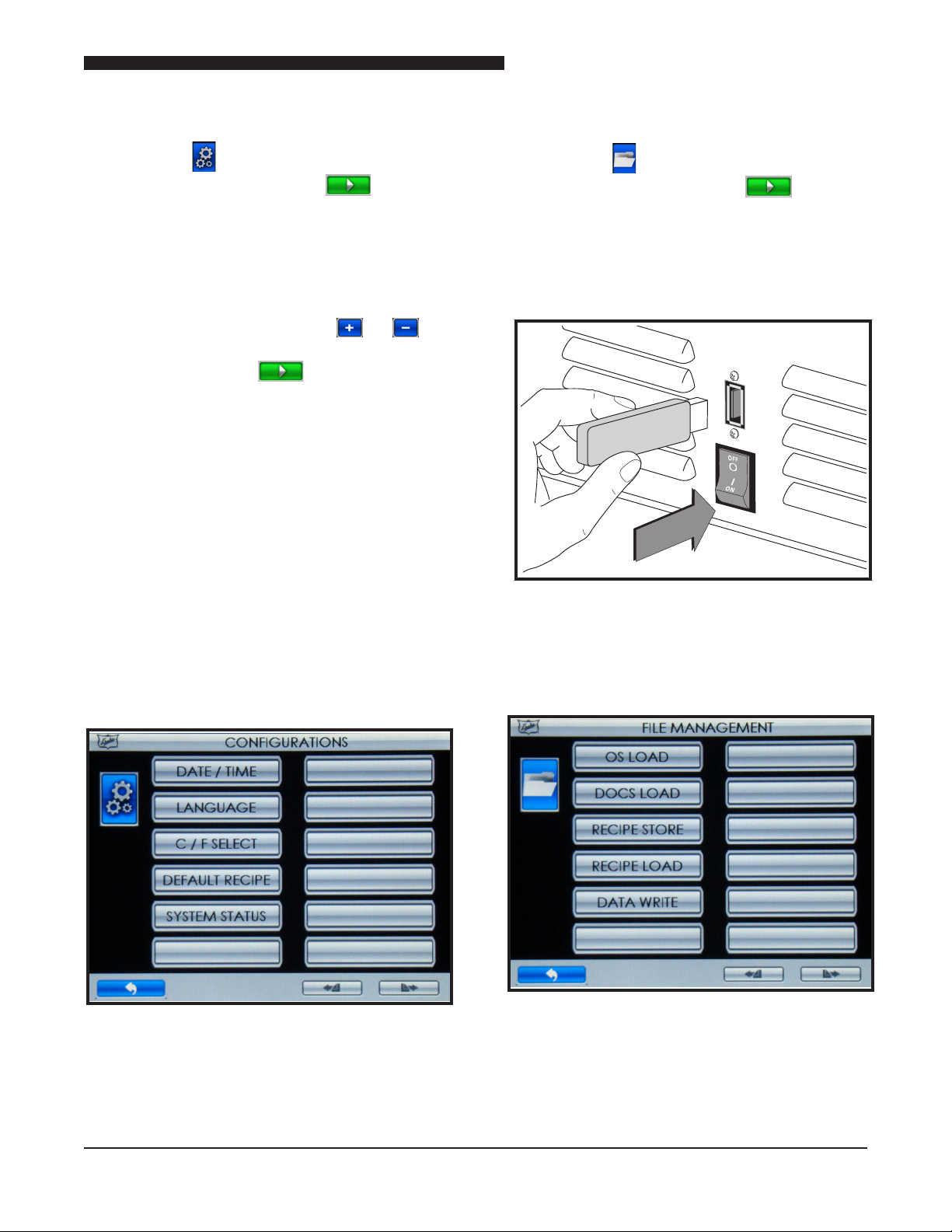
4. To edit the recipe name, touch the
button for the EDIT RECIPE NAME screen.
NOTE: Typing will add letters/characters
to the end of the text.
PRESS:
• TO TOGGLE THE KEYBOARD
BETWEEN THE UPPER/LOWER
CASE CHARACTER SET.
• , AND FOR THE
NUMBER AND SYMBOL
KEYBOARDS.
• TO SPACE
• TO CLEAR ALL TEXT
• TO DELETE/BACKSPACE
Figure: Edit Recipe Name Screen
9
Maintenance Manual for DUKE TSC Proofer
Oven with Touch Screen Controls
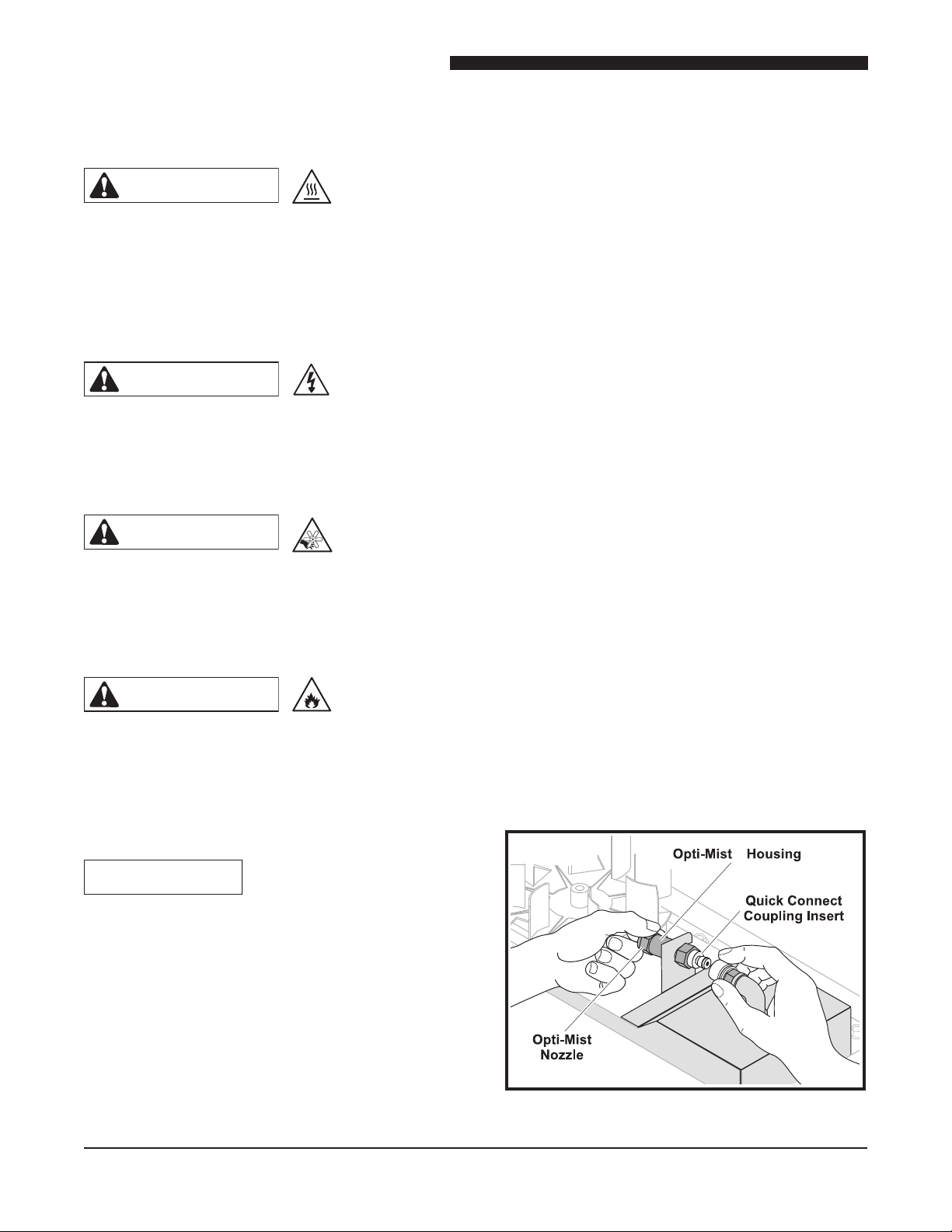
FILES (FILE MANAGEMENT)
1. Touch the button and then enter pin
code 3 4 5 6 and Touch the button
when prompted.
2. Insert USB drive with the le, until seated,
into the USB Host Device.
3. Select le operation from list and follow
instruction on the display screen.
Figure: Inserting USB Drive Into USB Host
Device
Figure: File Management Screen
CONFIG (CONFIGURATION S)
1. Touch the button and then enter pin
code 2 3 4 5 and Touch the button
when prompted.
2. Touch the button for the setting you want to
edit.
• DATE/TIME – Touching will display DATE/
TIME edit screen. Touch the or
button adjacent to the eld you want to
change. Touch the button to save the
changes.
• LANGUAGE – Touching will display a list of
included languages. Touch the preferred
language button to select.
• C/F SELECT – Touching will toggle
between CENTIGRADE MODE ENABLED
and FAHRENHEIT MODE ENABLED.
• DEFAULT RECIPE – Touching will reload
factory defaults.
• SYSTEM STATUS – Touching will display
Proofer Oven status.
Figure: Congurations Screen
Maintenance Manual for DUKE TSC Proofer
Oven with Touch Screen Controls
10
CARE AND CLEANING
WEEKLY CLEANING INSTRUCTIONS
1. Clean Proofer. Turn the proofer off and
allow elements to cool. Remove the bottom
panel (remove screw). Remove excess
water by wiping it up with a dry cloth.
Clean bottom panel to remove any mineral
deposits and debris with hot soapy water
and follow with clean damp cloth.
2. Clean Opti-Mist proofer spray Nozzle.
A. Remove nozzle assembly by depressing
latch on quick-connect tting and pull
nozzle out toward fan blade.
B. Soak nozzle in plain white vinegar for 4-8
hours to dissolve mineral deposits. Wipe
residue from nozzle and rinse in clean
water.
C. Do not insert objects into nozzle outlet
as this can change the water spray
performance.
D. Replace nozzle assembly if mineral
deposits from hard water cannot be
removed.
E. Reinstall nozzle by inserting into quick-
connect tting until fully seated.
Figure: Opti-MistTM Quick Connect Nozzle
TM
TM
WARNING
PROOFER OVEN INTERIOR AND
RACKS ARE VERY HOT AND COOL
SLOWLY.
ALLOW TO COOL BEFORE
HANDLING.
CAUTION
ELECTRICAL SHOCK HAZARD.
DO NOT WASH WITH WATER JET
OR HOSE.
CAUTION
RISK OF CUT FROM ROTATING FAN
BLADE.
DISCONNECT POWER TO SERVICE.
CAUTION
RISK OF BURN FROM HEATING
ELEMENTS.
DISCONNECT POWER AND ALLOW
TO COOL TO SERVICE.
CAUTION
DO NOT USE OVEN CLEANERS,
CAUSTIC CLEANERS, DEGREASERS,
ACIDS, AMMONIA PRODUCTS,
ABRASIVE CLEANERS, STEEL WOOL,
OR ABRASIVE PADS CONTAINING
IRON. THESE CAN DAMAGE THE
STAINLESS STEEL, DOOR GASKETS
AND PLASTIC SURFACES.
Altri manuali per TSC-6/18M
2
Questo manuale è adatto per i seguenti modelli
1
Indice
Altri manuali Duke Forno


Duke
Duke 59-E3C Guida

Duke
Duke PFB PROOFER BASE Guida rapida

Duke
Duke FLEXBAKE 5 Manuale utente

Duke
Duke AHPO-6/18 GOLD Manuale utente

Duke
Duke TSC-6/18 Manuale utente

Duke
Duke 613-G1V Manuale utente

Duke
Duke DSO 500 Manuale utente

Duke
Duke 155433P Guida

Duke
Duke TSC3-6/18 Manuale utente

Duke
Duke FLEXBAKE 5 Manuale utente


