
E-Bench KH 2258 Manuale utente

Operating Instructions
KH 2257
KH 2258
KH 2259
KH 2260
Cover_Front_UK 18.09.2002, 0:01 Uhr1

Cover_Front_UK 18.09.2002, 0:01 Uhr2

Operating Instructions |
Operating Instructions
eBench KH 2257/2258/2259/2260
Portable MP3-CD Player
with electronic digital anti-shock system
Manual_EN 18.09.2002, 0:01 Uhr1

| Operating Instructions
Contents
1. Technical data............................................................................................................................ 4
2. Included ...................................................................................................................................... 4
3. Use................................................................................................................................................. 4
4. Functions .................................................................................................................................... 5
5. Controls, displays and connections................................................................................... 6
5.1. Controls on the CD player ................................................................................................. 6
5.2. Displays on the CD player.................................................................................................. 7
5.3. Connections on the CD player......................................................................................... 7
KH 2257............................................................................................................................................ 8
KH 2259............................................................................................................................................ 8
KH 2258............................................................................................................................................ 9
KH 2260............................................................................................................................................ 9
5.4. Controls on the remote control.....................................................................................10
5.5. Displays on the remote control.....................................................................................10
5.6. Connections on the remote control ............................................................................10
6. Point of installation, operating conditions and safety instructions.....................11
7. Getting started........................................................................................................................13
7.1. Connecting to the power supply..................................................................................13
7.1.1. Mains operation ..............................................................................................................13
7.1.2. Battery operation............................................................................................................14
7.1.2.1. Exchanging batteries .................................................................................................15
7.1.2.2. Charging rechargeable batteries...........................................................................16
8. Conventional audio CDs......................................................................................................18
8.1. Playback.................................................................................................................................18
8.2. Setting the playback volume .........................................................................................20
8.3. Switching on Bass Boost ..................................................................................................21
8.4. Stopping playback (PAUSE mode)................................................................................21
8.5. Ending playback .................................................................................................................22
8.6. Selecting a track..................................................................................................................22
8.6.1. Skip forward/back to the beginning of a track.....................................................22
8.6.2. Skip 10 tracks forward...................................................................................................23
8.7. Fast search forward/back.................................................................................................24
8.8. Programming a compilation of tracks (PROGRAM function)..............................24
8.9. Intro play function .............................................................................................................26
8.10. Random playback (SHUFFLE) ......................................................................................27
8.11. Repeat functions..............................................................................................................28
8.11.1. Repeat playback of a single track ...........................................................................28
8.11.2. Repeat playback of all CD tracks .............................................................................28
9. MP3-CDs....................................................................................................................................29
Manual_EN 18.09.2002, 0:01 Uhr2

Operating Instructions |
9.1. Playback.................................................................................................................................29
9.2. Title selection.......................................................................................................................30
9.3. Skip forward by 10 titles ..................................................................................................31
9.4. Intro play function .............................................................................................................32
9.5. Random playback (SHUFFLE).........................................................................................32
9.6. Repeat functions.................................................................................................................33
9.6.1. Repeated playback of a single title...........................................................................33
9.6.2. Repeated playback of a title of a directory ............................................................34
9.6.3. Repeated playback of all MP3-CD titles..................................................................34
9.7. Programming a compilation of titles (PROGRAM function)................................35
9.8. Selecting tracks by their name ......................................................................................37
10. Equalizer function ...............................................................................................................38
11. Button lock (HOLD).............................................................................................................39
12. Switching o the MP3-CD player...................................................................................40
13. Connecting and using the accessories........................................................................40
13.1. Remote control.................................................................................................................40
13.2. Line-OUT cable .................................................................................................................41
13.3. Car adapter set..................................................................................................................42
13.3.1. Function...........................................................................................................................42
13.3.2. Use.....................................................................................................................................43
13.3.3. Setting up........................................................................................................................43
13.3.4. After use...........................................................................................................................44
14. Cleaning..................................................................................................................................45
15. Functional faults ..................................................................................................................45
Manual_EN 18.09.2002, 0:01 Uhr3

| Operating Instructions
1. Technical data
Mains: AC adapter/alternating current: 230 V ~ 50 Hz
or DC/direct current: 1.2 V – 2 x AA-type
Laser 3-beam laser
Frequency
response 100 Hz to 16 kHz
2. Included
1. MP3-CD player
2. Mains adapter
3. Headphones
4. Remote cable control
5. Line-OUT cable (chinch to 3.5 mm jack plug)
6. Two rechargeable NiCd batteries (AA-type, 1.2 V)
7. Protective bag
8. Auto-adapter set:
a) CD cassette adapter
b) Mains adapter for in-car cigarette lighter socket
3. Use
The eBench KH 2257/2258/2259/2260 Portable MP3-CD
Player is intended exclusively for ...
• An entertainment electronics system
• To playback audio CDs, CR-Rs and CR-RW with data in
audio CD format (.cda) and MP3 format (.mp3)
Manual_EN 18.09.2002, 0:01 Uhr4

Operating Instructions |
• For stationary and mobile use (e.g. in a car)
• For private, non-commercial use
The following can be used for the output of speech or music …
• The supplied headphones or headphones with a 3.5 mm
jack plug connection
• Loudspeakers with a 3.5 mm jack plug connection
• Other external HiFi units (connection by way of the sup-
plied line-OUT cable)
4. Functions
• Playback of audio CDs, CD-Rs and CD-RWs with data in
audio-CD format (.cda) and MP3 format (.mp3) up to 256
kbps.
• “ESP” Electronic digital anti-shock system with 45 seconds
(conventional audio CDs) and 120 seconds (MP3 CDs) interim
storage.
• Track name display with up to 11 characters (ISO Level 1)
or 31 characters (ISO Level II).
• Automatic display of title information (“ID 3 days”).
• Skip and fast search function forward/back
• Program function for individually programmed track com-
pilations
• Repeat functions for repeated playback of individual tracks,
programmed track compilations, directories and all CD tracks.
• Shue function for random playback.
• Intro Play to playback the beginning of all CD tracks
• Bass Boost System.
• Automatic switch-o (30 seconds).
Manual_EN 18.09.2002, 0:01 Uhr5

| Operating Instructions
• Battery change indication on the LCD display.
•
Charging suitable batteries in the unit, incl. charge in-
dication.
• Key lock.
Warning!
We do not accept any liability/warranty for damage incurred
as a result of incorrect use!
5. Controls, displays and connections
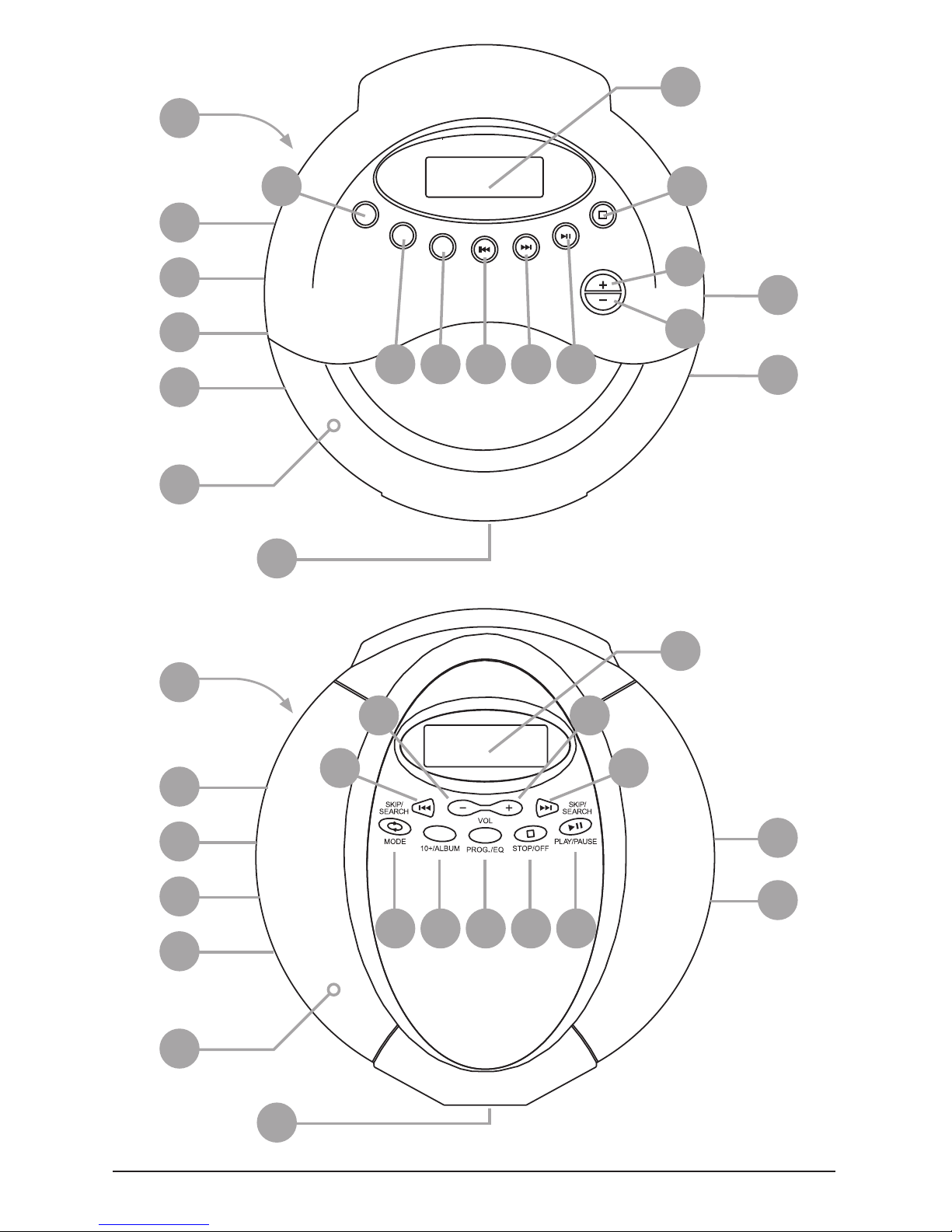
5.1. Controls on the CD player
1. CD compartment
2. “OPEN” slide
3. “MODE” button
4. “10+/ALBUM” button
5. “PROG./EQ” button
6. “SKIP/SEARCH 8” button
7. “SKIP/SEARCH 7” button
8. “PLAY/PAUSE 4;” button
9. “STOP <” button
10. “VOLUME +” button
11. “VOLUME –“ button
12. “HOLD” slide
13. “Bass Boost OFF/ON” slide
14. “CHARGE” slide
Manual_EN 18.09.2002, 0:02 Uhr6

Operating Instructions |
5.2. Displays on the CD player
15. LCD display
16. “CHARGE” display
5.3. Connections on the CD player
17. “DC 4.5V” connection for mains adapter
18. “PHONES” socket for headphones or remote cable control
19. “Line OUT” socket for chinch cable
Manual_EN 18.09.2002, 0:02 Uhr7
| Operating Instructions
19
18
17
12
13
16 34598
6
7
10
11
15
1
2
14
KH 2259
VOL
PROG./
EQ
SKIP/
SEARCH
PLAY/
PAUSE
MODE STOP/
OFF
10+/
ALBUM
10
11
17
12
13
16 45768
9
3
15
1
2
14
KH 2257
18
19
Manual_EN 18.09.2002, 0:02 Uhr8
Questo manuale è adatto per i seguenti modelli
3
Indice
Altri manuali E-Bench Sistema stereo portatile


