The DS700 t is a sensitive, ultrasonic movement
detector; it is essential therefore that it be
installed on a rigid surface that will not itself be
subject to movement or vibration.
Fix directly to a rigid surface or use the semi-
flush fixing kit to recess into a ceiling tile etc
(For semi-flush fixing, use a hole saw to drill a
76mm hole into the ceiling tile). Existing light
switch can be retained. Use switch wire from
switch as LIVE IN. A spare connection has been
provided for earth termination.
ON Sensitivity - Sets sensitivity to movement
when lights are switched on
This is the normal sensitivity adjustment
expected on any detector. Choose a setting as low
as practical. (ON Sensitivity set to maximum will
result in lights staying on permanently.)
OFF Sensitivity - Sets sensitivity to movement
when lights have switched off
This additional sensitivity adjustment is useful
in storage aisles, open plan areas etc. It enables
a reduced sensitivity to be set for when an area
is empty, so that fringe activity will not switch
on the lights. When fully clockwise, a very large
movement is needed to switch on the lights
whilst a much smaller movement (set by ON
Sensitivity) will sustain them. In enclosed rooms
or corridors, this control may be left in the fully
anti-clockwise position
when the sensitivity will remain the same
whether the lights are ON or OFF. The change
takes 5 seconds after the lights have switched off
to establish fully.
WHEN INSTALLING, REMEMBER
• LightSpot is not for use outdoors.
• Range is 10-15 metres for a walking target
in a corridor and 5-8 metres for small
hand-movements.
• Best performance is achieved at a mounting
height of 2-3 metres - in a corner - pointing
into the room (max size 6.0m x 6.0m) or one
end of a corridor.
• The detector is more sensitive to movement
ALONG the beam than ACROSS it.
• The detector can see behind itself, so it
should be positioned a metre or more inside
the monitored area - particularly in the case
of racking aisles and corridors.
• Ultrasonic detectors are sensitive to all
moving objects including air movement.
A mounting location should be chosen
thoughtfully, particularly where there
are fans in the area, e.g. extract fans and
computer cooling fans.
• The detector should not be positioned
within 25cm of a luminaire.
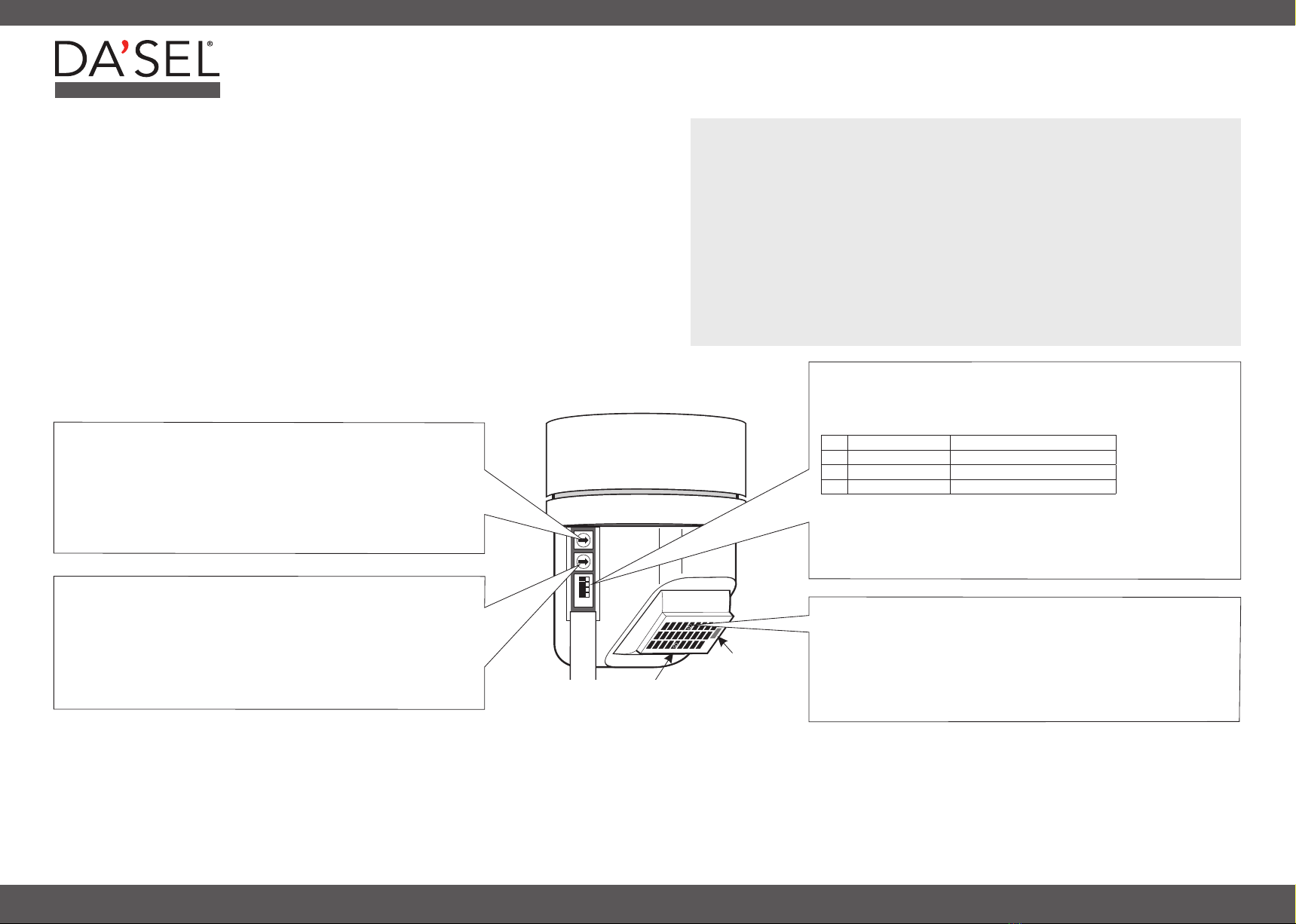
1. OFF SENSITIVITY
Reduces the sensitivity to movement when the lights are switched OFF.
When set fully anti-clockwise, the sensitivity is the same with the lights
switched ON and OFF.
Wait outside the area for the lights to switch OFF. Re-enter the area and check
the point at which the lighting switches on again. Increase the setting until the
lights are switched on JUST AT THE POINT OF ENTRY.
COARSE SENSITIVITY ADJUSTMENT
Normal setting is anti-clockwise. Turn clockwise to reduce
overall sensitivity (required only in special circumstances).
2. ON SENSITIVITY
Sets the sensitivity to movement when the lights are ON.
Rotate the control clockwise so that the LED flashes in response to typical
movements expected at the extremities of the monitored area. Wait to ensure that
the lights switch off and that no interference signals are triggering the detector.
DO NOT TURN TO MAXIMUM. Always adjust to the lowest setting consistent with
reliable performance..
3. PHOTOCELL
Prevents lights being switched ON when there is adequate daylight.
Commission for movement before adjusting the photocell. Anti-clockwise
adjustment makes the photocell more active so that lights will be held OFF until it
is darker. A mid setting is generally suitable. The photocell may be overridden by
switching the normal light switch OFF then ON. The lights will come ON if Power-
up ON is selected, i.e. Switch 1 is ON.
3. OFF DELAY AND POWER-UP CONDITION
Sets the time delay following the last observed movement after which the
lights switch OFF.
ON OFF
1Power-up ON Power-up OFF
2Semi-auto Auto
Add switches together to
select 15 minutes
35 min delay Zero delay
410 min delay Zero delay
With 3 and 4 in the OFF position, the delay time is 5 seconds which must only be
used for setting up purposes. In semi-automatic mode the lights are switched ON
by switching the wall-switch OFF then ON.
NOTE: In semi-automatic mode, Power-up ON must be selected, i.e. Switch 1
must be ON.
SENSITIVITY CONTROLS
INSTALLATION
COMMISSIONING
Ensure that any heating/ventilation plant which may cause interference is switched ON. Set the
PHOTOCELL control fully clockwise, sensitivity controls fully anti-clockwise and the four switches to
OFF then follow these simple commissioning instructions. We recommend that the Off Sensitivity
is not adjusted unless absolutely necessary and therefore the commissioning procedure is started
from Step 2.
PROFESSIONAL
INSTALLATION AND COMMISSIONING INSTRUCTIONS


