
Egnite Codespot Pro Istruzioni operative

Codespot Pro Event Player
Tutorial 1
This tutorial explains how to easily set up Codespot
Pro projects.
A phantom in a haunted house shall interact with the
visitors. Codespot Pro is used to teach it how to talk
and to make its eyes glow.

Contents
1 Introduction..............................................................................................................1
Hardware Setup.......................................................................................................
3 Getting Codespot Pro into operation ....................................................................3
4 Configuration of Codespot Pro...............................................................................5
4.1 Setup of Codespot Manager...................................................................................5
4. Configuration of the event player..........................................................................8
5 Connecting and testing Hardware.......................................................................13

1 Introduction
Codespot Pro is an event-controlled audio player. These Events can come from
Codespot Pro itself. Examples are Power on at start-up or Audio End when the
playback of an audio track has finished. External hardware, connected to Codespot
Pro's two digital inputs or the RS 3 -interface, can also notify the device of
occurring events.
To configure Codespot Pro's response to those events, the configuration GUI is
used. You can assign up to three different actions to a single event. These will be
executed consecutively. It is possible to adjust the playback behavior, to toggle the
external outputs, to send messages over the RS- 3 interface and also to initiate
delayed actions, making use of counters.
We want the phantom to interact with his surrounding as follows:
If a visitor approaches, it starts to hysterically laugh. A LED spot makes its eyes
glow. After some seconds the LED spot is turned off again. When the visitor leaves,
the phantom shouts: “You cannot escape!”.
1

Hardware Setup
This document only draws an outline on how to configure Codespot Pro. To follow
the example no additional hardware, like light barriers or LED spots, is needed.
Instead we are going to use the I/O testboard Bintest to simulate the setup.
So you need:
•the Codespot Pro event player
•a microUSB-cable
•a RS- 3 cable or a USB / RS- 3 bridge
•the I/O testboard Bintest
•a pair of speakers or headphones

3 Getting Codespot Pro into operation
At first, you have to connect Codespot Pro to your PC, using a microUSB cable.
Windows automatically recognizes a card reader and creates a new device. Copy all
provided data to your hard drive.
After installing Codespot Manager from the installation file, take any two audio files
and save them on Codespot Pro.
Caution
All media is played back in exactly that order it was copied to the devices. It is hence
a good idea to copy all files one by one.
Don't forget to eject the device afterwards. Click on the device symbol and choose
Eject
.
3

Otherwise Codespot Manager won't be able to establish a connection to Codespot
Pro and an error message is shown.
More information on how to put Codespot Pro into operation can be found in the
manual.
4

4 Configuration of Codespot Pro
On the internal microSD card of your Codespot Pro are now two audio files that
should be played after a signal from one of the connected light barriers indicates
that a visitor is approaching or leaving.
In its basic configuration, Codespot Pro plays all stored audio files successively. You
can check this behavior by connecting headphones or speakers to the line output.
Even if the light barriers and the LED-spot are never really connected to Codespot
Pro, we need to outline the intended hardware setup:
Input 1 Light barrier, indicating an approaching visitor
Input Light barrier, indicating a leaving visitor
Output 1 LED spot for the glowing-eyes effect
4.1 Setup of Codespot Manager
To configure Codespot Pro you need to connect it to your PC's RS- 3 port using a
serial cable. If you have no free serial port at your PC you can also use an USB / RS-
3 bridge that you can get at the local computer store.
At first, start Codespot Manager. The program immediately tries to establish a
connection to Codespot Pro.
If it is not connected to the pre-configured interface COM1, an error message shows
up. If you click on
Yes,
the software searches the serial ports of your PC for Codespot
Pro.
5

If everything works out, Codespot Manager will show the status
Ready
at the bottom
left corner of the program window.
If this status is not shown, something went wrong. Have a look at the manual to
learn how to resolve communication problems.
6

By clicking on the
Read
button you can import the current device configuration and
check if everything is working properly.
7
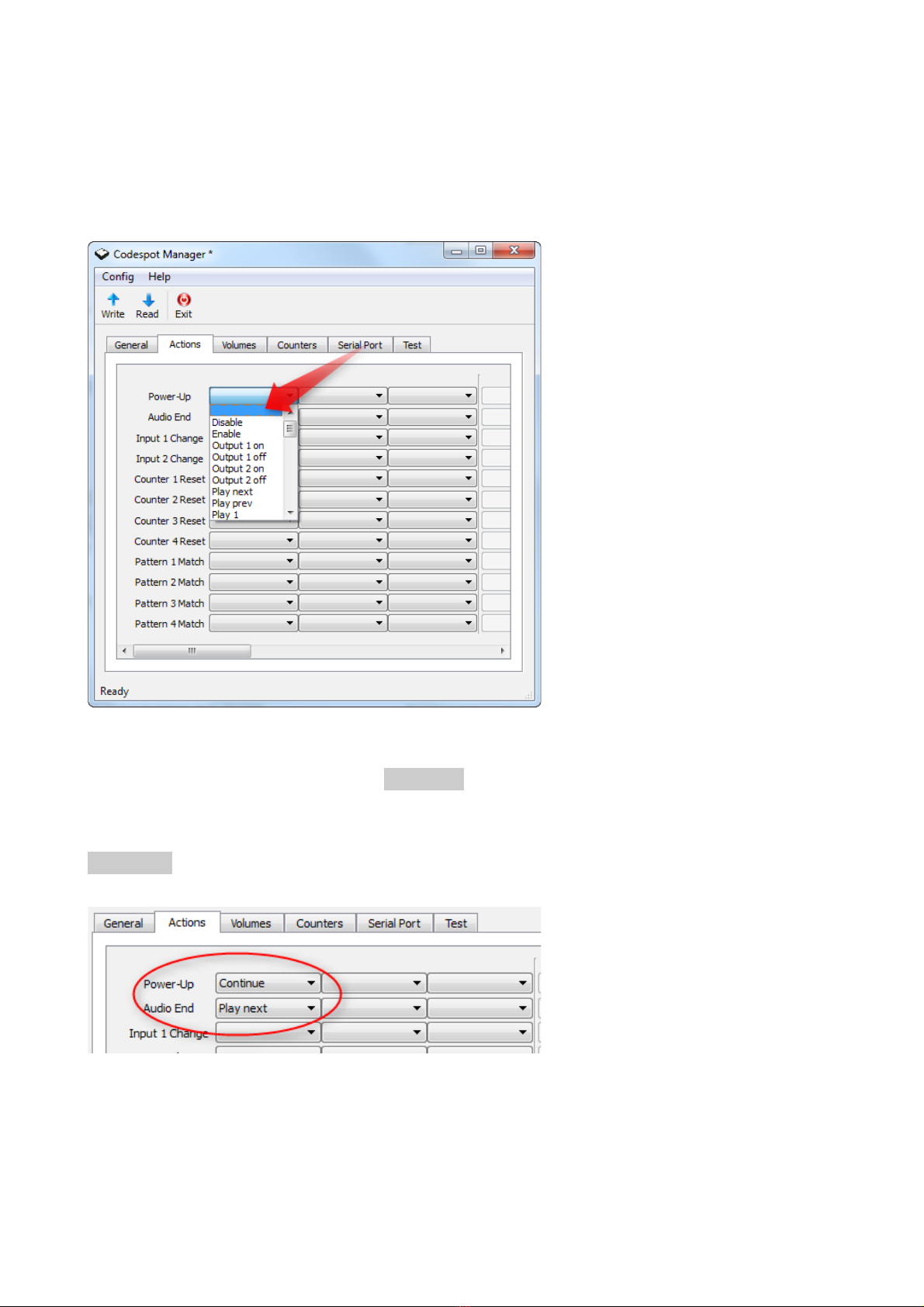
4. Configuration of the event player
Click on the
Actions
tab
.
Here you can take control on Codespot Pro's behavior. On
the left side you see the events, that Codespot Pro can react upon. With the list
boxes on the right side you can assign up to three different actions to every event.
In its basic configuration, Codespot Pro responds to two different events, each with a
single action. After Power Up the Continue action is performed, which instructs
Codespot Pro to play the first audio file on the microSD card. The event Audio End is
triggered after Codespot Pro has finished the playback of a track. Here, the action
Play Next is executed.
8
Indice


