Elatec TWN3 MIFARE Manuale utente

Transponder Reader
TWN3
Technical Manual
Doc.-Rev. 1.07

Elatec GmbH
Page 2 of 50
Content
1. Introduction..................................................................................................................... 4
2. Functional Overview....................................................................................................... 4
3. Modes of Operation......................................................................................................... 5
3.1
USB-Device .............................................................................................................................. 6
3.1.1
Keyboard Emulation (USB HID Device).........................................................................................6
3.1.2
Emulating a Virtual Serial Port........................................................................................................6
3.2
V24-Device............................................................................................................................... 6
3.2.1
Serial Communication Parameters ...................................................................................................6
3.2.2
Pin Assignment ................................................................................................................................7
4. Installation ...................................................................................................................... 7
4.1
V24-Device............................................................................................................................... 7
4.2
USB-Device (Keyboard Emulation) ...................................................................................... 8
4.3
USB-Device (Virtual Serial Port) .......................................................................................... 9
5. Configuration ................................................................................................................ 11
5.1
Entering the Configuration Mode....................................................................................... 11
5.2
Writing a Configuration to a TWN3 Device ...................................................................... 12
5.3
Resuming Normal Operation............................................................................................... 13
5.4
Selecting Mode of Operation ............................................................................................... 14
5.5
Setting Up the Keyboard Emulation................................................................................... 15
5.5.1
Table of Scan Codes ......................................................................................................................15
5.5.2
Sending ALT Codes.......................................................................................................................17
5.5.3
Key Repeat Rate ............................................................................................................................17
5.6
Installing Scripts ................................................................................................................... 18
5.7
Miscellaneous Settings.......................................................................................................... 19
5.8
Updating the Firmware........................................................................................................ 20
5.9
Preferences ............................................................................................................................ 21
5.10
Export and Import of Configurations............................................................................. 22
5.11
Installing USB-Drivers for Configuration...................................................................... 23
6. Transparent Mode......................................................................................................... 24
6.1
HID Prox Transparent Protocol.......................................................................................... 25
6.2
IndiTag Transparent Protocol............................................................................................. 25
7. Scripting ........................................................................................................................ 26
7.1
Language Description........................................................................................................... 26
7.1.1
Source Code...................................................................................................................................26
7.1.2
Comments ......................................................................................................................................26
7.1.3
Case Sensitivity..............................................................................................................................26
7.1.4
Preprocessor Directives .................................................................................................................26
7.1.4.1
#include Directive......................................................................................................................27
7.1.5
Functions........................................................................................................................................27
7.1.5.1
Return Values.............................................................................................................................27
7.1.5.2
Arguments..................................................................................................................................27

Elatec GmbH
Page 3 of 50
7.1.5.3
System Functions .......................................................................................................................27
7.1.5.4
Function main ............................................................................................................................28
7.1.6
Statements......................................................................................................................................28
7.1.6.1
if Statement ................................................................................................................................28
7.1.6.2
if else Statement.........................................................................................................................28
7.1.6.3
while Statement..........................................................................................................................28
7.1.6.4
do while Statement.....................................................................................................................28
7.1.6.5
for Statement..............................................................................................................................29
7.1.6.6
switch Statement ........................................................................................................................29
7.1.6.7
break Statement..........................................................................................................................29
7.1.6.8
continue Statement.....................................................................................................................29
7.1.6.9
return Statement .........................................................................................................................30
7.1.6.10
goto Statement .......................................................................................................................30
7.1.6.11
Labels.....................................................................................................................................30
7.1.6.12
Empty Statement ....................................................................................................................30
7.1.7
Storage Types ................................................................................................................................30
7.1.8
Storage Classes ..............................................................................................................................31
7.1.8.1
const...........................................................................................................................................31
7.1.8.2
secret..........................................................................................................................................31
7.1.9
Operators .......................................................................................................................................32
7.2
Runtime Environment.......................................................................................................... 33
7.2.1
Include File ....................................................................................................................................33
7.2.2
Basic Definitions............................................................................................................................33
7.2.3
Bit Fields........................................................................................................................................33
7.2.4
Startup Condition...........................................................................................................................33
7.2.5
System Function Calls....................................................................................................................34
7.2.5.1
Transponder Operations.............................................................................................................34
7.2.5.1.1
Generally Available Transponder Operations .....................................................................35
7.2.5.1.2
Multi125-Specific Transponder Operations........................................................................36
7.2.5.1.3
Mifare- and MultiISO-Specific Transponder Operations....................................................37
7.2.5.1.4
Legic Specific Operations ...................................................................................................38
7.2.5.1.5
HID iClass Specific Operations ..........................................................................................39
7.2.5.2
Functions for Host Communication ...........................................................................................40
7.2.5.3
Accessing LEDs.........................................................................................................................42
7.2.5.4
Accessing the Beeper .................................................................................................................43
7.2.5.5
Bit Operations............................................................................................................................43
7.2.5.6
Byte Operations .........................................................................................................................45
7.2.5.7
Timer Operations .......................................................................................................................46
7.2.5.8
Retrieving System Information ..................................................................................................47
7.2.5.9
Miscellaneous ............................................................................................................................47
8. Firmware History.......................................................................................................... 48
9. Technical Data .............................................................................................................. 48
10. Regulatory Information ................................................................................................ 49
10.1
CE Declaration of Conformity......................................................................................... 49
10.2
FCC Statement .................................................................................................................. 49
10.3
CI (Canada Industry) Statement ..................................................................................... 50
11. Trademarks.................................................................................................................... 50

Elatec GmbH
Page 4 of 50
1. Introduction
This document is the reference guide for the transponder reader family TWN3.
Note:
In order to use the functionality, which is described in this document, your TWN3 reader needs
a firmware version V4.00 or above. The latest version of the firmware is part of the developer
pack. Please revere to section “Updating the Firmware”, if you would like to update the
firmware.
2. Functional Overview
Here is a block diagram of the basic functional components of a TWN3 transponder reader:
Multi125 Mifare HID Prox HID iClass
Transponder Family Depending On Type of Devi e
Transparent Communi ation S ript Controlled Operation
Physi al COM Port Virtual COM Port Keyboard
Emulation
USB-Interfa eV24-Interfa e
TWN3 Transponder Reader
Legi IndiTag MultiISO

Elatec GmbH
Page 5 of 50
Let’s take a more detailed view:
The diagram below is showing the functional units and how they can be configured:
V24-
Interfa e
S ripting
Engine
Multi125
Mifare
HID Prox
HID iClass
Legi
Transparent
Communi ation
Config
Mode
Command
for Config
Mode
TWNConfig
Sele ted by
Cable
TWNConfig
S an ode
Translation
Table
USB Virtual
COM Port
USB
Keyboard
Emulation
TWNConfig TWNConfig TWN3
Devi e Type
IndiTag
MultiISO
3. Modes of Operation
The transponder reader TWN3 can be ordered in several hardware configurations:
•Support for the specific transponder family (Multi125, Mifare, HID Prox, HID iClass, Legic,
IndiTag, MultiISO)
•Physical type of connection (type of cable) to the host computer: USB or V24, DSUB25,
DSUB9 or PS/2
Many other configurations can be done by the system integrator:
•Type of USB mode (USB devices only)
•Behavior of keyboard emulation
•Scripting mode

Elatec GmbH
Page 6 of 50
3.1 USB-Device
A TWN3 USB reader is capable of supporting several modes of operation:
3.1.1 Keyboard Emulation (USB HID Device)
This is the default mode for USB devices. No drivers are required for running the device in a typical
environment like Windows XP or Linux. Any output from the TWN3 transponder reader to the host is
sent like keyboard input from a user. Therefore, any characters are displayed at the current position of
the cursor on the screen of the computer.
Please be aware, that the communication between TWN3 device and host computer is unidirectional.
This means, there is no possibility to send data from the host to the TWN3 device. In situations where
this is required, we recommend the emulation of a serial port.
3.1.2 Emulating a Virtual Serial Port
Optionally, a USB device can be configured to emulate a virtual serial port. This mode of operation is to
be preferred, if a direct communication between application and TWN3 transponder reader is required.
This mode also enables a bidirectional communication between .
The communication protocol is identical to the version of TWN3 reader with a physical V24 interface.
3.2 V24-Device
3.2.1 Serial Communication Parameters
Parameter Value
Baudrate 9600 Baud
Databits 8
Parity None
(1)
Stopbits 1
Handshake None
Connector DSUB25 or DSUB9 or PS/2
(1)
TWN3 Multi125 in transparent mode is using even parity,
which is the native setup for the T4 transponder reader
family.

Elatec GmbH
Page 7 of 50
3.2.2 Pin Assignment
Following pin assignment for the DSUB25 plug:
Pin Signal
2 RxD from host
3 TxD to host
7 Signal ground
24 5V power supply from the host
Following pin assignment for the DSUB9 plug:
Pin Signal
3 RxD from host
2 TxD to host
5 Signal ground
9 5V power supply from the host
Following pin assignment for the PS/2 plug:
Pin Signal
6 RxD from host
2 TxD to host
3 Signal ground
4 5V power supply from the host
4. Installation
4.1 V24-Device
Installing a TWN3 reader with a serial port requires an additional power supply, which is not standard
for usual PCs. On the other hand, many devices do supply the 5V on a rarely used pin of the serial
connector. Please contact your supplier for a specific solution.
The installation of the reader is as simple as connecting a USB device to a host.

Elatec GmbH
Page 8 of 50
4.2 USB-Device (Keyboard Emulation)
Installing a TWN3 reader emulating a keyboard is rather simple due to the fact, that drivers do come
with the operating system. Therefore, the device simply can be connected to the host computer and
can be immediately used.

Elatec GmbH
Page 9 of 50
4.3 USB-Device (Virtual Serial Port)
In order to install a TWN3 reader, which emulates a virtual serial port under Windows XP, keep the
drivers nearby and follow these steps:
•Plug in the TWN3 reader into your host computer. The following screen should appear (in your
native language)
Select to install the software from a specific source.
•The following screen should appear:
Select the directory, where the drivers reside and click continue. The drivers will be installed
now.
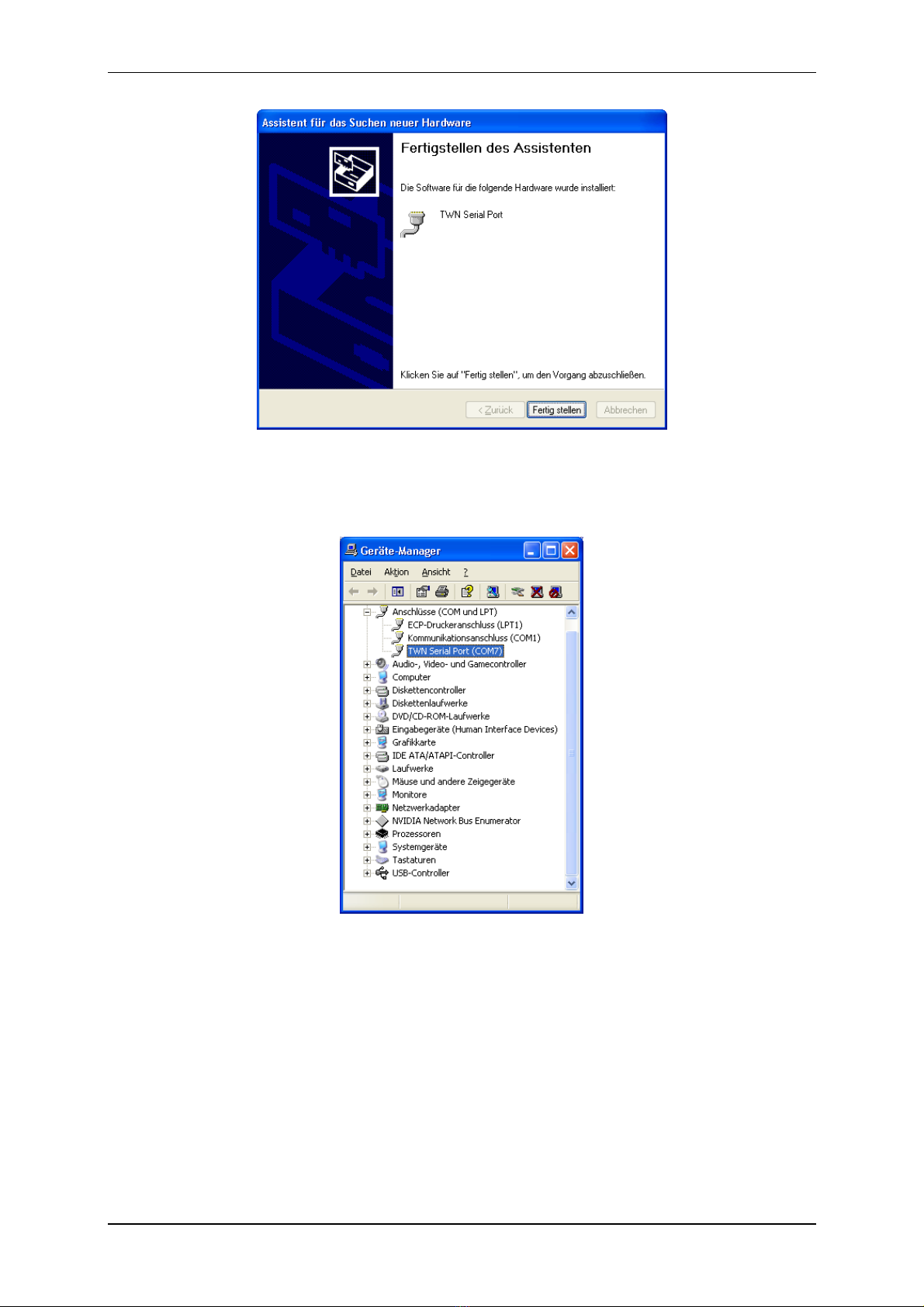
•After installation, the following screen should appear:

Elatec GmbH
Page 10 of 50
The installation is now completed. In order to find the serial communication port, which is emulated by
the TWN3 transponder reader, you may take a look into the device manager:
In this example, we find the TWN3 reader at COM7.
Depending on the further configuration of the device, you may now test the TWN3 transponder reader
with a normal terminal program.
Altri manuali per TWN3 MIFARE
4
Indice
Altri manuali Elatec Lettore di schede

Elatec
Elatec TWN4 MultiTech 2 HF Manuale utente

Elatec
Elatec TWN4 MultiTech 2 HF Manuale utente

Elatec
Elatec TWN4 Palon Compact Manuale utente

Elatec
Elatec TWN4 PALON COMPACT LEGIC M Manuale utente

Elatec
Elatec TWN4 Palon Compact Manuale per l'uso e la cura

Elatec
Elatec TWN4 MultiTech 2 HF Manuale utente

Elatec
Elatec TWN4 Slim Manuale utente

Elatec
Elatec TWN4 Palon Compact LEGIC Manuale utente

Elatec
Elatec TWN4 MultiTech 2 HF Manuale utente

Elatec
Elatec TWN4 MultiTech 2 HF Manuale utente