
Electronics Line EL-DVR-431RW Manuale utente

1
EL-DVR-431RW
Stand Alone Type
DVR SYSTEM
Electronics Line USA
User Manual
Revision Date: 2005.06.30
Firmware 2.4.20.116 Version

2
New Features for the EL-431RW.
1. Server DVR
○
12 Way Audio Conference
* 2 Way Audio Support between DVR and Remote Client
○
2Dynamic IP (DHCP) support
* DHCP Network IP Support for Plug and Play on your LAN
○
3CD-RW Backup (to AVI)
* Built in CD-RW makes AVI back ups simple
fMore Access levels
Operator : Live/PTZ
Manager : Live/PTZ + search
Administrator: All access
gAdditional PTZ support
hDDNS Support
Remote connection using Dynamic Domain Name Service.
iWeb Server Port change Support
Change default Web Browser port to avoid network conflicts.
2. Remote PC
○
1Web Client
*Web Browser interface (i.e.; Internet Explorer, etc.)
○
2Multi Client User
* Max 4 simultaneous users
○
3Remote Setup
* Extended Setup options through remote client.
○
42 Way Audio Conference
* 2 Way Audio Support between DVR and Remote Client

3
●INDEX
■CHAPTER 1. (Specification & System Organization)
1.1 Specification---------------------------------------------------------------------------------------------------------6
1.2 Product Contents List-----------------------------------------------------------------------------------------7
1.3 System Organization-------------------------------------------------------------------------------------------8
■CHAPTER 2. (Description)----------------------------------------------------------------------------------------- 9
2.1 Front Panel----------------------------------------------------------------------------------------------------------9
2.2 Rear Panel----------------------------------------------------------------------------------------------------------10
2.3 Remote Controller------------------------------------------------------------------------------------------------11
■CHAPTER 3. ( Installation )---------------------------------------------------------------------------------------12
3.1 Hard Disk Installation-------------------------------------------------------------------------------------------12
3.2 Camera Connection----------------------------------------------------------------------------------------------13
3.3 Monitor Connection----------------------------------------------------------------------------------------------13
3.4 Network Connection---------------------------------------------------------------------------------------------13
3.5 Alarm/Relay/PTZ Connection---------------------------------------------------------------------------------14
3.6 Power Connection-------------------------------------------------------------------------------------------------14
3.7 Hard Disk format-------------------------------------------------------------------------------------------------15
■CHAPTER 4. ( Monitoring )--------------------------------------------------------------------------------------16
4.1 System Power ON------------------------------------------------------------------------------------------------16
4.2 Select Screen Mode-----------------------------------------------------------------------------------------------16
4.3 Convert Screen Mode--------------------------------------------------------------------------------------------17
4.4 Control PTZ/Focus-----------------------------------------------------------------------------------------------17
4.5 System Power OFF-----------------------------------------------------------------------------------------------18
■CHAPTER 5. ( Search )--------------------------------------------------------------------------------------------19
Go to Search----------------------------------------------------------------------------------------------------------19
5.1 Search by Date/Time---------------------------------------------------------------------------------------------19
5.2 Search by Event---------------------------------------------------------------------------------------------------20

4
●INDEX
■CHAPTER 6. (Menu)
Go to Menu--------------------------------------------------------------------------------------------------------------22
Menu Initial--------------------------------------------------------------------------------------------------------------22
6.1 Display---------------------------------------------------------------------------------------------------------------23
6.2 Record----------------------------------------------------------------------------------------------------------------23
6.2.1 Size/Rec. Rate/Quality--------------------------------------------------------------------------------------23
6.2.2 Timer Recording Setup-------------------------------------------------------------------------------------24
6.2.3 Motion Detection Setup------------------------------------------------------------------------------------25
6.2.4 Alarm Recording Setup------------------------------------------------------------------------------------25
6.2.5 Time Recording Weekly Setup----------------------------------------------------------------------------26
6.2.6 Partial Motion Region Setup------------------------------------------------------------------------------27
6.3 Camera-------------------------------------------------------------------------------------------------------------28
6.3.1 Status/Title Setup-------------------------------------------------------------------------------------------28
6.3.2 Covert/PTZ Setup-------------------------------------------------------------------------------------------28
6.3.3 Color Setup---------------------------------------------------------------------------------------------------29
6.4 Audio-----------------------------------------------------------------------------------------------------------------29
6.4.1 Audio Recording Setup---------------------------------------------------------------------29
6.4.2 Live Audio Setup----------------------------------------------------------------------------30
6.5 Alarm-----------------------------------------------------------------------------------------------------------------30
6.5.1 Alarm Input Setup-------------------------------------------------------------------------30
6.5.2 Relay Output Setup--------------------------------------------------------------------------------31
6.6 System----------------------------------------------------------------------------------------------------------------31
6.6.1 Date/Time----------------------------------------------------------------------------------------31
6.6.2 Network---------------------------------------------------------------------------------------32
6.6.3 Buzzer Setup-------------------------------------------------------------------------------34
6.6.4.1 Administrator Password---------------------------------------------------------------34
6.6.4.2 Manager Password---------------------------------------------------------------------35
6.6.4.3 Operator Password--------------------------------------------------------------------35
6.6.4.4 Network Password-------------------------------------------------------------------35
6.6.5 Disk Write Mode--------------------------------------------------------------------------------36
6.6.6 System Information---------------------------------------------------------------36
6.6.7 Factory Default-----------------------------------------------------------------------------36
6.7 CD-RW Setup------------------------------------------------------------------------------------------------------37
6.7.1 CD-RW Back-up-------------------------------------------------------------------------------------------37
6.7.2 Backup process-------------------------------------------------------------------------------------------38

5
●INDEX
■CHAPTER 7 (CLIENT) .
System Requirements-----------------------------------------------------------------------------------------------------39
DVR Remote Agent Installation----------------------------------------------------------------------------------------39
7.1 Monitoring-------------------------------------------------------------------------------------------------------------42
7.1.1 Function Introduction-----------------------------------------------------------------------------------------42
7.1.2 Screen Division Selection-------------------------------------------------------------------------------------43
7.1.3 PTZ Control-----------------------------------------------------------------------------------------------------43
7.1.4 Select Network ID----------------------------------------------------------------------------------------------43
7.1.5 AVI File Conversion--------------------------------------------------------------------------------------------44
7.1.6. Color Adjustment----------------------------------------------------------------------------------------------44
7.1.7 Audio--------------------------------------------------------------------------------------------------------------44
7.2 Search Mode-----------------------------------------------------------------------------------------------------------45
7.2.1 Function Introduction-----------------------------------------------------------------------------------------45
7.2.2 Search Method--------------------------------------------------------------------------------------------------46
7.2.3 Search Option---------------------------------------------------------------------------------------------------47
7.3 IP Setting----------------------------------------------------------------------------------------------------------------52
7.3.1 Option Setting---------------------------------------------------------------------------------------------------53
7.4 Web Client--------------------------------------------------------------------------------------------------------------56
■ CHAPTER 8 .
Time Table------------------------------------------------------------------------------------------------------------------58
PTZ Protocol---------------------------------------------------------------------------------------------------------------59
PTZ Control----------------------------------------------------------------------------------------------------------------60
8.1 PTZ Preset---------------------------------------------------------------------------------------------------------61
8.2 Swing----------------------------------------------------------------------------------------------------------------61
Crossover Cable Making Tip--------------------------------------------------------------------------------------------62
AVI playback failure------------------------------------------------------------------------------------------------------63
Electronics Line USA Limited Warranty---------------------------------------------------------------------------65

6
●Specification & Organization
1.1 Specification
●80G HDD Storage Capacity(hour)
Resolution
CH & Frames Highest High Standard Low
4CH(CIF/30FPS) 41 58 93 154
4CH(2CIF/15FPS) 37 46 74 123
4CH(4CIF/7FPS) 19 23 38 61
4CH(4CIF/1FPS 93 132 154 185
7
●PackingContents
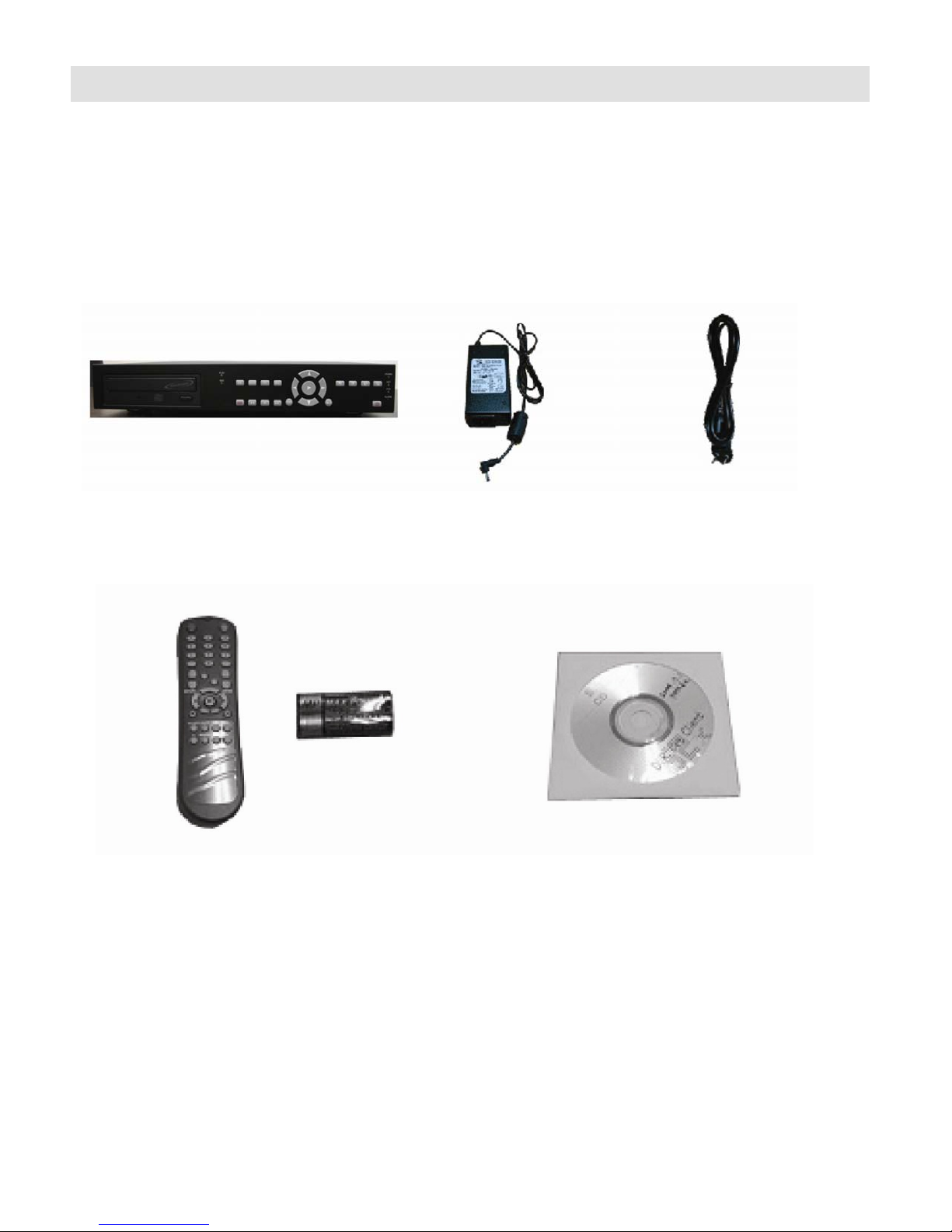
1.2 Product Contents List
Please confirm the contents when you open packing.
○
1Basic Contents
DVRMachine 12VAdaptor PowerCable
RemoteController RemoteViewerCD

8
●SystemOrganization
1.3 System Organization
Alarm Sensor #1-4 Relay Out
Client PC
Alarm Input/Out
Camera #1-4
TCP-IP
DVR M468
Video In
Video Out
Remote
Controller
VCR VGA AV Monitor
Monitor
Network

9
.●Front Panel Description
2.1 Front Panel
1. LED Indicator = Play/ Record status
2. SCR = Changes between Screen Division Modes or Rotation Mode
3.Backup = Opens CD-RW backup menu
4. PTZ = Go to Camera PTZ / Focus Control
5. Menu = Go to System Menu
6. Main Control = Go to Search Mode / Control PTZ movement / Move through Menus
7. Channel Select Buttons = Select Channel or Input Password (#s 1 through 4)
8. LED Indicator = Indicates Present System Status
(POWER = System On/Off, NET = Client Network Connect On/Off ,
PTZ = Speed Dome On/Off , ALARM = Alarm Sensor On/Off )
9. CD-RW Burner
10. Remote Controller Input Sensor
11. LOCK = Locks front panel buttons till password is inputted
12. Search Controller = Searching Recorded Video or Control Menu & PTZ / Focus.
13. Exit = Cancel Setup or Return to Previous Mode.
14. = (Enter) Press to apply setup and menu changes.
15. Power = System Power On/Off
Tip
Power Button is soft style to prevent system failure by incorrect operation.
Channel Selection Button is prior to SCR mode.
When Remote Controller Sensor Input is blocked by something it may cause
Remote controller to not work properly.
When pressing any button, the server emits a Beep Sound.

10
●Rear Panel Description
2.2 Rear Panel
1. Video Input = Camera video input connector (4 BNC ports)
2. Video Loop = Output camera signal to another device (4 BNC ports)
3. Monitor 1 = DVR main screen connector for AV monitor. (BNC port)
4. Monitor 2= Spot monitor output for AV Monitor. (BNC port)
5. NTSC/PAL = NTSC / PAL switchable.
6. VGA Out = DVR main screen output for VGA Monitor (optional)
7. S-Video = DVR main screen output for SVHS Monitor (S-Video)
8. Audio Out = Output for recorded audio (RCA port)
9. Audio In = Line inputs for 1~4 channels audio. (4 RCA ports)
10. Ethernet = Connect to LAN/WAN for remote client (RJ-45 port)
11. Alarm/Relay/RS-485 = Connection port for sensor, relay, and PTZ
12. RS-232 = For Manufacturers use only. (Programming and Firmware upgrade port.)
!!! Do not attempt to use for PTZ control or any other purpose!!!
13. DC12V = Connector for supplied 12V DC adaptor.
Tip
Please make ALL connections with system power OFF
Please use ONLY the supplied 12V Adaptor for Power Supply.
Indice


