
Elocity A7+ Manuale utente

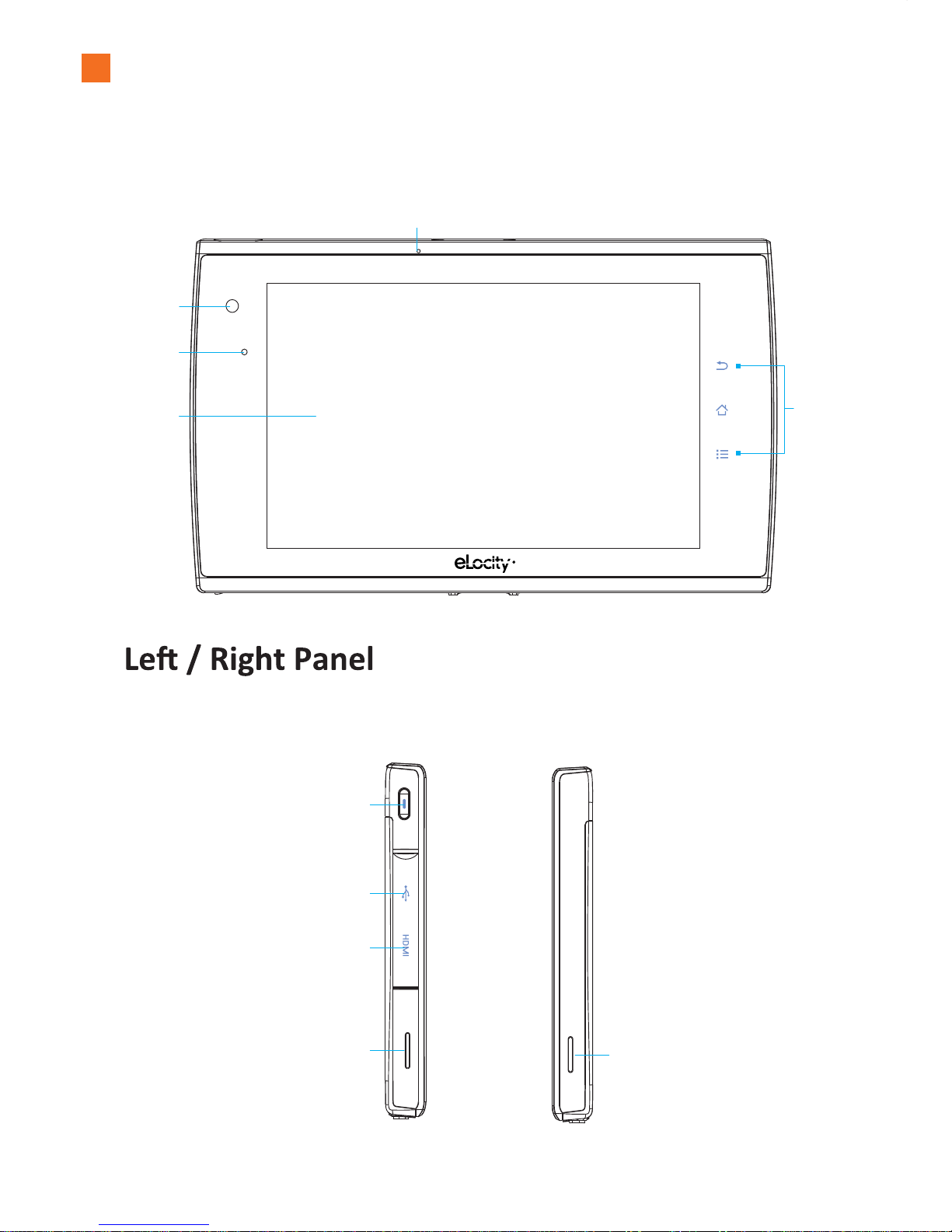
The A7+ Internet Tablet
A. Front Panel
B.
Light Sensor
Camera
LCD Panel Smart Keys
Microphone
Power Button
USB Port
HDMI
Speaker Speaker
Press to bring up
the Smart Menu
Touch Screen that
displays Tablet’s
images
Press to turn
on/off power
Use to connect to
USB devices
Use to input sounds
Supports standard, enhanced, or
high-definition audio and video
Outputs audio Outputs audio
LEFT RIGHT
1
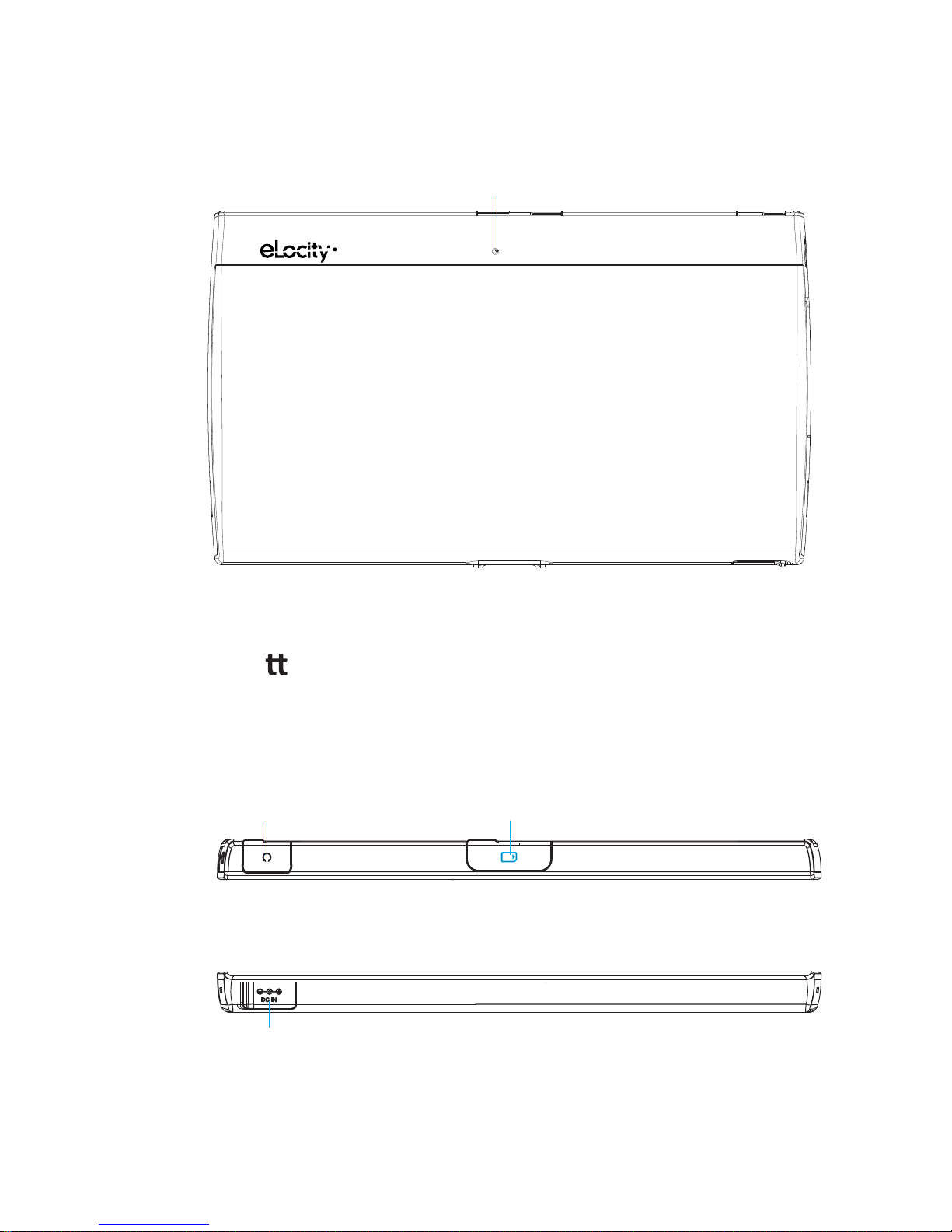
D. Top/Bo om Panel
C. Back Panel
Audio Card Reader
DC In
Reboot Key
Press to reboot the Tablet
Connect to the supplied stereo
earbuds for audio output
Use to connect to the
power cable
Insert a Micro SD card
to access media and other data TOP
BOTTOM
2
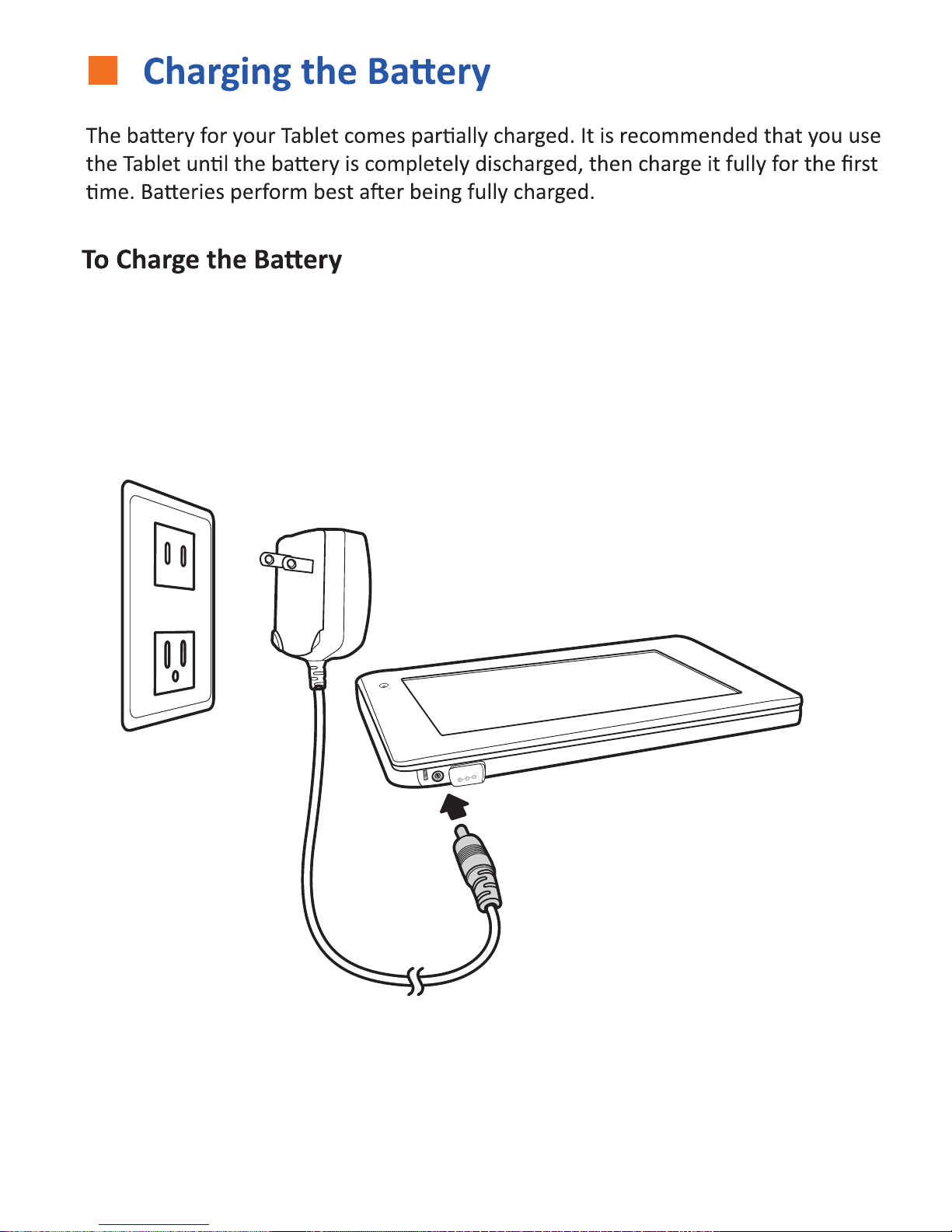
DC IN
1. Connect the power cable to the Tablet as shown.
2. Plug the power cable into an electrical outlet.
3. Remove the power cable when charging is complete.
Note: The Power LED indicator will show you the system power status:
When it is charging, the LED is Orange.
When it is fully charged, or when the Tablet is plugged in, the LED is Green.
3
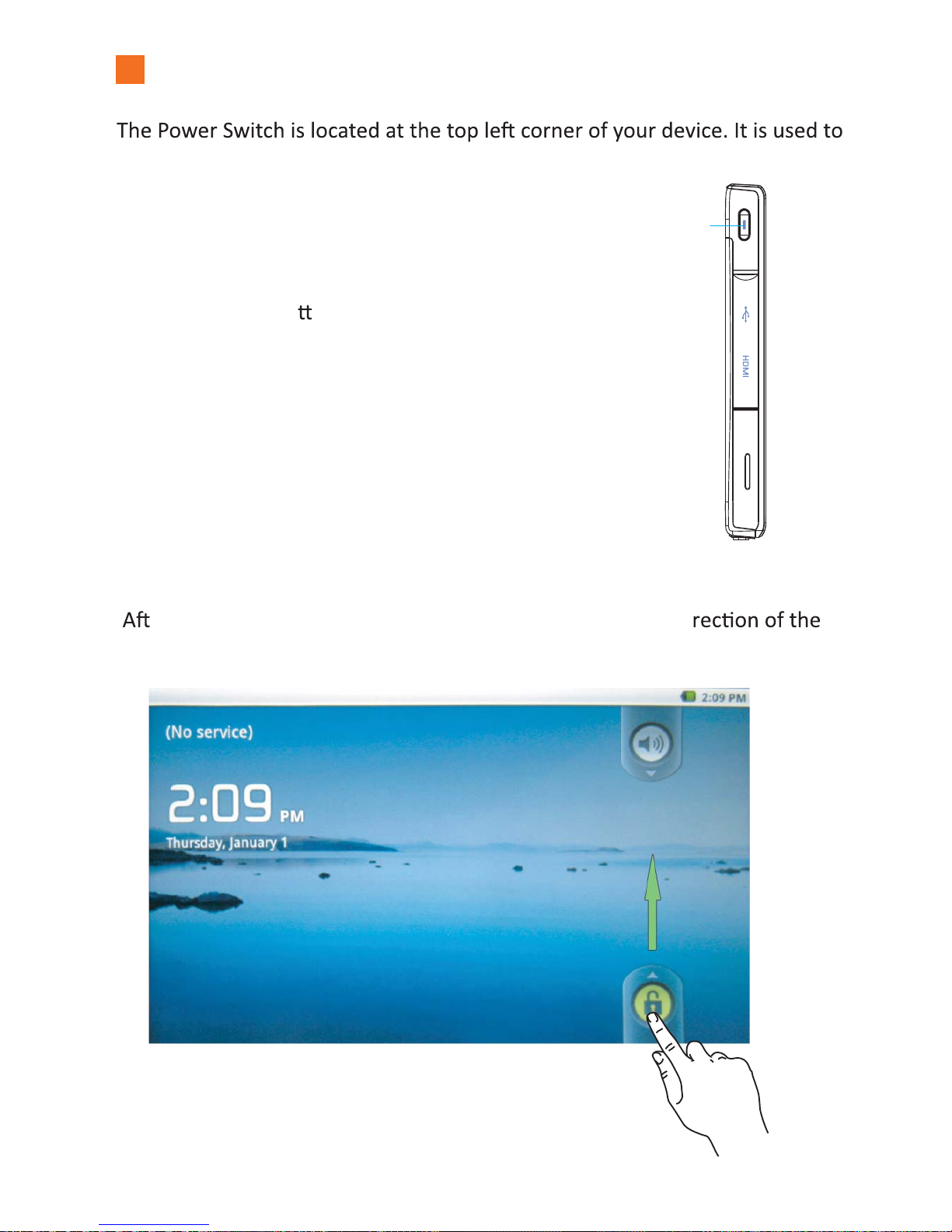
Turning on the Tablet
power on/off the Tablet.
A. To Turn on theTablet
Press the power bu on for about 2
seconds, then release.
B. To Unlock the Tablet
er turning on the Tablet, move the lock indicator in the di
arrow as shown below to enter the system.
Power Button
Press to turn
on/off power
4

A. Desktop Shortcut Menu
For quick and easy access to the apps you like most, the A7+ has 5 desktop screens
on which to place your shortcuts. At the top center you will see a Scroll Bar with 5
highlighted with a white circle and will show the page number. Swipe your finger
brings you to Page 3.)
Status Bar
Scroll Bar
Tap the left/right arrows to
scroll through the Main
Toolbar.
Operang the Tablet
Displays time of day
and status of battery.
To add a shortcut, scroll to the Desktop Page you want to customize. Tap the center
desktop. To move shortcuts once they are on the desktop, press and HOLD the icon
bigger in size. When it does, drag the icon to the trash can that appears at the right
edge of the screen. There is no need to empty the trash, as nothing is held there for
recycling.
5

B. Status Bar
The Status Bar at the top of the Tablet screen indicates several things: Wi-Fi status,
C. Smart Keys
There are 3 Smart Keys on the right side of the Tablet’s front panel.
Time
DescriptionStatus IcIconDescrip on
Icon
Shortcuts: Tap this to bring up related shortcuts
Home: Tap this to go back to the Start Menu
Previous: Tap this to go back to the previous page
DescriptionStatus Icon
Descrip on
Icon
D. Smart Menu
The Smart Menu, located on the right side of the Tablet’s screen, contains 5 keys:
1. The Music Smart Menu
Tap this to bring up the Music screen. Music is classified by Ar sts, Albums,
Ba ery Status: Indicates ba ery level, more bars denotes more power.
Songs,Playlists and Now Playing.
6
Wi-Fi Status: Icon appears when Wi-Fi is on
Bluetooth Status: Icon appears when Bluetooth is on

2. The Gallery Smart Menu
Tap this to bring up the Gallery screen. You can browse pictures and videos or
take photos by pressing the camera icon on the top right corner as shown
below.
!
7

3. The Home Menu
installed on the Tablet. You can launch an app by tapping the icon you need.
4. The Browser Smart Menu
8
Tap this to access the internet. No setup is required once you have established
a Wi-Fi connecon(see page 15). For more informaon about browsing and
bookmarkssee page 19.
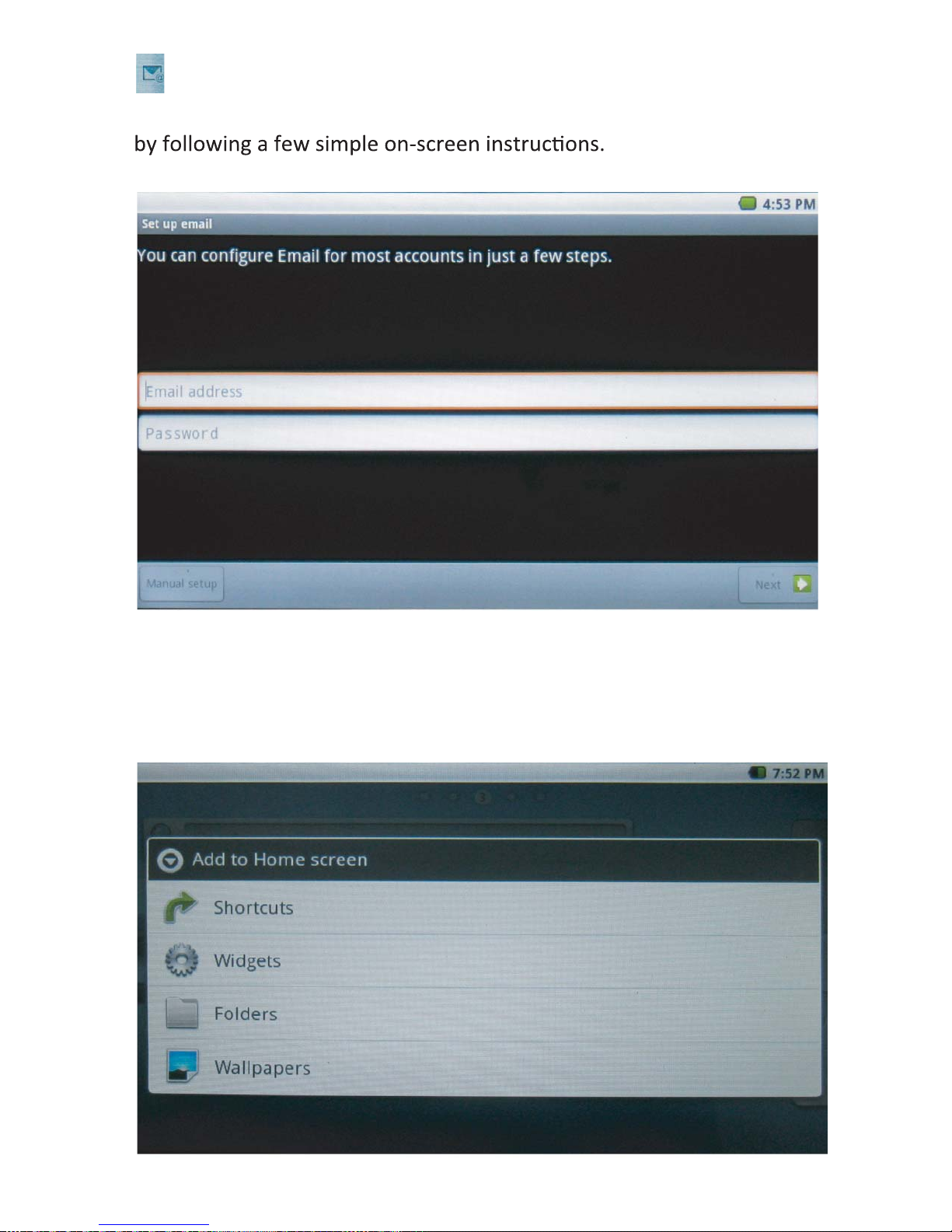
5. The Email Smart Menu
Tap this to bring up the Email screen. Set up your email when you first log in
E. Personalizing Your Desktop
By pressing the Desktop Page for 2 seconds, you can bring up the Add to Home
screen funcon. There are 4 types you can choose: Shortcuts, Widgets, Folders
and Wallpapers.
9
See Page 16 for addional
instrucons.
Altri manuali per A7+
2
Indice
Altri manuali Elocity Tavoletta


