
Elotech RS4100 Manuale utente

Manual RS4100 _EN Version: 1.00 ©Elotech GmbH Pa e 1 / 40
RS4100 or RS4110
Controller for Temperature Control Systems
DESCRIPTION AND OPERATING MANUA
ELOTECH Industrieelektronik GmbH
Verbindun sstraße 27
D - 40723 HILDEN
Phone +49 2103 / 255 97 0 Fax +49 2103 / 255 97 29
www.elotech.de E-Mail: info@elotech.de

Manual RS4100 _EN Version: 1.00 ©Elotech GmbH Pa e 2 / 40
Table of Contents
1 General Information ................................................................................................. 4
2 Installation Instructions ............................................................................................ 4
3 Type Codes .............................................................................................................. 6
3.1 Type Code of Controller ..................................................................................... 6
3.2 Type Code of IO-Board ...................................................................................... 6
4 Connection Dia rams ................................................................................................ 7
4.1 Connection Dia ram IO-Board ............................................................................ 7
4.1.1 Wirin examples ......................................................................................... 7
Level control and motor protection: .......................................................... 7
Coolin , fillin and drainin solenoid valves ............................................... 8
Pump Q1 and pump left K1 contactor *K1 if reverse runnin is needed ........ 8
Heatin SSR (SSR1/SSR2) and enable heatin contactor (Q2) ..................... 8
4.1 Connection Dia ram Hybrid Module .................................................................... 9
4.2 Connection Dia ram Controller ........................................................................... 9
4.2.1 Connection Dia ram Fieldbus Modules ........................................................ 10
4.2.2 Connection Dia ram: LAN and USB ............................................................ 10
5 Operatin the device .............................................................................................. 11
5.1 General advises re ardin GUI ......................................................................... 11
5.1.1 Entry of numerical values .......................................................................... 11
5.1.2 Activate / deactivate functions ................................................................... 12
5.1.3 Handlin of listin s ................................................................................... 12
5.1.4 Entry of text ............................................................................................. 13
5.1.5 Menu layout ............................................................................................. 14
5.2 Menus ............................................................................................................ 15
5.2.1 Operatin Mode display (Home) ................................................................. 15
5.2.2 Main Menu ............................................................................................... 16
5.2.3 Menu „Functions“ ..................................................................................... 17
Autotune .............................................................................................. 18
5.2.4 Menu „Process“ ........................................................................................ 19
5.2.5 Menu „Pump“ ........................................................................................... 19
5.2.6 Menu „Alarms“ (Event Monitorin ) ............................................................. 20
5.2.7 Menu „Confi uration Monitorin “ ................................................................ 20
Confi uration of temperature monitorin ................................................. 21
5.2.8 Menu „Alarm Lo “ ..................................................................................... 22
5.2.9 Menu „Graph“ ........................................................................................... 23
5.2.10 Menu „Pro ram“ (Pro ram controller raph) ............................................... 23
Settin of pro ram controller .................................................................. 24
5.2.11 Menu „Parameters“ ................................................................................... 26
Tool (equipment) selection ..................................................................... 26
Setpoint 2 ............................................................................................. 26
Confi uration Heatin / Coolin .............................................................. 26
5.2.12 Control Parameters ................................................................................... 27
5.2.13 Heatin Control Parameters ....................................................................... 27

Manual RS4100 _EN Version: 1.00 ©Elotech GmbH Pa e 3 / 40
5.2.14 Coolin Control Parameters ....................................................................... 28
Ramps .................................................................................................. 29
Cool down temperature.......................................................................... 29
Maximal fillin time ................................................................................ 29
Draina e time ....................................................................................... 29
5.2.15 Offsets and setpoint limits ......................................................................... 30
5.2.16 Menu „System“ ......................................................................................... 30
5.2.17 Menu for Common Settin s (General Settin s) ............................................ 30
5.2.18 Menus Fieldbus / USB / LAN ...................................................................... 32
5.2.19 Menu About ............................................................................................. 36
6 Error Messa es ...................................................................................................... 37
7 Technical Data ....................................................................................................... 38

Manual RS4100 _EN Version: 1.00 ©Elotech GmbH Pa e 4 / 40
1General Information
Symbols used:
www.elotech.de
Messa es shown by the controller are written in this font.
MRS / MRE Measurin Ran e Start / Measurin Ran e End
<Default>
Symbolizes the factory adjustment of the respective parameters.
2Installation Instructions
Make sure the device is used for the intended purpose only.
The devices of type R4100-C are desi ned for installation in control panels, the I/O-Boards
of type R4100-M are desi ned to be mounted on cap rails.
Protect the device a ainst impermissible humidity and contamination.
The permitted ambient temperature ran e may not be exceeded.
Electrical connections must be made accordin to valid re ulations and by properly qualified
personnel.
If usin thermocouple sensors, compensation lines have to be connected directly to the con-
troller terminals. Sensors may be connected only in compliance with the pro rammed ran e.
Sensor cables and si nal lines (e. . lo ic or linear volta e outputs) must be placed separately
from control lines and mains volta e supply cables (power cables).
In order to maintain EMC compliance screened detectors - and si nal lines have to be used.
It is not permitted to connect the rounds of the sensor-inputs and lo ic-outputs with each
other.
Spatial separation of RS4100 devices and inductive loads is recommended. Interference from
contactor coils must be suppressed by connectin adapted RC-combinations parallel to the
coils. Control circuits (e. . for contactors) should not be connected to the mains power sup-
ply terminals of the RS4100 devices.
The confi uration parameters (Window: System) are enerally to be selected first.

Manual RS4100 _EN Version: 1.00 ©Elotech GmbH Pa e 5 / 40
Disclaimer of iability
The contents of this document is checked for the conformity with the hardware and software
described. Nevertheless, we are unable to preclude the possibility of deviations so that we
are unable to assume warranty for full compliance. However, the information iven in the
publication is reviewed re ularly. Necessary amendments are incorporated in the followin
editions.
We would be pleased to receive any improvement proposals which you may have.
The information contained herein is subject to chan e without notice.
Disposal
Electronic scrap and components are subject to special treatment and must be disposed of
by authorised companies.

Manual RS4100 _EN Version: 1.00 ©Elotech GmbH Pa e 6 / 40
3Type Codes
Type Code of Controller
Type Code of IO-Board

Manual RS4100 _EN Version: 1.00 ©Elotech GmbH Pa e 7 / 40
4Connection Diagrams
Connection Diagram IO-Board
Outputs:
A1 Coolin Valve 24Vdc
A2 Fillin Valve 24Vdc
A3 Drainin Valve 24Vdc
A4
A5 GND
A6 GND
A7 Pump left relay 24Vdc
A8 Pump contactor 24Vdc
A9 Heater enable contactor 24V
A10 Heatin SSR 24Vdc
A11 Power supply GND
A12 Power supply +24Vdc
B1 Common Alarm relay
B2 Normally closed Alarm relay
B3 Normally open Alarm relay
Inputs:
D6 Level max.
D5 Level min.
D4 Motor protection
D3
D2 +24V
D1 +24V
C9 Pt100 Supply temperature GND
C8 Pt100 Supply temperature
C7 Pt100 Return flow temp. GND
C6 Pt100 Return flow temperature
C5 Pt100 Ext. temperature GND
C4 Pt100 Ext. temperature
C3 Pt100 Ext. temperature cable
C2 Output 0…10V/0…20mA
C1 GND analo ue value
4.1.1 Wiring examples
evel control and motor protection:

Manual RS4100 _EN Version: 1.00 ©Elotech GmbH Pa e 8 / 40
Cooling, filling and draining solenoid valves
Pump Q1 and pump left K1 contactor
*K1 if reverse running is needed
Heating SSR (SSR1/SSR2) and enable heating contactor (Q2)

Manual RS4100 _EN Version: 1.00 ©Elotech GmbH Pa e 9 / 40
Connection Diagram Hybrid Module
Connection Diagram Controller
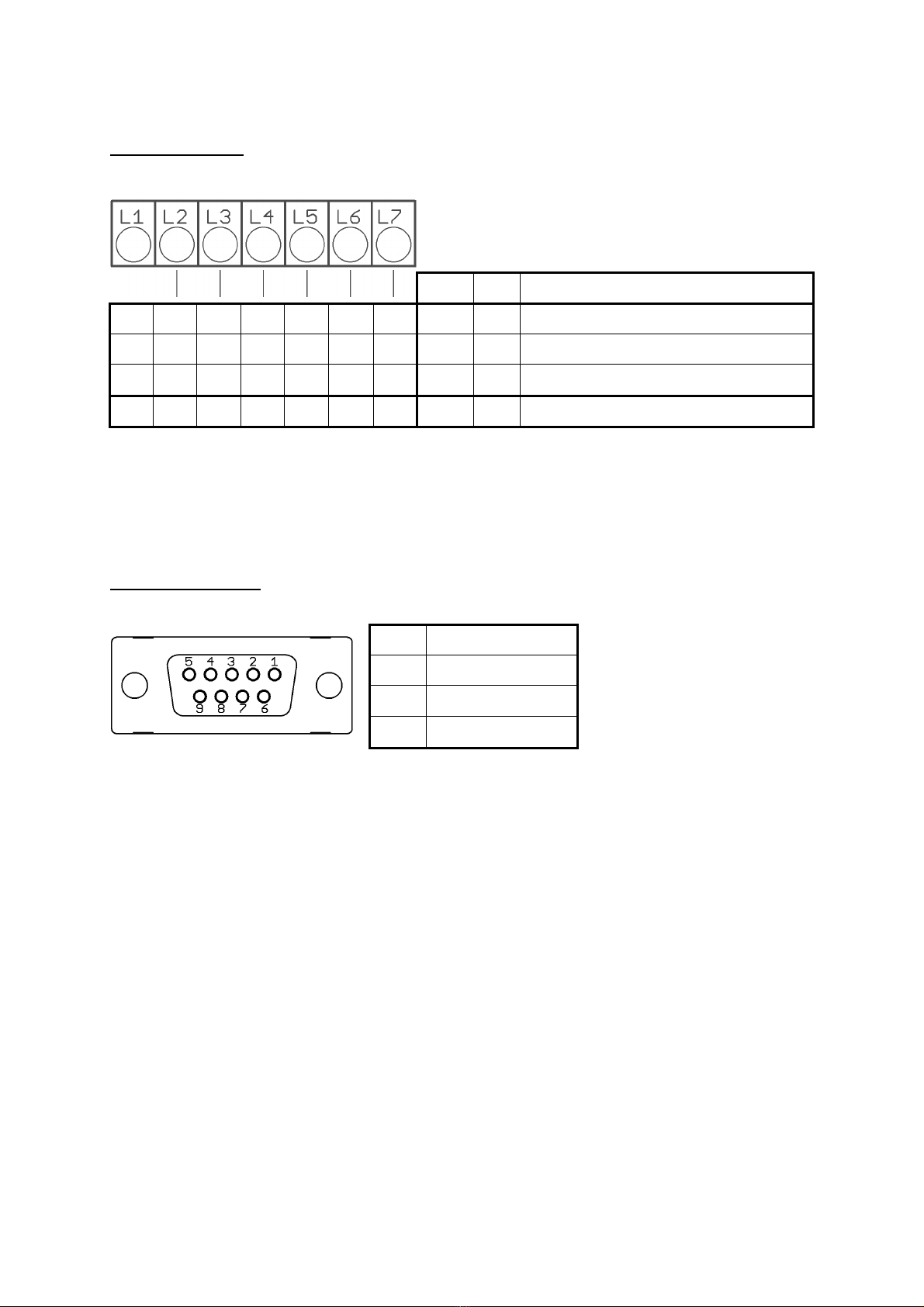
Manual RS4100 _EN Version: 1.00 ©Elotech GmbH Pa e 10 / 40
4.2.1 Connection Diagram Fieldbus Modules
Serial Interface
The serial fieldbus module contains the three interfaces RS232, RS485 und TTY. By choosin
the connection and settin the parameter ”HW-confi “ the requested bus is selected.
Type 09: Profibus
The 5V-Supply is desi ned for the
supply of the termination resistors.
Further loads are not allowed.
4.2.2 Connection Diagram: AN and USB
USB:
•Save process data, confi uration data and alarm data on an USB-Stick.
•Write back confi uration data from USB-Stick to the controller.
•Make a Firmware update. (Please use FAT formatted USB flash drives.)
LAN:
•Connection to confi uration tool EloVision 3.
•Read and write parameters by MODBUS-TCP protocol
•Web interface for easy confi uration
Bus Type Remark
A B RS485 03 Parameter HW-confi = RS232 / RS485
RxD TxD GND RS232 03 Parameter HW-confi = RS232 / RS485
- + TTY 03 Parameter HW-confi = TTY (current loop)
Pin 3 Data RxD / TxD - P
Pin 5 GND
Pin 6 +5V
Pin 8 Data RxD / TxD - N
Questo manuale è adatto per i seguenti modelli
1
Indice
Altri manuali Elotech Controllori


