
EMC TWT8G-200 Manuale

TWT8G-200
MODEL NUMBER:
OPERATING AND MAINTENANCE
INSTRUCTIONS
CW TWT HIGH POWER
WIDE BAND AMPLIFIER
THE EMC SHOP, 7401 GALILEE RD. #160 ROSEVILLE, CA 95678
844.423.7435[email protected]WWW.THEEMCSHOP.COM
SERIAL NUMBER:
1904037401
TWT8G-200 MANUAL
MAN-70007, REVISION B, 02-20-2017

MAN-70007, Rev B, 02-20-2016
Page 2of 31
PowerMax Innovation Inc.
1243 Reamwood Ave.,
Sunnyvale, CA 94089
Tel.: 408-541-0888; Fax. 408-541-1886
TABLE OF CONTENTS
SECTION DESCRIPTION PAGE
1.0 INTRODUCTION ........... ..............................................................................................................3
2.0 GENERAL DESCRIPTION............................................................................................................5
3.0 TWTA Controller Operation…………. ..........................................................................................6
4.0 GENERAL INFORMATION
4.1 Scope of This Manual .....................................................................................................14
4.2 Operation Overview ........................................................................................................14
4.3 N/A
4.4 General Specifications.....................................................................................................15
4.5 Functional Description ....................................................................................................15
4.6 Protection Circuits ..........................................................................................................16
4.7 Status Indicators, Controls and Connectors .....................................................................17
4.8 Data Sheets…….. ...........................................................................................................20
5.0 PRINCIPALS OF OPERATION
5.1 Proper Usage and Warnings............................................................................................21
6.0 REMOTE INTERFACE FOR MEDIUM POWER AMPLIFIERS
6.1 Introduction ....... ............................................................................................................22
6.2 RS-232 Interface.. ...........................................................................................................22
6.3 ETHERNET Interface.....................................................................................................23
6.4 Remote Command Format ..............................................................................................24
6.5 Remote Command ..........................................................................................................25
6.6 Remote Example Code....................................................................................................28
7.0 MAINTENANCE AND SERVICING
7.1 Periodic Maintenance......................................................................................................29
7.2 Servicing the Amplifier...................................................................................................29
7.3 Equipment Return Procedure ..........................................................................................30
8.0 WARRANTY INFORMATION....................................................................................................31
LIST OF FIGURES
FIGURE DESCRIPTION PAGE
1.0 OUTLINE DRAWING ..............................................................................................................4
2.0-9.0 CONTROL DISPLAY .........................................................................................................6-13
10.0 SYSTEM BLOCK DIAGRAM .......................................................................................14
11.0 REAR PANEL ILLUSTRATION....................................................................................18
THE EMC SHOP, 7401 GALILEE RD.
#160 ROSEVILLE, CA 95678
844.423.7435
WWW.THEEMCSHOP.COM
© THE EMC SHOP, LLC

MAN-70007, Rev B, 02-20-2016
Page 3of 31
PowerMax Innovation Inc.
1243 Reamwood Ave.,
Sunnyvale, CA 94089
Tel.: 408-541-0888; Fax. 408-541-1886
SECTION 1.0
INTRODUCTION
Congratulations on the purchase of your new Wide Band Amplifier from PowerMax Innovation, Inc.
Your new Wide Band Amplifier incorporates the finest advancements in the state of the art electronics
technology available in a compact, portable and versatile package. Your Wide Band Amplifier's quality,
performance and trouble free operation depends on you thoroughly reading through this manual and
familiarizing yourself with its proper operation and usage.
Your Wide Band Amplifier comes with the following accessories, be sure to check your packaging for
the items listed below before disposing of the packaging.
CONTENTS
(For a typical Wide Band Amplifier)
Quantity Description
1
1
1
1
CW TWT High Power Wide Band Amplifier, Model TWT8G-200
Mating Connector, Power Line
Operation andInstruction Manual
Data Sheets (Included in Manual)
!!ATTENTION!!
MUST Turn ON Amplifier for 4 hours
every 30-60 days in RF-ON mode
preferably with low-level RF drive to
prevent TWT gassing up.
THE EMC SHOP, 7401 GALILEE RD.
#160 ROSEVILLE, CA 95678
844.423.7435
WWW.THEEMCSHOP.COM
© THE EMC SHOP, LLC

MAN-70007, Rev B, 02-20-2016
Page 4of 31
PowerMax Innovation Inc.
1243 Reamwood Ave.,
Sunnyvale, CA 94089
Tel.: 408-541-0888; Fax. 408-541-1886
FIGURE 1.0
OUTLINE DRAWING
THE EMC SHOP, 7401 GALILEE RD.
#160 ROSEVILLE, CA 95678
844.423.7435
WWW.THEEMCSHOP.COM
© THE EMC SHOP, LLC

MAN-70007, Rev B, 02-20-2016
Page 5of 31
PowerMax Innovation Inc.
1243 Reamwood Ave.,
Sunnyvale, CA 94089
Tel.: 408-541-0888; Fax. 408-541-1886
SECTION 2.0
GENERAL DESCRIPTION
© The EMC Shop, LLC manufactured CW TWT Wide Band Amplifier is a Bench Top or rack mount
amplifier providing a nominal 200 Watts CW of RF power from 2 to 8 GHz, with output power of at
least 200 Watts CW. The minimum saturated output power at midband of the operating frequency
range is more than 200 Watts CW.
The Amplifier features atouch screen 7”, high resolution [800x480] color TFT Display that displays
continuous forward andreflectedpower metering. The display also provides the operator with operating
status andself diagnostic fault indications.
The Amplifier incorporates protection circuits that monitors and controls so the amplifier cannot be
damagedby any mismatched load.
The Amplifier has an Ethernet interface which allows the amplifier to be remotely controlledthrough the
use of a computer.
To operate the Amplifier, connect a three phase power line (220 Vac line to line) 5 wires to the Power
line MS connector on the rear panel as shown below.
For 220Vac single phase connect Line to pin A, Neutral to pin B and ground to pin E.
Three Phase Connection.
PIN A –PHASE A
PIN B –PHASE B
PIN C –PHASE C
PIN D –NEUTRAL
PIN E –GROUND
THE EMC SHOP, 7401 GALILEE RD.
#160 ROSEVILLE, CA 95678
844.423.7435
WWW.THEEMCSHOP.COM
© THE EMC SHOP, LLC

MAN-70007, Rev B, 02-20-2016
Page 6of 31
PowerMax Innovation Inc.
1243 Reamwood Ave.,
Sunnyvale, CA 94089
Tel.: 408-541-0888; Fax. 408-541-1886
SECTION 3.0
TWTA Controller Operation
3.1 Hardware Initialization
The local mode of operation will allow the user to exercise control over the parameters by way of
button switches located toward the right of the screen. Pressing a button switch will toggle the
switch position and will highlight its function.
FIGURE 2.0- Hardware Initialization Screen
Once the power is turned on the controller will boot and display the boot screen as shown
above. It will only be displayed for a few seconds follows by the The EMC Shop Logo screen.
THE EMC SHOP, 7401 GALILEE RD.
#160 ROSEVILLE, CA 95678
844.423.7435
WWW.THEEMCSHOP.COM
© THE EMC SHOP, LLC

MAN-70007, Rev B, 02-20-2016
Page 7of 31
PowerMax Innovation Inc.
1243 Reamwood Ave.,
Sunnyvale, CA 94089
Tel.: 408-541-0888; Fax. 408-541-1886
3.2 The EMC Shop Screen
FIGURE 3.0 - The EMC Shop Logo Screen
The The EMC Shop logo screen it is only displayed for a few seconds and is shown in
above.
THE EMC SHOP, 7401 GALILEE RD.
#160 ROSEVILLE, CA 95678
844.423.7435
WWW.THEEMCSHOP.COM
© THE EMC SHOP, LLC

MAN-70007, Rev B, 02-20-2016
Page 8of 31
PowerMax Innovation Inc.
1243 Reamwood Ave.,
Sunnyvale, CA 94089
Tel.: 408-541-0888; Fax. 408-541-1886
3.3 Information Screen
FIGURE 4.0 - System Information and Set Time Button Screen
The Information screen displayed is the set time, Model and version description screen, it will be
displayed for a few seconds, should the set time icon be touched the adjust time and date screen
will be shown as in Fig. 5.
THE EMC SHOP, 7401 GALILEE RD.
#160 ROSEVILLE, CA 95678
844.423.7435
WWW.THEEMCSHOP.COM
© THE EMC SHOP, LLC

MAN-70007, Rev B, 02-20-2016
Page 9of 31
PowerMax Innovation Inc.
1243 Reamwood Ave.,
Sunnyvale, CA 94089
Tel.: 408-541-0888; Fax. 408-541-1886
3.4 Time & Date setup menu
FIGURE 5.0 - Set Time and Date Screen
Figure 5 shows the buttons for adjusting the time and date. Touch the + or –Buttons to adjust the
time and date, then save, then exit to return to the main screen.
THE EMC SHOP, 7401 GALILEE RD.
#160 ROSEVILLE, CA 95678
844.423.7435
WWW.THEEMCSHOP.COM
© THE EMC SHOP, LLC
MAN-70007, Rev B, 02-20-2016
Page 10 of 31
PowerMax Innovation Inc.
1243 Reamwood Ave.,
Sunnyvale, CA 94089
Tel.: 408-541-0888; Fax. 408-541-1886
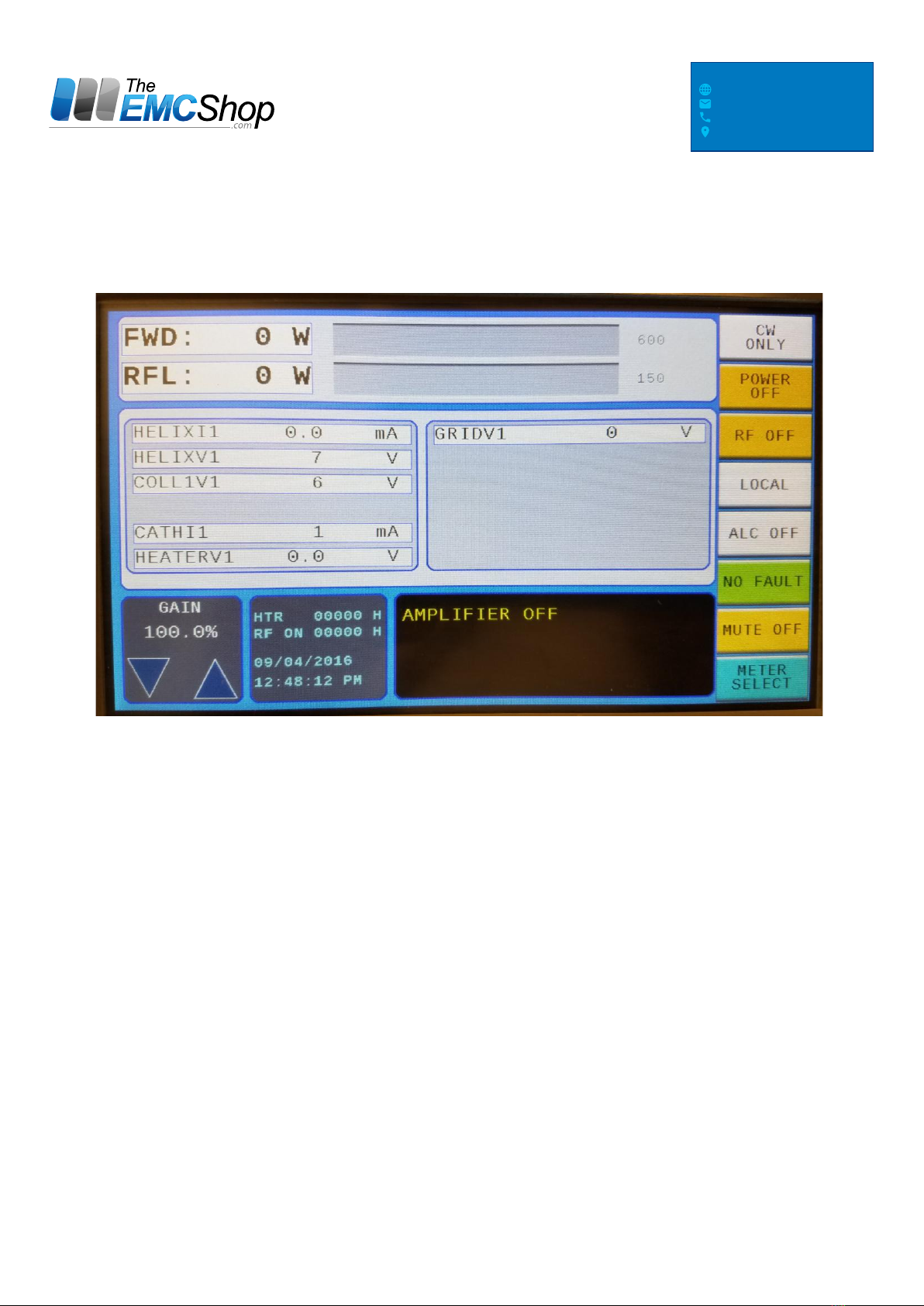
3.5 Operate Menu, RF-OFF
FIGURE 6.0 - OPERATE MENU
The operating menu will come up in POWER_OFF-Mode. The values for Forward Power
(FWD), Reflected Power (RFL), and metering should be zero. The Gain will be at 100% at all
times unless the Attenuator is being controlled by pressing the Gain buttons Up or Down [only
with Attenuator Option].
THE EMC SHOP, 7401 GALILEE RD.
#160 ROSEVILLE, CA 95678
844.423.7435
WWW.THEEMCSHOP.COM
© THE EMC SHOP, LLC
Indice


