
ENER-J SHA5287 Manuale utente
1
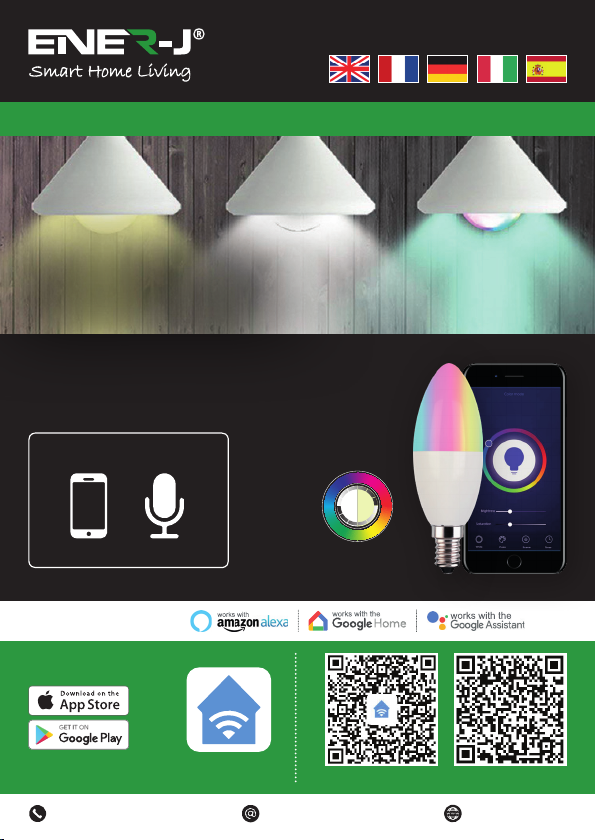
Take Control of Your
Lighting from Anywhere
Make your home smart & connected in simple steps with ENER-J
Compatible with:
ENERJSMART ANDROID iOS
Download our
app from
To download,
scan the QR code
Languages
Installation Guide
Control your power by:
VoiceMobile RGB+W+WW
Dimmable
2
WARNING: RISK OF ELECTRIC SHOCK
Always disconnect the mains power supply before Inspection/installation or
replacement. It is advised that a qualified person/engineer or electrician to do the
physical Installation.
Proceed in accordance with local safety regulations.
Instructions for proper grounding
Grounding must be performed in accordance with local regulations. Improper
grounding poses serious hazards to personnel and equipment.
Electrical Requirements
The Lamp has to be connected to main power supply. Special care shall be taken
during installation of this Ediscon Screw (E14) Bulb.
Physical Installation
Important Notice for Warranty:
The ENERJSMART lamp has 2 years warranty. Please Note that the device needs
cooling time and recommended usage is 10-12 hours/day. If used more than 12 hours
a day then warranty will be void.
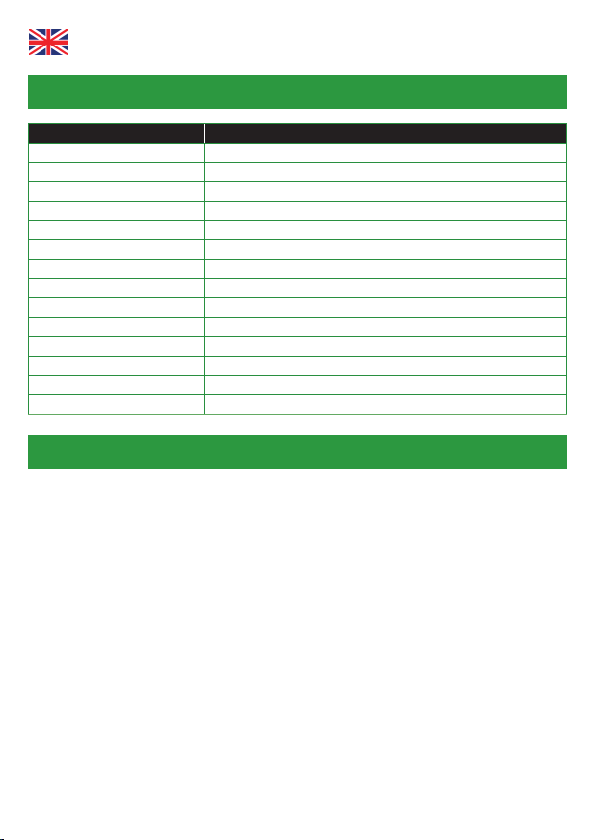
SKU SHA5287
Model 5-C37
Power 5W (40W Equivalent)
Input Voltage AC 200-240V 50/60Hz
Lumen 380lm
Base / Cap E14
Wireless Type Wi-Fi 2.4GHz (5G not supported)
Colour Temp 6000k to 2700k - RGB Colour Changing
Dimmable Yes
Material Aluminium & Plastic
Beam Angle 180° degrees
Ra >80Ra (vivid and natural light)
Service Life ≥30000 hours
Works with Amazon Alexa, Google Home and Google Assistant
Dimensions 45mm x 97mm
Specifications
English
3
App Installation
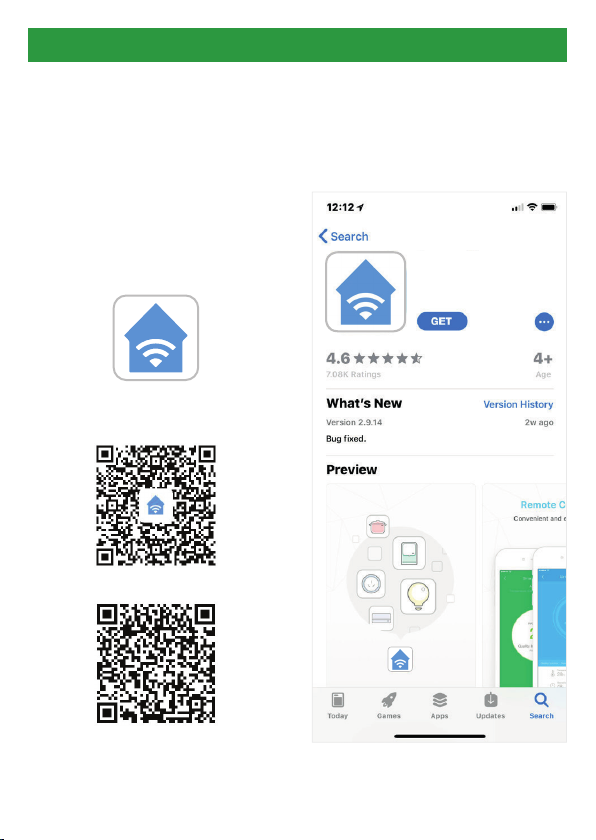
1. DOWNLOAD AND INSTALL OUR
APP
Install ‘ENERJSMART’ in your
Smartphone or Tablet devices
through Google Play or iOS Play
Store. Alternatively, please scan
below QR code’s.
ENERJSMART
ANDROID
iOS
2. Navigate to the app store on your
mobile device.
3. Download an app called Enerjsmart.
Enerjsmart
4
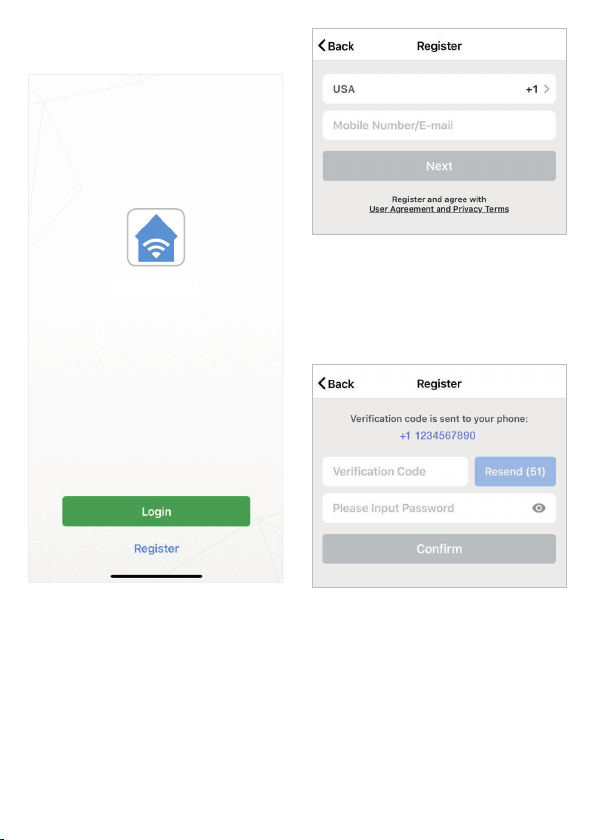
7. If you’re setting up using a phone
number, please enter the verification
code that was sent to your phone
and your desired password, then
select Confirm.
8. If you’re setting up using an email
address please enter your desired
password, and select Confirm.
Enerjsmart
5. The app should automatically detect
your country code. If not, please
select the country code for your
country of residence.
6. Enter either your email address or
phone number. (If you enter your
phone number you will be sent a
verification text message which you
will need in the Next Step).
4. Once app is downloaded, open the
app and select Register.
5
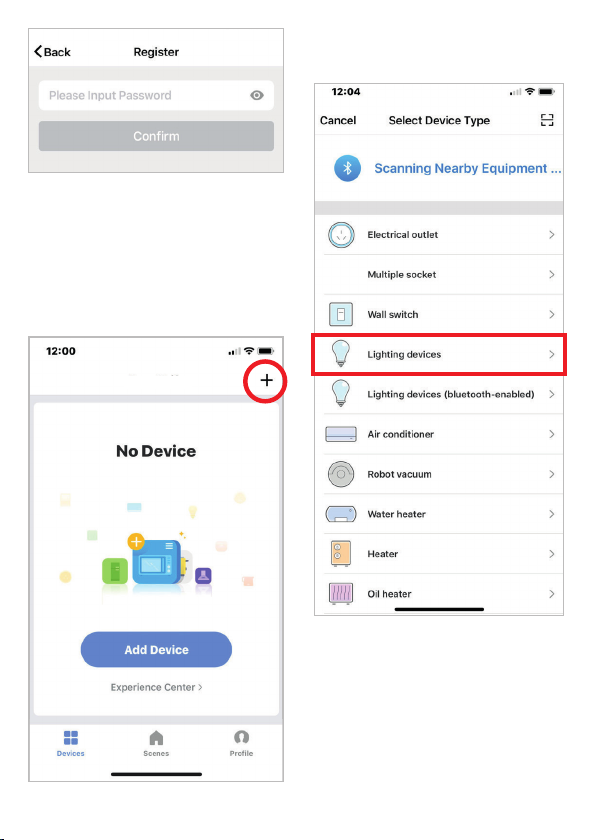
11. Select Lighting devices.
12. Connect your Smart light to a power
source. To enter pairing mode, turn
the Smart light on and then off for
3-5 seconds at a time. Do this 3
times. The Smart light will begin
blinking rapidly once in pairing
mode.
Enerjsmart
9. You have now successfully created
an account and you’re now ready
to start setting up your Smart lamps
and fixtures.
10. Select the Plus (+) in the top right
corner to add a device.
6
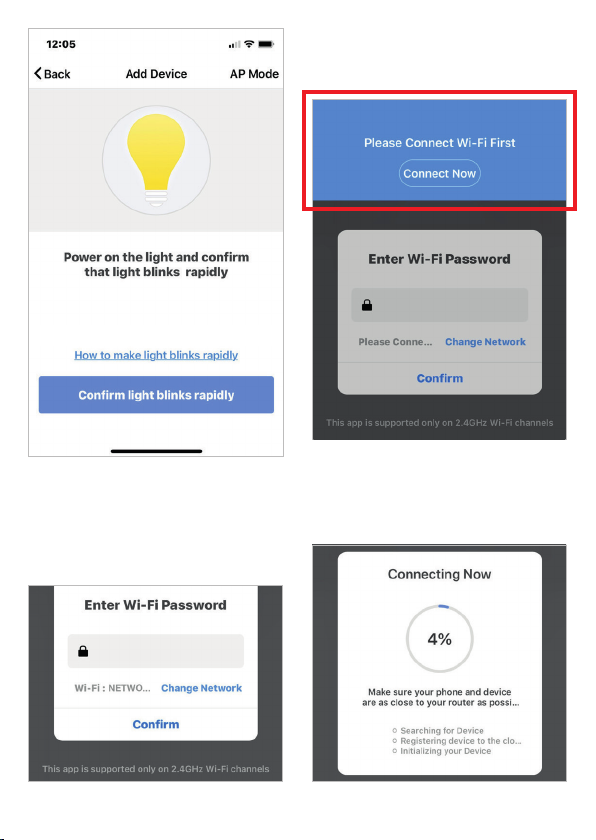
14. If a blue box appears at the top of
the screen it means you’re currently
not connected to a Wi-Fi network.
15. Once you select Confirm after
entering your password, the app
will start to pair the Smart light to
your app.
13. Connect to your desired Wi-Fi
network, enter your password, then
select Confirm.
7
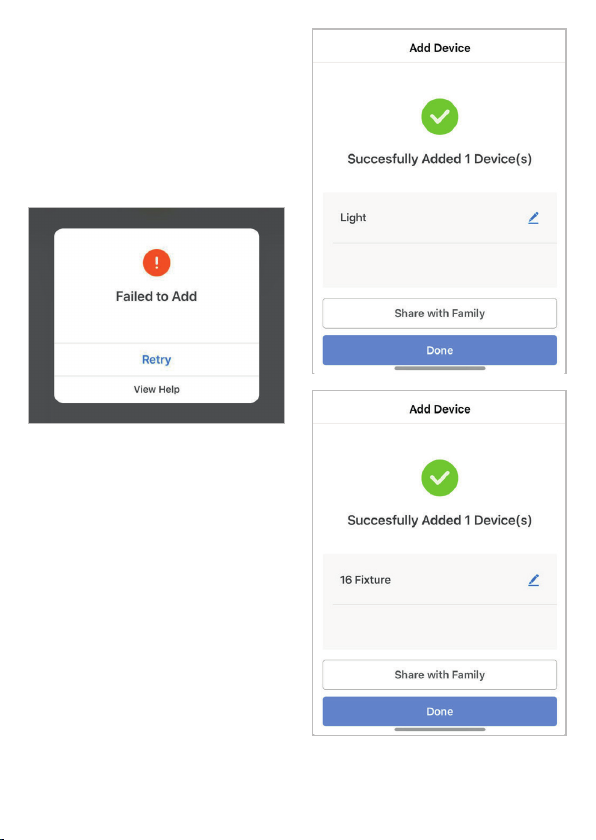
17. Once your Smart light successfully
connects to the app, the beside
screen will pop up and you can
change the name of your Smart
light/device.
For Example: 16 Fixture. It’s best
to make this simple so that if you
would like to connect this to your
Alexa App or Google Home, it will
be easier for the smart assistant to
understand which light you would
like to control.
After naming your Smart light, select
Done.
16. If you get a message that says
“Failed to Add” it means that the
connection has failed. You may
have to enter the Smart light into
pairing mode again, and repeat
steps 11 through 14. Please ensure
WiFi Frequency is set to 2.4G (5G
not compatible).
18. You’re now able to control your
Smart light in the Enerjsmart app.
8
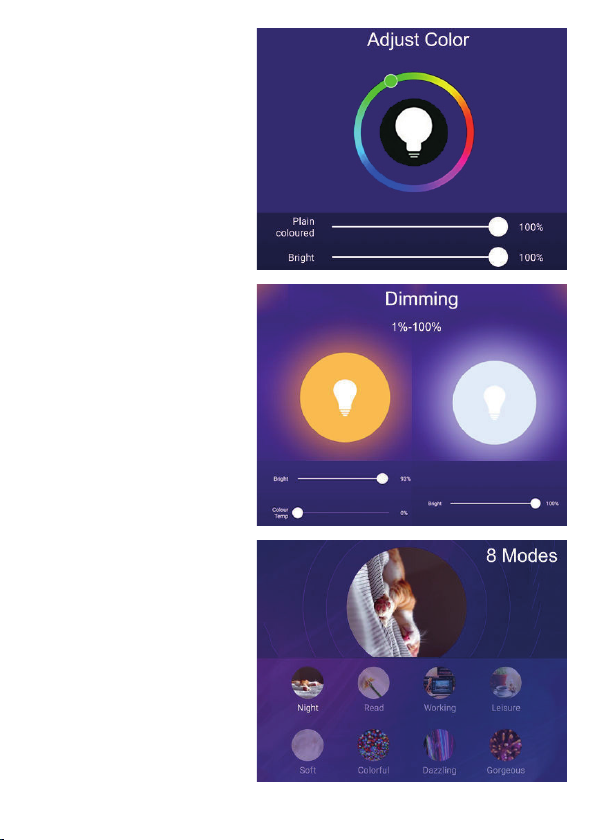
19. Select Profile. In your profile
you can use:
Adjust Colour
• RGB+6500K to 3000K:
You can adjust RGB
colour (1600 Million
colour) +6500K (Cold
white) or 3000K (Warm/
yellow light).
• RGB+3000K-6500K: You
can adjust RGB colour
(1600 Million colour)
+3000K (Warm/yellow
light) to 6500K (Cold
white).
• CCT: 3000K-6500K (Cold
white to warm white).
• C/W: 6000K or 3000K
(Cold white or warm
white).
*RGB not available in all
LED Lamps. Kindly check
the Product Specifications
for details.
Dimming
• The lamp is dimmable,
you can dim 1%-100%.
8 Modes
• Night, Read, Meeting,
Leisure, Soft Light,
Colourful...
9
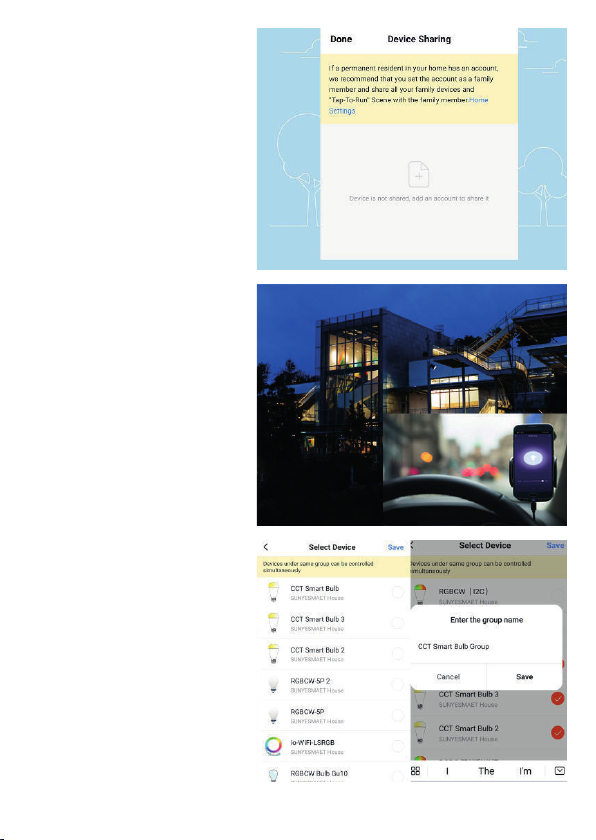
20. Share with your family
and friends
If you would like few people
to control the same lights,
then share with them.
21. Remote Control
12 million kilometers
remote control. When
we are still stuck with the
switch to control the lights,
smart lamps have made
it easy for you to master
the lighting at home on the
other side of the globe.
22. Create A Group to
Control
Control each Wi-Fi lamp
individually, or together as
a group.
10
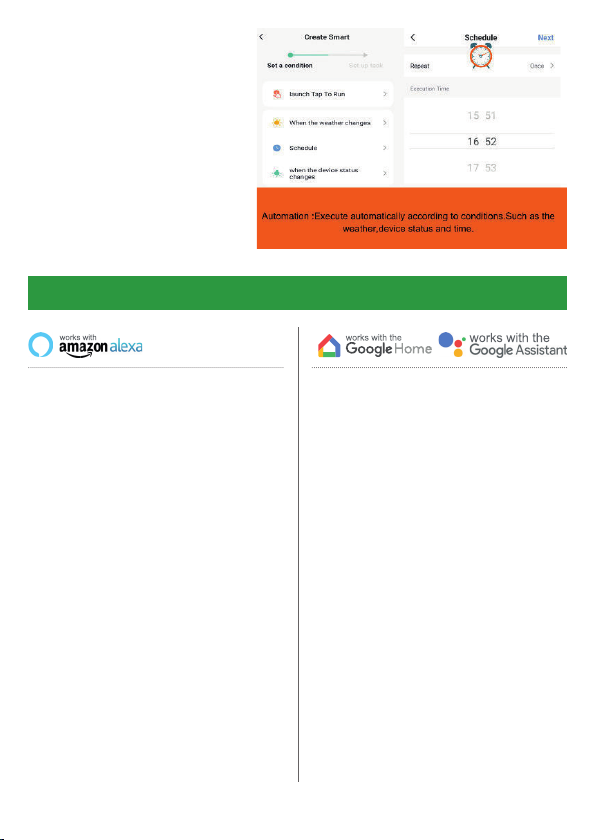
23. Automation
Execute automatically
according to conditions
such as the weather, device
status, and time (When
the weather changes
(Temperature, Humidity,
Weather, PM2.5, Air quality,
Sunset/sunrise, Wind
speed), schedule, when the
device status change).
Now you can use Google’s voice-
activated speaker to control your Smart
Home Sockets and adaptors. With the
Google Assistant, you can turn on lights
without pressing a button.
1. Setup
Start by getting the Google Home app
and setting up your Google Home if you
have not done this already.
2. Add ENERJSMART Action
In the Google Home app, tap the menu
icon and select Home Control. Then
tap the + button to see a list of Action
tapping ENERJSMART to select the
Action.
3. Link you ENERJSMART Account
Now follow the in-app instructions to link
you ENERJSMART App account. Once
complete you’ll be able to say “Okey
Google, turn my lamp on” or “Okay
Google, set hallway to ON/OFF”.
Third Party Control Overview:
If you’re new to Echo, it’s a super smart
speaker from Amazon that responds to
your voice.
Once you’ve bought Amazon Echo and
downloaded the ENERJSMART App,
you’ll need to enable...
1. Enable the ENERJSMART App
In your Alexa app, tap Skills in the menu
and search for ENERJSMART. Tap
Enable.
2. Link Account
Enter your ENERJSMART App
username and password and follow the
onscreen instruction.
3. Talk to Alexa
Now the fun part Ask Alexa to control
your ENERJSMART device. Check a full
list of things you can control by clicking
here.
Indice
Lingue:
Altri manuali ENER-J Attrezzatura di illuminazione


