ENGO CONTROLS E10W230WIFI Istruzioni per l'installazione

FULL MANUAL
E10W230WIFI / E10B230WIFI
| Internet controlled thermostat, WiFi

TABLE OF CONTENTS
1. Introduction...............................................................................................................................................................4
1.1 Product Compliance ......................................................................................................................................................................4
1.2 Safety Informations.......................................................................................................................................................................4
2. Product Overview .......................................................................................................................................................5
2.1 Package content............................................................................................................................................................................6
2.2 Proper thermostat location ...........................................................................................................................................................6
2.3 Wall mounting ..............................................................................................................................................................................7
3. Connection description ...............................................................................................................................................8
3.1 Connection diagram for gas boiler.................................................................................................................................................8
3.2 Connection diagram to pump / actuator .......................................................................................................................................9
3.3 Connection diagram to the control box .......................................................................................................................................10
4. About ENGO ..............................................................................................................................................................11
4.1 Wi-Fi installation guidelines........................................................................................................................................................11
4.2 Mobile device requirements........................................................................................................................................................11
4.3 About ENGO Smart app (general information) ............................................................................................................................12
5. First power on...........................................................................................................................................................13
5.1 LCD icon description ....................................................................................................................................................................14
5.2 Button description.......................................................................................................................................................................14
6. ENGO Smart app installation......................................................................................................................................15
7. Installation of the Wi-Fi thermostat in the app ...........................................................................................................16
8. Operation in the app .................................................................................................................................................19
8.1 General information....................................................................................................................................................................19
8.2 App icons description ..................................................................................................................................................................19
8.3 Control ........................................................................................................................................................................................20
8.3.1 Setpoint temperature change ....................................................................................................................................20
8.3.2„Power”function ........................................................................................................................................................21
8.3.3 Manual mode.............................................................................................................................................................23
8.3.4 Schedule mode ..........................................................................................................................................................24
8.3.5 Holiday mode.............................................................................................................................................................28
8.3.6 FROST mode...............................................................................................................................................................29
8.3.7 Diagrams....................................................................................................................................................................30
8.4 Settings (installer parameters)....................................................................................................................................................31
8.4.1 Child lock function .....................................................................................................................................................31
8.4.2 Backlight brightness ..................................................................................................................................................32
8.4.3 Max temp. limit..........................................................................................................................................................33
8.4.4 Min temp. limit ..........................................................................................................................................................34
8.4.5 Sensor Selection.........................................................................................................................................................35
8.4.5.1 Internal temperature sensor (IN) ..............................................................................................................35
8.4.5.2 External temperature sensor (OUT)...........................................................................................................36
8.4.6 Temperature correction ..............................................................................................................................................37
8.4.7 Control type (algorithm) ............................................................................................................................................38
8.4.8 Device state on power................................................................................................................................................40
8.5 E10 thermostat management in the Engo Smart app .................................................................................................................41
8.5.1 Change the name, icon and location of the thermostat..............................................................................................41
8.5.2 Device information.....................................................................................................................................................43
8.5.3 Tap-To-Run and Automation ......................................................................................................................................44
8.5.4 Oine notication.....................................................................................................................................................49

8.5.5 Share device...............................................................................................................................................................50
8.5.6 Create group ..............................................................................................................................................................52
8.5.7 FAQ & Feedback..........................................................................................................................................................54
8.5.8 Add to home screen ...................................................................................................................................................55
8.5.9 Check device network ................................................................................................................................................56
8.5.10 Device update ..........................................................................................................................................................57
9. Alarms / Push notications / Emergency states ...........................................................................................................58
10. Remove device........................................................................................................................................................60
11. Cleaning and maintenance ......................................................................................................................................61
12. Technical Informations ............................................................................................................................................61
13. Warranty ................................................................................................................................................................62

4E10W230WIFI(E10B230WIFI) - FULL MANUAL
This product complies with the essential requirements and other relevant provisions of Directives 2014/53/EU and 2011/65/EU.
• Before starting installation work and before using the product, read the entire manual.
• The information contained in the instructions is essential for proper functioning.
• To avoid accidents resulting in personal injury and material damage, please follow all safety precautions, specied in this manual.
• The device should not be used by people with limited mental, sensory or mental abilities, without experience, of insucient knowledge as well as
children.
• Do not use an unassembled device (eg without a cover).
• The device may only be opened by a qualied person.
• Keep electrical devices out of the reach of children and ensure that they do not play with it. Children should not be left unattended. If necessary,
disconnect the control system for the entire room.
• Do not leave the packaging, cabinet, or any loose parts of the device unattended, as they pose a risk to children.
WARNING!
• Installation must be carried out by a qualied person with appropriate electrical qualications in accordance with standards and regulations in force in
the given country and in the EU.
• Never try to connect the device other than as described in the manual.
• Before assembly, repair or maintenance as well as during any connection works it is absolutely necessary disconnect the mains supply and make sure
that the terminals and electric wires are not live.
• The device may not be exposed to extreme temperatures, strong vibrations or subjected to mechanical shock.
• The device should not be used in unfavorable environmental conditions or in rooms where there is a concentration of ammable gases, fumes or dust.
WARNING!
• There may be additional protection requirements for the entire installation that the installer is responsible for maintaining.
1. Introduction
1.1 Product Compliance
1.2 Safety Informations
Care for the natural environment is of paramount importance to us.The awareness that we manufacture electronic devices obliges us
to dispose of used electronic components and devices safely. Therefore the company has received a registration number issued by the
Chief Inspector for Environmental Protection.The crossed out symbol the trash can on the product means that the product must not be
disposed of with ordinary waste containers. Sorting waste for recycling helps to protect the environment. It is the user’s responsibility
to surrender used equipment to a designated collection point for recycling waste from electrical and electronic equipment.

5
E10W230WIFI(E10B230WIFI) - FULL MANUAL
E10W / E10B
E10 is a wired temperature thermostat with a WiFi and Bluetooth module. It enables economic and ecological control of any type of heating. Provides
remote control of the heating system using the ENGO Smart / Tuya Smart app. It is characterized by a clear menu and a multitude of useful functions.
Programming the E10 is very simple and allows you to adjust the heating cycle to the user’s daily rhythm. The model is available in white and black.
Using ENGO Smart, we can manage smart home devices working on the basis of various communication standards - Zigbee, Bluetooth or Wi-Fi. We can
control the equipment from anywhere.We also have the option to control several devices at the same time.
A big plus is the ability to create rules based on, among others about time, location or current air temperature. There is also an option to assign access
rights to specic people - for example family members. ENGO Smart is a free app, available for both Android and iOS users.
Product features:
• minimalistic design
• adjust the brightness of the display
• ability to share a device to multiple users
• possibility of connecting an external temperature sensor
• diagrams with temperature history (available in the app)
• multiple functions available from the ENGO Smart / Tuya Smart app
• possibility to set the minimum and maximum setpoint temperature range
• push notications from the app
• very easy to use
2. Product Overview

6E10W230WIFI(E10B230WIFI) - FULL MANUAL
2.1 Package content
1) E10W / E10B thermostat
2) Quick Guide
3) Mounting screws
2.2 Proper thermostat location
Please note:
The recommended height for mounting the E10W / E10B thermostat is approx. 1.5 m above the ground, away from any sources of heat
or cool. It is not recommended to install the thermostat on an outside wall, in a draft or in a place where it will be exposed to direct
sunlight.
1 2
3
Quick Guide
Wi-Fi Temperature thermostat (ENGO/TUYA App)
E10W230WIFI
E10B230WIFI
Ver.1
Release date: I 2022
Distributor:
QL CONTROLS Sp z o.o. Sp. k.
43-262 Kobielice
4 Rolna St.
Poland www.engocontrols.com

7
E10W230WIFI(E10B230WIFI) - FULL MANUAL
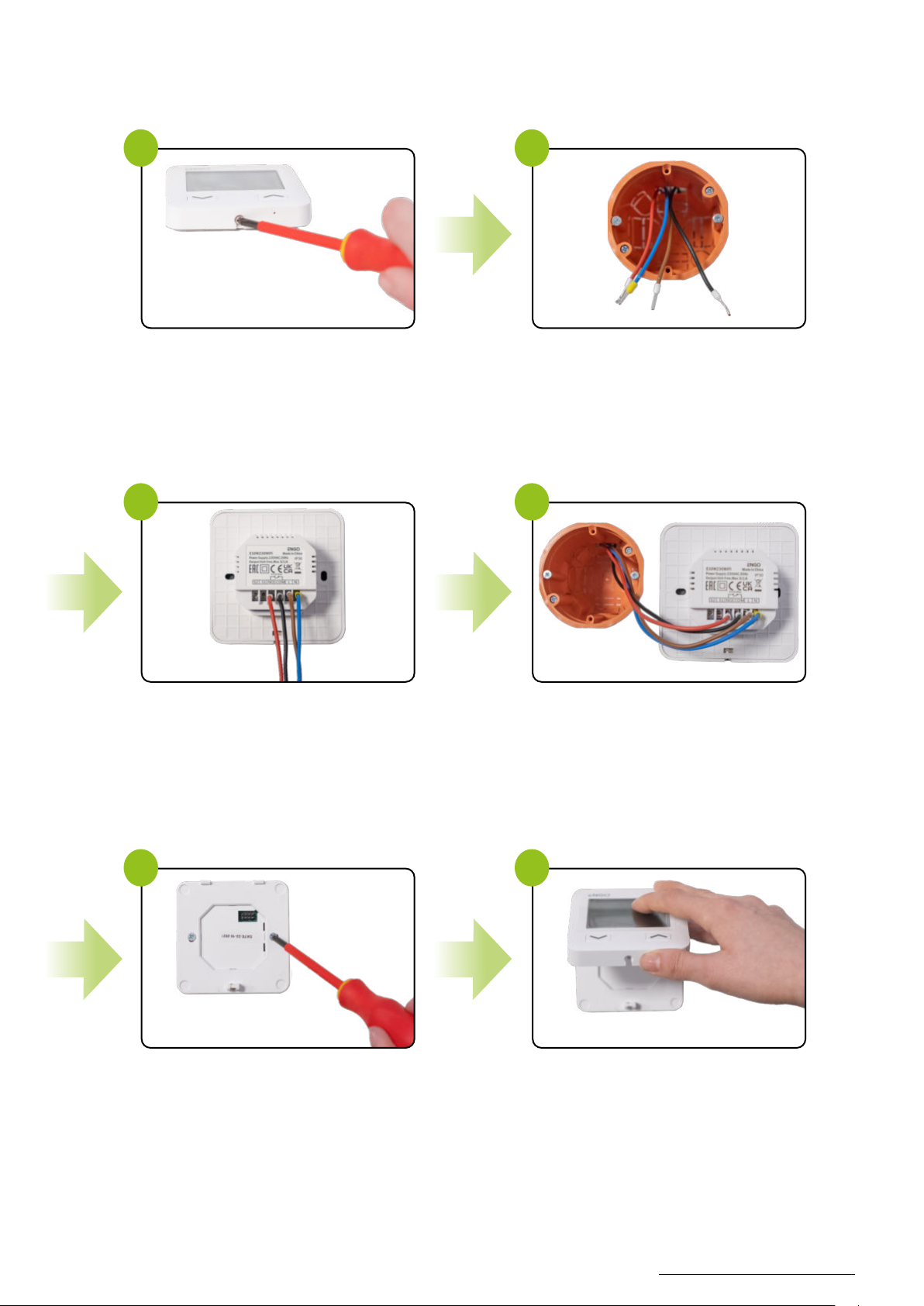
2.3 Wall mounting
To properly mount the thermostat on the wall, please follow the steps below:
Use a screwdriver to unscrew the screw at the
bottom of the thermostat to detach the rear part.
Make sure that the wires are not under 230V AC.
Connectthe thermostat accordingtothe wiring diagram.
Put the thermostat in the box.
Screw the thermostat to the mounting box. Slide the front of the thermostat onto its back
and tighten the screw from the bottom.
Turn on the power.
The thermostat is now ready for operation.
1
3
5 6
2
4
3

8E10W230WIFI(E10B230WIFI) - FULL MANUAL
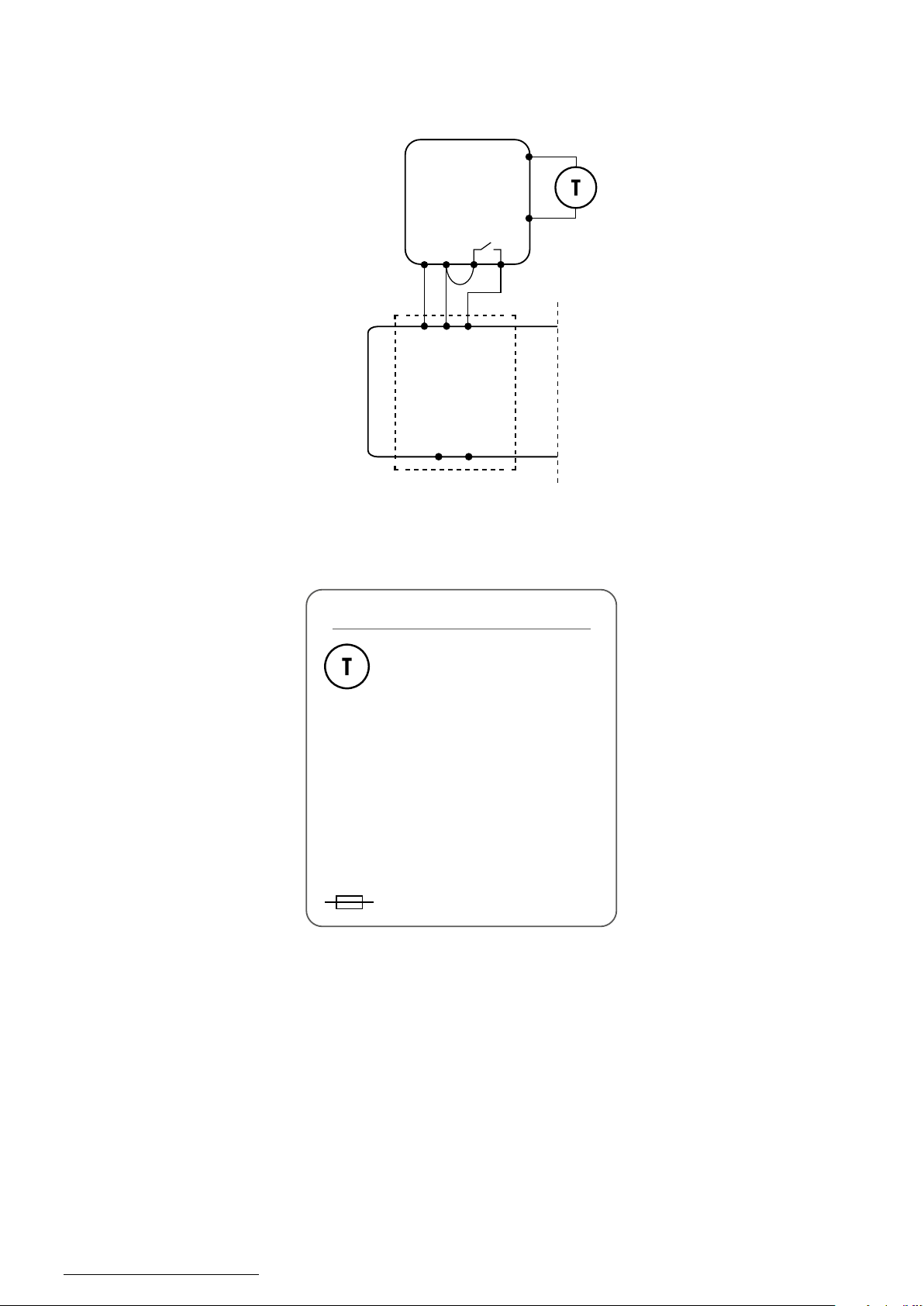
3. Connection description
3.1 Connection diagram for gas boiler
L, N - power supply
COM, NO - voltage-free output
S1, S2 inputs - output for temperature sensor
- fuse
Legend:
Boiler - Boiler connection*
- Boiler’s contacts for ON/OFF
thermostat (according to the
boiler’s instructions)
Temperature sensor
L
AC 230V
COM
NO
N
N
L
S1
S2
L
N
E10W230WIFI
BOILER CONNECTION

9
E10W230WIFI(E10B230WIFI) - FULL MANUAL
Legend:
3.2 Connection diagram to pump / actuator
Pump
Valve
Temperature sensor
L, N - power supply
COM, NO - voltage-free output
S1, S2 inputs - output for temperature sensor
- fuse
L
AC 230V
N
COM
NO
N
L
S1
S2
E10W230WIFI MAX
3(1)A

10 E10W230WIFI(E10B230WIFI) - FULL MANUAL
3.3 Connection diagram to the control box
L, N - power supply
COM, NO - voltage-free output
S1, S2 - output for temperature sensor
SL1...SL8 - 230V control input in the control box
- fuse
Legend:
Temperature sensor
NOCOM
LN
S1
S2
N
N
SL1
SL1
L
E10W230WIFI
ECB08M230
listwa sterująca
1 - 8 Strefy
Altri manuali per E10W230WIFI
1
Questo manuale è adatto per i seguenti modelli
1
Indice
Altri manuali ENGO CONTROLS Termostato

ENGO CONTROLS
ENGO CONTROLS E901RF Manuale utente

ENGO CONTROLS
ENGO CONTROLS SIMPLE Manuale utente

ENGO CONTROLS
ENGO CONTROLS E901WIFI Istruzioni per l'installazione

ENGO CONTROLS
ENGO CONTROLS EASY230W Manuale utente

ENGO CONTROLS
ENGO CONTROLS E10W230WIFI Manuale utente

ENGO CONTROLS
ENGO CONTROLS ESIMPLE230W Manuale utente

ENGO CONTROLS
ENGO CONTROLS E901WIFI Manuale utente

ENGO CONTROLS
ENGO CONTROLS E901RF Istruzioni per l'installazione

ENGO CONTROLS
ENGO CONTROLS EONEBATW Istruzioni per l'installazione

ENGO CONTROLS
ENGO CONTROLS E901 Istruzioni per l'installazione