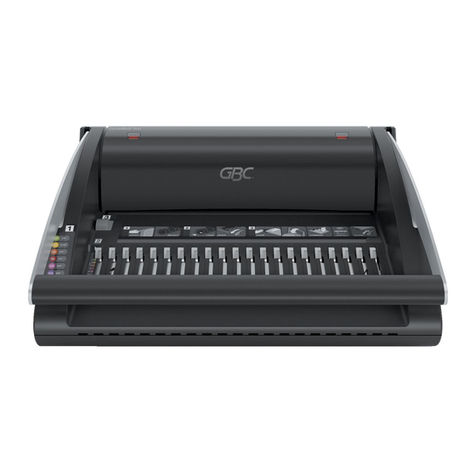
EP Equipment PB2000 Manuale utente

Important Information
-- This manual is designed to help you to install, operate and maintain Perfect Binding Machine
PB2000. Read, understand and keep this manual in a safe and convenient place.
-- Do not operate PB2000 until you read and understand the instructions in this manual.
-- E-P Equipment Co., Ltd. should not be liable for incidental consequential damages resulting
from : improper or inadequate maintenance by customer; unauthorized modification or misuse;
operation outside of the environment specifications for the product.
-- EP Equipment Co.,Ltd pursues a policy of continuing improvement in design and performance
of the product. Therefore, the product design and specifications are subject to change without
prior notice and without our legal obligation.
-- All rights are reserved. No part of the manual may be photocopied, reproduced or translated to
another language without the prior written consent of EP Equipment Co.,Ltd.
GB-6210

EP
( 1 )
GB-6210 Manual
Contents
1. Specifications
1-1 Major Specifications ........................................................................................ 2
1-2 Accessories ...................................................................................................... 3
2. Guide to Components
2-1 Main Frame ...................................................................................................... 4
3-2 Control Panel .................................................................................................... 5
3. Before Operation
3-1 Installation Precautions ................................................................................... 7
3-2 Operating Precautions ..................................................................................... 7
3-3. Knowledge of how to bind a good book ....................................................... 8
4. Operation Procedure
4-1 Preadjustments for operation ......................................................................... 9
4-2 Auto Mode ......................................................................................................... 11
4-3 Manual Mode .................................................................................................... 13
5. Maintenance
5-1 Glue Supply ...................................................................................................... 16
5-2 Clear the Waste tank ........................................................................................ 17
5-3 Unload glue ....................................................................................................... 18
6. Troubleshooting
................................................................................................................................... 22

( 2 )
GB-6210 Manual
1-1 Major Specifications
Model PB2000
Maximum Spine Length 330 mm (12.4’’)
Maximum Binding Thickness 38 mm (1.5’’), 380 Sheets
Minimum Binding Thickness 3 Sheets
Cover Weight range 70 to 180 gsm (Paper only)
Production Speed 1 Book / 35s, Up to 100 books/hour
Binding Glue Type Hot Melt Glue (170 to 190 Deg C)
Warming Up Time 25 Minutes
Power 220 ~230V - 50~60 Hz
Power Consumption 1050 W
Machine Dimensions
580x550x270 mm
25.6''x21.7''x10.6''
Machine Weight 60 Kg (120lbs.)
1. Specifications

( 3 )
GB-6210 Manual
2
6
5
3
4
1
1-2 Accessories
Name Quantity
1Hot melt Glue 2 KG
2Fuse 1 PC
3Waste Box 1 PC
4Power Cord 1 PC
5Hexagonal wrench 1 PC
6Hexagonal wrench 1 PC

( 4 )
GB-6210 Manual
5
6
4
7
82
3
1
2-1 Main Frame
Name Function
2-1-1 Clamper This clamps sheets to be bound and carries to the Roughing
cutter and the melt tank
2-1-2 Clamper Open/
Close Switch Used to open / close the clamper, used only in Hand mode
2-1-3 Control Panel The control panel
2-1-4 Nipper Used to nip cover and sheets to form spine
2-1-5 Main Switch Used to turn ON / OFF main power
2-1-6 Cover Gauge Used to regulate cover position
2-1-7 Cover Set Guide Used to fix cover
2-1-8 Melt Tank Cover
Used to cover the melt tank and roughing cutter. Keep your
hands off from the melt tank and glue application roller and
roughing cutter when the cover is open
2. Guide to Components

( 5 )
GB-6210 Manual
9
13
10
11
12
7
8
6
5
1
4
3
2
2-2 Control Panel

( 6 )
GB-6210 Manual
Name Function
2-2-1 Nipping Time Display Shows the length of nipping time
2-2-2 Nipping Time Control
Button Depress +/- button to set the length of nipping time
2-2-3 Start Lamp This Lamp turns on when the machine is ready to bind
2-2-4 Preparation Lamp This Lamp turns on when glue is not melted for binding
2-2-5 Auto Mode Select Button Used to select Auto mode
2-2-6 Auto Mode Lamp This Lamp turns on when Auto mode is selected
2-2-7 Hand Mode Select Button Used to select Hand mode
2-2-8 Hand Mode Lamp This Lamp turns on when Hand Mode is selected
2-2-9 Stop Button Used to stop the binding procedure at anytime
2-2-10 Stop Lamp This Lamp turns on when the stop button is depressed
2-2-11 Step Button
The binding procedure will carry on step by step, it will
go to the next step when you press the step button.
Can be only used in hand mode.
2-2-12 Reset Lamp
This Lamp turns on when the reset button is depressed
and it turns off when reset progress is over
2-2-13 Reset Button
Used to bring back the nipper and clamper to their
home position when stop button is depressed during
binding procedure;
2-2-14 Reset (Function) Button In Manual Mode, depress this button for 5 seconds, the
clamper will travel forward and stop at nipper position.

( 7 )
GB-6210 Manual
3-1 Installation Precautions
3-1-1. Place the machine in a flat space. Avoid places where table and foundation are
unstable.
3-1-2. Keep the machine away from direct sun light.
3-1-3. Keep the machine away from high temperature and humidity.
3-1-4. Keep the machine away from lots of dust.
3-1-5. Keep the machine away from magnetic or magnetized apparatus.
3-1-6. Do not put many loads on one electrical outlet.
3. Before Operation
3-2 Operation Precautions
3-2-1. Do not touch melted glue or melt tank or roughing cutter with your finger or
hand. They are so hot that they cause severer skin burn.
3-2-2. Do not supply too much glue in melt tank.
3-2-3. When the machine is not used, turn off power switch for preserving glue quality.
Deterioration pace of glue is proportional to time length during glue is melted.
3-2-4. Absolutely do not open any covers and disassemble or modify the machine.
3-2-5. Do not let fall down some thing small into the machine.

( 8 )
GB-6210 Manual
3-3. Knowledge of how to bind a good book
3-3-1 It is very important that the book stock should be trued up before binding. Good
and strong binding depends on spine-alignment of stock. To apply glue on spine
equally, all sheet must touch the level plate. Make sure the stock aligned enough.
3-3-2 The thickness (weight) of paper which can be used for cover is from 70-180
gsm. Do not use the cover too thin or too thick.
3-3-3 keep the clamper and the nipper clean. Otherwise the binding quality may be
affected by dusts or pieces of glue on the level plate and the nipper.
3-3-4 Do not open the bound book within five minutes.
3-3-5 Do not bind books which have been bound before or have glue on the book spine.
It may damage the Roughening cutter.
3-3-6 Please supply enough glue in the melt tank.

( 9 )
GB-6210 Manual
ON!
4. Operation Procedure
4-1-1 Turn on the machine 4-1-2 Warming Up
- Plug the power cord to outlet.
- Turn on the main switch.
- The Heat Preparation Lamp turns on, the
machine is heating the glue in the melt tank.
You can not operate the machine now.
- Warming up time is about 20 minute.
- Start lamp turns on when the machine is ready
to operate, but it keeps heating; please wait 5
more minutes so that the glue in the melt tank
can fully melted.
ON!
ON!
4-1 Preadjustments for operation
Make adjustments to ensure good binding quality when turn on the machine.
ON!
4-1-3 Set the nipping time
- Depress Nipping Time Control Button, you
can adjust the nipping time (between nipping
table raise and nipper plate open).
- For books with 100 sheets, nipping time
should be 5 seconds; for books with 200 sheets
or more, the nipping time should be 8 seconds
or more. For padding, the nipping time should
be 0 second.
4-1-4 Set the clamper width
- Depress clamper open/close button to adjust
the clamper width.
- After each binds, clamper width remains the
same.
Indice