EpiSensor ZVO-20 Manuale utente

User Guide
Wireless Analogue Signal Sensor
Applies to: ZVO-20, ZVO-22
EPI-206-00
© EpiSensor

Table of Contents
Safety Information 4
Electrical Installation 4
Intended Use 6
Related Documents 6
Introduction 6
Digital Signal Installation 6
Configuring the Jumpers 7
Input Operation 8
Dry Signal 8
Open Collector Signal 8
Active Signal 9
User Interface 9
Status LED 10
Alt LED 10
Mode Button 11
Install Mode 11
Electrical Installation 12
Mechanical 12
Enclosure & Label Material 12
Mounting Instructions 12
Opening the Enclosure 13
Tamper Evident Seals 13
Compliance 14
Wireless Communications 15
Sensors 16
Ordering Information 17
Troubleshooting & Support 17
Page 2of 17

Safety Information
Please read these instructions carefully before trying to install, operate, service or maintain the ZVO. The
following special notes may appear throughout the user guide (or on the equipment labels) to warn of potential
hazards or to call attention to information that clarifies or simplifies a procedure for users.
Symbol
Description
The addition of either symbol to a “Danger” or “Warning” safety label indicates that an
electrical hazard exists which will result in personal injury if the instructions are not
followed.
This is the safety alert symbol. It is used to alert you to potential personal injury hazards.
Obey all safety messages that follow this symbol to avoid possible injury or death.
Electrical Installation
Electrical equipment should be installed, operated, serviced and maintained only by qualified personnel. No
responsibility is assumed by EpiSensor for any consequences arising out of the use of this material.
A qualified person is one who has skills and knowledge related to the construction, installation, and operation of
electrical equipment and has received safety training to recognize and avoid the hazards involved.
Installation, wiring, testing and service must be performed in accordance with all local and national electrical
codes.
HAZARD OF ELECTRIC SHOCK, EXPLOSION, OR ARC FLASH
➔NEVER work alone.
➔Use appropriate personal protective equipment (PPE) and follow safe electrical work practices.
➔Only qualified electrical workers should install this equipment. Such work should be performed only
after reading the entire set of installation instructions.
➔If the equipment is not used in a manner specified by EpiSensor, the protection provided by the
equipment may be impaired.
Page 4of 17

➔Before performing visual inspections, tests, or maintenance on this equipment, disconnect all sources
of electric power. Assume that all circuits are live until they have been completely de-energized,
tested, and tagged. Pay particular attention to the design of the power system. Consider all sources of
power, including the possibility of backfeeding.
➔Turn off all power supplying the ZVO and the area in which it is installed before working on it.
➔Always use a properly rated voltage sensing device to confirm that all power is off.
➔Before closing all covers and doors, inspect the work area for tools and objects that may have been
left inside the equipment or panel.
➔When removing or installing metering or other equipment, do not allow it to extend into an energised
bus.
➔The successful operation of this equipment depends upon proper handling,
➔Neglecting fundamental installation requirements may lead to personal injury as well as damage to
electrical equipment or other property.
➔Before performing Dielectric (Hi-Pot) or Megger testing on any equipment in which the energy meter
is installed, disconnect all input and output wires to the ZVO.
➔High voltage testing may damage electronic components contained in the ZVO.
➔Failure to follow these instructions will result in death or serious injury.
Installation & Safety Notes
➔EpiSensor equipment should be installed, operated, serviced and maintained only by qualified
personnel. EpiSensor does not assume any responsibility for any consequences arising out of the use
of this equipment.
➔Fuse for neutral terminal is required if the source neutral connection is not grounded.
➔Clearly label the device’s disconnect circuit mechanism and install it within easy reach of the operator.
➔The fuses / circuit breakers must be rated for the installation voltage and sized for the available fault
current.
Page 5of 17

Intended Use
Do not use this device for critical control or protection applications where human or equipment safety relies on
the operation of the control circuit. Failure to follow these instructions can result in death, serious injury, or
equipment damage.
Related Documents
Related installation and configuration documents are listed in the following table:
Document
Reference No.
EpiSensor ZVO-2x Datasheet
EPI-XXX-xx
Install Sheet for ZVO-2X
EPI-089-00
Gateway API User Guide
ESE-009-08
Introduction
EpiSensor’s ZVO 0-10 Volt Sensor is intended to detect the voltage across a pair of wires from a 0-10 Volt
transducer. These transducers can measure a variety of real world conditions such as wind speed or direction,
weights, volumes and depths. The ZVO reports the data through the wireless sensor network to the Gateway.
The ZVO reports data in terms of the measured voltage signal. This value needs to be converted externally since
the parameter being measured is not known to the ZVO. This allows a single product to become quite versatile
and measure a variety of different transducers for different properties. The ZVO-20/22 product variants are both
mains powered versions. The available product variants are as follows:
SKU
Description
ZVO-20
Single channel, mains powered 0-10 Volt sensor
ZVO-22
Dual channel, mains powered 0-10 Volt sensor
4-20 Milliamp Installation
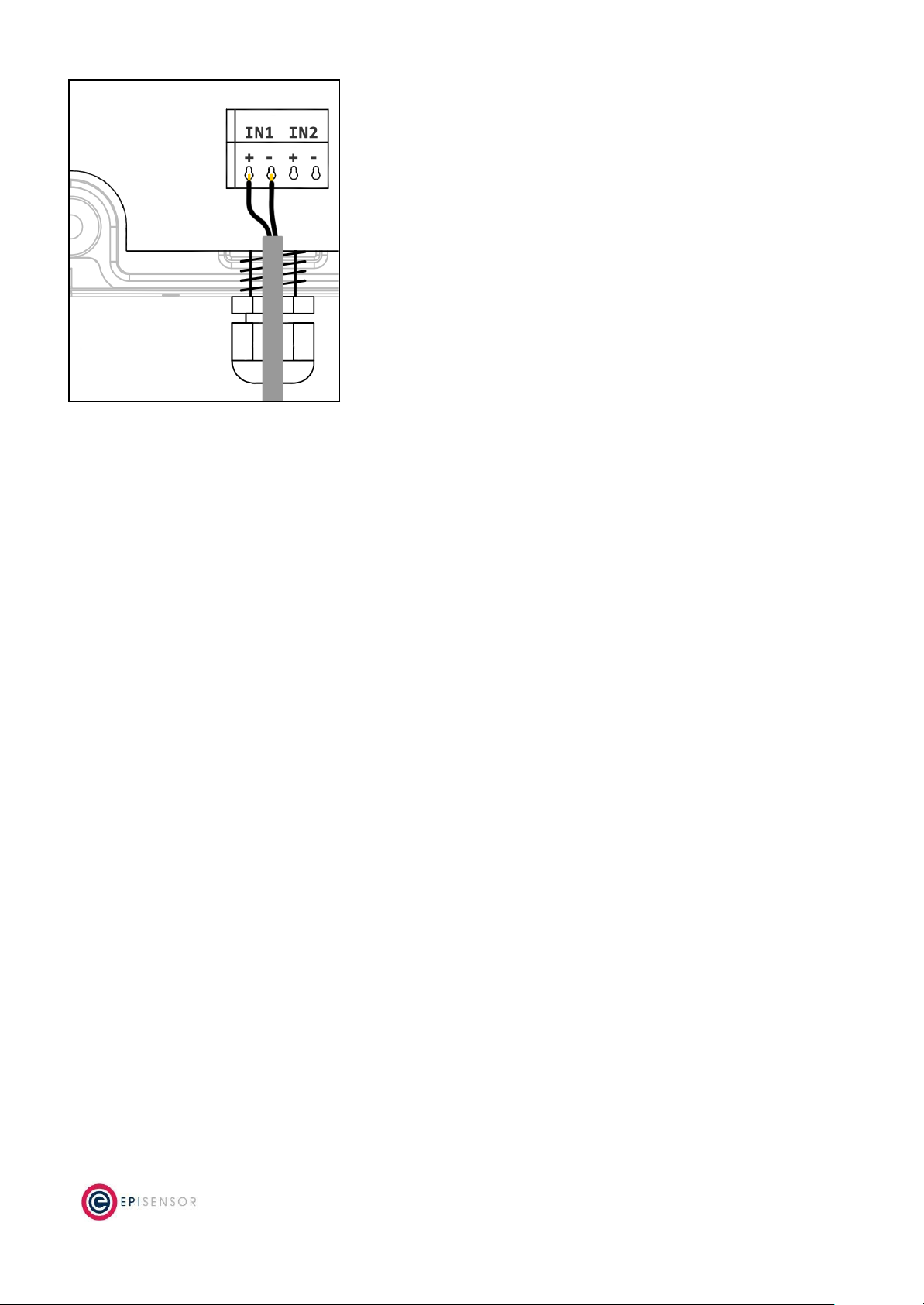
The 0-10 Volt signal wires should be fed through the enclosure’s M10 waterproof glands and connected to the
terminal block, as shown in the diagram below, taking note of the positive and negative terminals. There will be
2 terminals used per channel, so the dual-channel version (ZVO-22) would use 4 terminals. The input wires are
connected to IN1 for single channel models, and IN1 and IN2 for dual-channel models.
Page 6of 17

Diagram of a digital signal connected to Input 1 of the single-channel ZVO-20
Note: the single-channel version may use the same hardware as the dual channel version and so would also have
a 4-pin terminal block. However, only the first channel (IN1) will be enabled on the ZVO-20 variant.
The voltage across the terminals is polarity sensitive so it should be connected positive to positive (+) and
negative (or ground) to negative (-) terminal. The ZVO is polarity sensitive. Do not install the signal wires in
reverse.
Configuring the Jumpers
To the right of the terminal block there is a selector grid that is used to enable various parts of the circuit for
different applications. There are two rows of jumpers in the grid, the top row for IN1 and the bottom for IN2. The
columns of the grid are used to configure the input type. The options are:
●AP for Active Signal or Pulse Inputs (not used on the ZVO product range)
●DP for Dry Signal or Pulse Inputs, or Open Collector Inputs (not used on the ZVO product range)
●0-10 for 0-10 Volt Sensors - The jumper must be placed on this selector for the ZVO.
●4-20 for 4-20 Milliamp Sensors (not used on the ZVO product range)
The image below shows a dual channel mains powered digital signal sensor where IN1 is incorrectly configured
for a Dry Signal/Pulse and IN2 is correctly configured for a 0-10 Volt input:
Page 7of 17

Diagram showing ZVO-22 with IN1 incorrectly configured for an Dry Pulse, and IN2 correctly configured for a 0-10 Volt input
User Interface
There are two LED’s and one button on the front panel of the ZVO product range that are used to show the
status of the product and to issue commands. This section describes how to interact with user interface and
what each state means.
A node must be in “command mode” before users can interact with the product. To put the node in Command
Mode, press and hold the “MODE” button for 2 seconds, then release. At this point, a battery powered node will
switch the LED On Solid, while a mains powered node will flicker the LED and then switch the LED On Solid.
Page 8of 17

Status LED
The red status LED will flash in different sequences depending on the current state of the ZVO. This table below
lists all possible LED flash sequences and their meaning.
Flash Sequence
Description
Diagram
Heartbeat
The node is operating correctly and has
successfully joined a wireless network.
Inverse Heartbeat
The node has valid security keys, but is not
connected to a Gateway.
Square Wave
The node is operating correctly but has lost
contact with the Gateway.
On Solid, or Off
If the LED is On Solid, the node does not have
valid security keys and is searching for a special
commissioning Gateway to join. If it is Off, the
node may not be powered, or there is a
problem with the node. Check the power
supply, and if the problem persists, contact
EpiSensor support.
Alt LED
The Alt LED will flash when data is transmitted or received on the ZigBee wireless network. For mains powered
nodes, it will always be active - but for battery powered nodes, it will only be active when in Command Mode.
Page 9of 17

Mode Button
The following options are available with Command Mode. The button should be pressed and then released to
register a valid button press. If no further button presses are made, the device will terminate “command mode”
4 seconds after the last button press.
Press
Description
0
Send a PING message disable any active Install Mode or Range Test Mode. If the node is not joined,
try and join a network.
1
Send a DATA message to the Gateway for any enabled sensors that are not reporting in
‘snap-to-clock’ mode.
2
Leave the current network. Mains powered Nodes will automatically try and join a new network
once they have left and will periodically retry the join. Battery powered nodes will go to sleep.
4
Start “Install Mode”. Node sends a PING message every 15 seconds, with the LED pulse speed
indicating the wireless signal strength of the reply. Automatically expires after 5 minutes.
6
Reboot the node. Security keys for the wireless network the node is joined to will not be erased, and
all other settings will remain the same.
8
Factory-reset the node and perform a reboot. All settings and security keys will be lost. The node will
be returned to its factory default state.
12
Start “Range Test” mode. Node will send a PING message every 5 seconds. The LED pulse speed
indicates the wireless signal strength of the reply. Automatically expires after 5 minutes.
Install Mode
Issuing a press sequence on the Mode button of a powered node can enable either “Install Mode” or “Site
Survey Mode” on that node. In this mode, the LED will flash at a rate that indicates the wireless signal strength
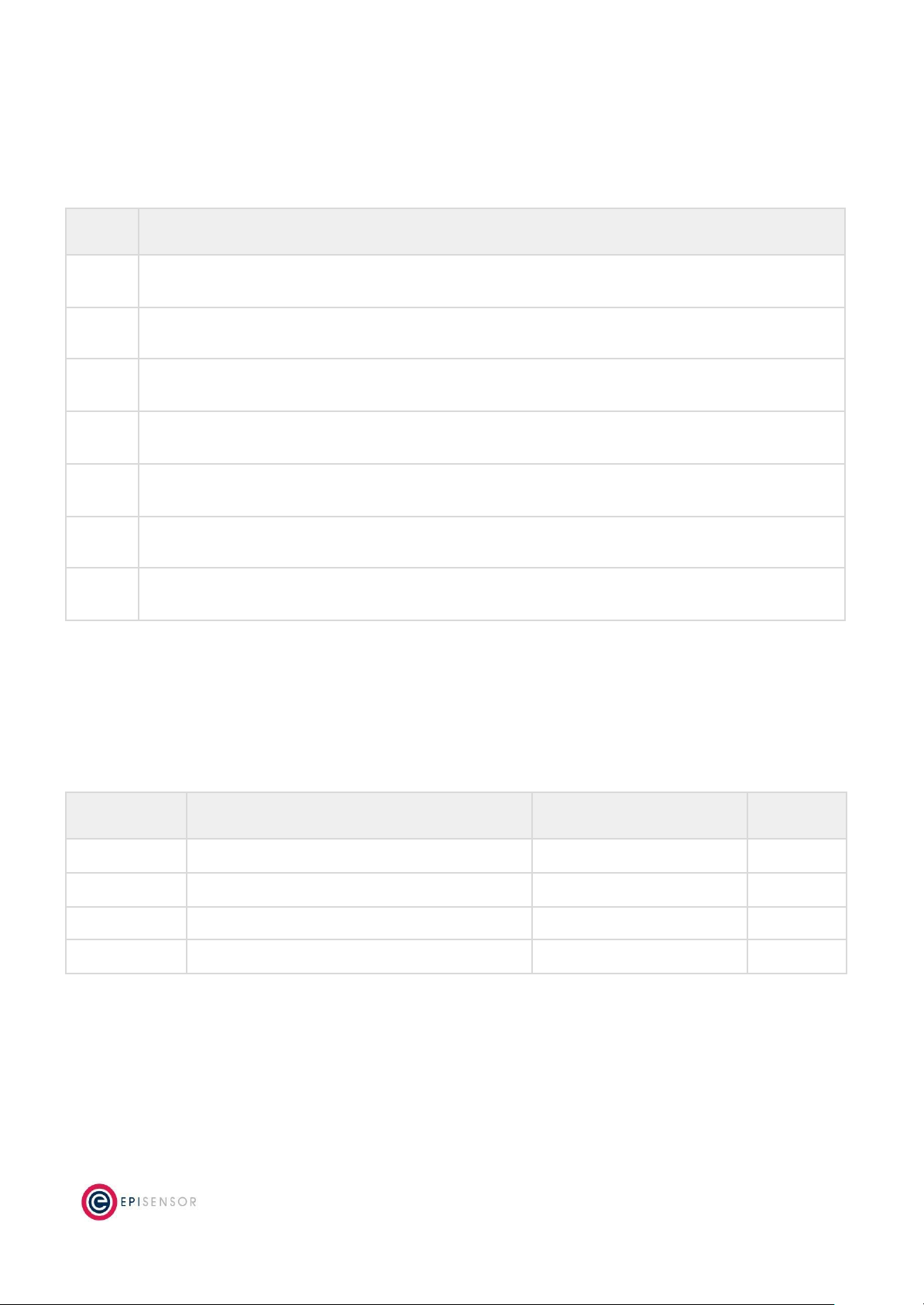
(Link Quality Indicator) of that node, based on the following table:
Flash Rate
Flashes per Second
Wireless Signal Strength
LQI
Very Fast
10 flashes / second (Light on 50ms, off 50ms)
Very good Signal
> 200
Fast
2 flashes / second (LED on 250ms, off 250ms)
Good Signal
> 150
Slow
1 flash / 2 seconds (LED on 1 sec, off 1 sec)
OK Signal
> 100
Very Slow
1 flash / 6 seconds (LED on 3 sec, off 3 sec)
Poor Signal
< 100
This mode expires after 15 minutes for Install Mode and 5 minutes for Site Survey Mode.
Page 10 of 17
Questo manuale è adatto per i seguenti modelli
1
Indice
Altri manuali EpiSensor Sensore di sicurezza