
ERGOMART TRS413 Manuale utente

To separate the tilter head from the tilter head yoke,
grasp the tilter head in one hand and yoke in the other.
Work the tilter head free by moving it slightly left and
right as you pull upward.
Insert the TRS413 pole into the opening on the top of
the Mount Kit.
TRS413 - BB103 MONITOR & KEYBOARD STAND
Installation Instructions
Ergonomic solutions for office and light industrial work environments
©2017 Ergomart. All rights reserved.
www.ergomart.com | 888 420 3200
1 2
3 4
5 6
Insert the Carriage Bolt into the square center-hole in
the VESA Slider plate so that the screw head rests
underneath the raised middle section. Place the LCD
monitor face down on a flat surface (use a towel or cloth
to protect the monitor from scratches) and align your
VESA Slider Adapter (with the raised middle section up).
Align holes with the corresponding holes on the back of
the monitor. Secure each Part D screw with the Phillips
Head Screwdriver by turning clockwise until each is tightly
secured.
Align the Tilter Head rotation plate with the 4 holes on the
backside of the BB103 Back Bar at the position which you
prefer. Secure each screw (Part A) with the Phillips
Head Screwdriver by turning clockwise until each is
tightly secured.
Secure pole by inserting the Allen key (Tool B) into 3/32”
set screw on the side of the mount cup and then turn
clockwise (to the right) until the pole is snug.
Loosen Ring Collar on pole to reposition tilter head
assembly to the anticipated optimal position and then
rotate the thumb screw clockwise until the Ring Collar
is secure.
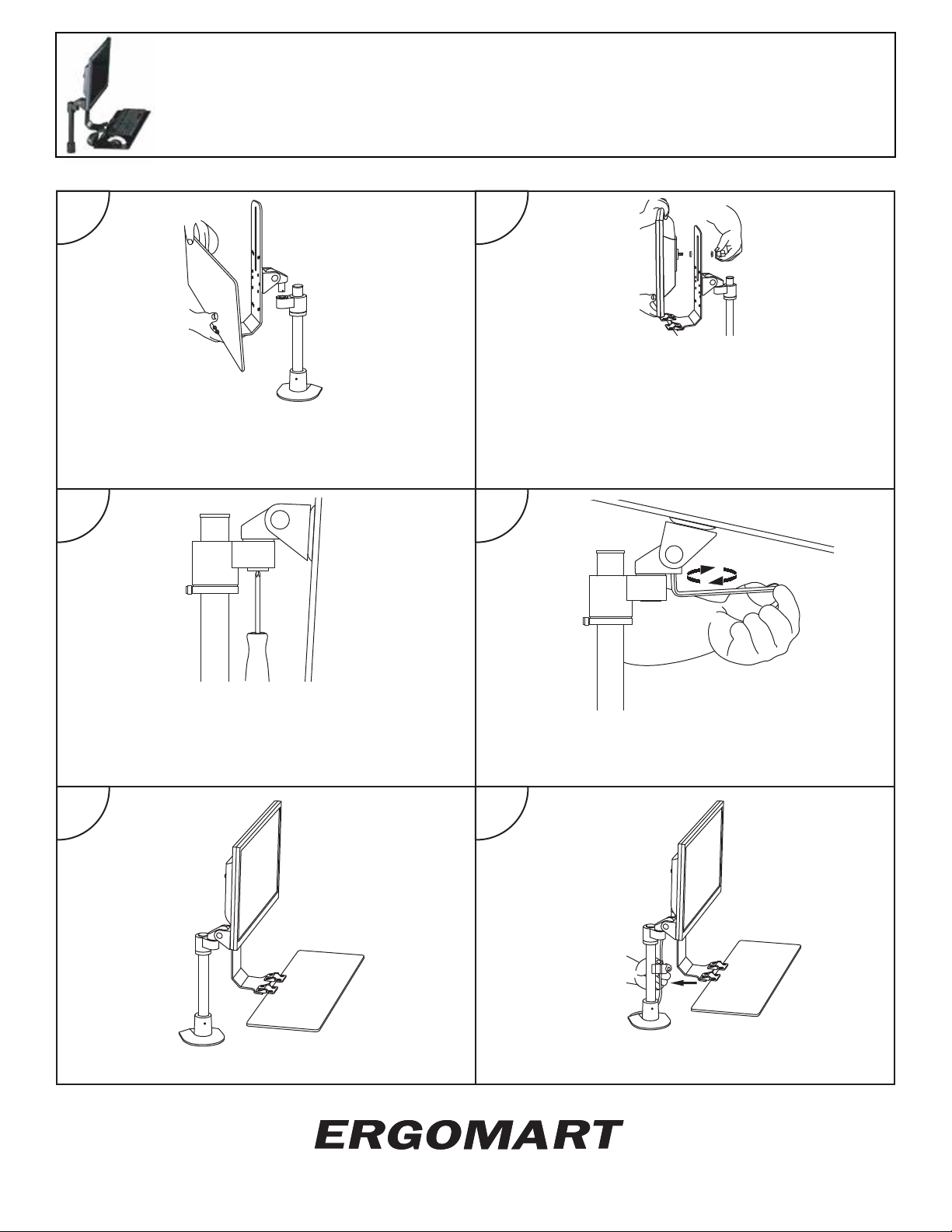
Assembly of the TRS413 is now completed.
To contain wires, push the open end of the wire management
clip over the pole with the wires resting in the middle.
Ergonomic solutions for office and light industrial work environments
©2017 Ergomart. All rights reserved.
7 8
910
11 12
Carefully position the BB103 and tilter head assembly
so that the silver pin is aligned with the opening of the
Tilter Head Yoke. Insert by pushing down. It may be
necessary to rotate the entire assembly slightly left and
right to ease the pin into position.
Place one of the Plastic Slider Plate Washers onto the
Carriage Bolt protruding from the back of the monitor with
attached VESA Slider Plate. Lift the monitor and place the
Carriage Bolt end through the vertical slot on the BB103
Back Bar. Place the second Plastic Slider Plate Washer
over the end of the Carriage Bolt on the back side of the
BB103. Secure Monitor to the BB103 by placing the Plastic
Knob on the end of the Carriage Bolt and rotating clock-
wise.
Align the registration pins of the Part C dog washer with
the small opening on the bottom of the Tilter Head pin.
Insert the Part B screw into the center hole of Part C.
During final adjustments, this screw can be tightened or
loosened to increase or decrease the resistance to
rotation.
To adjust the tilt of the LCD Monitor, you will need to
insert Allen key (Tool A) into the set screw at the base
of the Tilter Head. Loosen by twisting clockwise and
tighten by turning counterclockwise.
TRS413 - BB103 MONITOR & KEYBOARD STAND
Installation Instructions
www.ergomart.com | 888 420 3200
Questo manuale è adatto per i seguenti modelli
1
Indice
Altri manuali ERGOMART Rack e supporto

ERGOMART
ERGOMART EQP3418 Manuale utente

ERGOMART
ERGOMART LS1512 Manuale utente

ERGOMART
ERGOMART PM90 Manuale utente

ERGOMART
ERGOMART LEVERLIFT Manuale utente

ERGOMART
ERGOMART WS9110 Manuale utente

ERGOMART
ERGOMART SAA2045 Manuale utente

ERGOMART
ERGOMART SAA179 Manuale utente

ERGOMART
ERGOMART DS9109 Series Manuale utente

ERGOMART
ERGOMART SAA7000 Manuale utente

ERGOMART
ERGOMART POS18-3005 Manuale utente


