
Espin Sport Manuale utente


Table Of Contents
01 Meet Your Espin Bike
03 Assembly
04 Quick Start
05 Your rst Espin bike ride
06 Using the display + toggle functions
06 Display setup
07 Changing assist levels
08 Turn on/o headlight
08 Push mode
09 Parameter setting
12 Error code desciptions
13 Battery
14 Charging
14 Maintanance

1
About your new Espin Electric Bike.
We build Espin eBikes with quality, durability, and affordability in mind. In
order to safely enjoy your Espin eBike and to maintain its warranty, be sure to
read and follow the user and safety instructions.
The use of an electric bike assumes that you are familiar with and
comfortable riding a regular bicycle.
Although an electric bike feels and rides like a regular bike, you should rst
take the time to get acquainted with it. Espin eBikes are pedelecs, they need
to be pedaled in order for the electric motor to kick in. That takes a bit of
getting used to.
Electric power for the Espin eBike is provided by a 48 Volt, 14ah lithium-ion
battery which weighs just 7 lbs and is integrated into the frame. It is detach-
able and can be charged at home, in the ofce, or in a class room. It powers
a 500 Watt high torque electric hub motor allowing you to cruise uphill and
past trafc at up to 20 mph.

2

3
A toggle switch on the left side of the handle bar controls all electric functions of
the Espin eBike; in particular, it allows the user to choose between 5 pedal assist
levels or to switch on the LED headlight.
PAS 1 – Low Assist
PAS 2 – Medium Low Assist
PAS 3 – Medium Assist
PAS 4 – Medium High Assist
PAS 5 – High Assist
The digital LED panel mounted in the center of the handle bar displays the state
of all electric functions including speed, battery life, pedal assist level as well as
total miles traveled.

4
ASSEMBLY
Carefully remove your Espin eBike and all remaining contents from the
box. Please check that the following pieces are included in the box and
immediately contact Espin eBikes if anything is missing:
• Espin eBike (Sport or Flow)
• Pedals (Left and Right)
• Front wheel and front quick release pin
• Saddle and seat post
• Charger and pouch
• eBike Keys
• multi-purpose tool kit
1. Remove all packing and protective material from frame and components
2. Mount the front wheel by placing the front wheel in the fork and securing it
using the quick release pin. Make sure the disc brake is properly aligned.
3. Assemble the front headlight on the bolt above the front fork. Make sure to
secure the nut on the back of the bolt while tightening the bolt with the 5 mm
alan wrench key
4. Assemble the handle bar with the hand grips and LCD Display facing the rider
5. Attach Pedals. Note that the Left (L) pedal has a left thread meaning it is
6. tightened by turning it counterclockwise. The Right (R) pedal is tightened by
turning it clockwise
7. Install seat post. Secure it tightly using the quick release lever after adjusting it
to your desired height.
8. Inate tires to the desired PSI. Recommended PSI is between 40-65
9. Do a quick check of all the components on the bike to make sure no parts
have come loose during the transit and shipping of the eBike.
10. Completely charge the battery before your rst ride

5
Your First Espin ride
• Take a short ride without using the electric motor to check your balance,
the weight of the Espin eBike, and the ease of pedaling. Try the gear
shift and observe that you need to pedal harder as you shift into higher
gears.
• Once you feel comfortable on the bike you can switch on the motor with
the toggle switch of the power control system. Always start in PAS 1,
shown on the electronic display, and pedal slowly. Notice how the mo-
tor tries to “take over” after about half a rotation of the pedals and how
it stops helping you as soon as you stop pedaling. The power control
system does not control the speed; your pedaling and the setting of the
gear shift do - just like in a normal bike.
• Realize that the electric motor will have to work harder in higher gears.
Switch to a higher power level by moving the toggle to a higher PAS
level and notice the increased electric power.
• On level ground, a higher gear (and higher speed) usually require a
higher power setting to maintain the speed. Be careful to gauge your
speed: you will immediately notice that with the help of the electric mo-
tor you will get to higher speeds with much less effort. You will have to
get used to it.
• You will notice that hills are much easier to climb than with a normal
bike. But since the electric motor provides much of the climbing power,
you will need to increase the power settings even in low gears.
• Downhill make sure you don’t leave the power setting on the level you
used uphill: the bike may race uncomfortably fast. Stop pedaling and
use the brakes!

6
QUICK START
Before your rst Espin eBike ride
• Identify and familiarize yourself with the functions of various levers, switches,
and controls as well as the electronic display
• Adjust the seat to your height so your feet can touch the ground when you
don’t pedal
• Check the disc brakes by pulling rmly on the two brake levers. The levers
should not touch the handle
• Make sure the tires are fully inated. Low tire pressure will cause the bike to
feel unstable while you turn a corner
• Make sure the battery is fully charged and the power switch is “ON.”
7
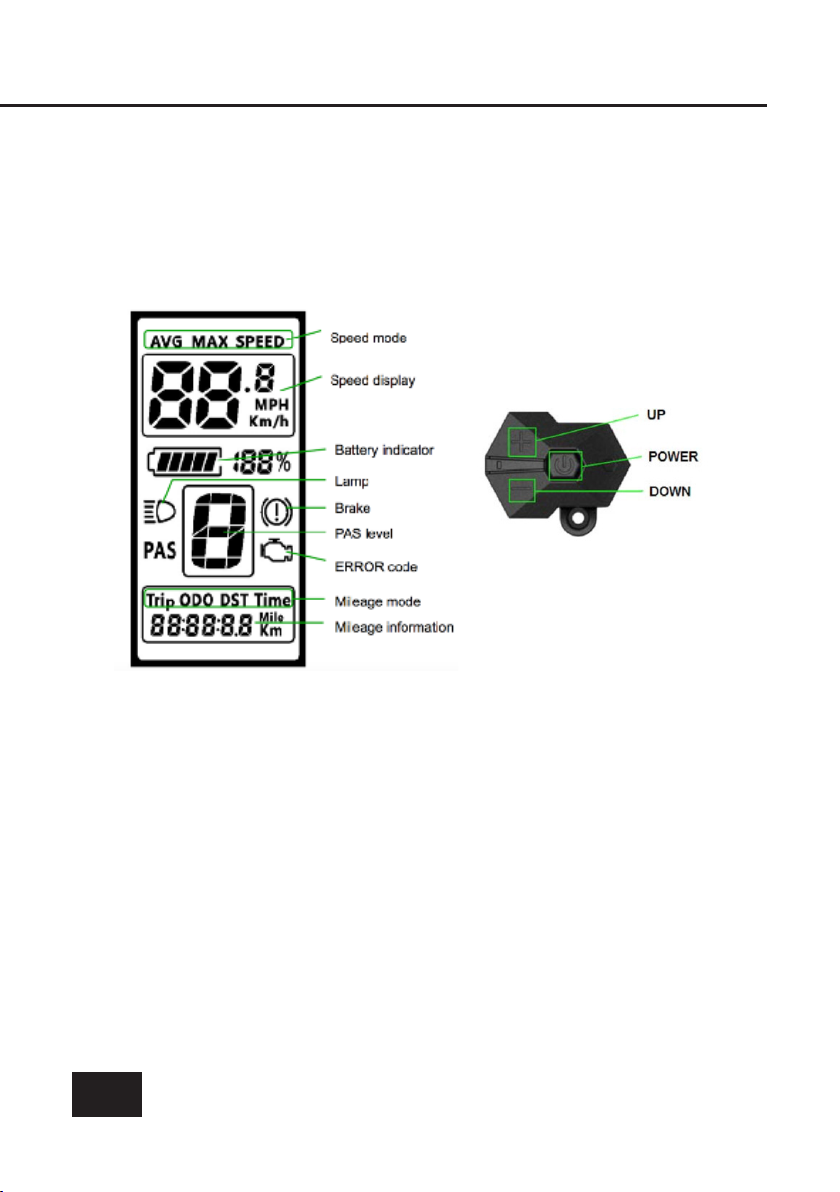
Using the display
LCD display & toggle functions:
Display setup
Press and hold the power button for 1 second or longer to turn ON/OFF
the display. Automatic shut down of display can be congured in setting
if you wish to have the display turn off after not operating for a certain
amount of time.
Questo manuale è adatto per i seguenti modelli
1
Indice
Altri manuali Espin Bicicletta


